Over the keys 1, 3, 5, 5, 5, 7, 9 in A1:A7, the formula XMATCH(5, A1:A7, 0, 2) returns 3. Change only the last argument to -1 and the same formula returns 5. Point the first version at a column that somebody re-sorted by a different field, and a 5 that is plainly visible on the sheet can come back as #N/A. All three answers are correct. The last argument of XMATCH, like the sixth argument of XLOOKUP, is two things at once: an instruction about which duplicate to prefer, and a promise about how the data is ordered
The report that leads here rarely mentions search modes. It says a generated workbook disagrees with what someone expected on a handful of rows, and those rows share something: a repeated key, an approximate match that had to choose a neighbor, or a lookup column whose order changed after the formula was written. The sections below go through the rules one at a time, with the exact result each formula produces
Which match_mode and search_mode values does XLOOKUP accept?
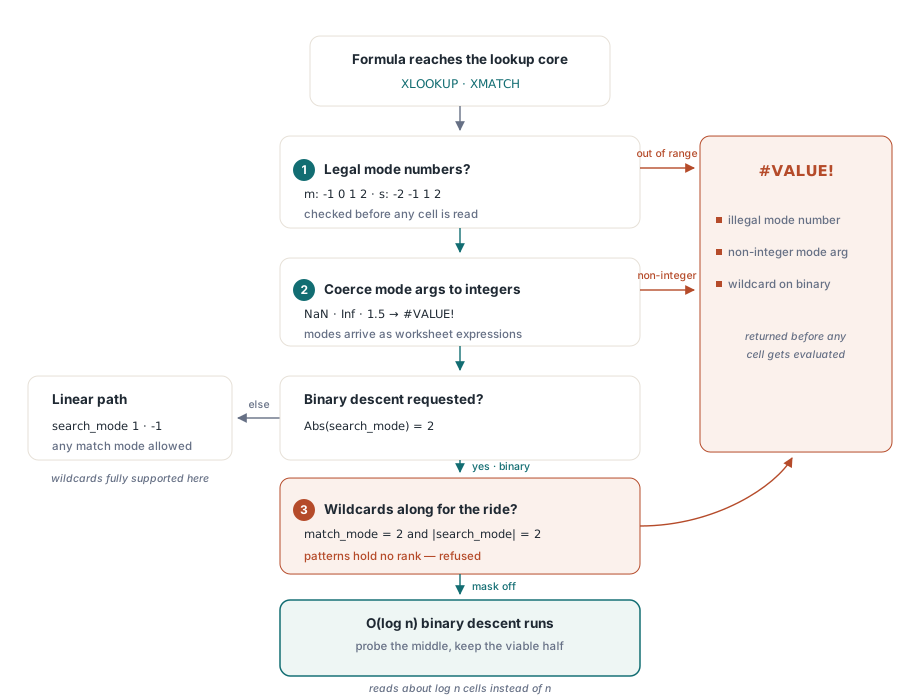
HotXLS, the native Delphi and C++Builder spreadsheet component, evaluates XLOOKUP and XMATCH through one shared lookup routine that accepts exactly four match modes and four search modes. match_mode may be 0 (exact), -1 (exact or next smaller), 1 (exact or next larger) or 2 (wildcard). search_mode may be 1 (scan first to last), -1 (scan last to first), 2 (binary search over ascending data) or -2 (binary search over descending data). Any other number returns #VALUE!; nothing is clamped into the nearest legal mode. Leaving the arguments out selects match mode 0 and search mode 1, which is what most hand-written formulas use
Argument counts are checked before any of that. XLOOKUP takes three to six arguments and XMATCH two to four, and a call outside those ranges is a #VALUE! before evaluation starts. The mode arguments themselves are ordinary worksheet expressions, so HotXLS converts each one to a number, returns #VALUE! for NaN, infinity or a value outside the 32-bit integer range, and then truncates toward zero. 1.5 becomes search mode 1, -1.5 becomes -1, and 2.9 becomes 2. Truncation bites when the mode comes from a cell computed by arithmetic: a value that displays as 2 but is stored as 1.9999999 selects a linear scan. Write the mode as a literal, or wrap a computed one in ROUND
The following program writes a small rate table and five lookups that exercise those rules. The comments give the value each formula cell holds after Recalculate, derived from the rules above
var
  Book: TXLSXWorkbook;
  Sheet: TXLSXWorksheet;
begin
  Book := TXLSXWorkbook.Create;
  try
    Sheet := Book.Sheets.Add('Rates');          // Sheets[1]
    Sheet.Cells[1, 1].Value := 10;  Sheet.Cells[1, 2].Value := 0.25;
    Sheet.Cells[2, 1].Value := 20;  Sheet.Cells[2, 2].Value := 0.20;
    Sheet.Cells[3, 1].Value := 30;  Sheet.Cells[3, 2].Value := 0.15;
    Sheet.Cells[4, 1].Value := 40;  Sheet.Cells[4, 2].Value := 0.10;

    // Defaults: match_mode 0, search_mode 1
    Sheet.Cells[1, 4].Formula := 'XLOOKUP(30,A1:A4,B1:B4)';               // 0.15
    // Exact or next smaller, binary search over ascending keys
    Sheet.Cells[2, 4].Formula := 'XLOOKUP(35,A1:A4,B1:B4,"none",-1,2)';   // 0.15
    // 1.5 truncates to search_mode 1
    Sheet.Cells[3, 4].Formula := 'XLOOKUP(40,A1:A4,B1:B4,"none",0,1.5)';  // 0.10
    // 3 is not a search mode
    Sheet.Cells[4, 4].Formula := 'XLOOKUP(40,A1:A4,B1:B4,"none",0,3)';    // #VALUE!
    // Wildcard matching cannot run on a binary search
    Sheet.Cells[5, 4].Formula := 'XLOOKUP("4*",A1:A4,B1:B4,"none",2,2)';  // #VALUE!

    if Book.Recalculate = lxOk then
      Book.SaveAs('lookup-modes.xlsx');
  finally
    Book.Free;
  end;
end;
Why does search_mode 2 miss a key that is on the sheet?
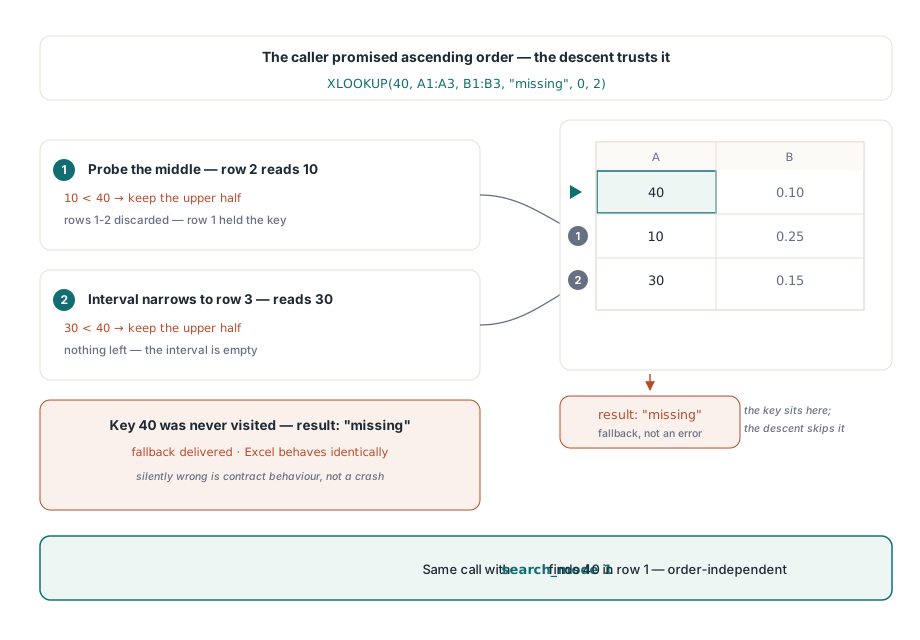
Search mode 2 tells HotXLS that the lookup vector is already sorted ascending, and the engine believes it. Checking the claim would take a full pass over the column, which is exactly the cost a binary search exists to avoid, so the descent halves the interval on each probe and returns wherever it ends. Microsoft documents the same contract for XLOOKUP and XMATCH: the binary modes require sorted data and give invalid results otherwise. ISO/IEC 29500-1 §18.17, the SpreadsheetML formula clause, describes the older LOOKUP and VLOOKUP with their own ascending-order requirement; XLOOKUP and XMATCH came later and are stored in the file as _xlfn.XLOOKUP and _xlfn.XMATCH under the future-function prefix
The figure traces XLOOKUP(40, A1:A3, B1:B3, "missing", 0, 2) over keys 40, 10, 30. The first probe lands on row 2, reads 10, and since 10 is below 40 it discards rows 1 and 2, including the row that holds 40. Row 3 reads 30, also below 40, and the interval is empty. The formula returns "missing". With search mode 1 the same call finds 40 in row 1
"Ascending" also means something more specific than it looks on screen. The binary path ranks values by kind before it compares them: numbers first, then text, then booleans, then error values, then blanks. A column of numeric part codes in which three cells hold the codes as text is not ascending under that rule, however tidy it looks. Text is compared without regard to case, and on Windows the order comes from the user locale through CompareStringW, which handles hyphens and accented letters differently from a byte-order sort. A key column sorted by a database with a binary collation can therefore fail the ordering promise on exactly the codes that contain punctuation
Blanks ranking last has a lopsided consequence. An ascending key column with empty rows below it is still ascending, so pointing search mode 2 at an oversized range such as A2:A5001 is harmless. A descending column followed by empty rows is not descending anymore, and search mode -2 walks straight into the blanks
var
  R: TXLSFormulaEvaluationResult;
begin
  // B1:B3 holds 9, 7, 5; B4:B10 are empty
  R := Sheet.EvaluateFormulaAt(1, 4, 'XMATCH(5,B1:B10,0,-2)');
  // R.Status = xlfeOk and VarIsError(R.Value): the result is #N/A.
  // The first probe reads the blank B5, blanks rank above every number,
  // so the descent keeps moving right and never comes back

  // Trim the range to the filled rows and the same call works
  R := Sheet.EvaluateFormulaAt(1, 4, 'XMATCH(5,B1:B3,0,-2)');     // 3

  // A linear scan skips the blanks and finds the key wherever it is
  R := Sheet.EvaluateFormulaAt(1, 4, 'XMATCH(5,B1:B10,0,-1)');    // 3
end;
Where do duplicate keys land?
XMATCH and XLOOKUP land on a fixed end of a duplicate run, and the search mode picks the end. Under search mode 2 the binary descent records each equal key it meets and keeps narrowing to the left, so the result is the lowest index of the run. Under search mode -2, over descending data, it records the position and narrows to the right, giving the highest index. The linear modes return the first hit in scan direction: the lowest index for search mode 1, the highest for search mode -1
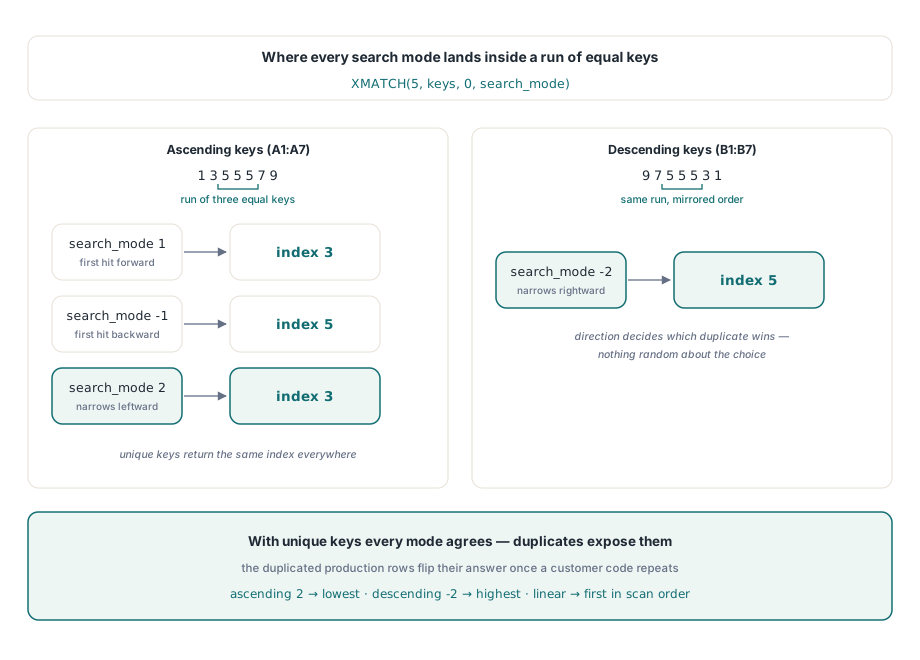
This is why the discrepancy reports cluster on particular rows. A sample file with unique keys gives the same answer under all four search modes, so every test built from it passes. Once production data repeats a customer code, the modes start to disagree on precisely the repeated rows, and the code that wrote the formulas has not changed at all
// A1:A7 holds 1, 3, 5, 5, 5, 7, 9 (ascending, a run of three)
Sheet.Cells[1, 3].Formula := 'XMATCH(5,A1:A7,0,1)';   // 3, first hit forward
Sheet.Cells[2, 3].Formula := 'XMATCH(5,A1:A7,0,-1)';  // 5, first hit backward
Sheet.Cells[3, 3].Formula := 'XMATCH(5,A1:A7,0,2)';   // 3, lowest index of the run

// B1:B7 holds 9, 7, 5, 5, 5, 3, 1 (descending)
Sheet.Cells[4, 3].Formula := 'XMATCH(5,B1:B7,0,-2)';  // 5, highest index of the run
How approximate match picks the runner-up
When no cell equals the lookup value, match mode -1 returns the largest value that is not greater than the target and match mode 1 returns the smallest value that is not smaller. In the linear modes HotXLS scans the whole vector and keeps a best candidate, so approximate matching works on unsorted data. A cell replaces the standing candidate only when it is strictly closer, never when it merely ties. Among several cells holding the same runner-up value, the one kept is the first met in scan order
Take keys 10, 30, 20, 30, 50, 40 in A1:A6. XMATCH(35, A1:A6, -1, 1) returns 2: the first 30 becomes the candidate, and the second 30 only ties it. Flip the scan with XMATCH(35, A1:A6, -1, -1) and the result is 4, because scanning backward meets the other 30 first. XMATCH(35, A1:A6, 1, 1) returns 6, since 40 beats 50 as the smallest value above 35. On sorted data the binary modes reach the same neighbor in a handful of probes: over 10, 20, 30, 40, 50, XMATCH(35, A1:A5, -1, 2) returns 3 and XMATCH(35, A1:A5, 1, 2) returns 4
If neither an exact hit nor an acceptable neighbor turns up, XLOOKUP returns its if_not_found argument when one was supplied and #N/A when it was not. XMATCH has no fallback argument and always returns #N/A
Why wildcards and binary search cannot coexist
A wildcard pattern has no position in a sort order. Match mode 2 asks whether a cell fits a mask, which is a yes-or-no question, while a binary descent needs a three-way answer that says which half to keep. There is no defensible way to say whether ACME-* lies left or right of a given cell, so HotXLS returns #VALUE! for match mode 2 combined with search mode 2 or -2 and does not guess. Use search mode 1 or -1 with wildcards and accept the linear cost
Match mode 2 always applies wildcard rules: * stands for any run of characters, ? for one character, and ~ makes the next character literal. XLOOKUP("PN~*", ...) therefore finds the text PN* itself, which matters when product codes really contain asterisks. In match mode 0 the linear scan compares text case-insensitively, and the binary path treats two values as equal when its ordering comparison reports a tie. That comparison is also case-insensitive, but it is the same locale-aware ordering described above, which is the only relation a binary search may legitimately use. Lookup-heavy sheets also shape what the dependency tracking behind incremental recalculation has to re-evaluate after an edit
Shape errors and spilled return slices
Both functions need a one-dimensional lookup range. A range that spans more than one row and more than one column at the same time returns #VALUE!; HotXLS does not pick an axis on your behalf. XLOOKUP adds a second rule: the return range must have the same length as the lookup range along the matching axis. A vertical lookup over 500 rows paired with a 499-row return range is an error, and the last row is never quietly dropped. When the lookup range is a single cell, the shape of the return range decides whether the lookup counts as vertical or horizontal
A return range wider than one column, for a vertical lookup, makes XLOOKUP hand back the whole matched row as an array. It spills into the neighboring cells under the same rules as the other dynamic array functions, covered in the article on spill ranges and dynamic arrays. Empty cells inside a spilled slice come back as 0. Pulling a full record out of a table with one formula is convenient, and it is also the quickest way to overwrite a column that happened to sit to the right of the formula
Choosing a mode for workbooks nobody watches
Server-side generation deserves a stricter policy than interactive use, because no person looks at the result before it ships. Leave match mode 0 with search mode 1 in place there: the match is exact, the scan ignores row order, and re-sorting the sheet cannot change the answer. Search mode 2 belongs only where the same code produced the ordering, in the same run, over the same column. A binary search over a column sorted by a different key is the cheapest way to compute a confident wrong number
When you do switch a lookup to binary mode, check the ordering yourself at the point where you emit the formula. The function below is not part of HotXLS; it is a guard to add to your own code. For many exact lookups against one table, the workbook property RecalcLookupCache lets Recalculate reuse the first scan of a range for later lookups against it. The cache switches itself off when the pass contains OFFSET, INDIRECT, circular references or What-If data tables, and results are the same either way
// Your own guard, not a HotXLS API: confirm a numeric key column is
// ascending before emitting a search_mode 2 formula that relies on it
function KeysAscending(Sheet: TXLSXWorksheet; Col, FirstRow,
  LastRow: Integer): Boolean;
var
  Row: Integer;
  Prev, Cur: Variant;
begin
  Result := False;
  Prev := Sheet.Cells[FirstRow, Col].Value;
  if not VarIsNumeric(Prev) then Exit;
  for Row := FirstRow + 1 to LastRow do
  begin
    Cur := Sheet.Cells[Row, Col].Value;
    if (not VarIsNumeric(Cur)) or (Cur < Prev) then Exit;  // text, blank or out of order
    Prev := Cur;
  end;
  Result := True;
end;

// Rates sheet: keys in A2:A5001, rates in B2:B5001
UseBinary := KeysAscending(Rates, 1, 2, 5001);
Book.RecalcLookupCache := True;
for Row := 2 to OrderCount + 1 do
  if UseBinary then
    Orders.Cells[Row, 5].Formula := Format(
      'XLOOKUP(B%d,Rates!$A$2:$A$5001,Rates!$B$2:$B$5001,0,-1,2)', [Row])
  else
    Orders.Cells[Row, 5].Formula := Format(
      'XLOOKUP(B%d,Rates!$A$2:$A$5001,Rates!$B$2:$B$5001,"missing")', [Row]);
The guard is deliberately conservative: a single blank or text cell sends the whole column back to the linear path. On a sorted, hot column the payoff of binary mode is real, about log₂ n reads per lookup instead of up to n, which for 5,000 keys means 13 probes at most
When a lookup is really a business rule in disguise, such as a tiered rate with exceptions, a callback into your own Pascal code is usually clearer than any arrangement of built-in functions; the article on custom worksheet functions shows how to register one. XLOOKUP, XMATCH and the rest of the formula engine described here are part of the HotXLS Delphi spreadsheet component, and its product page lists the supported worksheet functions for Delphi and C++Builder