A Delphi-generated workbook holds =GAMMA(5) and =XIRR(B2:B9,A2:A9), and Excel opens it with #NAME? in the GAMMA cell and a correct result in the XIRR cell. In HotXLS, the functions that carry an _xlfn. prefix in XLSX, or a name-based call in BIFF8 .xls, are the ones Excel saves that way — a list that departs from the MS-XLSX grammar
Why does Excel show #NAME? for GAMMA but not for XIRR?
The formula text is right; the storage is not. Inside an XLSX worksheet a formula is plain text in an <f> element, and a function added after Excel 2007 is written as _xlfn.NAME. The prefix tells a reader "this is a built-in function you may not know yet", so an older Excel shows #NAME? without mistaking the call for a user-defined name, and current Excel strips the prefix on display so users see =GAMMA(5). Leave it off and current Excel goes looking for a defined name called GAMMA, finds none, and shows #NAME?. XIRR is older. It came in with the Analysis ToolPak, Excel writes it bare, and a prefixed _xlfn.XIRR is a different token from the one Excel produces. GAMMA, GAUSS, PHI, SHEET, SHEETS and XOR all need the prefix, and so do the eight functions Excel 2013 added to the engineering and complex-number set (IMCOSH, IMCOT, IMCSC, IMCSCH, IMSEC, IMSECH, IMSINH and IMTAN), while the older IMSIN, IMSQRT and IMSUM stay bare. Worksheet-only array functions carry a second prefix, _xlfn._xlws., which MS-XLSX §2.2.2 reserves for FILTER, SORT and PY. On reading, HotXLS removes both prefixes, so Cell.Formula returns the clean function name
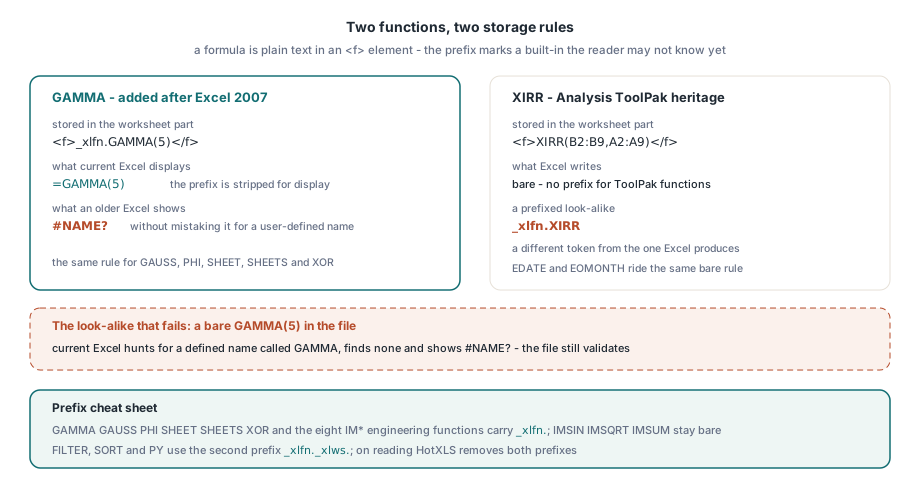
Which functions does Excel prefix that the MS-XLSX grammar leaves bare?
MS-XLSX §2.2.2 spells the list in ABNF as future-function-list = ("_xlfn." ("AGGREGATE" / "ACOT" / … / "Z.TEST")) / "ECMA.CEILING" / "ISO.CEILING" / "NETWORKDAYS.INTL" / "WORKDAY.INTL" / "FORECAST.ETS" / …. Read literally, the closing parenthesis after Z.TEST ends the prefixed group, so everything after it is a bare name. A second production, the ordinary built-in function list, includes CONCAT, TEXTJOIN, IFS, MAXIFS, MINIFS and SWITCH next to SUM and VLOOKUP. Excel disagrees on both counts:
| Function | Where the MS-XLSX grammar puts it | What Excel writes |
|---|---|---|
| NETWORKDAYS.INTL, WORKDAY.INTL | After the _xlfn. group, so bare | _xlfn.NETWORKDAYS.INTL, _xlfn.WORKDAY.INTL |
| ISO.CEILING | After the _xlfn. group, so bare | _xlfn.ISO.CEILING |
| FORECAST.LINEAR and the FORECAST.ETS family | After the _xlfn. group, so bare | Prefixed, for example _xlfn.FORECAST.LINEAR |
| CONCAT, TEXTJOIN, IFS, MAXIFS, MINIFS, SWITCH | Ordinary built-in function list | Prefixed, for example _xlfn.TEXTJOIN |
| XIRR, XNPV, ERFC | Not in the future-function list | Bare |
A writer generated from the grammar therefore produces NETWORKDAYS.INTL(…) without a prefix, and Excel answers with #NAME? in a file that validates against the published syntax. Take the list from saved Excel files and treat the ABNF as a starting point. HotXLS does that for every function it calculates, so the prefixed CONCAT and the prefixed NETWORKDAYS.INTL both come out the way Excel writes them. The following code saves the same kind of formulas both ways and reads one back:
uses
  SysUtils, lxCalc, lxHandle, lxHandleX;

procedure SaveModernFunctions;
var
  XBook, XCheck: TXLSXWorkbook;
  XSheet: TXLSXWorksheet;
  Book: TXLSWorkbook;
  Sheet: TXLSWorksheet;
begin
  // XLSX: prefixes are added on save and stripped on load
  XBook := TXLSXWorkbook.Create;
  try
    XSheet := XBook.Sheets.Add('Calc');
    XSheet.Cells[1, 1].Value := 46000.0;                // a date serial
    XSheet.Cells[1, 2].Formula := 'EDATE(A1,1)';       // ToolPak: no prefix
    XSheet.Cells[1, 3].Formula := 'GAMMA(5)';          // _xlfn.GAMMA
    XSheet.Cells[1, 4].Formula := 'NETWORKDAYS.INTL(A1,A1+30,11)';
    XSheet.Cells[1, 5].Formula := 'TEXTJOIN("-",TRUE,B1:D1)';
    if XBook.SaveAs('modern.xlsx', xlsxOpenXMLWorkbook) <> lxOk then
      raise Exception.Create('XLSX save failed');
  finally
    XBook.Free;
  end;

  XCheck := TXLSXWorkbook.Create;
  try
    if XCheck.Open('modern.xlsx') <> lxOk then
      raise Exception.Create('XLSX open failed');
    // Expected: NETWORKDAYS.INTL(A1,A1+30,11), prefix already removed
    Writeln(string(XCheck.Sheets[1].Cells[1, 4].Formula));
  finally
    XCheck.Free;
  end;

  // BIFF8: the same calls become name tokens plus Ftab entry 255
  Book := TXLSWorkbook.Create;
  try
    Sheet := Book.Sheets.Add;
    Sheet.Cells[1, 1].Value := 46000.0;
    Sheet.Cells[1, 2].Formula := '=EDATE(A1,1)';       // add-in EXTERNNAME
    Sheet.Cells[1, 3].Formula := '=ISOWEEKNUM(A1)';    // hidden _xlfn NAME
    if Book.SaveAs('modern.xls') <> lxOk then          // BIFF8 by default
      raise Exception.Create('XLS save failed');
  finally
    Book.Free;
  end;
end;
Both files should open in current Excel with every function intact. To see the prefixes, open the package as a ZIP and list the raw <f> text of the worksheet part; for modern.xlsx the routine below should print EDATE(A1,1), _xlfn.GAMMA(5), _xlfn.NETWORKDAYS.INTL(A1,A1+30,11) and _xlfn.TEXTJOIN("-",TRUE,B1:D1). The quotes come out as " because the routine prints XML text without unescaping it, which is harmless for a diagnosis. It works on files from any producer, so it is the quickest check when a third-party workbook shows #NAME? in a function your copy of Excel supports
uses
SysUtils, Classes, Zip;
// Print every <f> element of one worksheet part, prefixes included
procedure DumpRawFormulas(const XlsxFile: string;
const Part: string = 'xl/worksheets/sheet1.xml');
var
Zip: TZipFile;
Bytes: TBytes;
Xml: string;
P, StartTag, Close: Integer;
begin
Zip := TZipFile.Create;
try
Zip.Open(XlsxFile, zmRead);
Zip.Read(Part, Bytes);
finally
Zip.Free;
end;
Xml := TEncoding.UTF8.GetString(Bytes);
P := 1;
while True do
begin
StartTag := Pos('<f', Xml, P);
if StartTag = 0 then
Break;
P := StartTag + 2;
if not CharInSet(Xml[P], ['>', ' ', '/']) then
Continue; // <formula>, <font>: not a cell formula
P := Pos('>', Xml, P) + 1; // skip attributes such as t="shared"
if Xml[P - 2] = '/' then
Continue; // empty <f .../> of a shared formula
Close := Pos('</f>', Xml, P);
if Close = 0 then
Break;
Writeln(Copy(Xml, P, Close - P)); // XML-escaped: " & <
P := Close + 4;
end;
end;How does a BIFF8 .xls file call a function it has no number for?
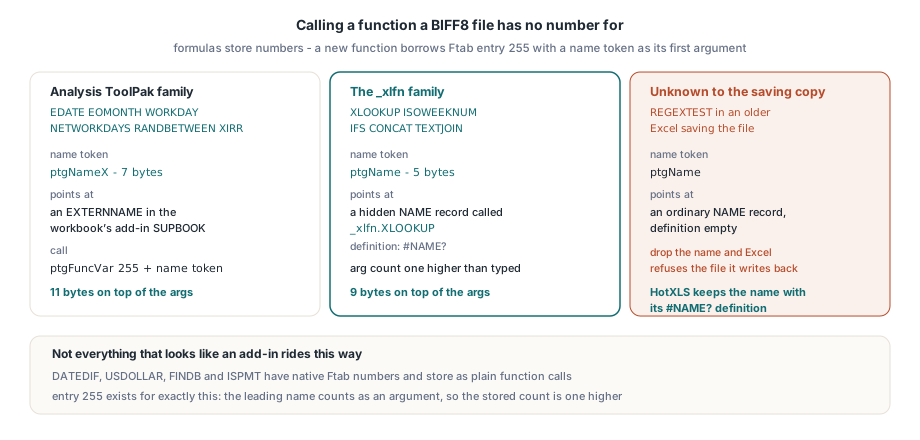
BIFF8 formulas contain no function names at all. Each built-in function is a number in a fixed function table (Ftab), and a formula stores ptgFunc or ptgFuncVar with that number. Newer functions have no number. MS-XLS routes those calls through Ftab entry 0x00FF, "User Defined Function": a ptgFuncVar with function index 255 whose first argument is a name token pointing at the real function. The argument count stored in the token is one higher than what the user typed, because that leading name counts as an argument. Which name token Excel writes depends on the function's family:
| Function family | Name token | What the name points to |
|---|---|---|
| Analysis ToolPak functions: EDATE, EOMONTH, WORKDAY, NETWORKDAYS, RANDBETWEEN, XIRR … | ptgNameX | An EXTERNNAME record in the workbook's add-in SUPBOOK |
Functions Excel writes with _xlfn.: XLOOKUP, ISOWEEKNUM, IFS, CONCAT … | ptgName | A hidden NAME record called _xlfn.XLOOKUP (or _xlfn._xlws.FILTER) whose definition is #NAME? |
| Functions the saving copy of Excel does not recognize | ptgName | An ordinary workbook NAME record with an empty definition |
The add-in SUPBOOK in the first row is the same record a reader meets when it sorts external references, and the way BIFF SUPBOOK records classify external references shows where it sits among the other kinds. Not everything that looks like an add-in goes this way. DATEDIF, USDOLLAR, FINDB and ISPMT, among others, have native Ftab numbers and are stored as plain function calls. The third row is the fragile one: a function too new for the Excel that saved the file, such as REGEXTEST and REGEXEXTRACT, becomes a call through an ordinary name with no definition. A reader that drops empty-definition names as junk leaves the formula pointing at a name index that no longer exists, and Excel refuses to open the whole file it writes back. HotXLS keeps such a name with a #NAME? definition and writes the original record out again on save
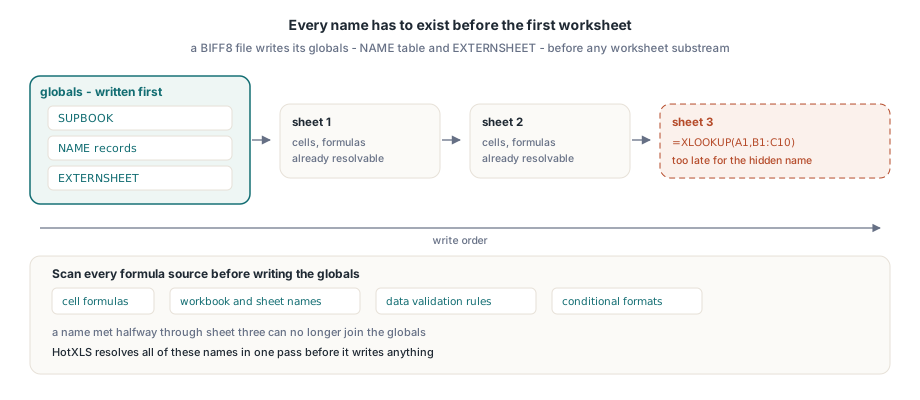
Every name has to exist before the first worksheet
Order is the next constraint. A BIFF8 file writes its globals — the NAME table and EXTERNSHEET — before any worksheet substream, so every name a formula will point to must be known before the first cell is written. A writer that meets XLOOKUP halfway through sheet three can no longer add the hidden name it needs. If you produce BIFF8 yourself, scan every formula source before writing the globals: cell formulas, workbook and sheet-level names, data validation rules and conditional formatting. The sizes follow from the tokens. A name call costs 9 bytes on top of the arguments (5 for ptgName, 4 for ptgFuncVar) and an add-in call 11 (7 for ptgNameX, 4 for ptgFuncVar), and record lengths computed before writing must use the same choice of token as the bytes written afterwards. HotXLS resolves all of these names in one pass before it writes anything
Operand classes change what Excel computes
Each argument in a BIFF8 formula is tagged as a reference, value or array operand, and Excel takes the tag at its word. Tag the third argument of AGGREGATE as a value and Excel returns #VALUE!. Tag the inner result of SUM(SORTBY(…)) as a value and Excel inserts an implicit intersection, shows SUM(@SORTBY(…)) and sums a single cell. A writer has to tag these arguments the way Excel does, which is not always the class the function's documentation suggests: add-in function arguments are written as references, dynamic-array functions return arrays, and XLOOKUP, TAKE, DROP, IFS and SWITCH return references when they sit where a reference is expected. Wrong classes do not break the file. They change the answer
VBA functions keep an XLSB workbook binary
XLSB adds a third storage case. A macro workbook can call its own VBA Function procedures from cells, and the binary format declares each one as a name flagged as a procedure with an empty formula; the cell then calls it through the same ptgName plus function 255 pattern as BIFF8. The XML formats have no equivalent. An empty defined name is not valid there, and a name defined as #NAME? would hide the VBA function of the same name. HotXLS saves such a workbook back to XLSB with the declarations intact, and refuses conversion to any other format before writing a byte. Ask for the conversion report before you convert, not after a save fails: TXLSXWorkbook.GetConversionReport returns a VBAFunctionNames entry marked unsupported for these workbooks, and code can branch on it
uses
  SysUtils, lxCalc, lxDiagnostics, lxHandleX;

procedure ConvertOrKeepBinary(const XlsbFile: string);
var
  Book: TXLSXWorkbook;
  Report: TXLSConversionReport;
  I: Integer;
  Blocked: Boolean;
begin
  Book := TXLSXWorkbook.Create;
  try
    if Book.Open(XlsbFile) <> lxOk then
      raise Exception.Create('Open failed');
    Report := Book.GetConversionReport(xlsConversionOpenXmlWorkbook);
    try
      Blocked := False;
      for I := 0 to Report.Count - 1 do
        if Report[I].Fidelity = xlsConversionUnsupported then
        begin
          Blocked := True;
          Writeln(string(Report[I].Feature), ': ', string(Report[I].Message));
        end;
    finally
      Report.Free;
    end;
    if Blocked then                               // e.g. VBAFunctionNames
      Book.SaveAs(ChangeFileExt(XlsbFile, '.edited.xlsb'),
        xlsxExcelBinaryWorkbook)
    else
      Book.SaveAs(ChangeFileExt(XlsbFile, '.xlsx'), xlsxOpenXMLWorkbook);
  finally
    Book.Free;
  end;
end;
When a workbook from another tool shows #NAME? on a function Excel plainly knows, run DumpRawFormulas on it before anything else: a bare NETWORKDAYS.INTL or TEXTJOIN in the <f> text is the whole diagnosis. Assign that same formula text through Cell.Formula in the HotXLS Delphi Excel component and the XLSX gets the prefix Excel expects, while a .xls save of the workbook gets the hidden name and the function-255 call