The engineering family in Excel reads like the easiest corner of the function reference. DEC2BIN turns a number into a binary string. HEX2DEC turns it back. IMSUM adds two complex numbers. Each one looks like a formatting exercise. They are not. Behind these names sits a ten-bit two's complement encoding most developers have not touched since a computer-architecture class, a complex-number format that lives entirely inside strings, and bitwise operators that will silently overflow a 64-bit integer if you shift before you check. A spreadsheet engine that reproduces Excel exactly cannot round any of it off
The functions split into three groups, and each group hides a different trap. Base conversion is about negative numbers and per-base thresholds. Complex arithmetic is about parsing and formatting a string. Bitwise operations are about staying inside the bounds of Int64. This article walks each group as HotXLS implements it, with the worksheet calls you would actually write
Base conversion and the ten-bit two's complement
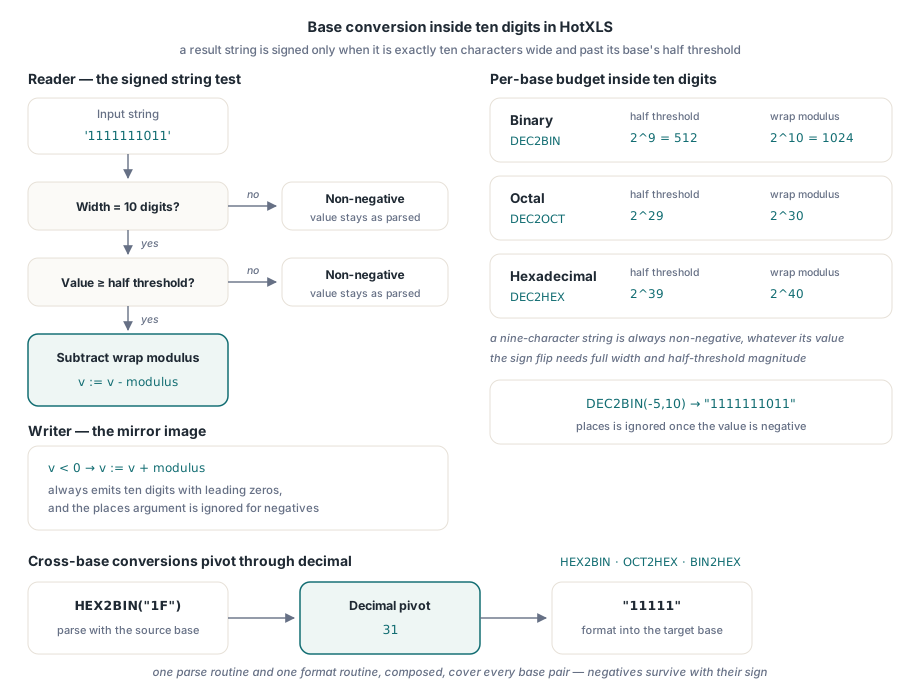
The forward direction is the part everyone expects. DEC2BIN(9) gives "1001", and an optional second argument left-pads the result to a fixed width. The trap is negative input. Excel does not write a minus sign. It encodes the value as a ten-digit two's complement string in the target base, which is why DEC2BIN(-5,10) returns "1111111011" rather than anything with a sign. The places argument is ignored once the value is negative, because the encoding is already pinned at ten digits
Ten digits is a fixed budget, and that budget sets the representable range per base. In binary the magnitude that flips into the negative half is 512, and the wrap modulus is 1024, so a binary string is signed only when it is exactly ten characters long and its value is at least 512. The same idea scales with the base. Octal uses a half threshold of 2^29 and a full modulus of 2^30. Hexadecimal uses 2^39 and 2^40. The HotXLS reader applies exactly this rule: it accumulates the digits, and only when the string is ten characters wide and the accumulated value sits at or above the half threshold does it subtract the full modulus to recover the signed value. A nine-character string is always non-negative, no matter how large
The encoder is the mirror image. A non-negative value is converted digit by digit and optionally zero-padded to the requested width, and it is rejected if it overflows the base's positive ceiling or if the requested width is too narrow to hold it. A negative value is first brought into range by adding the full modulus, which turns it into a value whose base representation is always ten digits, and then the digits are emitted with leading zeros to fill the width. The single shared range check, the symmetric lower and upper bounds per base, is what keeps DEC2BIN, DEC2OCT and DEC2HEX consistent with one another at their edges
That leaves the cross-base conversions, the ones such as HEX2BIN and OCT2HEX that change base without passing through decimal in the function name. The implementation does not carry a separate routine for every ordered pair. It parses the input string into a signed decimal value using the source base, then formats that decimal value into the destination base. Decimal is the pivot. One parse routine and one format routine, composed, cover every combination, and because both halves share the same ten-digit signed convention, a negative value survives the trip with its sign intact
Complex numbers are strings, so the work is parsing
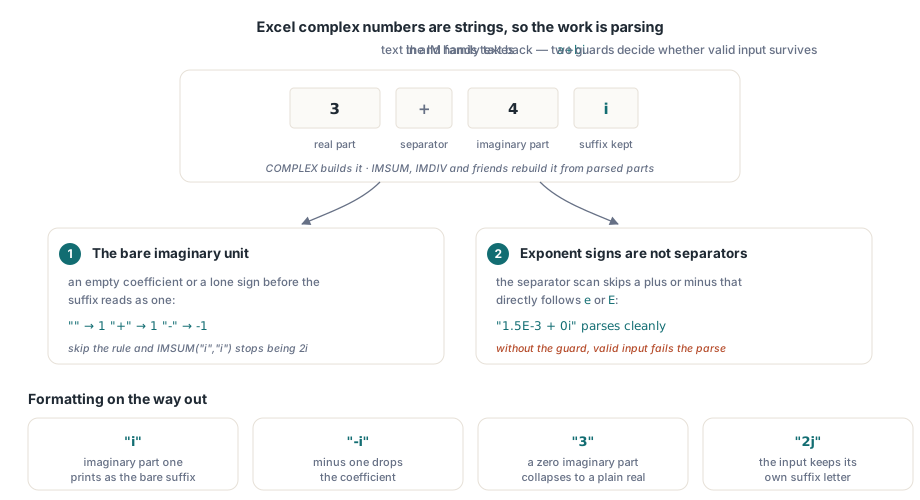
Excel has no complex data type. A complex value is the string "a+bi", and every function in the IM family takes those strings in and hands one back. COMPLEX builds the string from a real and an imaginary part. IMSUM, IMSUB, IMPRODUCT and IMDIV parse their arguments, do the arithmetic on the numeric parts, and format the result back into a string. The numeric work is undergraduate algebra. The difficulty is entirely in turning the text into two floating-point numbers reliably, and that is where the internal parser earns its keep
Two details in that parser are easy to get wrong. The first is the bare imaginary unit. The string "i" means one times i, not zero and not an error, so when the coefficient in front of the suffix is empty or is a lone plus sign the parser has to read it as the value 1, and a lone minus as -1. Skip that and IMSUM("i","i") stops being 2i. The second is scientific notation colliding with the sign that separates the real and imaginary parts. The parser finds that separator by scanning for a plus or minus, but a number written as "1.5E-3" contains a minus that belongs to the exponent. The scan therefore refuses to treat a plus or minus as the separator when the character immediately before it is e or E. Without that guard the real part would be torn in half at the exponent sign and the parse would fail on perfectly valid input
The suffix itself is preserved rather than normalized. Excel accepts both i and j, and HotXLS remembers which one the input used so the formatted result carries the same letter. Formatting then applies the conventional shorthands: an imaginary part of one prints as just the suffix, minus one as -i, a zero imaginary part collapses to a plain real, and a zero real part drops the leading 0+
var
  Book: TXLSXWorkbook;
  Sheet: TXLSXWorksheet;
begin
  Book := TXLSXWorkbook.Create;
  try
    Sheet := Book.Sheets.Add('Engineering');
    // Negative input: a ten-bit two's complement, places argument ignored.
    Sheet.Cells[1, 1].Value := Sheet.Calculate('=DEC2BIN(-5,10)'); // 1111111011
    // Complex multiply on two "a+bi" strings.
    Sheet.Cells[2, 1].Value := Sheet.Calculate('=IMPRODUCT("3+4i","1+2i")'); // -5+10i
  finally
    Book.Free;
  end;
end;
The transcendental complex functions, IMSQRT, IMEXP, IMLN and IMPOWER among them, do not work in rectangular coordinates. They convert the parsed value to polar form, apply the operation on the modulus and argument, and convert back. A square root halves the argument and takes the root of the modulus. A power multiplies the argument and raises the modulus. Doing it any other way would mean re-deriving each identity in rectangular form, which is both more code and less numerically stable near the branch cuts
Bitwise operators and the overflow you must check first
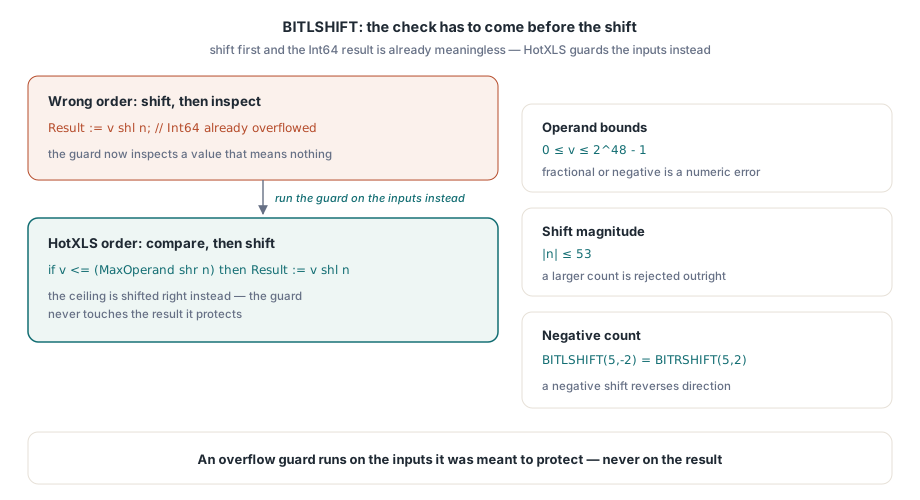
Excel 2013 added BITAND, BITOR, BITXOR, BITLSHIFT and BITRSHIFT. The operands are constrained: each must be a non-negative integer no larger than 2^48 minus 1, and any fractional or negative argument is a numeric error. That cap is generous enough to cover any realistic flag set while staying well inside the exactly representable range of a double, which matters because Excel hands every numeric argument across as a floating-point value
The shift functions carry the one ordering rule that genuinely bites. A left shift can produce a value far larger than its input, and if you perform the shl first and inspect the result afterward you have already overflowed Int64 and the test is meaningless. The check has to come before the shift. HotXLS compares the operand against the ceiling shifted right by the shift amount, and only if the operand fits does it perform the actual left shift. A shift magnitude beyond 53 bits is rejected outright, and a negative shift simply reverses direction, so BITLSHIFT with a negative count behaves as a right shift. The principle generalizes far past this one function: when a guard exists to prevent overflow, it has to run on the inputs, never on the result it was meant to protect
// Bitwise calls evaluate the same way through Calculate.
Sheet.Cells[3, 1].Value := Sheet.Calculate('=BITAND(13,11)');    // 9
Sheet.Cells[4, 1].Value := Sheet.Calculate('=BITLSHIFT(5,2)');   // 20
Sheet.Cells[5, 1].Value := Sheet.Calculate('=BITRSHIFT(40,3)');  // 5
Future functions and the _xlfn name prefix
The bitwise operators and a long list of other post-2007 additions interact with a naming scheme that has nothing to do with what they compute and everything to do with how Excel stores them. The original binary worksheet format assigned each built-in function a numeric slot in a fixed table. Functions invented after that table was frozen have no slot. To save such a function into a file and have a modern Excel recognize it, the name is written with an _xlfn. prefix, so BITAND is stored as _xlfn.BITAND on disk even though the user only ever types BITAND
The catch is that the rule is not uniform. Some newer functions were given table slots and are written bare, while a few legacy hidden functions are also written without a prefix despite their age. HotXLS keeps an explicit whitelist of which names need the prefix, adds it on write and strips it on read, so the formula text you set and read back is always the clean Excel-facing name. You set =BITLSHIFT(5,2), the file holds _xlfn.BITLSHIFT, and the value comes back as 20 regardless. The prefix is a storage detail that should never leak into the formulas you work with in code
Putting it together in a worksheet
The public surface for all of this is small. Create a TXLSXWorkbook, add a worksheet, and either write a formula into a cell through Cells[Row, Col].Formula and recalculate, or evaluate an expression directly with the worksheet's Calculate method, which compiles the formula against that sheet and returns a Variant. The examples above use Calculate because it shows the result of a single engineering call without the surrounding sheet state, but the same functions evaluate identically inside real cell formulas when the workbook recalculates
The encodings are the part to keep in mind, not the call sites. A binary string is signed only at ten digits and only past the half threshold for its base. A complex number is text, an empty imaginary coefficient is one, and the parser steps over the e of an exponent. A left shift is checked before it shifts. Get those four facts right and the engineering family stops being a source of off-by-a-sign surprises
If you are wiring your own domain math into the same engine, the mechanics of registering a handler and returning values are covered in our article on extending the formula engine with custom functions, and when those formulas have to reach across sheets by name rather than by cell address, the walkthrough on defined names and cross-sheet formulas shows how the references resolve. The engineering functions described here ship as part of the HotXLS Delphi spreadsheet component for Delphi and C++Builder, alongside the reading, writing, and calculation APIs covered elsewhere on this blog