The pattern (a+)+$ is six characters long. Run it against a cell holding thirty a characters and a trailing b, and a backtracking matcher must rule out every way of splitting those thirty characters between the inner and the outer repetition before it is allowed to answer FALSE. There are 2^29 such splits, a little over 536 million. Ten more characters multiply that by 1,024. So a spreadsheet formula like REGEXTEST(A2, "(a+)+$") on a server that recalculates uploaded workbooks is, in effect, a program written by whoever sent the file
Getting the Boolean right is the easy half of supporting Microsoft 365's regular expression functions outside Excel. The harder half is everything around the match: stopping it partway through, counting the memory the matcher allocates while it backtracks, and returning the same answer whether the workbook is recalculated on Windows, Linux or macOS
What REGEXTEST, REGEXEXTRACT and REGEXREPLACE return in HotXLS
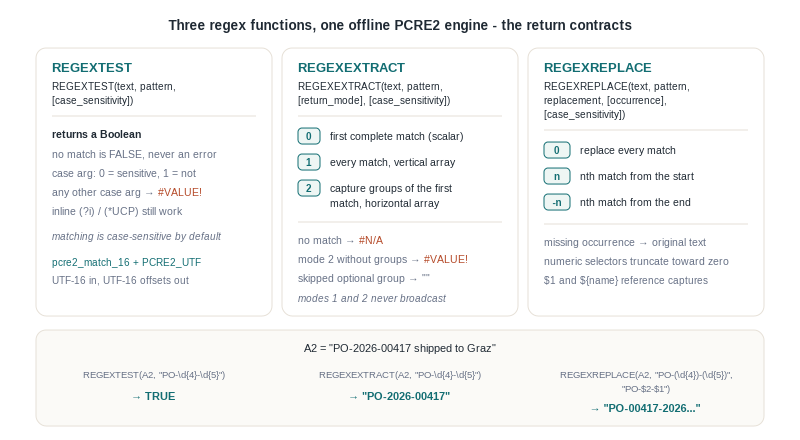
HotXLS evaluates REGEXTEST, REGEXEXTRACT and REGEXREPLACE inside its own Delphi formula engine, using a statically linked 16-bit build of PCRE2 10.49 with no Excel installation and no system regex DLL. Matching is case-sensitive by default; the final case_sensitivity argument takes 0 or 1, and any other value gives #VALUE!. Inline PCRE2 options such as (?i) or (*UCP) also work inside the pattern
REGEXTEST(text, pattern, [case_sensitivity]) returns a Boolean. A pattern that finds nothing yields FALSE; a pattern that does not compile yields #VALUE!. REGEXEXTRACT(text, pattern, [return_mode], [case_sensitivity]) has three modes: 0 returns the first complete match, 1 returns every complete match as a vertical array, and 2 returns the capture groups of the first match as a horizontal array. No match gives #N/A, and mode 2 on a pattern without capture groups gives #VALUE!. An optional group that did not take part in the match comes back as an empty string
REGEXREPLACE(text, pattern, replacement, [occurrence], [case_sensitivity]) uses PCRE2 replacement syntax, so $1 and ${name} reference captures, and a reference to a group that did not participate inserts nothing. An occurrence of 0 replaces every match, a positive value picks the nth match from the start, and a negative value counts back from the end. Ask for the fifth match in a string that has three and HotXLS returns the original text unchanged. Numeric selectors are truncated toward zero the way Excel treats fractional integer arguments, and a value outside the 32-bit integer range is #VALUE!
In a workbook they behave like any other worksheet formula
var
  Book: TXLSXWorkbook;
  Sheet: TXLSXWorksheet;
begin
  Book := TXLSXWorkbook.Create;
  try
    Sheet := Book.Sheets.Add('Orders');   // Sheets is 1-based: this is Sheets[1]
    Sheet.Cells[2, 1].Value := 'PO-2026-00417 shipped to Graz';

    // TRUE when the cell holds a purchase order number
    Sheet.Cells[2, 2].Formula := '=REGEXTEST(A2, "PO-\d{4}-\d{5}")';

    // First complete match: "PO-2026-00417"
    Sheet.Cells[2, 3].Formula := '=REGEXEXTRACT(A2, "PO-\d{4}-\d{5}")';

    // Swap year and sequence with numbered captures: "PO-00417-2026 ..."
    Sheet.Cells[2, 4].Formula :=
      '=REGEXREPLACE(A2, "PO-(\d{4})-(\d{5})", "PO-$2-$1")';

    // Case-insensitive test through the final argument
    Sheet.Cells[2, 5].Formula := '=REGEXTEST(A2, "graz", 1)';

    Book.Recalculate;
    Book.SaveAs('orders.xlsx');
  finally
    Book.Free;
  end;
end;
Formula text in Delphi is a plain string literal, so \d needs no escaping on the Pascal side; only the double quotes inside the formula matter, and they follow Excel's rules. When the workbook is saved, the XLSX writer stores the three names with the _xlfn. future-function prefix that Excel expects, and a reopened workbook recalculates them again. The classic BIFF8 engine can evaluate the functions in a contextual call but cannot write them as native .xls formula tokens, so keep regex formulas in XLSX output
How do regex formulas broadcast over a column?
REGEXTEST, REGEXREPLACE and mode 0 of REGEXEXTRACT broadcast across array operands, and every argument may be a scalar, a row, a column or a rectangle. HotXLS takes the largest row count and the largest column count among the operands as the result shape. An operand whose dimension is neither 1 nor that maximum turns the whole call into #VALUE!, the usual Excel array mismatch. REGEXTEST(A2:A500, "^[A-Z]{2}\d{9}$") therefore yields 499 Booleans, and a column of patterns tested against one text cell works the same way in the other direction
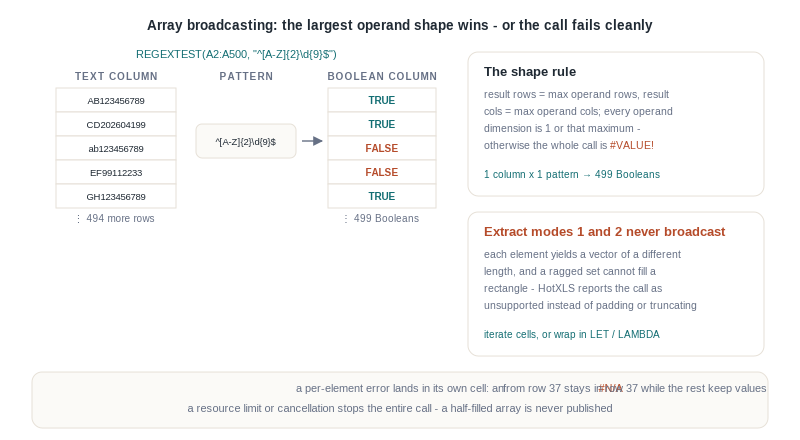
Modes 1 and 2 of REGEXEXTRACT do not broadcast. Each element would produce a vector of its own length, and a ragged set of vectors has no rectangular shape to spill into. HotXLS reports such a call as an unsupported function, which EvaluateFormulaAt surfaces as xlfeUnsupportedFunction. Called on a single text value, both modes work normally. To collect every match from many cells, loop over the cells in Delphi and extract one at a time, or restructure the formula with LET and LAMBDA closures in the HotXLS formula engine so that each closure call sees one text value
Errors inside a broadcast result stay where they belong. A #N/A from an extraction that found nothing in row 37 lands in that one cell while the other 498 keep their values. A resource limit or a cancellation stops the entire call instead, and no partially filled array is published
Broadcasting has a hidden cost: HotXLS compiles the pattern once per evaluated element, so a column of 50,000 cells means 50,000 compilations on top of the matching. For bulk cleanup of data you already trust, a regex pass in Delphi code outside the workbook is the faster tool. Inside a workbook that came from someone else, a predictable, interruptible cost is worth more than raw speed
Running an untrusted pattern under a step budget
When the pattern comes from a file you did not write, evaluate it through TXLSXWorksheet.EvaluateFormulaAt. It evaluates the formula as if it lived at the given row and column (both 1-based), returns the full array, and takes a TXLSFormulaEvaluationOptions record whose MaxEvaluationSteps, MaxArrayBytes and CancelFlag fields bound that one call. XLSDefaultFormulaEvaluationOptions starts you at 1,000,000 steps. The HotXLS formula engine and custom function guide covers the rest of that evaluation API
var
  Book: TXLSXWorkbook;
  Sheet: TXLSXWorksheet;
  Opts: TXLSFormulaEvaluationOptions;
  Eval: TXLSFormulaEvaluationResult;
  Row, I: Integer;
begin
  Book := TXLSXWorkbook.Create;
  try
    Sheet := Book.Sheets.Add('Log');
    Sheet.Cells[1, 1].Value := 'GET /api/v2/orders 200 18ms';

    Opts := XLSDefaultFormulaEvaluationOptions;
    Opts.MaxEvaluationSteps := 200000;        // matching, compiling and input all draw on this
    Opts.MaxArrayBytes := 16 * 1024 * 1024;   // PCRE2 memory plus result arrays

    // Mode 2: capture groups of the first match as a 1 x 3 array
    Eval := Sheet.EvaluateFormulaAt(1, 2,
      '=REGEXEXTRACT(A1, "(GET|POST) (\S+) (\d{3})", 2)', xlfrsA1, Opts);

    // Log is your own logging routine
    case Eval.Status of
      xlfeOk:
        if VarIsError(Eval.Value) then
          // #N/A (no match) and #VALUE! (pattern does not compile,
          // no capture groups, malformed UTF-16) arrive with xlfeOk
          Log('Formula returned an Excel error value')
        else if VarIsArray(Eval.Value) then
        begin
          Row := VarArrayLowBound(Eval.Value, 1);
          for I := VarArrayLowBound(Eval.Value, 2) to
                   VarArrayHighBound(Eval.Value, 2) do
            Log(VarToStr(Eval.Value[Row, I]));
        end;
      xlfeResourceLimit:
        Log('Pattern exceeded its budget: ' + Eval.Issue.Message);
    else
      Log('Evaluation failed: ' + Eval.Issue.Message);
    end;
  finally
    Book.Free;
  end;
end;
The trap in that block is the first branch. A pattern with a syntax error is an ordinary Excel outcome, the same #VALUE! a user would see in Excel, so Eval.Status is xlfeOk and the error sits in Eval.Value. Code that checks only the status and then hands Eval.Value to VarArrayLowBound fails on a value that is not an array. Test VarIsError first
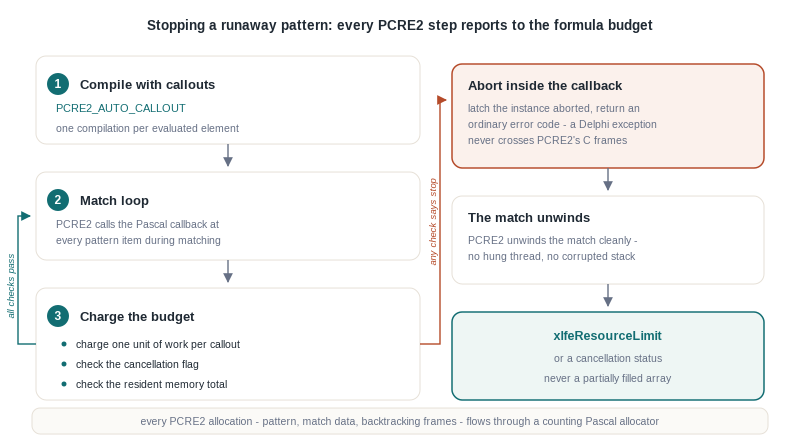
The budget reaches inside the match itself. HotXLS compiles every pattern with PCRE2_AUTO_CALLOUT, so PCRE2 calls back into Pascal code at each pattern item while it matches, backtracking included. Each callback charges one step, checks the cancel flag and compares memory in use against the array-memory ceiling; compiling charges one step per pattern character, and the text length is charged up front. When a check fails, the callback returns PCRE2's abort code and the match unwinds inside PCRE2. If PCRE2's own match or heap limits fire first, the result is the same xlfeResourceLimit
Here is the pattern from the top of this article, run with a tight budget and a cancel flag that another thread can set
var
  Cancelled: Boolean;   // a Cancel button or watchdog thread sets this to True
  Opts: TXLSFormulaEvaluationOptions;
  Eval: TXLSFormulaEvaluationResult;
begin
  Sheet.Cells[1, 1].Value := StringOfChar('a', 30) + 'b';

  Cancelled := False;
  Opts := XLSDefaultFormulaEvaluationOptions;
  Opts.MaxEvaluationSteps := 100000;
  Opts.CancelFlag := @Cancelled;

  Eval := Sheet.EvaluateFormulaAt(1, 2,
    '=REGEXTEST(A1, "(a+)+$")', xlfrsA1, Opts);

  // Expected: xlfeResourceLimit after about 100,000 callouts, far short of
  // the 2^29 splits a full search would visit; xlfeCancelled instead if
  // Cancelled became True while the match was still running
  if Eval.Status in [xlfeResourceLimit, xlfeCancelled] then
    Log('Rejected pattern: ' + Eval.Issue.Message);
end;
Memory is metered on the same path. Every PCRE2 allocation, from the compiled pattern to the backtracking frames, goes through a Pascal allocator and counts toward the ceiling, along with output buffers and extracted strings. A pattern that matches a million tiny strings in mode 1 hits the limit just as surely as one that backtracks forever. The effective ceiling is the smaller of the workbook's array-memory limit and the MaxArrayBytes you pass
A Delphi exception raised inside a callback that PCRE2 invoked must never propagate upward: between that callback and your code sit C stack frames with no knowledge of Delphi's exception tables, and unwinding through them can corrupt the stack. The HotXLS callbacks catch every exception, mark the match as aborted and return a plain error code to PCRE2, so your code receives a failed evaluation status
UTF-16 offsets and text that is not valid UTF-16
Excel strings are UTF-16, and so are Delphi WideString values, so HotXLS passes formula text to pcre2_match_16 with PCRE2_UTF set, and every offset that comes back is a UTF-16 code unit index. No UTF-8 round trip happens, so nothing can drift on characters outside the Basic Multilingual Plane
Patterns that can match an empty string follow PCRE2's global-match rule in mode 1 and in negative occurrence counting. After an empty match, the scan first retries a nonempty match anchored at the same position, and only when that fails does it move forward by one Unicode character, which means two code units when it sits on a surrogate pair. By that rule, REGEXEXTRACT("ab12", "\d*", 1) returns four rows: an empty string at position 0, another at position 1, then 12, then a final empty string at the end of the text
Malformed input behaves differently. A lone surrogate, the leftover half of a pair, appears when an upstream tool cuts a string at a fixed number of code units. With PCRE2_UTF set, PCRE2 validates the subject and rejects such text, and HotXLS turns that into #VALUE! for the element. REGEXTEST is no exception: it returns FALSE only for a genuine non-match, so a #VALUE! in a Boolean column points at the source data
Static PCRE2 with JIT switched off
PCRE2 is linked into the executable as a static object, so deployment adds no DLL and the result never depends on whichever regex library a server happens to have installed. JIT is disabled in every HotXLS build of PCRE2, and for untrusted workbooks that is the right trade. The JIT compiler needs executable memory and a JIT stack of its own, outside the per-formula allocator, while the interpreter keeps every byte inside the formula budget and every match under the callback. Each evaluation owns its own PCRE2 contexts, so parallel calculation workers share no mutable PCRE2 state
One detail of the Windows link matters to anyone who brings C objects into a Delphi project. A C function whose frame is larger than a page calls a stack probe first, which touches each 4 KB page in order so that Windows can commit stack memory through the guard page. A probe stub that simply returns will link and pass every test that uses short patterns; then a deep frame jumps past the guard page and the process dies. HotXLS links a working probe for each Windows object format it ships
Where the regex functions run, and how close they stay to Excel
The regex functions run in Delphi and C++Builder Windows builds (Win32, both Win64 object formats and ARM64EC) and in Free Pascal builds for Windows ARM64, all against prebuilt objects of the pinned PCRE2 release. Free Pascal builds for Linux x64 and macOS ARM64 link the same release once the bundled build-pcre2-unix.sh has compiled it on that host. On any other target the formula reports an unsupported function. Falling back to a different regex engine there would be worse: a workbook that computes differently on one platform is a discrepancy nobody notices until an audit
Signatures and documented examples follow Microsoft's pages for the three functions; edge cases follow the PCRE2 and array rules above. If a workbook leans on an obscure corner, such as a backreference quirk or a Unicode property class, compare that exact formula against Excel with the same input
The regex functions share one calculation engine, and one set of evaluation budgets, with LAMBDA, GROUPBY and PIVOTBY. Editions, platform details and the trial download are on the HotXLS spreadsheet component for Delphi and C++Builder page