HotXLS compares two workbooks through TXLSXWorkbookCompare, which pairs worksheets by name, walks the populated cells of each pair, and reports what differs as a structured list of difference records and, on request, as one readable line per difference. No Excel installation is involved, and the comparison runs entirely on the loaded object model in Delphi or C++Builder
The need usually appears the first time someone asks what changed. A finance workbook comes back from review, a nightly export is regenerated after a code change, or two departments send versions of the same template. Opening both side by side works for one sheet and fails for twenty. Comparing files byte by byte answers nothing at all, because two saves of the same workbook differ in ways nobody cares about
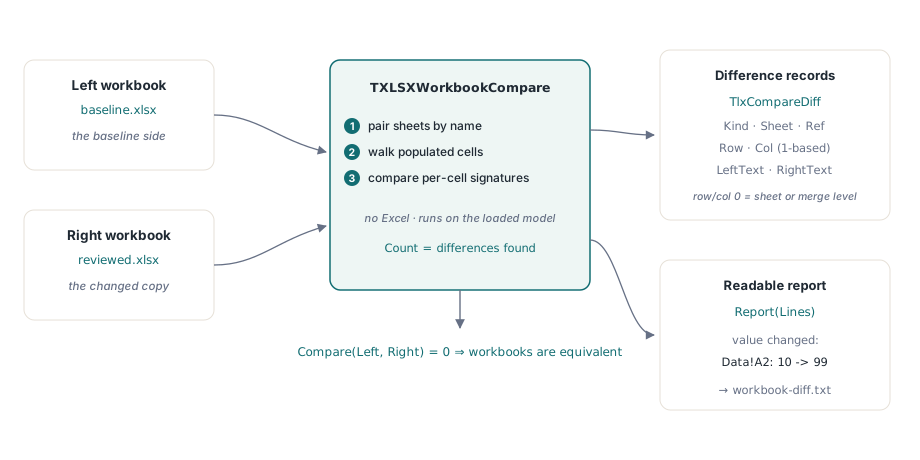
What counts as a difference?
The comparison reports eight kinds, and the set is deliberately small: a sheet added or removed, a populated cell added or removed, a cell whose value changed, a cell whose formula changed, and a merged range added or removed. Everything is expressed against the left workbook as the baseline, so an added item exists only on the right and a removed item only on the left
Sheets are paired by name rather than by position. Reordering worksheets therefore produces no differences at all, which is almost always the behavior you want: a user dragging a tab is not a data change. A sheet present on only one side reports one sheet-level entry rather than expanding every populated cell inside it, which keeps a report of two structurally different workbooks readable instead of thousands of lines long
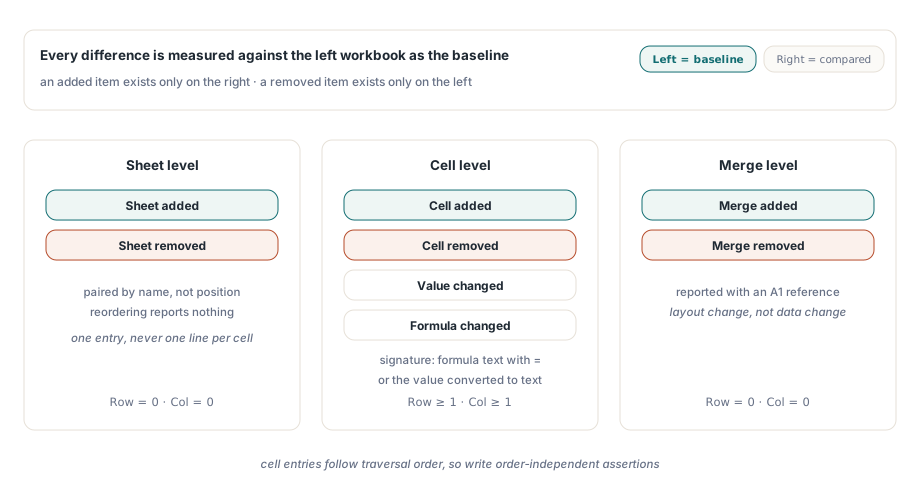
Value or formula, and how each is compared
Each cell contributes a signature, and the rule is simple: a cell carrying a formula compares by its formula text with a leading equals sign, and a cell without one compares by its value converted to text. That distinction matters more than it first appears. Two cells can hold the same displayed number while one is a literal and the other a formula, and treating them as equal would hide exactly the edit most worth catching in a reviewed workbook
It also means a formula whose text is unchanged reports no difference even if its cached result differs, which is the correct behavior for comparing authored content, and the wrong behavior if you are trying to detect recalculation drift. For that second question, recalculate both workbooks before comparing, so the values you compare are the ones the formulas actually produce today
Running a comparison
Compare takes the two loaded workbooks and returns the number of differences found. The difference list is then available by index, or can be dumped into any TStrings:
uses
  lxHandleX, lxCompare;

var
  Left, Right: TXLSXWorkbook;
  Cmp: TXLSXWorkbookCompare;
  Lines: TStringList;
begin
  Left := TXLSXWorkbook.Create;
  Right := TXLSXWorkbook.Create;
  Cmp := TXLSXWorkbookCompare.Create;
  Lines := TStringList.Create;
  try
    if (Left.Open('baseline.xlsx') <> 1) or
       (Right.Open('reviewed.xlsx') <> 1) then
      Exit;

    if Cmp.Compare(Left, Right) = 0 then
      Writeln('workbooks are equivalent')
    else
    begin
      Cmp.Report(Lines);              // one readable line per difference
      Lines.SaveToFile('workbook-diff.txt');
      Writeln(Format('%d difference(s) written', [Cmp.Count]));
    end;
  finally
    Lines.Free;
    Cmp.Free;
    Right.Free;
    Left.Free;
  end;
end;
A line produced by Report reads like value changed: Data!A2: 10 -> 99, which is enough for a reviewer and enough for a commit message. That is the human-facing surface. The programmatic surface is the difference record itself, and it is the one to use when the comparison feeds a decision rather than a document
Driving logic from the structured differences
Each difference exposes its kind, the sheet name, one-based row and column for cell-level entries, an A1 reference for merge-level entries, and the left and right text. Sheet-level and merge-level entries report row and column as zero, which is how you tell them apart without inspecting the kind:
var
  I: Integer;
  D: TlxCompareDiff;
  FormulaEdits: Integer;
begin
  FormulaEdits := 0;
  for I := 0 to Cmp.Count - 1 do
  begin
    D := Cmp.Diff(I);
    case D.Kind of
      lckFormulaChanged:
        begin
          Inc(FormulaEdits);
          Writeln(Format('%s R%dC%d: %s => %s',
            [D.Sheet, D.Row, D.Col, D.LeftText, D.RightText]));
        end;
      lckSheetAdded, lckSheetRemoved:
        Writeln(Format('structure: %s', [D.Describe]));
      lckMergeAdded, lckMergeRemoved:
        Writeln(Format('layout: %s at %s', [D.Describe, D.Ref]));
    end;
  end;

  // A review policy that only blocks on formula edits
  if FormulaEdits > 0 then
    raise Exception.CreateFmt(
      '%d formula change(s) need sign-off', [FormulaEdits]);
end;
Two properties of the output are worth knowing before you write assertions against it. The order of cell-level entries follows the internal traversal order of the cell store, so tests should be written order independently. And the formula signature carries its own leading equals sign, which means a description string built by concatenation can show a doubled ==; check the field values rather than parsing the descriptive line when the result drives logic
Where workbook diffing pays off
Three uses justify the feature on their own. Regression testing a report generator: keep a known-good workbook, regenerate, compare, and fail the build on any unexpected difference. Change review: hand a reviewer the readable report instead of two files. And migration verification: after converting a batch of legacy workbooks, compare each result against its source to prove nothing was lost
That third case pairs naturally with the inventory and audit passes described in the workbook audit and conversion workbench, where counting what a workbook contains happens before conversion and comparison happens after. If your differences cluster around inserted rows, the reference rewriting rules in formula reference adjustment on insert and delete explain why formulas that look unchanged report as changed
The limits, stated plainly
The comparison covers values, formulas, merges and sheet presence. It does not compare number formats, fonts, fills, conditional formatting rules, data validations, charts, images or defined names. A cell whose value is identical but whose format changed from General to Currency reports no difference, which is correct for a data comparison and insufficient for a formatting review
Date-valued cells deserve one specific caution: they compare as their text conversion, so a workbook stored on the 1904 date system and one on the 1900 system can compare equal or unequal in ways that surprise you if the underlying serial numbers differ. The date system rules are covered in date serial numbers and the 1904 system. When formatting or object-level fidelity is part of the question, combine the diff with an audit pass that counts those features on each side
Workbook comparison, auditing and conversion all run on the same engine for Delphi and C++Builder; the complete feature list is on the HotXLS Delphi spreadsheet component page