Renaming a hardcoded worksheet reference across a thousand macro-enabled report templates rules out opening each file in the VBA editor by hand. HotXLS, the native Delphi and C++Builder Excel component, handles that case by exposing a VBA module's source as an editable SourceCode property and recompressing every edit with the MS-OVBA compression algorithm Microsoft defines for VBA storage, writing the result back into classic XLS VBA storage, a standalone VBA project file, or a macro-enabled XLSM workbook. No Excel instance, no VBA editor, and no macro recorder is involved anywhere in that path
Why a VBA module stream is not a text file
A VBA module inside an XLS workbook or a standalone VBA project file is not source text sitting in a stream waiting to be read — it is a small binary container. A compiled performance cache comes first, the bytes Office uses to skip recompiling the module on load when the cache still matches the host version, and the actual source text follows, run through a proprietary compression scheme that MS-OVBA defines specifically for VBA storage. That scheme is not zip, not deflate, and not anything the Windows compression APIs produce natively, which is exactly why most third-party Excel libraries can read a module's source — decompression is the easier half of the problem — while stopping short of writing it back, since recompression is where a subtly wrong bit produces a file Excel refuses to open. Public write-ups of the read side exist; write-side implementations that actually exercise recompression, rather than just unpacking an existing module for inspection, are scarce enough that this remains one of the least documented corners of the Excel file formats
What does HotXLS's SourceCode property actually change?
HotXLS represents every VBA module as a TXLSVBAModule object with a plain SourceCode: WideString property, and assigning it a new value is exactly as simple as it looks: the module is marked dirty in memory, and nothing touches the underlying OLE stream until the project is saved. The project itself comes from IXLSWorkbook.VBAProject on the classic XLS engine or TXLSXWorkbook.ParsedVBAProject on the OOXML macro-enabled engine, both returning a TXLSVBAProject whose modules sit behind a 1-based Item[] indexer and a Count property, so a batch edit across every module in a workbook is just a loop over an integer range
var
  Wb: TXLSWorkbook;
  Project: TXLSVBAProject;
  I: Integer;
  Updated: WideString;
begin
  Wb := TXLSWorkbook.Create;
  try
    Wb.Open('MonthlyReport.xls');
    if Wb.HasVBAProject then
    begin
      Project := Wb.VBAProject;
      for I := 1 to Project.Count do
      begin
        Updated := StringReplace(Project[I].SourceCode,
          'ReportSheet2025', 'ReportSheet2026', [rfReplaceAll]);
        if Updated <> Project[I].SourceCode then
          Project[I].SourceCode := Updated;   // marks the module dirty
      end;
      Wb.SaveAs('MonthlyReport.xls');          // recompresses on write
    end;
  finally
    Wb.Free;
  end;
end;
That loop is also the shape of an audit pass. Before a thousand templates get touched, most teams first want to know how many of them actually carry macros and what those macros reference, which is the scenario behind the workbook audit and conversion workbench — the same Project.Count that drives a rewrite loop here becomes a per-file macro tally there
Inside the MS-OVBA compression container
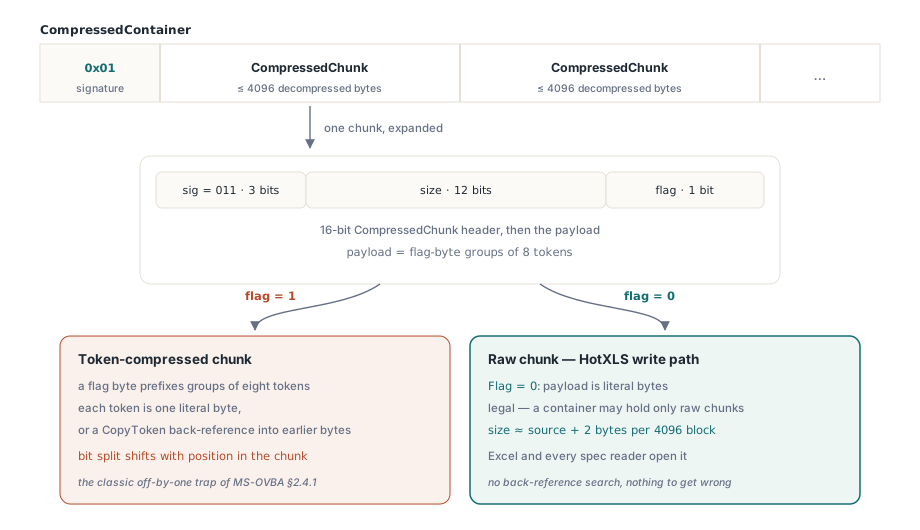
MS-OVBA's compression format packages source bytes into what the spec calls a CompressedContainer: a single signature byte, required to equal 0x01, followed by a sequence of CompressedChunk blocks, each covering up to 4096 bytes of decompressed data. A 16-bit chunk header carries three fields — a 3-bit signature that must equal 3, a 12-bit size field, and a CompressedChunkFlag bit marking whether the chunk's payload is literal bytes or a token-compressed sequence. When the flag is set, the payload is a run of flag-byte-prefixed groups of eight tokens, and each token is either a single literal byte or a CopyToken: an offset/length back-reference into bytes already decompressed earlier in the same chunk, with the bit width split between offset and length shifting depending on how far into the chunk the decompressor currently sits. This part of MS-OVBA (§2.4.1, Compression and Decompression) is where a hand-rolled implementation most often loses a day to an off-by-one in that bit-width calculation
Why HotXLS writes raw chunks instead of matching tokens
HotXLS's write path sidesteps the token-matching half of that algorithm entirely. When it recompresses an edited module, every chunk goes out with the CompressedChunkFlag cleared, meaning the chunk holds literal bytes rather than back-reference tokens — legal under MS-OVBA, since a compressed container is allowed to consist entirely of uncompressed chunks, and it removes precisely the part of the algorithm that is hardest to get right by hand: finding valid back-references and packing an offset/length pair into a bit width that depends on the current position inside the chunk. The trade-off shows up in file size, not correctness — a rewritten module stream lands close to the size of its source text plus a two-byte header per 4096-byte block, not smaller the way a fully token-compressed chunk would be. Every reader that implements the decompression side of the spec, Excel included, still opens the result correctly, because a raw chunk is just as valid a CompressedChunk as a token-compressed one
What HotXLS leaves untouched when it rewrites a module
Recompression only ever replaces part of the module stream. Every module stream stores its performance cache first and its compressed source second, and the project's dir stream records exactly where that split falls for each module in a MODULEOFFSET entry; HotXLS reads that offset, keeps every byte before it exactly as it found them, and rebuilds only the compressed container from the offset onward
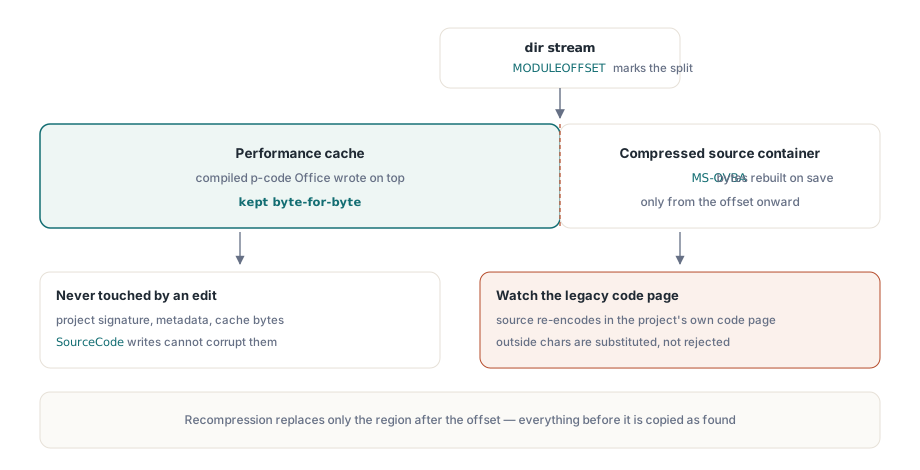
Source text itself round-trips through the VBA project's own code page rather than UTF-8 — the same legacy code page Office wrote the project with in the first place. A SourceCode edit that introduces characters outside that code page's repertoire gets silently substituted with best-fit replacement characters when HotXLS re-encodes the string back to bytes, not rejected, so an unusual regional character dropped into a comment or string literal is the most likely place to notice the loss. External references and library bindings inside the same project follow a related but separate preservation path, covered in the companion article on VBA external link preservation, and it is worth a read before a rewrite pass touches a project that links out to other workbooks or type libraries
How do you get the rewritten macros back into a workbook?
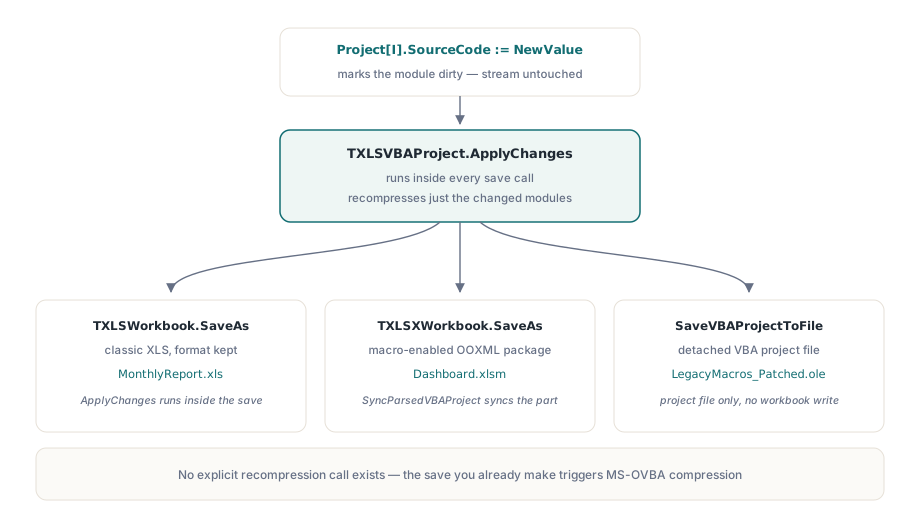
Nothing calls the recompression step explicitly — it runs automatically the moment a workbook or a standalone VBA project gets saved. TXLSVBAProject.ApplyChanges walks every module, recompresses the ones whose SourceCode changed since the last save, and rewrites just that module's stream; the classic TXLSWorkbook.SaveAs, when the save target keeps the file's original format, and the OOXML TXLSXWorkbook.SaveAs for a macro-enabled XLSM package both call it internally before anything is written to disk, and SaveVBAProjectToFile calls the same method when the target is a detached VBA project file rather than a full workbook
var
  Wb: TXLSWorkbook;
begin
  Wb := TXLSWorkbook.Create;
  try
    if Wb.LoadVBAProjectFromFile('LegacyMacros.ole') = 1 then
    begin
      Wb.VBAProject[1].SourceCode :=
        StringReplace(Wb.VBAProject[1].SourceCode, 'OldServer', 'NewServer', [rfReplaceAll]);
      Wb.SaveVBAProjectToFile('LegacyMacros_Patched.ole');  // ApplyChanges runs internally
    end;
  finally
    Wb.Free;
  end;
end;
var
Xlsx: TXLSXWorkbook;
Project: TXLSVBAProject;
begin
Xlsx := TXLSXWorkbook.Create;
try
Xlsx.Open('Dashboard.xlsm');
Project := Xlsx.ParsedVBAProject;
if Assigned(Project) then
begin
Project[1].SourceCode := StringReplace(Project[1].SourceCode,
'ConnStringV1', 'ConnStringV2', [rfReplaceAll]);
Xlsx.SaveAs('Dashboard.xlsm'); // SyncParsedVBAProject recompresses before the part is written
end;
finally
Xlsx.Free;
end;
end;All three destinations share the same SourceCode and ApplyChanges mechanics underneath; the only real difference between them is which save call ends up triggering the recompression
Where this still breaks
Two failure modes are common enough to plan around before a rewrite pass runs against production files. A digitally signed VBA project stops being validly signed the moment its source changes, since the signature covers the project's content; HotXLS has no way to re-sign a project on your behalf, and Excel drops or flags the signature the next time the file opens, so a signed macro project needs a re-signing step downstream if that signature is something your workflow actually checks. The second failure mode belongs to anyone tempted to reimplement this compression format from scratch instead of using a library that already handles it: a single wrong bit in a chunk header, in the signature nibble, the size field, or the compressed flag, produces a file Excel refuses to open, usually behind a generic corruption warning that gives no hint which byte was wrong — precisely the class of bug the raw-chunk write strategy described earlier exists to avoid
None of this requires reverse-engineering the format to use. Delphi and C++Builder developers get SourceCode read and write access, MS-OVBA-compliant recompression, and all three write-back destinations described here as part of the standard HotXLS Delphi Component, alongside the rest of its classic XLS and OOXML workbook API