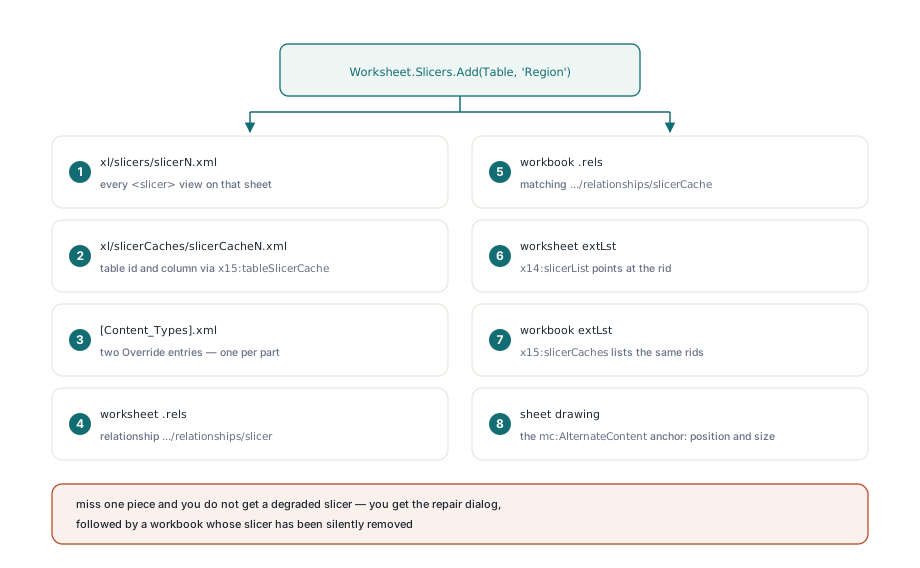
HotXLS creates Excel table slicers from Delphi and C++Builder with one call — Worksheet.Slicers.Add(Table, ColumnName) — and writes all eight package locations a slicer needs: the slicer and slicerCache parts, both content-type overrides, the worksheet and workbook relationships with their matching extLst blocks, and the drawing anchor
A slicer looks like a control you drop on a sheet. In the file it is nothing of the sort. It is a distributed record spread across two new parts, two relationship graphs, three extension blocks, and one drawing anchor, and the whole thing is validated as a unit when Excel opens the package. Miss one piece and you do not get a degraded slicer; you get the repair dialog, followed by a workbook with the slicer silently removed. That failure mode is what makes slicers annoying to emit by hand, and it is why the interesting engineering here is bookkeeping rather than rendering
Why does one slicer touch eight places in the package?
Because a slicer is three separate concepts that OPC forces into three separate homes: the filter state (workbook-scoped), the view (worksheet-scoped), and the shape (drawing-scoped). HotXLS writes exactly eight landing points per table slicer, and every one of them is load-bearing
xl/slicers/slicerN.xml— one part per worksheet, holding every<slicer>view on that sheet in thehttp://schemas.microsoft.com/office/spreadsheetml/2009/9/mainnamespacexl/slicerCaches/slicerCacheN.xml— workbook-level, one per sliced table column, carrying the actual binding- a
<Override>in[Content_Types].xmlfor each of those two parts, usingapplication/vnd.ms-excel.slicer+xmlandapplication/vnd.ms-excel.slicerCache+xml(ECMA-376 Part 2 requires a content type for every part, and Excel refuses the package without them) - a worksheet relationship of type
.../office/2007/relationships/slicer, plus an<x14:slicerList>extension inside the worksheetextLstthat points at that rid - a workbook relationship of type
.../office/2007/relationships/slicerCache, plus an<x15:slicerCaches>extension inside the workbookextLstlisting the same rids - an
mc:AlternateContentanchor in the sheet drawing that gives the slicer its position and size - an
<x15:tableSlicerCache>block inside the cache part that binds it to a table id and a table column id
The extension blocks use the standard ECMA-376 Part 1 §18.2.10 extLst mechanism: each <ext> carries a uri attribute that identifies the feature, and readers that do not recognize the GUID skip the block. HotXLS discriminates table slicers from pivot slicers by that GUID alone — {3A4CF648-6AED-40f4-86FF-DC5316D8AED3} for the table slicerList, {A8765BA9-456A-4dab-B4F3-ACF838C121DE} for the pivot one, and correspondingly {46BE6895-7355-4a93-B00E-2C351335B9C9} and {BBE1A952-AA13-448e-AADC-164F8A28A991} for the two workbook slicerCaches extensions. The table binding itself lives under {2F2917AC-EB37-4324-AD4E-5DD8C200BD13}. Those constants are exposed in the unit as XlsxExtUriSlicerListX15, XlsxExtUriWbSlicerCachesX15, and XlsxExtUriTableSlicerCache, so nothing in the write path carries a magic string
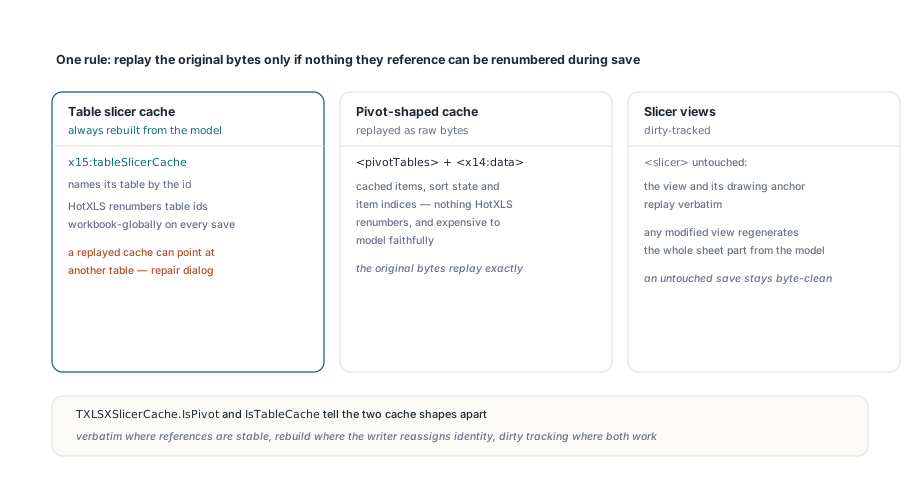
Which parts can replay verbatim, and which must be rebuilt?
HotXLS answers this with a single rule: a part may replay its original bytes only if nothing it references can be renumbered during save. Table slicer caches fail that test, so HotXLS rebuilds them from the model on every save, unconditionally — even when the user never touched the slicer. The reason is tableId: the <x15:tableSlicerCache> element identifies its table by the id attribute of <table>, and HotXLS renumbers table ids workbook-globally when it writes. An early implementation stored the cache part as raw bytes at open and pushed them back out at save, which is the right strategy for most opaque parts. It produced files that opened cleanly in the common case and triggered a repair in the interesting one: add a table on an earlier sheet, save, and the cache now points at a table id that belongs to something else, or to nothing at all. The bug is invisible in a plain open-and-save regression because the ids happen not to move
Pivot-shaped caches take the opposite route. Their payload is <pivotTables> plus an <x14:data> block describing cached items, sort state, and item indices — a structure with no HotXLS-side renumbering, and one that is expensive to model faithfully. Those are kept as raw bytes and replayed exactly, with TXLSXSlicerCache.IsPivot and IsTableCache telling the two apart. The slicer views follow a third policy, dirty-tracked: an untouched <slicer> element and its drawing anchor replay verbatim, and the moment any view on the sheet is modified the whole sheet part is regenerated from the model. That is the general shape of the judgement — verbatim replay where references are stable, model rebuild where the writer reassigns identity, dirty tracking where both are acceptable — and it applies well beyond slicers, as the lossless round-trip notes on themes, extLst blocks, and calcChain work through in more depth
Creating a table slicer from Delphi
TXLSXSlicers.Add is the whole creation API. Given a TXLSXTable and a column name it materializes the table column ids, finds or creates the backing TXLSXSlicerCache, reserves the matching defined name, and anchors a view to the right of the table. The two-argument overload picks the placement; the six-argument one takes an explicit 1-based inclusive box
var
  Book: TXLSXWorkbook;
  Sheet: TXLSXWorksheet;
  Slicer: TXLSXSlicer;
begin
  Book := TXLSXWorkbook.Create;
  try
    Book.Open('sales.xlsx');
    Sheet := Book.Sheets[0];

    // Default placement: two columns clear of the table,
    // 13 rows tall at the 19pt default row height
    Slicer := Sheet.Slicers.Add(Sheet.Tables[0], 'Region');
    Slicer.Caption   := 'Sales region';
    Slicer.StyleName := 'SlicerStyleLight1';
    Slicer.ColumnCount := 2;

    Book.SaveAs('sales-sliced.xlsx');
  finally
    Book.Free;
  end;
end;
Two naming rules are worth knowing because they are Excel conventions rather than HotXLS inventions. The cache is named Slicer_<column> with non-identifier characters folded to underscores, and collisions append a numeric suffix — Slicer_Region, then Slicer_Region1, and so on. And every cache name is also reserved as a workbook defined name whose formula is #N/A, which is what TXLSXSlicers.ReserveCacheDefinedName does. Excel creates that name itself, and it matters: cache names and defined names share one namespace, so a workbook that already has a name called Slicer_Region would otherwise collide on the next save. If you build tables and validation together, the defined-name interactions in the article on data validation, AutoFilter, and tables cover the neighboring cases. Sharing follows the same rule Excel uses. TXLSXSlicerCaches.FindForTableColumn(ATableId, ATableColumnId) is consulted before a new cache is created, so two slicer views over the same table column — one on the dashboard sheet, one on the detail sheet — share a single cache part and stay filter-synchronized. Deleting a view runs the reverse check across every sheet in the workbook and drops the cache plus its reserved #N/A name only when the last view referencing it is gone
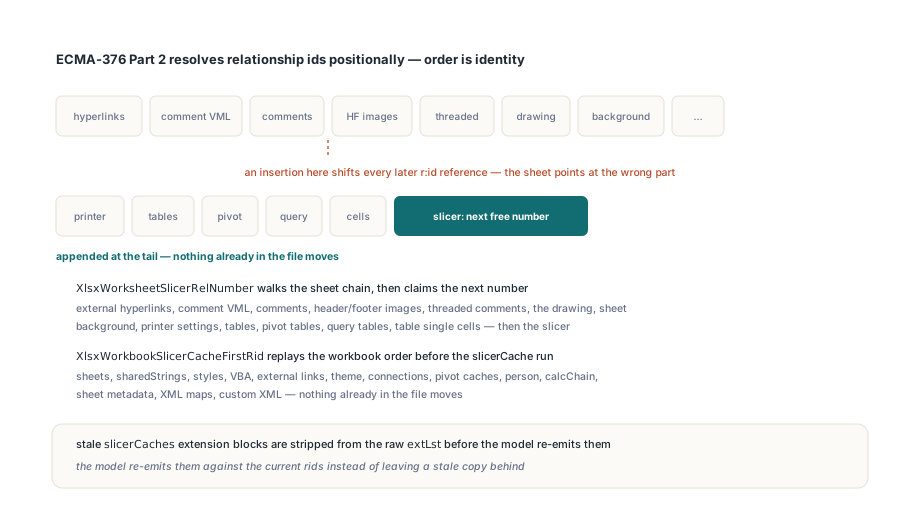
How do relationship ids stay stable on both ends?
They stay stable because HotXLS computes the slicer rid by replaying the exact order in which it emits every other relationship, and appends the new relationships at the tail. Nothing already in the file moves. This sounds like over-engineering until you have debugged the alternative. Relationship ids in a worksheet .rels are referenced from inside the worksheet part — by hyperlinks, by the drawing, by comments, by table parts — and ECMA-376 Part 2 resolves them positionally within the relationship graph, not by any stable identity. If the writer inserts the slicer relationship in the middle, every reference after it shifts by one, and the sheet quietly starts pointing at the wrong part. So XlsxWorksheetSlicerRelNumber walks the full deterministic chain — external hyperlinks, then the comment VML, comments, header/footer images, threaded comments, the drawing, the sheet background, printer settings, tables, pivot tables, query tables, table single cells — and only then claims the next number for the slicer. XlsxWorkbookSlicerCacheFirstRid does the same on the workbook side: sheets, sharedStrings, styles, VBA, external links, theme, connections, pivot caches, person, calcChain, sheet metadata, XML maps, custom XML, then the slicerCache run. The general problem is worked through in the piece on OPC relationship resolution. The workbook-side extension is then built from those numbers by XlsxBuildWorkbookSlicerCachesExtXml, and if the source file already had slicerCaches extension blocks they are stripped from the raw extLst first, so the model re-emits them against the current rids instead of leaving a stale copy behind
The AlternateContent anchor and its legacy fallback
The drawing anchor is the one place where the slicer markup gets genuinely strange, and the strangeness is deliberate. HotXLS emits the shape inside an mc:AlternateContent element per ECMA-376 Part 3, with a Choice branch that Excel 2013 and later take and a Fallback branch for everything older
// What XlsxSlicerAnchorPayloadXml produces, structurally:
//
//   <mc:AlternateContent>
//     <mc:Choice xmlns:sle15=".../drawing/2012/slicer" Requires="sle15">
//       <xdr:graphicFrame>
//         <a:graphicData uri=".../drawing/2010/slicer">
//           <sle:slicer xmlns:sle=".../drawing/2010/slicer" name="Region"/>
//         </a:graphicData>
//       </xdr:graphicFrame>
//     </mc:Choice>
//     <mc:Fallback><xdr:sp>...notice shape...</xdr:sp></mc:Fallback>
//   </mc:AlternateContent>
Look at the two namespaces. The Requires="sle15" token resolves to the 2012 slicer namespace, which is the version gate — a reader that does not understand 2012 slicers must skip the whole Choice branch. But the graphicData/@uri and the sle:slicer element inside it use the 2010 namespace, because that is the drawing-side identifier the graphic frame has always used. Getting these backwards produces a file Excel opens without complaint and then renders as an empty frame, which is a memorably unhelpful symptom. The Fallback branch holds a plain rectangle with a text body explaining that table slicers are not supported in this version — that is what a 2007-era reader draws in place of the control, and it is why an older Excel can round-trip the workbook without destroying anything. TXLSXSlicer exposes the geometry as a 1-based inclusive box through SetBounds(ARow1, ACol1, ARow2, ACol2) and the individual FromRow / ToCol properties, plus AnchorType for the usual move-and-size-with-cells behavior. HasAnchor is False for one specific case: a slicer nested inside a group shape. Those replay with their group anchor verbatim and HotXLS deliberately does not synthesize a second anchor for them, since doing so would emit the shape twice
Editing an existing slicer
var
  Slicer: TXLSXSlicer;
  Cache: TXLSXSlicerCache;
begin
  Slicer := Sheet.Slicers.FindByName('Region');
  if Slicer <> nil then
  begin
    Slicer.SetBounds(2, 8, 16, 11);      // 1-based, inclusive
    Slicer.ShowCaption := 1;             // -1 = attribute omitted
    Slicer.LockedPosition := 1;
    Slicer.RowHeightEmu := 19 * XlsxEmuPerPoint;   // 241300 EMU

    Cache := Slicer.Cache;
    if Cache <> nil then
    begin
      Cache.SortOrder   := 'descending';
      Cache.CrossFilter := 'showItemsWithNoData';
    end;
  end;

  // Removing the last view over a column drops its cache
  // and the reserved #N/A defined name with it
  Sheet.Slicers.Delete(Sheet.Slicers.IndexByName('Region'));
The tri-state integer properties deserve a note, since they look like a modeling accident and are not. ShowCaption, LockedPosition, ColumnCount, StartItem, and CustomListSort all use -1 to mean the attribute was absent in the source file and should stay absent on write, with 0 and 1 as explicit values. Excel treats absent and explicitly-default differently in a few places, and preserving that distinction is what keeps a byte diff of an untouched save clean. RowHeight and ColumnWidth are kept as raw strings for a related reason: Excel writes decimals into those EMU attributes, and reparsing them through an integer would lose precision on round-trip. RowHeightEmu is the integer convenience accessor over the same storage, with XlsxSlicerDefaultRowHeight at 241300 EMU — 19 points at the XlsxEmuPerPoint ratio of 12700
Where this stops
Two honest limits. First, HotXLS models the table slicer completely but does not model pivot slicer creation — you can open a workbook containing pivot slicers, read their identity, keep them intact across a save, and delete them, but the cache side replays as bytes and there is no API to build one from scratch. Second, a slicer does not filter anything on its own. It is a UI over a table column, and the visible-row state it drives is Excel-side; HotXLS writes the control and the binding, not a computed filter result. If you need rows actually filtered in the saved file, set the table AutoFilter as well. Any attribute HotXLS does not model on <slicer> or <x15:tableSlicerCache> is carried through unchanged, so a slicer that came from a newer Excel build still re-serializes with its unfamiliar attributes intact even after you move it. That is the property that makes the dirty-rebuild path safe to take: rebuilding from the model is only acceptable if the model is a superset of what it parsed. The GUID-tagged extension mechanism from ECMA-376 Part 1 §18.2.10, and the slicer part definitions in [MS-XLSX], are what make that guarantee expressible in the first place
Table slicers ship in the HotXLS Delphi Component, which reads and writes XLSX, XLSM, and legacy BIFF workbooks from Delphi 5 through the current release, plus C++Builder and Free Pascal, with no Excel installation and no OLE. Full API reference and a trial build are on the HotXLS Delphi Spreadsheet Component product page