Type =NORM.DIST(115,100,15,TRUE) into a cell and Excel returns 0.8413447 without ceremony. The call reads like a lookup. It is not. Behind that one number is the cumulative normal distribution, an integral with no closed form, and behind CHISQ.INV.RT and BETA.DIST sit special functions that a careful library has to evaluate, not approximate by hand. A spreadsheet component that claims Excel compatibility has to reproduce these values to the last digit Excel shows, which means reproducing the numerical methods, not just the function names
HotXLS implements more than fifty of these statistical functions, and the work that makes them correct is almost entirely invisible from the formula bar. This is a tour of how the engine computes them: the shared special-function core, the branch decisions that keep the arithmetic stable, and one inverse-normal bug that hid in the tail for a long time because the common case never touched the broken line
One worksheet call, fifty distributions behind it
The functions span the families a statistics workbook reaches for. There is the normal family, NORM.DIST and NORM.S.DIST with their inverses; the gamma and chi-square family, GAMMA.DIST, CHISQ.DIST, CHISQ.DIST.RT, CHISQ.INV.RT; the beta family, BETA.DIST and BETA.INV; the sampling distributions T.DIST, T.DIST.2T, F.DIST and F.INV; the discrete pair BINOM.DIST and POISSON.DIST; and the inference helpers such as CONFIDENCE.T and CONFIDENCE.NORM. From the caller's seat each is a single formula. You set inputs in cells, ask the workbook to evaluate, and read the result
var
  wb: IXLSWorkbook;
  sh: IXLSWorksheet;
begin
  wb := TXLSWorkbook.Create;
  sh := wb.Sheets.Add;
  sh.Range['A1', 'A1'].Value := 115;   // observation
  sh.Range['A2', 'A2'].Value := 100;   // mean
  sh.Range['A3', 'A3'].Value := 15;    // standard deviation

  // The XLS formula parser uses ';' as the argument separator.
  Writeln(wb.Calculate('=NORM.DIST(A1;A2;A3;TRUE())'));   // 0.8413447
  Writeln(wb.Calculate('=CHISQ.INV.RT(0.05;10)'));        // 18.3070381
  Writeln(wb.Calculate('=BETA.DIST(0.5;2;3;TRUE())'));    // 0.6875
end;
The Calculate method on the workbook compiles and evaluates an ad-hoc formula against the live sheet and hands back a Variant. One detail trips people on the first try: the formula parser behind Calculate takes the semicolon as its argument separator, so it is =SUM(A1;B1), not =SUM(A1,B1). Stored cell formulas keep the Excel-standard comma. The same evaluator dispatches every statistical function below, so once one of these works in Calculate, the rest follow the same path
The two functions everything else is built on
Most cumulative distributions in this set are not computed by summing or integrating their own definitions. They are computed from two special functions: the regularized lower incomplete gamma, written P(a, x), and the regularized incomplete beta, written Ix(a, b). Internally these are the helpers the dispatchers lean on, and the chain is short. The chi-square CDF is the gamma CDF with shape df/2 and scale 2. The gamma CDF is P(a, x) directly. The t, F, and binomial cumulative functions are all values of the regularized incomplete beta at the right arguments. Poisson's CDF is the upper incomplete gamma Q. Implement the gamma and beta functions well and a dozen distributions inherit their accuracy for free
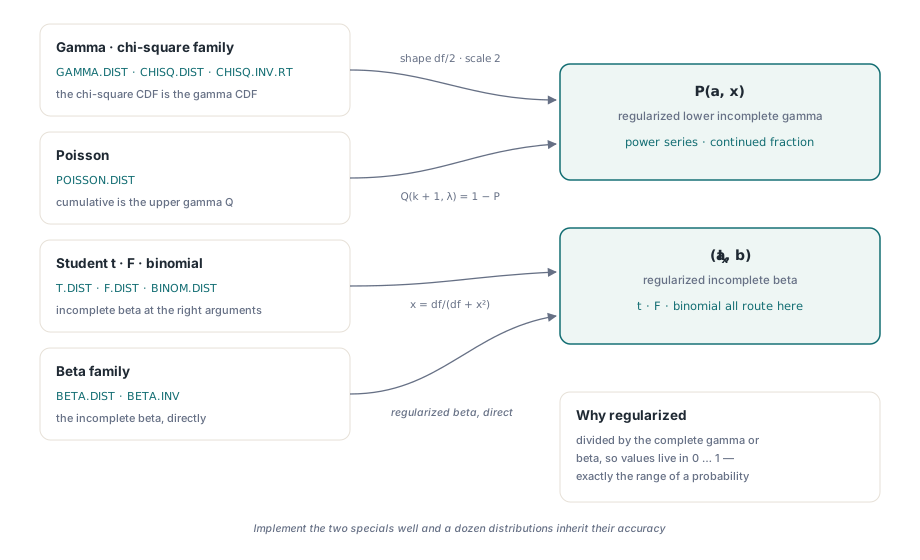
The word "regularized" is the whole point. The raw incomplete gamma grows like a factorial and the raw beta integral can underflow or overflow long before the answer does. The regularized forms are divided through by the complete gamma or beta, so they live entirely in the interval from zero to one, which is exactly the range a probability occupies. That normalization is what lets the same routine serve a chi-square with two degrees of freedom and one with two hundred without the intermediate terms running off the end of a double. It also explains why you do not compute a CDF by adding up a long tail of density terms: each term carries its own rounding error, the errors accumulate as the series runs, and the regularized special function sidesteps the sum entirely by evaluating a rapidly convergent series or continued fraction instead
Series below the diagonal, continued fraction above it
The incomplete gamma routine makes one decision before it computes anything: it compares x against a + 1. That boundary is not arbitrary. The power-series expansion of P(a, x) converges quickly when x is small relative to a, and slowly, eventually uselessly, when x is large. The continued fraction has the opposite character. So the engine uses the power series for x below a + 1 and a Lentz continued fraction for x at or above a + 1, and each branch is asked to do only the work it is good at
The continued fraction needs one guard. Lentz's method works by carrying a running numerator and denominator and inverting the denominator on every step, and if either approaches zero the inversion blows up. The fix is a tiny floor: whenever an intermediate term falls below roughly 1e-30 in magnitude it is clamped to 1e-30, which keeps the recurrence finite without disturbing the converged value. The same clamp appears in the incomplete beta's continued fraction for the same reason. It is a small constant doing load-bearing work, the difference between a stable evaluation and a division by something indistinguishable from zero
The upper tail, Q(a, x), is simply 1 minus P(a, x), and that is how Poisson's cumulative branch is computed: the probability of at most k events with mean λ is Q(k + 1, λ). Routing it through the upper incomplete gamma rather than summing k + 1 Poisson terms is, again, a choice to evaluate one convergent expression instead of accumulating many small ones
Discrete masses without factorial overflow
The discrete distributions raise a different hazard. A binomial probability mass involves a binomial coefficient, and the coefficient for fifty-two-choose-twenty-six is an enormous integer. Form it directly and the numerator overflows a double before the division that would bring it back to a sensible probability. The engine never forms it. It computes the factorials in log space through the log-gamma function, adds and subtracts the logs, folds in the log of the success and failure probabilities, and exponentiates once at the very end
// Binomial probability mass, evaluated entirely in log space.
// LnGammaF(n+1) is ln(n!); the three log-factorials form ln(C(n,k)),
// and the whole exponent is built before a single Exp call.
//   ln P(X=k) = ln(n!) - ln(k!) - ln((n-k)!) + k*ln(p) + (n-k)*ln(1-p)
result := Exp(LnGammaF(nt + 1) - LnGammaF(kk + 1) - LnGammaF(nt - kk + 1)
  + kk * Ln(pp) + (nt - kk) * Ln(1 - pp));
The log-gamma function itself is a Lanczos approximation, accurate across the whole positive axis and cheap to evaluate. Because every large quantity is held as its logarithm until the final Exp, the largest number the routine ever materializes is the probability itself, which is at most one. Poisson's mass function follows the same recipe, with the single log-gamma term standing in for the factorial in the denominator. The closed forms are special-cased at the edges, where p is exactly zero or one, so the code never calls Ln(0). HotXLS returns 0.2460938 for BINOM.DIST(5,10,0.5,FALSE) and 0.6766764 for the cumulative POISSON.DIST(2,2,TRUE), matching Excel through the digits it prints
Inverses by bracketing the forward curve
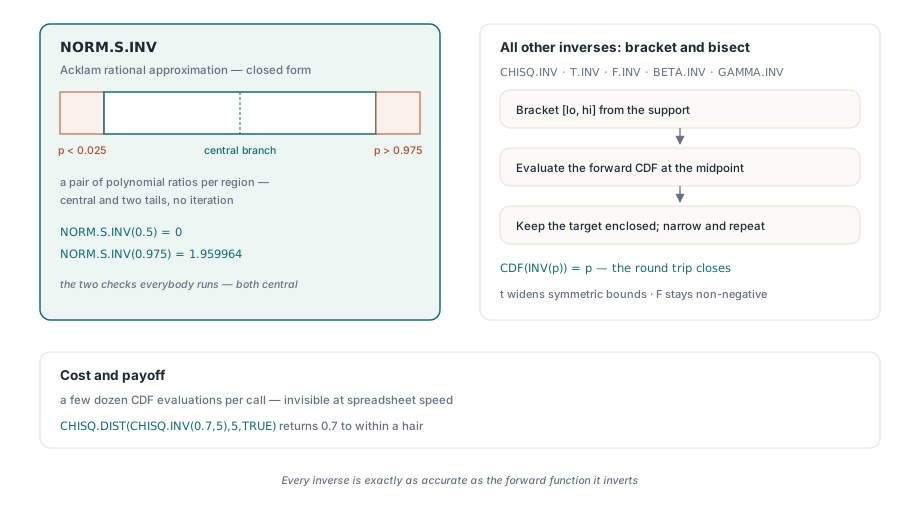
An inverse distribution function asks the opposite question: given a probability, find the value whose CDF equals it. Only one inverse in this set has a fast direct formula. NORM.S.INV, the inverse standard normal, uses an Acklam rational approximation, a pair of polynomial ratios accurate to roughly the precision of a double across the entire range, split into a central region and two tails. It is a closed-form evaluation with no iteration
The other inverses have no such formula, so the engine inverts them numerically. It brackets the answer with a low and high bound chosen from the distribution's support, then bisects: evaluate the forward CDF at the midpoint, move whichever bound keeps the target probability enclosed, and repeat until the interval is narrow. For the gamma and chi-square inverses the bracket starts at zero and a generous upper estimate built from the shape and scale, doubling the upper bound if the probability is not yet enclosed. The t inverse brackets symmetric bounds that widen outward; the F inverse bisects on a non-negative interval. The cost is a few dozen CDF evaluations per call, which is invisible at spreadsheet speed, and the benefit is that every inverse is exactly as accurate as the forward function it inverts. That is why a round trip such as CHISQ.DIST(CHISQ.INV(0.7,5),5,TRUE) returns 0.7 to within a hair
The base-10 logarithm that hid in the tail
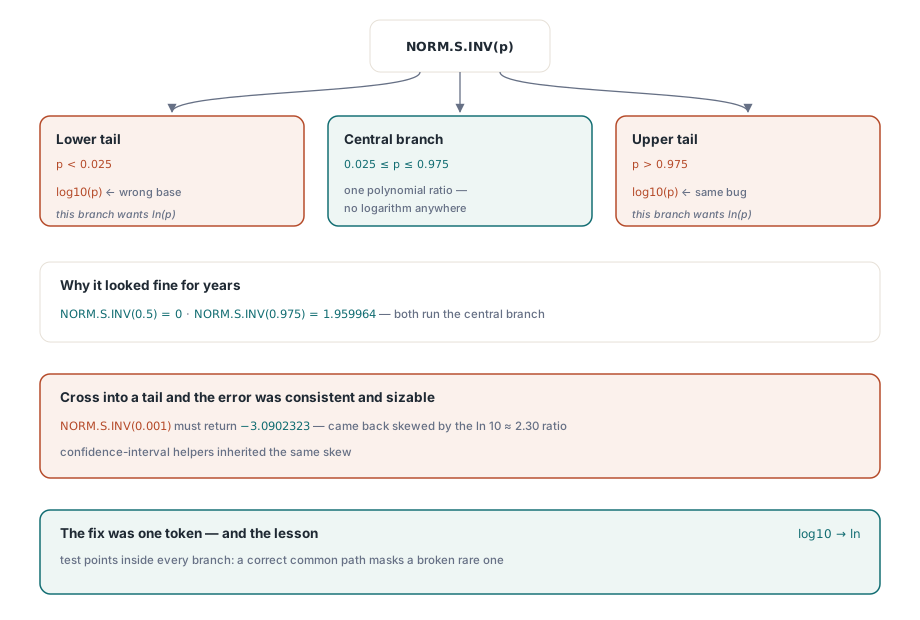
Here is the bug worth telling, because it is the kind that survives a long time. The Acklam inverse-normal routine has three branches. The wide central branch, used whenever the probability sits between about 0.025 and 0.975, runs the input through a polynomial ratio with no logarithm anywhere in it. The two tail branches, for very small or very large probabilities, each take a logarithm of the input first, because the tail behaves like the square root of minus the natural log of p
An early version of the tail branch took a base-10 logarithm where the natural logarithm belonged. The two differ by a constant factor of about 2.30, so the tail results were wrong by a consistent, sizable margin. And yet the function looked fine in every casual check, because casual checks live in the middle. NORM.S.INV(0.5) is zero, NORM.S.INV(0.975) is the textbook 1.959964, and both of those run through the central polynomial that never calls a logarithm at all. The error only appeared once a probability crossed into a tail, say NORM.S.INV(0.001), which must return -3.0902323 and instead came back near the natural-log-versus-base-10 ratio off. Any function that depends on the inverse normal in its tail, including the confidence-interval helpers, inherited the same skew. The lesson is mundane and expensive: a function with a branch structure needs test points inside every branch, because a correct common path will cheerfully mask a broken rare one. The fix was a one-token change from the base-10 log to the natural log, and the tail values snapped to Excel's
The sign of x decides the t-distribution's tail
The Student t cumulative function carries a subtlety that is easy to get backward. Its value comes from the regularized incomplete beta evaluated at df / (df + x²), but that beta value is the probability in the tail beyond the magnitude of x, not the cumulative probability up to x. The symmetric shape of the t-distribution means the conversion depends on which side of zero x falls
// Student t CDF. ib is the regularized incomplete beta at df/(df+x*x),
// which measures the symmetric tail. The cumulative value depends on
// the sign of x; returning ib unconverted gives the wrong tail.
ib := BetaIF(df / 2, 0.5, df / (df + x * x));
if x > 0 then
  result := 1 - 0.5 * ib        // above the mean: one minus half the tail
else if x < 0 then
  result := 0.5 * ib            // below the mean: half the tail
else
  result := 0.5;                // exactly at the mean
For x above zero the cumulative probability is one minus half the symmetric tail; for x below zero it is half that tail; at zero it is exactly one half. Return the beta value directly and you report the wrong side of the distribution, off by the entire body of the curve for any nonzero x. The right-tail and two-tail variants build on the same branch, which is why T.DIST.2T(1,1) comes back as 0.5 and T.DIST(1,1,TRUE) as 0.75, and the inverse T.INV bisects against this corrected CDF so the round trip closes
None of this is visible from the cell, and that is the intended outcome. You write a formula and read a number that agrees with Excel. If you are extending the engine with your own logic, the mechanics of registering a function are covered in our walkthrough of the formula engine and custom functions, and the way formulas reach across sheets and named ranges is covered in the article on defined names and cross-sheet formulas. All of it ships inside the HotXLS Delphi spreadsheet component for Delphi and C++Builder, alongside the reading, writing, charting, and formatting APIs covered elsewhere on this blog