An ODS workbook with one pivot table goes through a library, a single source cell gets edited, and the saved file opens with every cell value intact and the pivot gone: content.xml held one <table:data-pilot-table> on the way in and holds zero on the way out. The obvious repair is to copy the pivot XML across as a string. That restores the element count, and then a namespace-aware parser refuses the saved part outright with an unbound-prefix error. Both failures have one root. A piece of XML only travels safely when the namespace declarations it depends on travel with it
Where an ODS pivot definition lives in content.xml
An OpenDocument pivot table, which the format calls a data pilot, is a definition stored after the sheets in content.xml, and a writer that rebuilds that part from its own object model keeps it only if the model has somewhere to put it. ODF 1.3 Part 3 §9.6 describes the container: <table:data-pilot-tables> holds one <table:data-pilot-table> per pivot, each with a table:source-cell-range, a set of table:data-pilot-field children, a table:target-range-address and a table:buttons list. The result cells the pivot displays sit inside the worksheet as ordinary cells. So a writer that only regenerates cells, styles, validations, named expressions and database ranges produces a perfectly valid spreadsheet with the same numbers on screen and no pivot behind them
HotXLS Delphi Excel Component reads the whole <table:data-pilot-tables> subtree out of content.xml during OpenODS, before it parses a single cell, and then tries to translate the collection into its pivot model. A definition in the plain shape the model represents, with a local source range, a row field, aggregate measures and stored results that agree with the source data, becomes a TXLSPivotTable in the worksheet's PivotTables list, the same object you get from an XLSX pivot and can extend with calculated fields and refresh from Delphi. Anything outside that shape keeps the collection as captured XML, and SaveAsODS writes it back. An attribute in a namespace the translator does not know is enough: pivots saved by LibreOffice can carry loext: and calcext: attributes, and a loext: attribute sends the definition down the captured path
The fallback is all or nothing per workbook. If one pivot in a collection of three falls outside the translatable shape, all three stay as captured XML. Splitting them would leave content.xml with two sources of truth for one container, half rebuilt from objects and half replayed from text, and any disagreement between the halves would land in the user's file. Keeping the collection whole is the safer default, and it is the same policy HotXLS applies to unknown extLst blocks in XLSX: whatever the model cannot carry is kept as written
Why does a sliced pivot definition break the saved file?
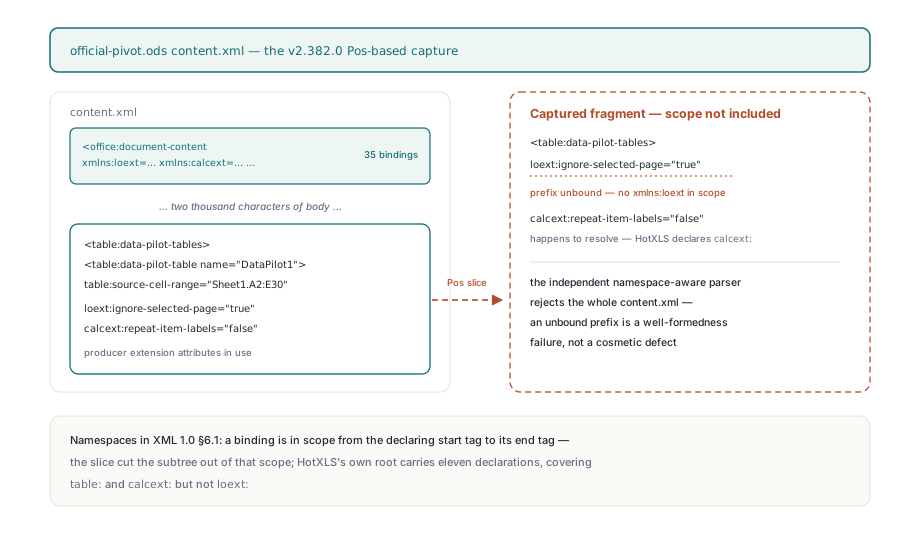
A pivot definition cut out of content.xml with a string search loses the namespace declarations that give its prefixes meaning, and Namespaces in XML treats a prefix without a declaration as a well-formedness error. The string approach is short: decode the part to a WideString, find <table:data-pilot-tables with Pos, find the matching close tag after it, and copy everything in between. The text that comes out looks complete. It contains loext:ignore-selected-page="true" on a page field and calcext:repeat-item-labels="false" on every level, but the xmlns:loext and xmlns:calcext declarations that bind those prefixes sit on the document root, <office:document-content>, thousands of characters earlier
Namespaces in XML 1.0 §6.1 puts a declaration in scope from the start tag that carries it to the matching end tag, and every prefixed name inside resolves against it. Cut a subtree out of the document and you cut it out of that scope. When the fragment is pasted into a new document, each prefix resolves only if the new root happens to declare it. HotXLS writes its own <office:document-content> with the namespaces its writer uses, among them office, table, text, style, fo, draw, calcext, tableooo and of. In the sliced copy table: resolves, calcext: resolves, and loext: does not. One unbound prefix is enough for a namespace-aware parser to reject the entire part, so the pivot does not degrade gracefully; the sheet data around it becomes unreadable too
String search has other blind spots that a reader-based capture never meets. Pos matches the tag text inside a comment, inside a CDATA section, or inside an attribute value that quotes it. It cannot tell nested elements of the same name apart. And it matches the literal prefix table:, while ODF allows a producer to bind the table namespace to any prefix it likes
How HotXLS carries namespace scope onto the fragment
HotXLS captures the pivot subtree with a streaming XML reader that tracks every namespace declaration together with the depth where it appeared, and copies the declarations still in effect onto the fragment's opening tag at the moment the target element arrives. The stack grows on each start tag that declares xmlns or xmlns:prefix and shrinks when the element that declared a binding closes. Empty elements need the same treatment: <x xmlns:p="..."/> never produces a separate end-tag event, so the pop has to fire on the empty start tag too, or a binding leaks into its siblings
At the target, the capture walks the stack from the innermost binding outward and writes each prefix once. Walking inward-out is what implements shadowing. If <office:spreadsheet> rebinds a prefix the root already declared, the nearer value is the one in force at the pivot, exactly as §6.1 requires, and a set of prefixes already written keeps the outer value from following it. A prefix that the pivot element declares on itself is skipped, because writing xmlns:table twice on one tag is a different well-formedness error
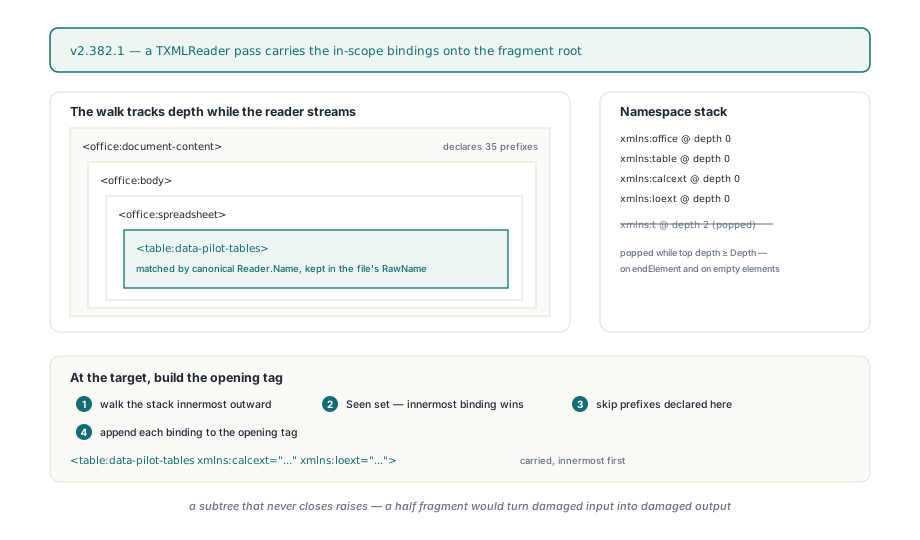
The target is matched by namespace, so a producer that writes <t:data-pilot-tables> with t bound to the ODF table URI is still recognized, while the captured tags keep the spelling from the file. Whitespace text nodes come back exactly as written. Attribute quoting and the choice between <x/> and <x></x> are normalized, since the fragment is re-serialized from reader events instead of copied byte for byte. If content.xml ends while the pivot subtree is still open, as it does in a truncated file, the open fails with an exception rather than keep half a definition that would be written back on the next save
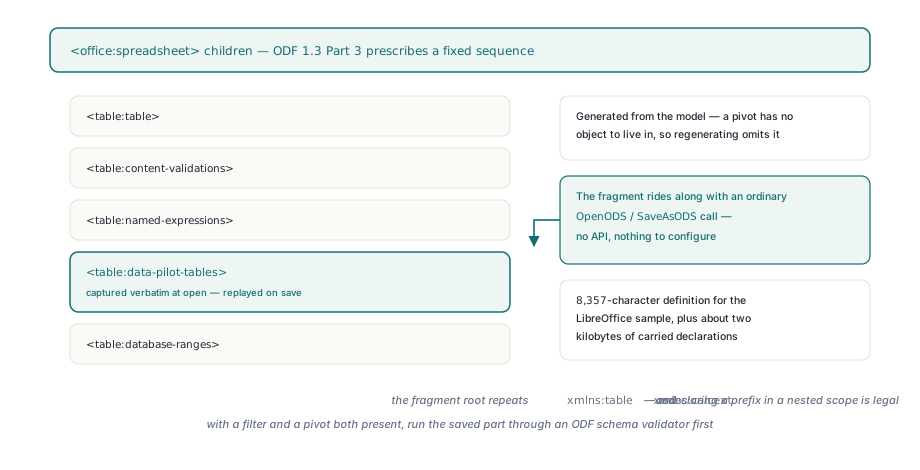
The carried set is deliberately generous. The capture copies every binding in scope, whether or not the subtree uses it, so the fragment root repeats xmlns:table and xmlns:calcext even though the saved document root declares them as well. Redeclaring a prefix in a nested scope is legal under Namespaces in XML, and a file from a producer that declares dozens of namespaces on its root gains a couple of kilobytes. Pruning the list would mean scanning the subtree for every prefix in element names, attribute names and attribute values that hold QNames, and a single miss there brings the unbound-prefix failure straight back. A few redundant declarations cost far less than that risk
Opening, editing and saving a workbook that carries a pivot
From the calling side there is nothing to switch on: the pivot definition rides along with an ordinary OpenODS and SaveAsODS. Worksheets are numbered from 1, and both methods return 1 on success:
uses
  System.SysUtils, lxHandleX;

procedure EditPivotSource(const InFile, OutFile: string);
var
  Book: TXLSXWorkbook;
begin
  Book := TXLSXWorkbook.Create;
  try
    if Book.OpenODS(InFile) <> 1 then
      raise Exception.CreateFmt('Cannot open %s', [InFile]);
    // E2 lies inside a pivot source range of Sheet1.A2:E30
    Book.Sheets[1].Cells[2, 5].Value := 1250.0;
    if Book.SaveAsODS(OutFile) <> 1 then
      raise Exception.CreateFmt('Cannot save %s', [OutFile]);
  finally
    Book.Free;
  end;
end;
In the saved content.xml, the pivot collection sits inside <office:spreadsheet> right after the <table:named-expressions> the writer generates and ahead of <table:database-ranges>. A workbook that carries both an AutoFilter, which HotXLS writes as a database range, and a pivot puts the two elements next to each other, and if your pipeline runs a strict ODF schema validator, that pair is the place to look first
The edit in that example changes a source value and leaves the pivot's result cells as they were. A captured definition is replayed as written: HotXLS does not recompute it, and the spreadsheet application that opens the file recalculates the pivot on its next refresh. The same applies to its addresses. Rename Sheet1 or move the source block, and the saved definition still points at Sheet1.A2:E30, which the consuming application reports as a broken range when it refreshes. Keep sheet names and the source block stable in any workbook whose pivots travel this way
Which path did a given pivot take?
The quickest check is the worksheet's PivotTables list: a translated definition shows up there as a TXLSPivotTable, and a captured one does not. The conversion report answers the second half of the question, what would happen to the pivot in a different output format. GetConversionReport inspects the workbook without saving or recalculating it, and the caller owns the returned report:
uses
  System.SysUtils, lxHandleX, lxDiagnostics;

function DescribeOdsPivots(Book: TXLSXWorkbook): string;
var
  I, Modeled: Integer;
  Report: TXLSConversionReport;
begin
  Modeled := 0;
  for I := 1 to Book.Sheets.Count do          // Sheets is 1-based
    Inc(Modeled, Book.Sheets[I].PivotTables.Count);

  Report := Book.GetConversionReport(xlsConversionOpenXmlWorkbook);
  try
    for I := 0 to Report.Count - 1 do
      if (Report[I].Feature = 'OpenDocumentPivotTables') and
         (Report[I].Fidelity = xlsConversionDropped) then
        Exit('Captured ODF pivot XML: keep this workbook on .ods');
  finally
    Report.Free;
  end;

  if Modeled > 0 then
    Result := Format('%d pivot table(s) in the pivot model', [Modeled])
  else
    Result := 'No pivot definitions';
end;
The output path matters because captured XML is ODF vocabulary and only the ODS writer emits it. Saved as .xlsx, the captured collection has no SpreadsheetML counterpart, and the report lists it under OpenDocumentPivotTables with xlsConversionDropped. The binary .xlsb writer refuses a workbook that still holds it. A translated pivot is an ordinary model object and follows the rules of the target format instead. The differences between the ODS import and export paths apply here as everywhere, and for pivot-bearing files the safe route is .ods in, .ods out
One more rule follows from the all-or-nothing fallback. A workbook either replays a captured collection or writes its pivots from the model; it never mixes the two in one content.xml. Adding a pivot with AddPivotTable to a workbook that already holds captured pivot XML makes the ODS save stop with an error instead of splicing generated XML next to replayed XML
Checking the saved part with a second parser
An element count proves nothing about namespaces. A regular expression that finds data-pilot-table start tags in the saved content.xml sees text, and the sliced copy from the second section passes that test. A namespace-aware parser that has nothing to do with the library that wrote the file is a far stricter judge, and Delphi already ships one. The function below is a check for you to add to your own test suite; TZipFile and TXMLDocument come from the Delphi RTL, not from HotXLS:
uses
  System.SysUtils, System.Classes, System.Zip,
  Xml.xmldom, Xml.XMLIntf, Xml.XMLDoc;

// Your own test helper: True when content.xml in an .ods package
// loads in a namespace-aware DOM parser
function OdsContentParses(const OdsFile: string; out Error: string): Boolean;
var
  Zip: TZipFile;
  Bytes: TBytes;
  Stream: TBytesStream;
  Doc: IXMLDocument;
begin
  Error := '';
  Zip := TZipFile.Create;
  try
    Zip.Open(OdsFile, zmRead);
    Zip.Read('content.xml', Bytes);
  finally
    Zip.Free;
  end;
  Stream := TBytesStream.Create(Bytes);
  try
    Doc := TXMLDocument.Create(nil);
    try
      Doc.LoadFromStream(Stream);     // an unbound prefix fails here
      Result := True;
    except
      on E: EDOMParseError do
      begin
        Error := E.Message;
        Result := False;
      end;
    end;
  finally
    Stream.Free;
  end;
end;
Run it on every .ods your code saves, then go one step further for pivot-bearing files and compare the pivot subtree of the input and output after parsing: tag, sorted attributes, text and children, recursively, with names expanded to namespace URI plus local name. That comparison lets a respelled prefix pass and catches an unbound one, which is exactly the line between harmless and broken. Feed it files from every producer your users actually run. A document that binds the table namespace to a different prefix, declares a prefix on the pivot element itself, or rebinds one in <office:spreadsheet> exercises the skip and shadowing rules in a way a single LibreOffice file does not
The ODS reader and writer, the pivot model for both XLSX and ODS, and the conversion report used above are all part of the HotXLS Delphi Excel Component; its product page covers the full XLSX, XLS and ODS read-write support for Delphi and C++Builder