A finance workbook maintained by hand collects pivot caches, slicers, conditional formats and years of cell styles, yet the nightly job only has to swap the numbers on one data tab. A full load and save parses, rebuilds and deflates every part again. Rewriting only that worksheet part and carrying every other zip entry across untouched skips nearly all of that work
What makes this possible is the package format itself. An .xlsx file is a zip archive of XML parts laid out by the Open Packaging Conventions (ECMA-376 Part 2), and every zip entry records its own compression method, CRC-32 and compressed size in the local header and again in the central directory. An entry can therefore move from one archive into another without ever being inflated, provided the copier writes those three values along with the raw bytes. The pivot cache does not need to be understood to be preserved. It only needs to be copied
Why copy compressed bytes instead of re-saving the workbook?
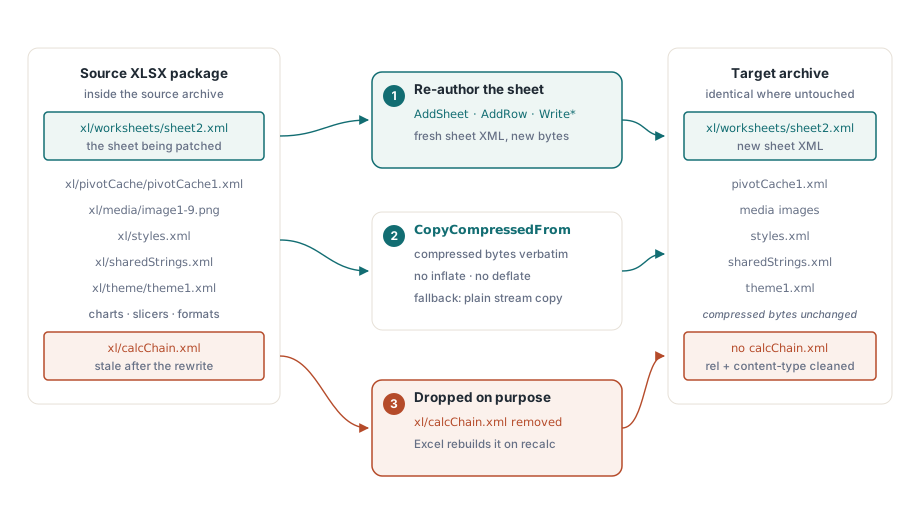
Copying at the compressed level turns most of the patch into a plain stream copy. In HotXLS, TXLSDirectWriter.BeginPatch opens the source package read-only and hands every entry the patch leaves alone to TZipArchive.CopyCompressedFrom, which writes the source entry's compressed bytes, CRC and sizes straight into the target archive. A conventional write path pays for an inflate on the way in and a deflate on the way out, and deflate is the expensive half. On a workbook whose bulk is a large pivot cache plus a few dozen embedded images, the time goes into the sheet you are actually writing
The raw copy covers entries stored uncompressed (zip method 0) and deflated entries (method 8). An entry that uses some other compression method is still carried over: the writer reads it through a decompressing stream and writes it back out, so the part lands in the target either way. Directory marker entries hold no content and are skipped, since the writer produces its own. A handful of entries are never copied at all, because they are regenerated or edited: the target worksheet and its _rels part, xl/calcChain.xml, xl/_rels/workbook.xml.rels and [Content_Types].xml, plus xl/workbook.xml when a sheet is inserted
Replacing one sheet in place with BeginPatch
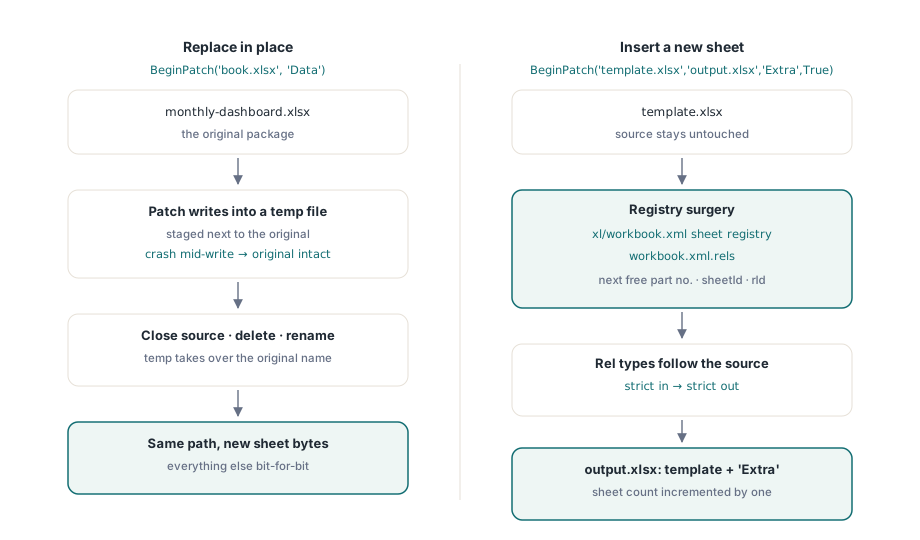
The two-argument overload BeginPatch(FileName, SheetName) replaces an existing worksheet and writes the result back to the same path. It resolves the name through the sheet registry in xl/workbook.xml and the relationship map that binds each sheet to its part, compares names case-insensitively, and raises an exception containing "worksheet not found" when nothing matches. From there the sheet is authored with the same AddSheet, AddRow and Write* calls the streaming writer uses for new files
var
  W: TXLSDirectWriter;
begin
  W := TXLSDirectWriter.Create;
  try
    W.BeginPatch('monthly-dashboard.xlsx', 'Data');  // replace in place
    W.AddSheet('Data');               // name is informational in patch mode
    W.AddRow(1);
    W.WriteString(1, 'Region');
    W.WriteString(2, 'Revenue');
    W.AddRow(2);
    W.WriteString(1, 'North');
    W.WriteNumber(2, 184320.55);
    W.AddRow(3);
    W.WriteString(1, 'South');
    W.WriteNumber(2, 97410.20);
    W.AddRow(4);
    W.WriteString(1, 'Total');
    W.WriteFormula(2, 'SUM(B2:B3)');  // no leading '='
    W.Close;
  finally
    W.Free;
  end;
end;
Two details in that listing are easy to misread. The name passed to AddSheet does not rename anything: the tab keeps the name, sheetId and position it already has in xl/workbook.xml, so AddSheet('Totals') would still write into Data. And a second AddSheet raises, because one patch writes exactly one worksheet. Refreshing three tabs means three patches, each of which copies the package once more
The formula goes in without an equals sign. WriteFormula places its text directly into the cell's <f> element, and ECMA-376 Part 1 §18.3.1.40 stores formulas there without the "=" that Excel shows in the formula bar; writing '=SUM(B2:B3)' puts a literal equals sign into the XML. WriteFormula also emits no cached result. If something downstream reads cached values instead of recalculating, WriteFormulaNumber writes the formula together with the number you already know it evaluates to
The in-place overload never writes into the original while it works. The patched package is built in a sibling file named after the source with .hxlpatch.tmp appended. At Close the source handle is released and the staged file replaces the original through a single rename. Should that rename fail, Close raises an exception whose message names both paths, keeps the staged copy and leaves the original where it was. A process killed before Close leaves the original intact and a stray .hxlpatch.tmp beside it, which the next BeginPatch on that file deletes before it starts
Appending a new worksheet to a copy of the template
The four-argument overload BeginPatch(SourceFileName, TargetFileName, SheetName, InsertSheet) leaves the source file alone and writes a new package. With InsertSheet = False it replaces the named sheet in the copy; with True it appends a new worksheet under that name and raises "worksheet already exists" if the template already has a tab called that
  // template.xlsx stays untouched; output.xlsx gets one extra tab
  W.BeginPatch('template.xlsx', 'output.xlsx', 'Extra', True);
  W.AddSheet('Extra');
  W.AddRow(1);
  W.WriteString(1, 'Appended by the nightly job');
  W.Close;
Insertion is where the package bookkeeping gets edited. The writer scans the existing xl/worksheets/sheetN.xml entries for the highest part number, the <sheet> elements for the highest sheetId, and the workbook relationships for the highest rId, then takes the next value of each. The new <sheet> element goes in just before </sheets>, so the new tab shows up last. The relationship attribute reuses whatever prefix the source workbook binds sheets with, which is usually r:id but is not required to be
Relationship types follow the source package as well. When the workbook relationships already use the ISO/IEC 29500 Strict namespaces under purl.oclc.org, the new worksheet relationship is written with the Strict type URI; a Transitional workbook gets the Transitional one. A patched Strict workbook therefore does not end up with one Transitional relationship among Strict ones
Styles, strings and the parts a patch leaves alone
Inside a patch, everything the new sheet points at must already exist in the source package. Strings are therefore written inline into the sheet instead of into xl/sharedStrings.xml, because the shared string table crosses over byte for byte and cannot grow. Setting UseSharedStrings to True makes AddSheet raise in patch mode
The same rule changes what StyleIndex means. In a patch it is a position in the source workbook's cellXfs list (ECMA-376 Part 1 §18.8.10), and the writer only checks that it lies between 0 and 65534. It cannot tell whether index 14 exists in that particular file, so a wrong number goes straight into the output. The most dependable way to find the right one is to unzip the current version of the sheet and read the s attribute on a cell that already carries the format you want; that number is the cellXfs position. Excel can add entries to that list whenever someone formats cells in the template, so look the index up again after every template edit rather than trusting a constant written a year ago
const
  // cellXfs position of a date format in THIS template, taken from the
  // s="..." attribute of an existing date cell; re-check after template edits
  TemplateDateXf = 5;
begin
  ...
  W.AddRow(5);
  W.WriteString(1, 'Refreshed');
  W.WriteDateTime(2, Now, TemplateDateXf);  // explicit index: accepted

  // W.WriteDateTime(2, Now);  raises in patch mode: its implicit date style
  //                           lives in a styles part the patch never writes
end;
Anything that would add new package parts is refused. AddTable, AddChart, the AddImage family, AddComment, AddDefinedName and AddCellStyle raise as soon as they are called, and Close checks again before committing, which also catches conditional formats that set their own fill, font color, bold or italic styling, since those need new entries in styles.xml. A refused call is better than a package where the sheet references a table part nobody registered
Replace mode also starts the sheet from nothing. The old sheet's relationship part is not copied, so a drawing, comments or external hyperlinks attached to the previous version are no longer attached to the new one, and column widths, frozen panes, merged ranges and data validation stored in the old sheet XML are gone too. Those that live in the sheet XML can be written again with SetColumnWidth, FreezePanes, MergeCells, AddDataValidation and AddHyperlink. A chart or picture anchored on the data tab cannot come back through a patch, so keep charts on their own sheet and point their series at the data tab
The calculation chain is dropped in both modes. xl/calcChain.xml lists formula cells in the order Excel last evaluated them; after a replace its entries describe cells that no longer exist in that form, and after an insert the sheet indexes it refers to have shifted. The part is left out of the copy, and its relationship and its Override in [Content_Types].xml are removed, so the package does not reference a missing part. Excel rebuilds the chain the next time it recalculates
When the row loop throws halfway
The destructor of TXLSDirectWriter finishes the package when Close was never called, so a forgotten Close does not leave a half-written zip lying around. Because it finishes whatever the writer holds, an exception that unwinds through Free under the in-place overload still commits the rows written so far and swaps them over the original. A loop that fetches and writes rows, raises halfway through and frees the writer in a finally block ends exactly that way
For anything that runs unattended, write to an explicit target, open the result, check it, and only then replace the live file yourself. An exception from the row loop still lets Free finish the staged file, but it also skips the swap, so the live workbook keeps yesterday's numbers instead of half of today's
uses
  Windows, SysUtils, Variants, lxDirectWrite, lxHandleX;

procedure RefreshDashboard;
const
  Live = 'monthly-dashboard.xlsx';
  Staged = 'monthly-dashboard.next.xlsx';
var
  W: TXLSDirectWriter;
  Check: TXLSXWorkbook;
  Sheet: TXLSXWorksheet;
begin
  W := TXLSDirectWriter.Create;
  try
    W.BeginPatch(Live, Staged, 'Data', False);
    W.AddSheet('Data');
    WriteRefreshedRows(W);  // your own row loop, not part of HotXLS
    W.Close;
  finally
    W.Free;
  end;

  Check := TXLSXWorkbook.Create;
  try
    if Check.Open(Staged) <> 1 then
      raise Exception.Create('Staged workbook does not open');
    Sheet := Check.Sheets.SheetByName('Data');
    if (Sheet = nil) or (VarToStr(Sheet.Cells[2, 1].Value) <> 'North') then
      raise Exception.Create('Data sheet did not come back as written');
  finally
    Check.Free;
  end;

  // Windows API, not HotXLS: replace the live file only after the checks
  if not MoveFileEx(PChar(Staged), PChar(Live), MOVEFILE_REPLACE_EXISTING) then
    RaiseLastOSError;
end;
TXLSXWorkbook.Open returns 1 on success, and both Sheets and Cells are 1-based: Check.Sheets[1] is the first tab and Cells[2, 1] is A2. Beyond a spot value, two structural checks catch most mistakes. Check.Sheets.Count should equal the template's count after a replace and exceed it by one after an insert, and a listing of the archive from any zip tool should show no xl/calcChain.xml and no entry name that appears twice. Duplicate names matter because some readers take the last entry with a given name, which makes two sheets look as if their contents were swapped
Patch, stream or load the workbook?
Patching fits when the workbook is large, the change is confined to one sheet, and the rest of the file has to survive bit for bit. It is the wrong tool when the change spans several sheets, when the new data needs formats the template does not already define, when charts or tables must be created, or when the file is small enough that a normal load and save costs nothing worth measuring. For bulk generation from scratch, the streaming direct writer is the better fit, and since it shares the same AddRow and Write* calls, moving code between the two is mostly a matter of swapping BeginFile for BeginPatch
When the job really does need the full object model, sheet-level work inside a loaded workbook is covered in duplicating worksheets in XLSX packages. And if patching is on the table only because whole-workbook processing has become slow, large workbook performance looks at where load and save time and memory actually go before you commit to an approach
The patch writer, the streaming writer and the full TXLSXWorkbook object model all come in one library for Delphi and C++Builder; editions and the complete feature list are on the HotXLS Delphi spreadsheet component page