A reporting job runs fine for a year. It builds a workbook, fills a sheet with whatever the query returns, and saves it. Then a customer with five years of history asks for a full export, the row count crosses a million, and the process dies with an out-of-memory error long before the file reaches disk. Nothing was wrong with the code. It was holding the entire workbook in RAM so it could serialize it at the end, and the memory it needed grew in lockstep with the number of rows it was asked to write
The fix is not a bigger machine. It is a different writing model. The streaming direct writer in HotXLS emits the OOXML package incrementally as rows arrive, so the memory it uses does not depend on how many rows you write. It is the write-side counterpart to the streaming reader: where the reader walks a huge sheet without building a cell tree, the writer produces one without building a cell tree either
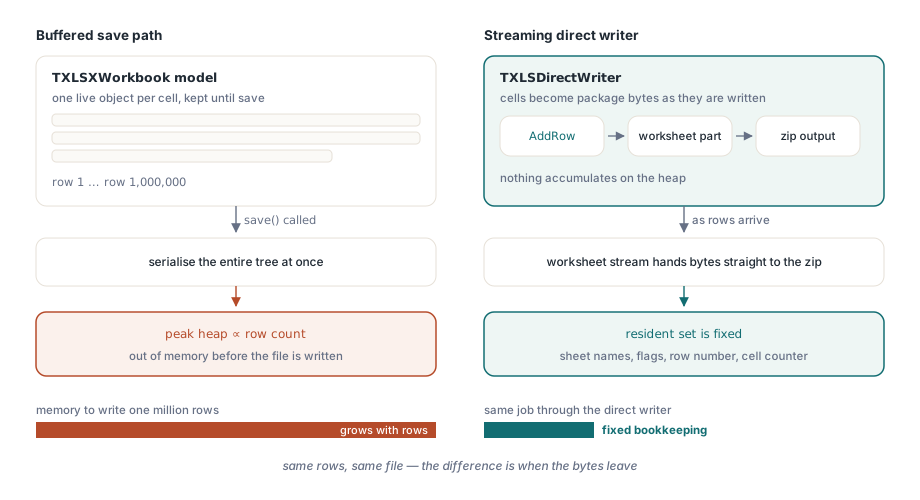
Why the normal save path grows with the data
The regular TXLSXWorkbook path builds a full object model first. Every cell, with its value, type, and style reference, lives as an object in memory until you call save, at which point the whole tree is serialized into the package. That model is the right one when you want to read a sheet, edit it, recalculate, and write it back, because random access to any cell is exactly what editing needs. It is the wrong one when you are pouring rows in one direction and never looking back, because you pay to keep every row resident for no benefit. A million rows of objects is a million rows of objects whether you ever revisit them or not
The streaming writer removes the tree. As soon as a cell is written it becomes bytes in the worksheet part, and those bytes are handed to the zip output. The worksheet stream is the only buffer that grows, and it grows on the output side, not as live Delphi objects on the heap. What stays resident is a fixed amount of bookkeeping: the sheet names, a few flags, the current row number, a cell counter. That set does not change between row one and row ten million
The shared-string table is the trap, and inline strings are the way out
Most streaming XLSX writers do well until they meet text. The OOXML format normally stores strings in a shared-string table: each distinct string is written once into a separate part, and every cell that holds that string carries an index into the table instead of the text. It is a good space optimization for files full of repeated labels, and it is the default the standard save path uses. The problem for a streaming writer is brutal. To deduplicate, the table has to stay resident for the whole job, because any row still to come might repeat a string from a row already written, and only a complete in-memory map of seen strings can assign the right index. So the one structure a streaming writer cannot stream is the very structure that is supposed to make the file small. Text-heavy data defeats the streaming you came for
The direct writer sidesteps the table entirely. Strings are written inline, as t="inlineStr" cells whose text sits directly inside the cell with an <is><t> element. There is no table to accumulate and no map of seen strings to hold, so text columns cost no more memory than numeric ones. The trade is explicit and worth stating plainly. Inline strings repeat the same text wherever it occurs, so a file with many identical labels is larger on disk than the shared-string equivalent. You spend file size to buy constant memory. For a one-pass export that is the right side of the trade, and zip compression absorbs much of the repetition on the way out anyway

The style table arrives at the end, with one date format
Styles present the same tension as strings. A workbook references its formatting through a styles part, and a streaming writer cannot keep a growing palette of styles in step with cells it has already flushed. The direct writer answers this by keeping the style table small and fixed, and emitting it on close rather than up front. One default cell format covers ordinary cells. One date number format covers dates, registered with a format code of yyyy-mm-dd at a known position in the cell formats list
That date format is the reason WriteDateTime exists as its own call. Excel has no native date type; a date is a number wearing a date format. WriteDateTime writes the value as a plain serial number and tags the cell with the one date style, so the spreadsheet renders it as a date instead of a five-digit integer. The serial it writes matters for round-tripping. It stores the TDateTime value directly under the 1900 date system, which is the same convention the regular TXLSXWorkbook save path uses. Because both paths agree on the serial, a file the streaming writer produces reads back through the HotXLS reader and opens in Excel with dates that match what you intended, with no off-by-one or epoch surprise between the writer and the reader
Order is mandatory, because the bytes are already gone
Streaming buys its memory profile with one rule you have to honor. Output is emitted as you go and cannot be revisited, so everything must be written in the order it appears in the file. Within a row, cells go in ascending column order. Within a sheet, rows go in ascending order. There is no buffer that lets the writer sort your cells after the fact, because the row you closed a moment ago is already bytes in the zip stream and is no longer reachable. Hand it column 5 and then column 2 in the same row and the output is malformed, since the writer simply emits what you give it in the sequence you give it
The row API has a small convenience for the common case. AddRow takes a 1-based row index, but passing 0 means take the next row after the previous one, so a sequential fill does not have to track and pass an incrementing counter. Each AddRow closes the row before it, and each AddSheet closes the sheet before it, so you never explicitly end a row or a sheet. You start the next one and the writer finalizes the open structure for you

Escaping is handled where text enters the XML
Any text you write becomes part of an XML document, so the five predefined XML entities have to be escaped or the package is invalid the moment a value contains an ampersand or an angle bracket. The writer escapes &, <, >, ", and ' for you on both inline string text and formula text, the two places where caller-supplied characters land inside markup. You pass a raw WideString and the writer makes it safe. A product name like Smith & Co <Ltd> or a formula referencing a quoted sheet name comes out as well-formed XML without any escaping on your side
Lifecycle, and why Destroy still closes
Finishing the package is what writes the workbook part, the styles part, the content-types and relationship parts, and finally the zip central directory. That work happens in Close. A package that is never closed is an incomplete zip that no spreadsheet program will open, so closing is not optional cleanup, it is the step that makes the file valid. To guard against a forgotten Close in an error path, Destroy performs a best-effort close if the package is still open, so freeing the writer does not leak the underlying zip object even when an exception skipped the explicit call. The reliable pattern is still the ordinary Delphi one: write inside a try, call Close, and free in the finally
Streaming a large sheet end to end
The shape of the job is begin, add a sheet, pour rows, close. The example below writes a header row and then a long run of typed data rows, mixing strings, numbers, a formula with no cached result, and a date. The memory it uses for ten rows and for ten million rows is the same, because every cell leaves for the zip stream as soon as it is written
uses
  lxDirectWrite;

procedure StreamReport(const Path: string; RowCount: Integer);
var
  W: TXLSDirectWriter;
  I: Integer;
begin
  W := TXLSDirectWriter.Create;
  try
    W.BeginFile(Path);
    W.AddSheet('Sales');

    // Header row, written in ascending column order
    W.AddRow(1);
    W.WriteString(1, 'Item');
    W.WriteString(2, 'Qty');
    W.WriteString(3, 'Price');
    W.WriteString(4, 'Total');
    W.WriteString(5, 'Date');

    // Data rows; pass 0 to AddRow to take the next row automatically
    for I := 1 to RowCount do
    begin
      W.AddRow(0);
      W.WriteString(1, 'Item ' + IntToStr(I));
      W.WriteNumber(2, I);
      W.WriteNumber(3, 1.5 + (I mod 10));
      W.WriteFormula(4, Format('B%d*C%d', [I + 1, I + 1]));
      W.WriteDateTime(5, EncodeDate(2026, 1, 1) + I);
    end;

    W.Close;                       // finalises the package
  finally
    W.Free;
  end;
end;
A second sheet is simply another AddSheet before you continue, and the writer closes the first sheet as it opens the second. Boolean flags use WriteBoolean, which writes a typed boolean cell rather than the text "True". If you want to confirm the file is sound and round-trips, the property CellCount reports how many cells were written, and reading the result back with the streaming reader should report the same total
  // A second sheet of typed flags after the data sheet above
  W.AddSheet('Flags');
  W.AddRow(1);
  W.WriteString(1, 'Name');
  W.WriteString(2, 'Active');
  W.AddRow(0);
  W.WriteString(1, 'alpha');
  W.WriteBoolean(2, True);

  WriteLn(Format('wrote %d cells', [W.CellCount]));
Writing to a stream instead of a file is the same code with BeginStream in place of BeginFile, which lets a server send the workbook to an HTTP response or a memory stream without a temporary file on disk. The writer does not own the stream you pass, so you keep control of its lifetime
When the work is a server endpoint that builds workbooks on demand, the patterns in streaming writes for server and batch jobs show how to wire this into a request handler and a scheduled export. When the question is the wider cost of very large workbooks, both reading and writing, large workbook performance in Delphi covers where the time and memory actually go. The streaming direct writer ships as part of the HotXLS Delphi Component for Delphi and C++Builder, alongside the full read, edit, and save APIs covered elsewhere on this blog