A chart series filled with a literal RGB does not follow the workbook theme. Change the theme and the series keeps the old color. HotXLS handles this in binary XLS with theme-colored chart series fills: a GelFrame record, 4198 or $1066, written right after the AreaFormat inside the series block and carrying an OfficeArt scheme index plus a tint. Excel then renders the series the way it renders a themed fill it wrote itself
Where does the GelFrame record number come from?
The GelFrame record number is 4198 ($1066), and you will not find it in the record's own specification section. [MS-XLS] 2.4.131 describes what a GelFrame contains, but unlike most record sections it does not state the rt value. The chart substream ABNF is no help either: it only gives the production GELFRAME = 1*2GelFrame *Continue, which names the record without numbering it. The number lives in the record-number enumeration table, several pages away from the section that documents the payload. That production is worth a second look for anyone writing a reader: it permits one or two GelFrame records, each optionally followed by Continue records, so a parser that assumes a single record per production will mis-handle a file it did not write. HotXLS emits exactly one GelFrame per themed series, which is what Excel produces for a simple solid theme fill, and its decoder treats the record as a self-contained payload rather than assuming a fixed count
Inside the GelFrame payload: two OfficeArt property tables
The GelFrame payload is two OfficeArt property tables back to back: an OfficeArtFOPT (called OPT1) followed by an OfficeArtTertiaryFOPT (OPT2). Each table is a two-byte property count followed by that many six-byte FOPTE entries, and each entry is a two-byte opid plus a four-byte op. Bit 15 of opid is fComplex: when it is set, the op value is a byte length and a variable tail follows the fixed entries. A decoder that ignores those tails desynchronizes and reads garbage opids for everything after the first complex property
The theme fill is expressed by three properties spread across both tables, plus one that declares the fill kind. HotXLS writes four properties in 28 bytes with no complex tails:
fillType$0180 in OPT1, set to 1 (msofillSolid)fillColor$0181 in OPT1, the flattened RGB an older or theme-unaware consumer will drawfillColorExt$019E in OPT2, the base theme colorfillColorExtMod$01A0 in OPT2, the tint or shade applied to that base
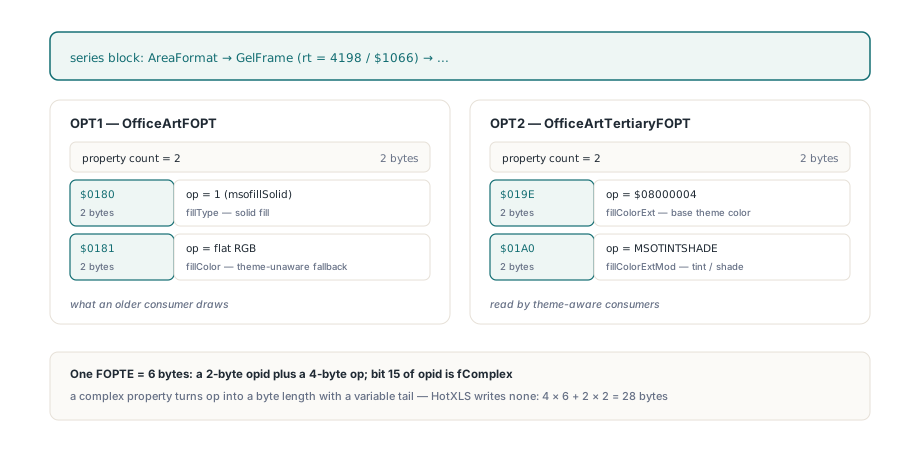
That split is deliberate in the format, not an accident of the implementation: [MS-ODRAW] 2.2.2 describes the theme triple as a flat color plus a base color plus a modification, so a consumer that understands themes recomputes the fill while one that does not still paints something reasonable. The surrounding opids follow the same pattern and carry identical numbering in the old and current [MS-ODRAW] editions, which is convenient when you are cross-reading two revisions: fillOpacity $0182, fillBackColor $0183, fillShadeType $019C, fillBackColorExt $01A2 and fillBackColorExtMod $01A4
Why does the scheme index sit in the red byte?
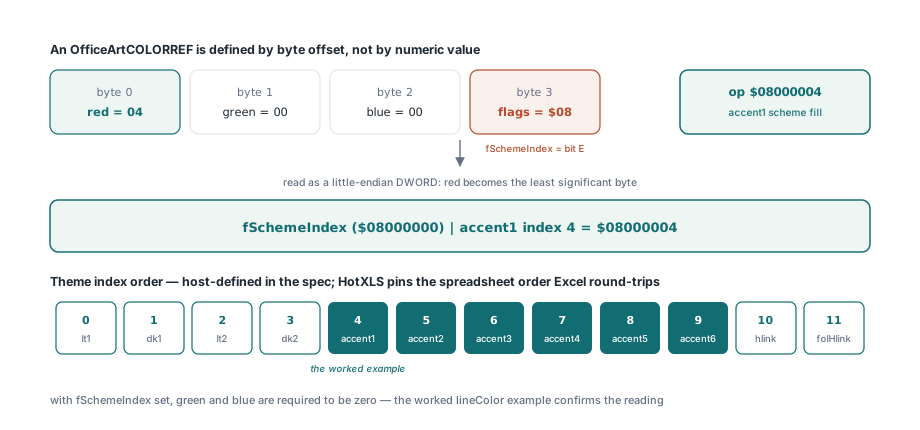
Because an OfficeArtCOLORREF is defined by byte offset, not by numeric value: red at byte 0, green at byte 1, blue at byte 2, flags at byte 3. Read that structure as a little-endian DWORD, which is what every FOPTE op is, and red becomes the least significant byte. The worked lineColor example in [MS-ODRAW] confirms it. So fSchemeIndex, which is flags bit E, has the numeric value $08000000, and the scheme index itself goes in the red byte with green and blue required to be zero. Accent1 is therefore the op value $08000004, not $00000004 and certainly not $04000000
The theme index order the specification refuses to define
The specification calls the scheme index order host-defined and gives no table, which means the byte layout alone is not enough to interop with Excel. HotXLS uses the spreadsheet theme order, which is what round-trips against real Excel files:
- 0 = lt1, 1 = dk1, 2 = lt2, 3 = dk2
- 4 through 9 = accent1 through accent6
- 10 = hlink, 11 = folHlink
Tint and shade: the MSOTINTSHADE payload
The fillColorExtMod op is an MSOTINTSHADE value, and it encodes direction and amount in one DWORD rather than as a signed fraction. The value $20000000 means unmodified. A lightening tint is $02F4 shl 16 or amount shl 8 or $10 (MSOTINT); a darkening tint is the same shape with $01F4 in the high word (MSOSHADE). The amount byte runs the opposite way from intuition: $FF means unchanged and $00 means the full modification. HotXLS normalizes that to a single DrawingML-style double where positive lightens and negative darkens, using plus or minus (255 - amount) / 255. The mapping is exact for the values Excel actually offers in its UI, which is why the round-trip is lossless rather than approximately lossless: the familiar "Lighter 40%" is amount 153, and (255 - 153) / 255 is 0.4 with no rounding error in either direction. A shade with amount 191 comes back as -64/255. Here is the encoder, clamped to the legal range:
if Tint > 0 then                       // MSOTINT - lighter
  TintOp := LongWord($02F4) shl 16 or
    (LongWord(Round(255 * (1 - Tint))) shl 8) or $10
else if Tint < 0 then                  // MSOSHADE - darker
  TintOp := LongWord($01F4) shl 16 or
    (LongWord(Round(255 * (1 + Tint))) shl 8) or $10
else
  TintOp := $20000000;                 // MSOCOLORMODUNDEFINED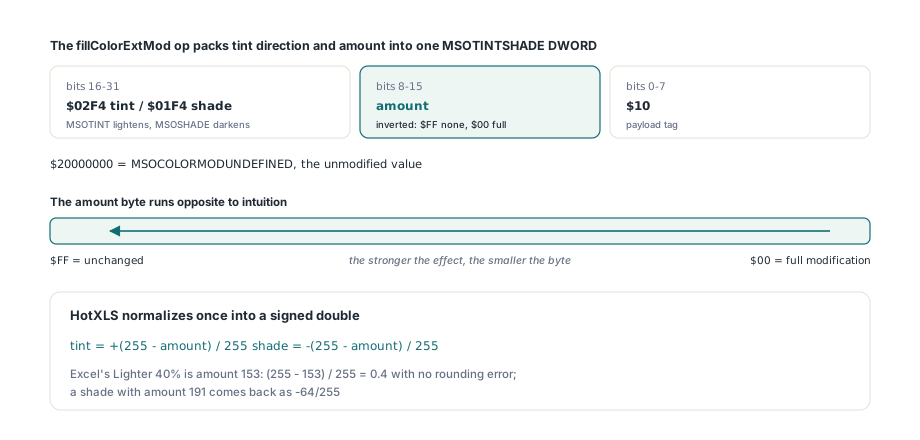
Setting and reading a theme fill from Delphi
On the write side a theme fill is two extra fields on the per-series style record. TXLSChartSeriesStyleInfo gained HasFillTheme, FillThemeColor and FillThemeTint, and the builder emits the GelFrame only when HasStyle and HasFillTheme are both set. If you also set an explicit FillRgb, that value goes into the OPT1 fillColor verbatim; if you do not, HotXLS flattens the color itself through a built-in default Office theme table with the tint applied, so a theme-only series still has a sane flat color for consumers that ignore OPT2. Note the Default() initialization, which matters because TXLSChartSeriesInfo contains managed fields and its plain Boolean members are otherwise stack garbage:
var
  Wb: TXLSWorkbook;
  Series: array [0..1] of TXLSChartSeriesInfo;
begin
  Wb := TXLSWorkbook.Create;
  try
    Wb.Sheets.Add.Name := 'Data';

    Series[0] := Default(TXLSChartSeriesInfo);   // never FillChar this record
    Series[0].Name := 'Explicit';
    Series[0].Categories := 'Data!$A$1:$A$2';
    Series[0].Values := 'Data!$B$1:$B$2';
    Series[0].HasStyle := True;
    Series[0].Style.HasFill := True;
    Series[0].Style.FillRgb := $C47244;          // accent1, red in the low byte
    Series[0].Style.HasFillTheme := True;
    Series[0].Style.FillThemeColor := 4;         // accent1
    Series[0].Style.FillThemeTint := 0.4;        // Lighter 40%

    Series[1] := Default(TXLSChartSeriesInfo);
    Series[1].Name := 'ThemeOnly';
    Series[1].Categories := 'Data!$A$1:$A$2';
    Series[1].Values := 'Data!$C$1:$C$2';
    Series[1].HasStyle := True;
    Series[1].Style.HasFillTheme := True;        // no explicit RGB: flattened
    Series[1].Style.FillThemeColor := 8;         // accent5

    Wb.Sheets.AddChartSheet('Themed', xlsChartTypeColumn, '', '', '', Series);
    Wb.SaveAs('themed.xls');
  finally
    Wb.Free;
  end;
end;
Reading it back goes through the same chart model the rest of the HotXLS chart inspection uses. GetChartModel returns an owned TXLSChartModel that you free, and each TXLSChartSeries exposes HasFillTheme, FillThemeColor and FillThemeTint alongside the FillRgb decoded from the OPT1 fillColor, which takes precedence over the AreaFormat color for that series. The same three values also reach the canonical semantic snapshot as SolidFillThemeSet, SolidFillThemeColor and SolidFillThemeTint, so a workbook diff sees a theme change as a theme change rather than as an unexplained RGB drift. If you are coming from the XLSX side, this is the binary-format counterpart of the styling described in the HotXLS guide to Excel charts, images and drawings in Delphi:
Wb := TXLSWorkbook.Create;
try
  Wb.Open('themed.xls');
  Model := Wb.Sheets[2]._Chart.GetChartModel;
  try
    Ser := Model.GetSeries(0);
    if Ser.HasFillTheme then
    begin
      WriteLn(Ser.FillThemeColor);            // 4 = accent1
      WriteLn(Ser.FillThemeTint:0:3);         // 0.400
      WriteLn(IntToHex(Ser.FillRgb, 6));      // C47244, the OPT1 fillColor
    end;
  finally
    Model.Free;
  end;
finally
  Wb.Free;
end;
What does a theme fill in binary XLS not promise?
Three honest limits. First, and most important for anyone auditing this code: no sample file in the local corpus contains a GelFrame record at all. The eleven occurrences of the byte pair 66 10 in the conditional-formatting sample sit at non-record boundaries, and a full-stream record dump finds zero hits. The bit layout described here was derived from the specification and then pinned three ways, by decode symmetry on the builder output, by hand-built byte tests that feed a synthetic $1066 payload straight into the decoder, and by asserting the exact flattened RGB. That is a weaker form of evidence than a captured Excel file, and it is worth saying so rather than implying otherwise. Second, the flattening for a theme-only fill uses a built-in default Office theme table, not a theme part read from the workbook, because binary XLS has no theme part in the sense that a packaged XLSX does — if you need the workbook's own theme to drive the flat color, supply FillRgb yourself. Third, the decoder only accepts a GelFrame inside a series block; the same record can appear on the chart area or an axis frame, and accepting it there would silently attribute a background fill to a series, so those are ignored. A fillColorExt without the $08000000 flag is likewise treated as a plain extended color and never sets HasFillTheme. For workbooks where the chart is authored in the XLSX world and only passes through, the preservation path in editing Excel charts without losing ChartML is the safer route, and the container these records sit in is covered in reading OLE2 compound files in Delphi without COM IStorage
Theme-colored chart fills, the GelFrame encoder and decoder, and the full BIFF8 chart substream builder ship in the HotXLS Delphi spreadsheet component for Delphi and C++Builder, which reads and writes XLS, XLSX and ODS without Excel installed