A legacy .xls uploaded to a REST endpoint arrives as a TBytes buffer, and the call most Delphi code reaches for next, StgOpenStorage, wants a file name, a thread with COM initialized and ole32.dll to load. A Linux build has no ole32.dll at all. The container itself is a documented format, [MS-CFB], and reading it straight from a TStream takes one 512-byte header, two allocation tables and a directory of 128-byte entries
None of those structures is hard on its own. The work is in a handful of offsets that look interchangeable on the files you test with and stop being interchangeable on the files your users send
Why does StgOpenStorage break on a server?
The file format is fine; the COM structured-storage API is what fails in the places modern Delphi code runs. StgOpenStorage is a Win32 entry point that takes a path, so a workbook held in memory has to be written to a temp file, opened, read back and deleted, and now the service owns a temp-file lifecycle that has to survive concurrent uploads and crashed requests. StgOpenStorageOnILockBytes is the documented way around the path, but it means implementing ILockBytes over a TMemoryStream, which is more COM interop than most teams want to maintain. Then comes the worker thread nobody called CoInitialize on. And the platform requirement ends the discussion for an FPC build on Linux, a container image or macOS
HotXLS reads and writes the container in Object Pascal through TlxCompoundFile in the lxCompoundFile unit. The class accepts version 3 (512-byte sectors) and version 4 (4096-byte sectors) files, works against any TStream, and never touches ole32.dll. Inside the library, the lxOLE storage layer binds to Windows structured storage on Windows and to this same class on every other target, and the encrypted-workbook code reads and writes its EncryptionInfo and EncryptedPackage streams through it on all platforms. For bytes that never touch disk, such as uploads, database BLOBs and mail attachments, call TlxCompoundFile directly on Windows too. A temp file written only so ole32.dll can read it back buys nothing
The header, and an offset formula that only holds on version 3
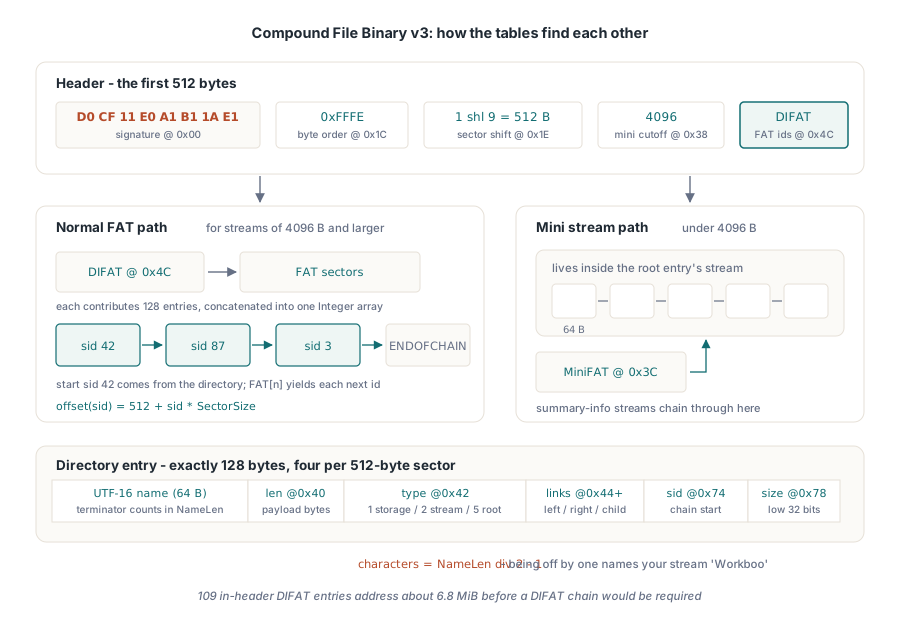
The first 512 bytes answer every structural question before a byte of payload is read. [MS-CFB] §2.2 fixes the signature at offset 0 as D0 CF 11 E0 A1 B1 1A E1. lxIsCompoundStream compares exactly those eight bytes and then seeks back by however many it read, so a sniff never moves the caller's position, even on a stream shorter than eight bytes. Four more fields decide the geometry: byte order at 0x1C must be 0xFFFE, sector shift at 0x1E is 9 or 12, mini sector shift at 0x20 is 6, and the mini stream cutoff at 0x38 is 4096. LoadFromStream accepts only those values and raises an exception for anything else ('CFB: unsupported sector size', 'CFB: bad byte order'). A malformed header with a shift of 0 or 31 would otherwise feed straight into sector arithmetic
Now the trap. Sector 0 starts right after the header, and on a version 3 file the header is 512 bytes and so is a sector, so 512 + N * SectorSize and (N + 1) * SectorSize give the same answer for every N. A parser can carry the first formula for years. On a version 4 file the header fields still occupy 512 bytes, but the format pads the header out to a full 4096-byte sector, so sector 0 begins at byte 4096. The 512-based formula lands 3,584 bytes early: inside the zero padding for sector 0, inside the previous sector for everything after it. TlxCompoundFile computes every sector address in one place as (N + 1) * SectorSize
FAT chains, the DIFAT and the mini stream
A compound file is a FAT filesystem inside a file. FAT[n] holds the ID of the sector that follows sector n, and a stream is a linked list that starts at the sector its directory entry names and ends at ENDOFCHAIN. Read as signed 32-bit integers, the sentinels are all negative: -1 free, -2 end of chain, -3 a sector that belongs to the FAT itself, -4 a DIFAT sector. The FAT sectors are located through the DIFAT, whose first 109 entries live in the header at 0x4C. With 128 entries per 512-byte FAT sector that covers 13,952 sectors, about 6.8 MiB of container. Past that point the DIFAT continues as a chain of its own starting at header offset 0x44, and the reader follows it
Malformed files mostly go wrong here. A chain whose last link points back to an earlier sector turns a naive while loop into a hang, and two streams sharing a sector turn one corrupt file into two wrong payloads. TlxCompoundFile tracks visited sectors on every chain it walks (FAT, DIFAT, MiniFAT, directory and stream) and raises an exception that names the defect, such as 'CFB: cyclic stream chain' or 'CFB: shared FAT or DIFAT sector'. A header that claims an absurd number of FAT sectors stops at MaxReaderMetadataBytes, which caps the memory spent on allocation tables and directory entries and defaults to 256 MiB. Lower it for an upload endpoint; a real .xls needs a tiny fraction of that
Streams under the 4096-byte cutoff are not stored in regular sectors. They live in the mini stream, an ordinary stream owned by the root directory entry, cut into 64-byte mini sectors and chained through a second table, the MiniFAT, whose first sector is named at header offset 0x3C. In a typical .xls the Workbook stream sits on the FAT while the two summary-information streams sit in mini-sector space. A parser that handles only the FAT path reads workbooks correctly and then fails the first time someone asks for the document title
The directory ties the rest together. Each entry is exactly 128 bytes: a UTF-16 name in the first 64, the name length in bytes at 0x40, the object type at 0x42 (1 storage, 2 stream, 5 root), left, right and child links at 0x44, 0x48 and 0x4C, the start sector at 0x74 and the stream size at 0x78. The name length counts the terminating null, so the character count is NameLen div 2 - 1; drop the - 1 and every name picks up a trailing #0, or subtract one too many and you are looking for a stream called Workboo. The size field is 64 bits on version 4 files and the reader takes all eight bytes there, while on version 3 only the low 32 bits are defined. Lookup follows the format's own ordering, shorter names before longer ones and then a case-insensitive comparison, which lxCfbCompareNames exposes. OpenStream('workbook') therefore finds Workbook. Nested storages resolve by path: FindStorage returns the index of a sub-storage, and the OpenStream and HasStream overloads that take a ParentIndex reach the streams beneath it
Pulling a Workbook stream out of a memory buffer
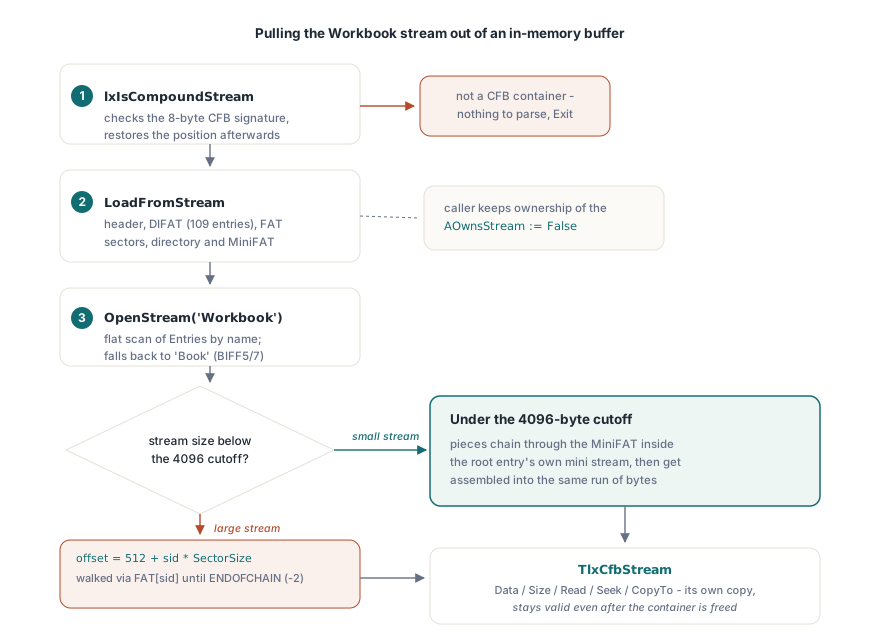
LoadFromStream reads the header, FAT, directory and MiniFAT, and OpenStream returns a TlxCfbStream holding the stream's bytes. The whole sequence below runs against a TBytesStream, and nothing reaches the disk
uses
  Classes, SysUtils, lxCompoundFile;

function ExtractBiffPayload(const Blob: TBytes): TBytes;
var
  Src: TBytesStream;
  Cfb: TlxCompoundFile;
  Wb: TlxCfbStream;
begin
  SetLength(Result, 0);
  Src:= TBytesStream.Create(Blob);
  try
    if not lxIsCompoundStream(Src) then
      Exit;                            // not a CFB container at all
    Cfb:= TlxCompoundFile.Create;
    try
      Cfb.LoadFromStream(Src);         // raises on a malformed container
      Wb:= Cfb.OpenStream('Workbook'); // BIFF8
      if Wb = nil then
        Wb:= Cfb.OpenStream('Book');   // BIFF5 / BIFF7
      if Wb <> nil then
      try
        Result:= Wb.Data;
      finally
        Wb.Free;
      end;
    finally
      Cfb.Free;
    end;
  finally
    Src.Free;
  end;
end;
LoadFromStream takes an AOwnsStream flag that defaults to False, so the caller keeps the source stream, and it puts the source position back where it found it once loading finishes. OpenStream returns nil when no stream of that name exists, and the returned TlxCfbStream owns its own copy, exposed through Data, Size, Read, Seek and CopyTo. That copy is the price of an object that stays valid after the container is freed, and for a few megabytes of BIFF it is the right price
For a stream large enough that a second in-memory copy hurts, CopyEntryToStream writes the validated chain into any destination stream in bounded chunks, and CopyEntryRangeToStream does the same for an Int64 offset and count. OpenStream stops at streams up to MaxInt bytes, so anything beyond 2 GiB has to go this way. Both take a directory index, which a scan over Entries provides:
function CopyWorkbookTo(Cfb: TlxCompoundFile; Dest: TStream): Int64;
var
  I: Integer;
  E: TlxCfbEntry;
begin
  Result:= -1;
  for I:= 0 to Cfb.EntryCount - 1 do
  begin
    E:= Cfb.Entries(I);
    if (E.EntryType = cfbStream) and (E.ParentIndex = Cfb.RootIndex) and
       (lxCfbCompareNames(E.Name, 'Workbook') = 0) then
      Exit(Cfb.CopyEntryToStream(I, Dest)); // bytes written
  end;
end;
The source stream passed to LoadFromStream must still be alive when CopyEntryToStream runs, because the payload is read from it on demand. The streaming direct reader for oversized spreadsheets takes the same idea further, past the container layer and into the BIFF records
Why does an encrypted XLSX look like an XLS file?
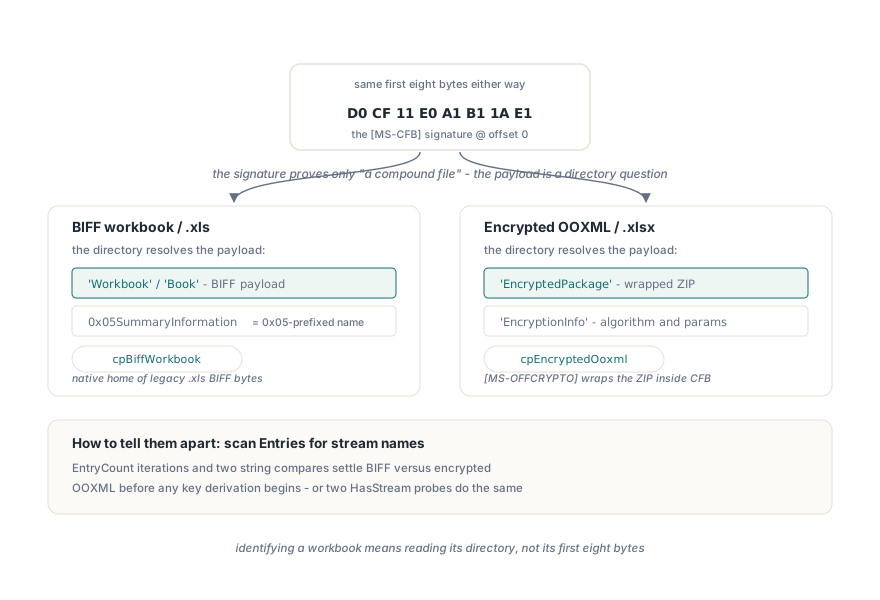
An encrypted .xlsx starts with D0 CF 11 E0 A1 B1 1A E1 because it really is a compound file. [MS-OFFCRYPTO] does not encrypt the ZIP package in place: it stores the encrypted package as a stream named EncryptedPackage inside a CFB container, next to an EncryptionInfo stream that describes the algorithm. Code that classifies files by their first eight bytes calls it a legacy workbook, hands it to a BIFF parser, and gets an error about a missing Workbook stream instead of a password prompt. The signature identifies the container. The payload is a directory question
type
  TCfbPayload = (cpUnknown, cpBiffWorkbook, cpEncryptedOoxml);

function ClassifyContainer(AStream: TStream): TCfbPayload;
var
  Cfb: TlxCompoundFile;
begin
  Result:= cpUnknown;
  if not lxIsCompoundStream(AStream) then
    Exit;
  Cfb:= TlxCompoundFile.Create;
  try
    Cfb.LoadFromStream(AStream);
    if Cfb.HasStream('EncryptedPackage') and Cfb.HasStream('EncryptionInfo') then
      Result:= cpEncryptedOoxml
    else if Cfb.HasStream('Workbook') or Cfb.HasStream('Book') then
      Result:= cpBiffWorkbook;
  finally
    Cfb.Free;
  end;
end;
HasStream uses the same case-insensitive lookup as OpenStream; a hand-rolled loop with a plain = on E.Name is stricter than the format. The summary-information streams need care too, because their names start with a 0x05 control character, so the lookup string is #5'SummaryInformation', and a log line that prints directory names raw shows a box or nothing in front of them. What happens after cpEncryptedOoxml (deriving the key, checking the password verifier) belongs to a different layer, covered in why Excel rejects a workbook encrypted with the wrong cipher mode
Writing a container Excel will open
The writer follows the layout Excel produces itself rather than every variation [MS-CFB] allows. Streams below 4096 bytes go into the mini stream, so a 300-byte summary stream takes five 64-byte mini sectors instead of a whole 512-byte sector, and larger streams go onto the FAT. The children of each storage are written as a balanced binary tree over names sorted in the format's length-first order, colored so that the result is a valid red-black tree without any rebalancing. Output stays on version 3 with 512-byte sectors until the sector count would push the file past 2 GiB, and only then does Save switch to 4096-byte sectors, extend the 109 header DIFAT slots with DIFAT sectors and leave the range-lock sector at 0x7FFFFF00 unused, as the format requires. FAT and DIFAT sizes come from a short fixed-point loop, because adding FAT sectors can raise the sector count enough to need one more
procedure WrapBiffFile(const BiffPath, Dest: string);
var
  Src, FS: TFileStream;
  Cfb: TlxCompoundFile;
begin
  Src:= TFileStream.Create(BiffPath, fmOpenRead or fmShareDenyWrite);
  try
    FS:= TFileStream.Create(Dest, fmCreate);
    try
      Cfb:= TlxCompoundFile.Create;
      try
        Cfb.CreateNew(FS);                // root entry is index 0
        // Borrows the range; Src must stay open until Save returns
        Cfb.AddStreamFromStream('Workbook', Src, 0, Src.Size);
        Cfb.Save;                         // data, directory, FAT, then header
      finally
        Cfb.Free;
      end;
    finally
      FS.Free;
    end;
  finally
    Src.Free;
  end;
end;
AddStreamFromStream queues a byte range of an existing stream without reading it, and Save copies it through a 64 KiB buffer. The source has to be a different stream from the destination; AddStreamFromStream raises 'CFB writer: source equals destination' otherwise. For payloads already in memory, AddStream takes a TBytes; AddStorage creates a sub-storage and returns its index for the ParentIndex overloads. MaxWriterEntries (1,000,000 by default) and MaxWriterMetadataBytes (256 MiB) bound what a single Save will plan
With the container in plain Object Pascal, .xls handling parses from a byte array, runs in tests without a filesystem, compiles for whatever the compiler targets and needs no COM apartment. Identification changes with it: a workbook is recognized by its directory, the same approach used for listing sheet names without opening the whole workbook
TlxCompoundFile and the BIFF and OOXML readers built on it are part of the HotXLS Delphi Excel Component for Delphi, C++Builder and Lazarus, where the product page lists the supported compilers and target platforms