HotXLS Delphi Component compares two text values the way Excel 16 does since v2.384.67: case-insensitively, in the "word sort" order of the Windows user locale, which is what CompareStringW returns with the NORM_IGNORECASE flag. Hyphens and apostrophes are skipped in the first pass and only break ties, so ="a-b">"ab" is TRUE, while other punctuation sorts before digits and letters, so ="a~b"<"ab" is TRUE as well. The same order now drives the comparison operators, > / < criteria, range sorting and VLOOKUP
Nobody files a bug titled "collation mismatch". The reports say that COUNTIF(A:A,">M") counts two more rows on the server than in Excel, that a price list sorted by the reporting service puts X-100 somewhere Excel would not, or that VLOOKUP("ABC",...) returns #N/A although the column plainly contains abc. All three come from the same question: when both operands are text, which one is smaller? Excel has a precise answer, it is not the one most Delphi code gives, and before v2.384.67 HotXLS gave three different answers depending on which code path asked
What rule does Excel use to compare two text strings?
Excel compares text with the user locale's word sort, ignoring case. Word sort is the default collation of the Windows NLS comparison functions: letters compare by their linguistic order rather than their code points, accented letters sit next to their base letter, and two characters get special treatment. The hyphen - and the apostrophe ' are ignored on the first pass, so co-op and coop land next to each other, and only when the rest of the strings tie does their presence decide the order. Every other punctuation mark is significant and sorts before digits, and digits sort before letters
The table shows what that means in practice, next to the two comparisons a Delphi developer is most likely to reach for. The Excel column holds the verdicts Excel 16 returned for IF(A<B,...), which HotXLS reproduces since v2.384.67
| A vs B | Excel 16 / HotXLS | CompareStr (ordinal) | CompareText |
|---|---|---|---|
"a-b" vs "ab" | greater | less | less |
"a'b" vs "ab" | greater | less | less |
"a~b" vs "ab" | less | greater | greater |
"a_b" vs "ab" | less | less | greater |
"ab" vs "AB" | equal | greater | equal |
"é" vs "f" | less | greater | greater |
"Z" vs "f" | greater | less | greater |
Two consequences are easy to miss. First, the tie-breaking role of the hyphen means ="a-b"="ab" is FALSE: the strings are close neighbors in the sort, yet not equal. Second, equality ignores case completely, so ab, AB and Ab are the same key as far as any comparison is concerned. Sorting 20 test words with Excel's Range.Sort gives a b, a.b, a_b, a~b, a0, a1b, ab / AB / Ab, ab-, a'b, a-b, -ab, ab1, abc, b, e, é, f, Z; within the ab group, the position of the ignored character decides
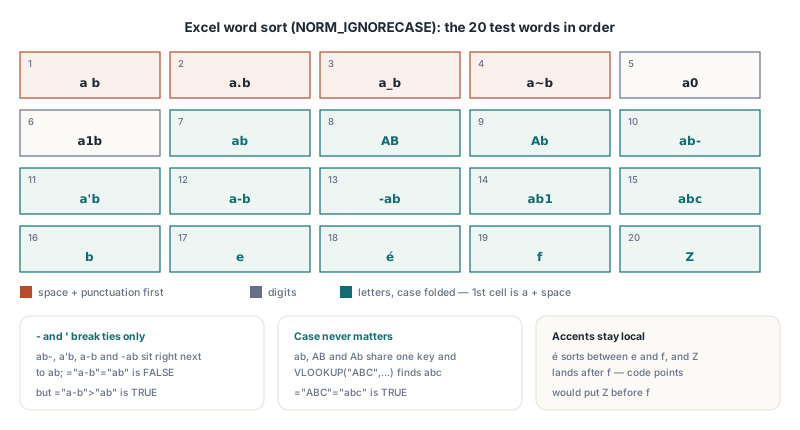
How was Excel's text order pinned down?
Excel's text order was identified by measurement, not by documentation, because Excel's documentation does not name the collation. The test generated 4,000 random string pairs from ASCII punctuation, digits, both letter cases, spaces, é, ß, ä, Chinese characters, full-width forms and the non-breaking space, with lengths from 0 to 4 and half of the pairs built as near-misses of each other. Excel 16 evaluated IF(A<B,-1,IF(A=B,0,1)) for every pair, and the verdicts were matched against the Windows comparison API with different flag sets
NORM_IGNORECASEalone (default word sort, user locale): no genuine mismatch. The only 7 differences were cells whose entire content was', which Excel consumes as the text prefix character, so they were sampling artifacts rather than collation differencesNORM_IGNORECASEwithSORT_STRINGSORT: 41 mismatches. String sort treats the hyphen and apostrophe as ordinary symbols, which is exactly the behavior Excel does not have- Adding
NORM_IGNOREWIDTH: wrong in a different way, because it makes full-width and half-width forms of the same letter compare equal, and Excel keeps them apart
A second, hand-picked check compared all 190 pairs drawn from 20 tricky words and the result of Excel's Range.Sort on the same column. Both agreed with plain NORM_IGNORECASE word sort, and those 190 verdicts plus the sorted order are now part of the HotXLS regression suite, run through both the classic TXLSWorkbook engine and the XLSX-native TXLSXWorkbook engine
Why do CompareText and ordinal comparison get it wrong?
CompareText and ordinal comparison get Excel's order wrong because they compare UTF-16 code units, and code-point order puts punctuation in arbitrary places relative to letters. The hyphen is U+002D and the apostrophe U+0027, both below every letter, so an ordinal comparison calls "a-b" smaller than "ab" instead of treating the hyphen as a tie-breaker. The tilde U+007E sits above every letter, so "a~b" comes out larger, the opposite of Excel. CompareText in the Delphi RTL folds only a..z to upper case and then compares code units, which adds a second distortion: the underscore U+005F lies between the upper-case and lower-case letters, so folding to upper case moves "a_b" from below "ab" to above it. Neither function knows that é belongs between e and f
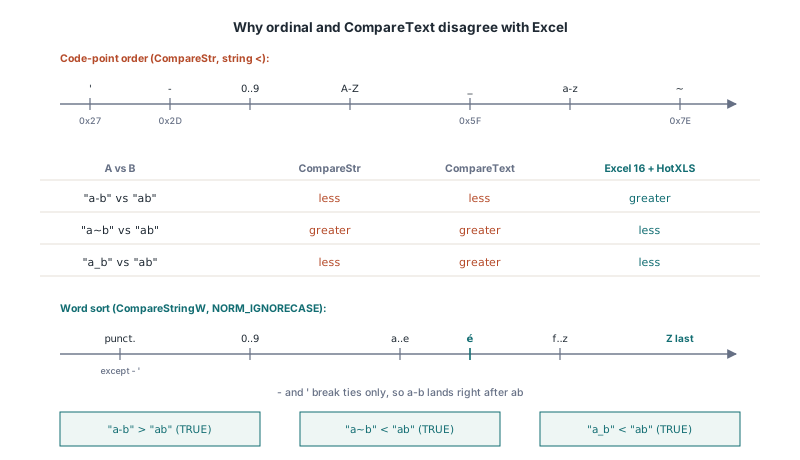
The usual Delphi tools fall on both sides of the line:
CompareStr, the string<operator andTComparer<string>.Default(which callsCompareStr) are ordinal and case-sensitive, soTArray.Sort<string>without a comparer putsZbeforefCompareTextandSameTextare ordinal after ASCII-only case foldingAnsiCompareTextandWideCompareTextin the Delphi RTL on Windows callCompareString(LOCALE_USER_DEFAULT, NORM_IGNORECASE, ...), the same call that matches Excel. A sortedTStringListwith its defaults (UseLocaleTrue,CaseSensitiveFalse) goes throughAnsiCompareTextand therefore agrees with Excel too- On POSIX targets the Delphi RTL routes
AnsiCompareTextthrough an ICU collator, which is a different algorithm with different punctuation rules, and Free Pascal'sAnsiCompareTexton Windows callsCompareStringAafter converting to the ANSI code page, which loses any character that page cannot represent
So the locale-aware RTL functions are right on Windows by implementation, not by contract, and code that needs Excel's order is better off making the API call explicitly. HotXLS had the same mix internally. The comparison operators upper-cased both strings and compared code points, the > / < branches of criteria functions used Delphi's case-sensitive Variant comparison, and VLOOKUP / HLOOKUP matched text with that case-sensitive Variant comparison as well, which is why VLOOKUP("ABC",A1:A20,1,FALSE) could not find abc. The range sort already used WideCompareText. Three paths, three orders
What changed in HotXLS v2.384.67?
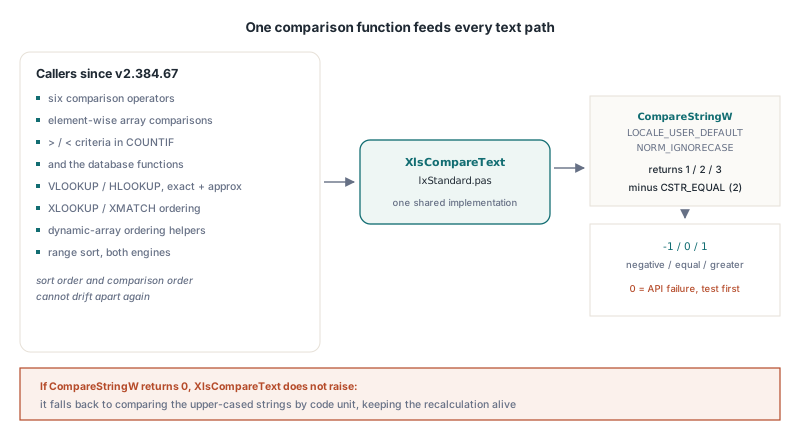
Since v2.384.67 the text-versus-text comparisons in the HotXLS calculation and sorting paths go through one function, XlsCompareText in lxStandard.pas, which calls CompareStringW(LOCALE_USER_DEFAULT, NORM_IGNORECASE, ...) and subtracts CSTR_EQUAL. The callers are the six comparison operators, element-wise comparisons in array formulas, the >, <, >= and <= branches of COUNTIF-style criteria and the database functions, VLOOKUP and HLOOKUP (exact and approximate), the ordering helpers behind the dynamic-array functions and XLOOKUP / XMATCH, and the range sort of both engines. Routing the range sort through the same function guarantees that sort order and comparison order cannot drift apart again, which matters because approximate VLOOKUP on text is only meaningful when the column was sorted in the order the lookup compares in
uses
  System.Variants, lxHandleX;

var
  Book: TXLSXWorkbook;
begin
  Book := TXLSXWorkbook.Create;
  try
    Book.Sheets.Add('Data');  // Calculate evaluates against the active sheet
    Writeln(VarToStr(Book.Calculate('="a-b">"ab"')));   // True: hyphen only breaks ties
    Writeln(VarToStr(Book.Calculate('="a-b"="ab"')));   // False: tie broken, not equal
    Writeln(VarToStr(Book.Calculate('="a~b"<"ab"')));   // True: punctuation first
    Writeln(VarToStr(Book.Calculate('="ABC"="abc"')));  // True: case ignored
  finally
    Book.Free;
  end;
end;
Cross-type comparisons are a separate rule and did not change: every number is below every text value and every text value is below every boolean, as described in the article on comparison chains, blank operands and SUMIF. The word sort only applies once both operands are text. Wildcard matching is also separate: a criterion such as "a*" or "=ab" is a pattern or equality test, covered in the guide to Excel wildcards in COUNTIF, MATCH and DSUM, and the collation discussed here decides only the ordering operators
The next example loads the 20 test words into a column, sorts it with TXLSXWorksheet.SortRange, and checks a criteria count and a lookup. The counts are the ones Excel 16 returned for the same column
const
  Words: array [0..19] of string = ('ab', 'a-b', 'a~b', 'a_b', 'AB', 'a b',
    'ab1', 'ab-', '-ab', 'abc', 'a''b', 'Ab', 'b', 'a.b', 'a1b', 'a0',
    #$00E9, 'e', 'f', 'Z');
var
  Book: TXLSXWorkbook;
  Sheet: TXLSXWorksheet;
  i: Integer;
begin
  Book := TXLSXWorkbook.Create;
  try
    Sheet := Book.Sheets.Add('Words');
    for i := 0 to High(Words) do
      Sheet.Cells[i + 1, 1].Value := WideString(Words[i]);

    // Excel 16 on the same column: 11, 11, 14
    Writeln(VarToStr(Book.Calculate('=COUNTIF(A1:A20,">ab")')));
    Writeln(VarToStr(Book.Calculate('=COUNTIF(A1:A20,"<a-b")')));
    Writeln(VarToStr(Book.Calculate('=COUNTIF(A1:A20,">=AB")')));

    // Was #N/A before v2.384.67: the lookup compared case-sensitively
    Sheet.Cells[1, 3].Formula := '=VLOOKUP("ABC",A1:A20,1,FALSE)';
    Book.Recalculate;
    Writeln(VarToStr(Sheet.Cells[1, 3].Value));                // abc

    // One key column, ascending: a b, a.b, a_b, a~b, a0, a1b, ab, AB, Ab, ...
    Sheet.SortRange(1, 1, 20, 1, [1], [False]);
    for i := 1 to 20 do
      Writeln(VarToStr(Sheet.Cells[i, 1].Value));
  finally
    Book.Free;
  end;
end;
TXLSXWorksheet.SortRange uses a stable merge sort, so ab, AB and Ab, which compare equal, keep the relative order they had before the sort. Blank cells go to the end in both directions, as in Excel
How do I match Excel's sort order in my own Delphi code?
To match Excel's text order in your own Delphi code, call CompareStringW with LOCALE_USER_DEFAULT and NORM_IGNORECASE, and do not add SORT_STRINGSORT or NORM_IGNOREWIDTH. The return value is not a signed comparison result: the API returns CSTR_LESS_THAN (1), CSTR_EQUAL (2) or CSTR_GREATER_THAN (3), and 0 when the call fails. Subtract 2 to get the usual negative / zero / positive convention, and test for 0 first, because a failure that is mistaken for a result becomes -2, a silent "less than"
uses
  Winapi.Windows, System.SysUtils, System.Generics.Defaults,
  System.Generics.Collections;

// Excel's text order: user-locale word sort, case-insensitive
function ExcelCompareText(const A, B: string): Integer;
var
  R: Integer;
begin
  R := CompareStringW(LOCALE_USER_DEFAULT, NORM_IGNORECASE,
    PWideChar(A), Length(A), PWideChar(B), Length(B));
  if R = 0 then
    RaiseLastOSError;          // 0 is a failure, not a comparison result
  Result := R - CSTR_EQUAL;    // 1/2/3 become -1/0/1
end;

var
  Keys: TArray<string>;
begin
  Keys := ['abc', 'a-b', 'AB', 'a~b', '-ab', 'ab'];
  TArray.Sort<string>(Keys, TComparer<string>.Construct(
    function(const L, R: string): Integer
    begin
      Result := ExcelCompareText(L, R);
    end));
  // a~b, ab / AB (equal, either order), a-b, -ab, abc
end;
TArray.Sort is not stable, so keys that compare equal, such as ab and AB, may come out in either order; if the original order of equal keys matters, sort an index array with the original position as a secondary key. The opposite case also comes up: sometimes a column must not follow Excel's order, for example part numbers where X-100 and X100 are distinct codes and should sort by code point. TXLSXWorksheet.SortRange has an overload that takes a TXLSSortCompareEvent, a method with the signature function(const Left, Right: Variant): Integer of object, and uses it instead of the built-in comparison
uses
  System.SysUtils, System.Variants, lxStandard, lxHandleX;

type
  TPartNumberOrder = class
    function Compare(const Left, Right: Variant): Integer;
  end;

function TPartNumberOrder.Compare(const Left, Right: Variant): Integer;
begin
  // A custom comparer also receives empty cells (as Null): place them yourself
  if VarIsNull(Left) or VarIsNull(Right) then
    Exit(Ord(VarIsNull(Left)) - Ord(VarIsNull(Right)));
  Result := CompareStr(VarToStr(Left), VarToStr(Right));   // ordinal, case-sensitive
end;

var
  Sheet: TXLSXWorksheet;   // a filled sheet, rows 2..501, columns A..D
  Order: TPartNumberOrder;
begin
  // ...
  Order := TPartNumberOrder.Create;
  try
    // keyed on column A, ascending
    Sheet.SortRange(2, 1, 501, 4, [1], [False], xlsSortByRows,
      xlsSortExcelLike, Order.Compare);
  finally
    Order.Free;
  end;
end;
When a custom comparer is supplied, HotXLS skips its own blank handling and passes the raw key values, so the comparer must deal with Null. For a descending key HotXLS negates whatever the comparer returns, which also moves blanks to the top unless the comparer accounts for it. Keep in mind that a column sorted this way is no longer in the order Excel's approximate VLOOKUP or a binary-search XLOOKUP expects; the pitfalls of those modes on data sorted in a different order are covered in the guide to XLOOKUP and XMATCH binary search modes
Why can the same workbook sort differently on another machine?
The same workbook can sort differently on another machine because Excel's text order depends on the Windows user locale, and HotXLS deliberately follows that dependency. Word sort is language-specific: the Swedish collation, for instance, places ä after z, where English and German keep it next to a. Excel inherits that from the locale it runs under, so a workbook recalculated by a Stockholm colleague can return a different COUNTIF(...,">y") than the same file on a desktop in Chicago. HotXLS passes LOCALE_USER_DEFAULT so that its results equal Excel's on the same machine; any fixed locale would make HotXLS disagree with Excel on every machine with a different setting
Three practical consequences follow for server-side generation:
- The locale that counts is the one of the account the process runs under. A Windows service or IIS application pool may use a different regional format from the developer's desktop, so results observed in the IDE are not automatically what production computes
- Cached formula results written into the file reflect the generating machine's locale. Excel recalculates with its own locale, so a value can change when the file is opened elsewhere and recalculated; that is Excel's behavior, not a HotXLS artifact
- Locales disagree mostly on accented letters, on letter combinations that some languages treat as a single letter, and on non-Latin scripts, so test data limited to plain English words will not reveal the problem
The platform boundary is simple. HotXLS is a Windows library, built for Win32 and Win64 with Delphi and C++Builder and for win32 / win64 targets with Lazarus and Free Pascal, and all of these builds call the same CompareStringW. There is no separate non-Windows collation path. The only fallback is for a failed API call: if CompareStringW returns 0, XlsCompareText compares the upper-cased strings by code unit rather than raising an exception in the middle of a recalculation, which keeps the calculation running but no longer guarantees Excel's order
Quick reference: Excel text comparison in HotXLS
- Rule: user-locale word sort with
NORM_IGNORECASE, noSORT_STRINGSORT, noNORM_IGNOREWIDTH, in HotXLS since v2.384.67 -and'only break ties:="a-b">"ab"is TRUE and="a-b"="ab"is FALSE- Other punctuation sorts before digits, digits before letters:
="a~b"<"ab"and="a0"<"ab"are TRUE - Case never matters:
="ABC"="abc"is TRUE andVLOOKUP("ABC",...)findsabc - Covered paths: comparison operators, array comparisons,
>/<criteria,VLOOKUP/HLOOKUP, dynamic-array ordering,SortRangein both engines - Not covered by this rule: mixed types (number < text < boolean) and wildcard criteria, which have their own rules
- In Delphi code:
CompareStringW(LOCALE_USER_DEFAULT, NORM_IGNORECASE, ...), check for 0, subtractCSTR_EQUAL; avoidCompareText,CompareStrandTComparer<string>.Defaultwhen the result must agree with Excel - Results depend on the locale of the account running the code, in Excel and in HotXLS alike
Ordinary words sort the same under every rule, so only hyphenated codes, punctuation and accented names expose a wrong collation. HotXLS now gives Excel's answer on all of them in both the XLS and XLSX engines. Details on licensing, supported Delphi and C++Builder versions and the trial download are on the HotXLS Delphi Excel component page