HotXLS Delphi Component evaluates =1<2<3 as FALSE, the same answer Excel 16 gives, because since v2.384.3 its formula parser folds comparison operators left to right: 1<2 becomes TRUE, and TRUE<3 is FALSE because a boolean ranks above every number. The same release makes a blank operand equal to both 0 and "", and lets SUMIF stretch a one-cell sum range to the shape of its criteria range. Each of these looks like trivia until a workbook computed in Delphi disagrees with the same workbook opened in Excel
The disagreement usually starts with a formula a person wrote by intuition. Someone types =0<B2<100 to check that a quantity is in range, Excel quietly answers FALSE for every row, and the sheet ships with that bug baked in. A calculation engine does not get to fix the user's intent; its job is to produce the value Excel would produce, so that the cached result HotXLS writes into the file matches what Excel shows after a recalculation. Before v2.384.3 HotXLS answered TRUE for that range check on every row, wrong in the opposite direction, and a report generated on a server would contradict the same report opened on a desktop
Why does =1<2<3 return FALSE in Excel?
Excel returns FALSE because it reads a chain of comparisons as (1<2)<3, and the inner TRUE then loses the type-ranking contest against the number 3. The old HotXLS parser read the same text as 1<(2<3): TXLSSyntax.Parse_expr in lxFormula.pas parsed one operand, saw a comparison token, and recursed into Parse_expr for the right-hand side, which makes the operator right-associative. That gives 1<TRUE, and a number is below a boolean, so the result was TRUE. The mistake is symmetric: =3>2>1 is TRUE in Excel and was FALSE in HotXLS, and =1=1=TRUE is TRUE in Excel and was FALSE before the fix. The regression CalculateFormula_ComparisonChainsFoldLeftToRight pins seven such formulas against the values Excel 16 returns, and runs every one through both engine architectures, the classic TXLSWorkbook and the XLSX-native TXLSXWorkbook, using the Calculate method described in the HotXLS formula engine overview
const
  Formulas: array [0..6] of string = ('=1<2<3', '=3>2>1', '=(1<2)<3',
    '=1<(2<3)', '=1=1=TRUE', '=3>2>1=TRUE', '=1<2<3=FALSE');
  // What Excel 16 returns:  FALSE, TRUE, FALSE, TRUE, TRUE, TRUE, TRUE
var
  Classic: IXLSWorkbook;
  Xlsx: TXLSXWorkbook;
  i: Integer;
begin
  Classic := TXLSWorkbook.Create;
  Xlsx := TXLSXWorkbook.Create;
  try
    // TXLSXWorkbook.Calculate evaluates against the active sheet and
    // returns Null when the workbook has no sheet at all
    Xlsx.Sheets.Add('Data');
    for i := 0 to High(Formulas) do
      Writeln(Formulas[i], '  classic=', VarToStr(Classic.Calculate(Formulas[i])),
        '  xlsx=', VarToStr(Xlsx.Calculate(Formulas[i])));
  finally
    Xlsx.Free;
  end;
end;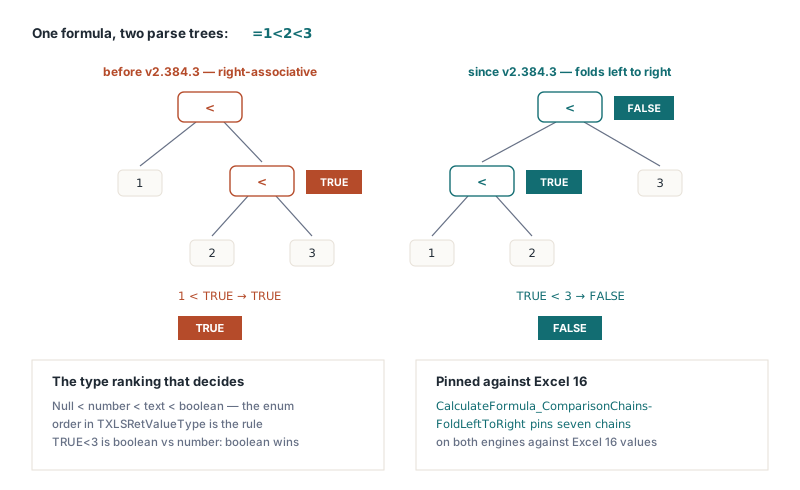
The fix turns Parse_expr into a loop of the same shape Parse_expr1 already used for +, - and &. It parses the first operand with Parse_expr1, and while the next token is one of =, <>, <, >, <= or >=, it creates a comparison node, attaches the accumulated left result as the first child, parses the next operand with Parse_expr1 rather than Parse_expr, and makes the new node the left result for the next round. Two details were easy to get wrong when converting recursion into iteration, and both are in the maintainers' notes: the accumulated node has to be handed over (lChild := Item; Item := nil) in that order, and the error path has to Exit after freeing the half-built node rather than fall out of the loop and return a dangling tree
How does HotXLS rank numbers, text and booleans in a comparison?
HotXLS ranks mixed types the way Excel does: every number is less than every text value, and every text value is less than every boolean. TXLSCalculator.CompareVariants in lxCalc.pas classifies both operands with GetRetValueType into the enumeration TXLSRetValueType = (xlVariantValue, xlNumberValue, xlStringValue, xlBooleanValue), and when the two classes differ it simply compares their ordinals, so the declaration order of that enum is the cross-type rule. Inside one class the comparison is the natural one, with one Excel-specific twist for text: both strings pass through lxUpperCase first, so ="abc"="ABC" is TRUE. This ranking is why the chain result cannot be reasoned about without it. TRUE<3 is not a coercion of TRUE to 1, it is a boolean compared with a number, and the boolean wins. Dates are serial numbers to the engine (varDate classifies as xlNumberValue), so a date is always below any text, including text that happens to look like a date
What does a blank cell equal in a comparison?
A blank cell used as a comparison operand equals 0 when the other side is a number, equals "" when the other side is text, and since v2.384.53 equals FALSE when the other side is a logical value, so with A1 empty =A1=0, =A1="" and =A1=FALSE are all TRUE. TXLSCalculator.CompareVarValues, which serves all six comparison operators, substitutes the blank before calling CompareVariants: if exactly one operand is Null it becomes WideString('') when its partner is a string, False when its partner is a boolean, and 0 otherwise. Two blanks still compare equal to each other without substitution. The arithmetic path had always turned a blank into 0, which is why =A1+1 gave 1, but CompareVariants keeps Null as its own lowest rank, below every number, and the comparison operators used that rank directly
var
  Wb: IXLSWorkbook;
  Sh: TXLSWorksheet;
begin
  Wb := TXLSWorkbook.Create;
  Sh := Wb.Sheets.Add;
  Sh.Range['B1', 'B1'].Value := 5;      // A1 is left blank on purpose

  Writeln(VarToStr(Wb.Calculate('=A1=0')));    // True
  Writeln(VarToStr(Wb.Calculate('=A1=""')));   // True
  Writeln(VarToStr(Wb.Calculate('=A1<B1')));   // True: the blank compares as 0
  Writeln(VarToStr(Wb.Calculate('=A1<0')));    // False; True before v2.384.3
end;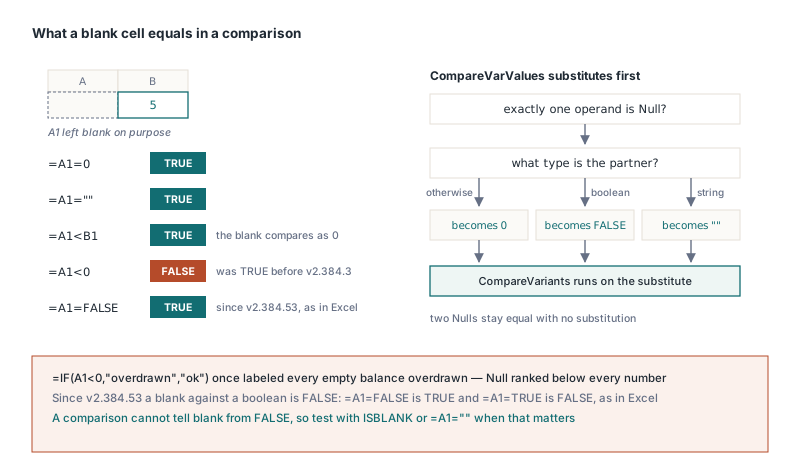
The last line is the one that hurt in practice. Under the old rank, a blank was smaller than every number, negative ones included, so =IF(A1<0,"overdrawn","ok") labeled every empty balance cell as overdrawn, and =A1=0 was FALSE for a cell any user would describe as zero. One boundary remained after v2.384.3: the substitution chose only between 0 and the empty string, so a blank compared with a boolean became 0, which ranks below both TRUE and FALSE, and =A1=FALSE on an empty A1 evaluated to FALSE. Since HotXLS 2.384.53 a blank compared with a logical value is treated as FALSE in both the XLS and XLSX engines, as Excel does: with A1 empty, =A1=FALSE and =A1<TRUE return TRUE and =A1=TRUE returns FALSE. That also means the comparison cannot tell blank from FALSE, in Excel or in HotXLS; when a sheet needs that distinction, test with ISBLANK or =A1=""
Why did SUMIF with a single-cell sum range return 0?
SUMIF returned 0 because HotXLS clamped the iteration to the smaller of the two ranges, while Excel keeps the criteria range's shape and only uses the sum range for its top-left cell. =SUMIF(A1:A10,">5",B1) therefore means B1:B10 in Excel, a convenience many hand-built templates rely on. The shared worker TXLSCalculator.GetValueItemRange2 used to shrink its row and column counts to those of the value range, which reduced the example to a single test of A1 against B1. v2.384.3 removes the clamp: the loop now walks the criteria range and reads each value at the same offset from the sum range's top-left corner. Because CalcSumIF and CalcAverageIF both call that worker, AVERAGEIF gets the same resize, and a sum range larger than the criteria range is trimmed to the criteria shape for the same reason. The criteria argument in the middle is a value-class argument and the outer two are reference-class, the distinction covered in the article on implicit intersection and argument classes
var
  Book: TXLSXWorkbook;
  Sheet: TXLSXWorksheet;
  Row: Integer;
begin
  Book := TXLSXWorkbook.Create;
  try
    Sheet := Book.Sheets.Add('Sales');
    for Row := 1 to 10 do
    begin
      Sheet.Cells[Row, 1].Value := Row;          // criteria column: 1..10
      Sheet.Cells[Row, 2].Value := Row * 100;    // amounts: 100..1000
    end;
    Sheet.Cells[1, 4].Formula := '=SUMIF(A1:A10,">5",B1)';     // one-cell sum range
    Sheet.Cells[2, 4].Formula := '=SUMIF(A1:A10,">5",B1:B10)'; // explicit sum range
    if Book.Recalculate = lxOk then
      // Both D1 and D2 are 4000 (600+700+800+900+1000); D1 was 0 before v2.384.3
      Writeln(VarToStr(Sheet.Cells[1, 4].Value), ' ', VarToStr(Sheet.Cells[2, 4].Value));
  finally
    Book.Free;
  end;
end;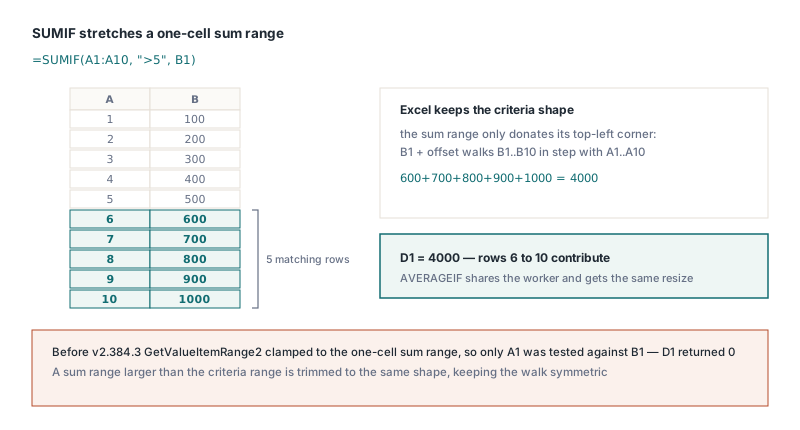
INDIRECT and YEARFRAC: two quieter corrections
INDIRECT now honors its second argument, and text after a valid reference is an error instead of being ignored. With a1 FALSE the text is parsed as absolute R1C1, so =INDIRECT("R2C3",FALSE) reads C2; the old code ignored the flag, read "R2" as column R, row 2, and silently returned the wrong cell. The flag is dispatched on its variant type (boolean, number or text) because converting a string variant straight to Double raises an exception. Relative R1C1 text such as R[1]C[1] returns #REF!, since INDIRECT has no formula-cell origin to resolve it against, and A1 text with trailing characters, "B2 junk", returns #REF! as well. YEARFRAC with basis 0 now applies the NASD last-of-February rules that DAYS360 already implemented: when both dates are the last day of February the end day becomes 30, then a start on the last day of February becomes 30. From 2024-02-29 to 2025-02-28 the count is now 360 days, a fraction of exactly 1, where the previous Days360US counted 359
What do these fixes guarantee, and what was the lesson?
The comparison-chain behavior is guaranteed by a test that compares both engines with values measured in Excel 16, and that test exists because the first description of the fix was wrong. The v2.384.3 release note originally said that left-to-right folding made =1<2<3 TRUE, which is precisely what the old right-associative parser produced and the opposite of what both Excel and the new code return. Nobody had evaluated the example; it was written from the intuition that "1 is less than 2 is less than 3". The note was corrected and the seven-formula test added in a follow-up commit, and the rule that came out of it applies to anyone documenting spreadsheet semantics: run the example in Excel before you write the expected value down. The blank-operand substitution and the SUMIF resize follow the same Excel behavior, including the blank-versus-boolean case since v2.384.53, and conditional aggregates that also have to skip filtered or hidden rows follow the separate rules in the SUBTOTAL and AGGREGATE hidden-row article
HotXLS is a native Delphi and C++Builder spreadsheet component that reads, recalculates and writes XLS, XLSX, ODS and CSV without Excel installed, and the comparison, blank and SUMIF rules described here live in the calculation engine both workbook architectures share. The full function list and licensing options are on the HotXLS Delphi spreadsheet component product page