A defined name that refers to a whole column is read by Excel as a single cell when it appears in a scalar position: =Vertical+1 in row 7 means "the row-7 cell of Vertical", not the whole area. HotXLS Delphi Component applies that implicit intersection in v2.382.4 at two levels, during evaluation and during dependency extraction, because a loan template with 4805 formulas showed that getting the value right is not enough. When the dependency walker expands the name to its full area, a downstream formula that feeds any cell of that area closes a cycle that does not exist, and TXLSXWorkbook.Recalculate refuses the whole workbook
The template in question is a stock loan amortization workbook. With every cached value poisoned to 777 and a full Recalculate run, both engine architectures returned 23, which is lxErrorRef, the circular reference code. 3842 of the 4805 formulas did not match the independent expectation, B18 held #VALUE!, E18 was still 777, and the payment count in J7 had read the placeholders in an unfinished balance column. Three separate defects were hiding behind one return code, and this article walks through each with the source that fixed it
Why does a scalar reference to a column name create a false cycle?
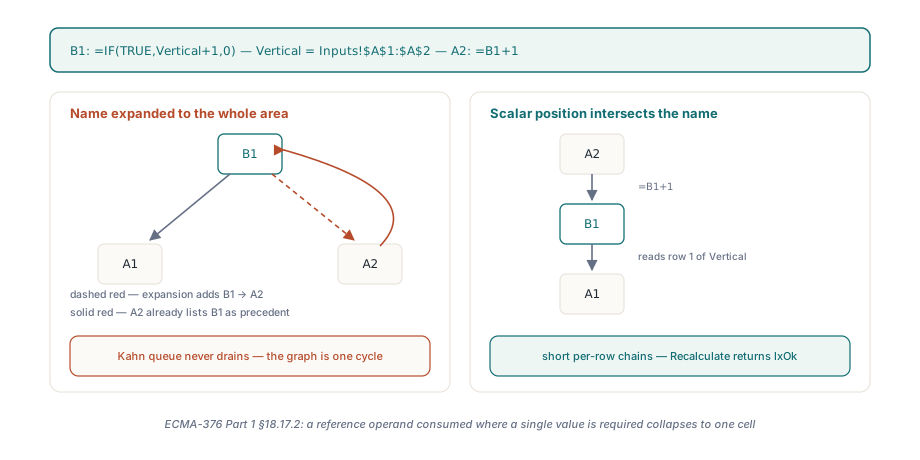
Because a dependency graph only knows edges, and an edge from a formula to a 480-row area is 480 edges, one of which points back through a cell that depends on the formula. Consider =IF(TRUE,Vertical+1,0) in B1 with Vertical defined as Inputs!$A$1:$A$2, and =B1+1 in A2. Excel evaluates B1 as A1+1 and A2 as B1+1, a straight chain. A walker that records B1 as depending on A1:A2 makes A2 a precedent of B1, A2 already lists B1 as a precedent, and the Kahn queue that drives incremental recalculation in HotXLS never sees either node reach in-degree zero. This is the pattern loan templates are made of: every period row references named columns for the balance, the rate and the payment count, each name spans the whole schedule, and each row also writes into those columns. Expand the names and the graph is one giant strongly connected component. Evaluate them with implicit intersection and the graph is a set of short chains, one per row, which is what ECMA-376 Part 1 §18.17.2 describes for a reference operand consumed where a single value is required
var
  Book: TXLSXWorkbook;
  Sheet: TXLSXWorksheet;
begin
  Book := TXLSXWorkbook.Create;
  try
    Sheet := Book.Sheets.Add('Inputs');
    Book.DefinedNames.Add('Vertical', 'Inputs!$A$1:$A$2');
    Book.DefinedNames.Add('Alias', '=Vertical');
    Sheet.Cells[1, 1].Value := 1;
    // Scalar position: Vertical collapses to A1 because the formula is in row 1
    Sheet.Cells[1, 2].Formula := '=IF(TRUE,Vertical+1,0)';
    Sheet.Cells[2, 1].Formula := '=B1+1';
    // A name whose definition is another name still intersects, so this is A2
    Sheet.Cells[2, 2].Formula := '=Alias';
    // Reference-class argument: the whole area is summed, no intersection
    Sheet.Cells[3, 2].Formula := '=SUM(Vertical)';
    // Row 6 lies outside A1:A2, the intersection is empty and IFERROR catches it
    Sheet.Cells[6, 2].Formula := '=IFERROR(Vertical,42)';

    if Book.Recalculate = lxOk then
    begin
      // B1 = 2, A2 = 3, B2 = 3, B3 = 4, B6 = 42
      // Before v2.382.4 this branch was unreachable: B1 -> A2 -> B1 was a cycle
    end;
  finally
    Book.Free;
  end;
end;
How does HotXLS decide that an argument is scalar?
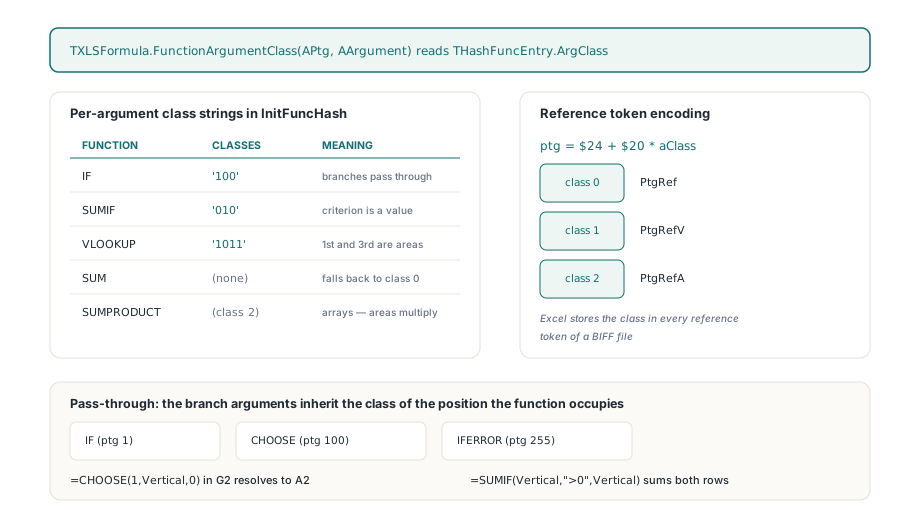
HotXLS reads the answer from the function table rather than from the shape of the argument. Every entry in TXLSFormula.InitFuncHash is registered through THashFunc.SetValue with an optional per-argument class string: 'IF' carries '100', 'SUMIF' carries '010', 'VLOOKUP' carries '1011', and 'SUM' carries none, so all of its arguments fall back to the function-level class 0. The new TXLSFormula.FunctionArgumentClass(APtg, AArgument) exposes that byte through THashFuncEntry.ArgClass, and a result of 1 means value class. These are the same three classes that [MS-XLS] §2.2.2 assigns to operand tokens, and the encoder already depended on them: when it writes a reference it computes the ptg as $24 + $20 * aClass, which yields PtgRef for class 0, PtgRefV for class 1 and PtgRefA for class 2. A BIFF file written by Excel stores that class in every reference token, so an engine whose table matches the spec can answer "is this argument scalar" without looking at the data. The middle argument of SUMIF is the criterion, a value; the first and third are areas, references. SUMPRODUCT is registered with function-level class 2, array, which is why =SUMPRODUCT(Vertical,Vertical) still multiplies the whole area
Three functions do not consult their own table entry for anything past the first argument. IF (ptg 1), CHOOSE (ptg 100) and IFERROR (ptg 255) pass through whatever they select, so their branch arguments inherit the class of the position the function itself occupies. That single rule is what lets =CHOOSE(1,Vertical,0) in G2 resolve to A2 while =SUMIF(Vertical,">0",Vertical) next to it still sums both rows, and it is the rule an amortization schedule exercises most, because its period cells lean on IF to test whether the loan is still open
Carrying the class through the dependency walk
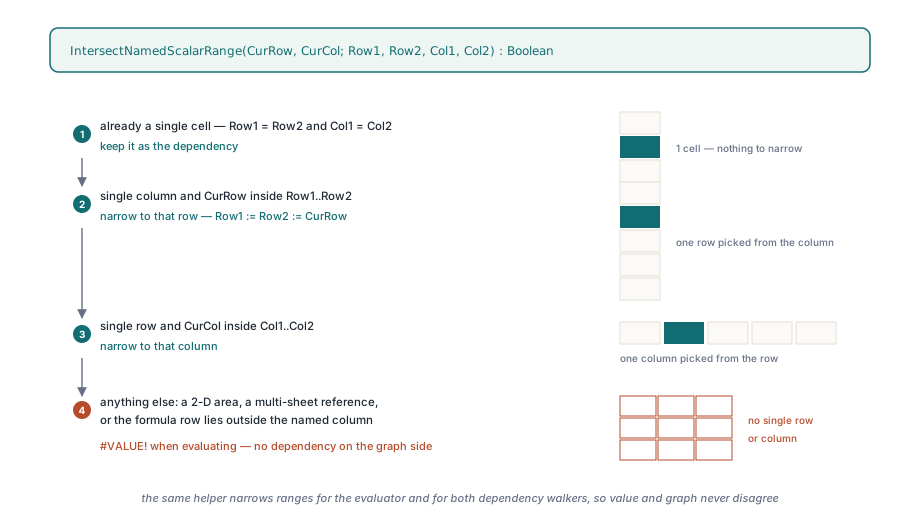
The dependency extractor in lxCalc.pas is a recursive Walk over the compiled syntax tree, and it exists twice, once in TXLSCalculator.ExtractDependencies for the per-workbook graph and once in ExtractWorkspaceDependencies for the cross-workbook graph. v2.382.4 gives both walkers two extra parameters. AScalar starts as True at the root of a formula, is recomputed for each function child from FunctionArgumentClass, and is passed through unchanged for the branch arguments of ptg 1, 100 and 255. ANameRoot becomes True only when the walker descends into the compiled definition of a name, and it survives only through SA_GROUP nodes, the parentheses, so a name defined as =A1:A2+1 is not mistaken for a plain area. When both flags are True at an SA_RANGE node, AddResolvedRange narrows the area with the same helper the evaluator uses before it records the dependency. The helper is short enough to quote in full
function IntersectNamedScalarRange(CurRow, CurCol: Integer;
  var Row1, Row2, Col1, Col2: Integer): Boolean;
begin
  Result := False;
  if (Row1 = Row2) and (Col1 = Col2) then Exit(True);   // already a cell
  if (Col1 = Col2) and (CurRow >= Row1) and (CurRow <= Row2) then
  begin
    Row1 := CurRow; Row2 := CurRow;                     // single column: take this row
    Exit(True);
  end;
  if (Row1 = Row2) and (CurCol >= Col1) and (CurCol <= Col2) then
  begin
    Col1 := CurCol; Col2 := CurCol;                     // single row: take this column
    Result := True;
  end;
end;
Anything the helper rejects, a two-dimensional area, a multi-sheet reference or a formula whose row lies outside the named column, produces #VALUE! on the evaluation side and no dependency at all on the graph side, which is what Excel does for an empty intersection. The evaluation side lives in TXLSCalculator.GetValueItemName: it strips SA_GROUP wrappers from the compiled definition, and if the root is an SA_RANGE it calls GetRangeInfo, intersects, and fetches the one cell through FGetValue instead of evaluating the whole definition. External references stay on the old path, because there is no local row to intersect against. Where a name's storage and scope come from in the first place is covered in the defined names and cross-sheet formulas article; the point here is only what the engine does once the name resolves
Why did MATCH over a half-calculated column read 777?
Because the lookup-array argument of MATCH is a scan reference, and scan references were deliberately excluded from evaluation order. The lookup scan article introduced TXLSDepRange.LookupScan and closed with a section called "What you give up by excluding scan edges from the ordering": a lookup formula may run before every cell in its range has been recalculated and read stale values. In an interactive session that converges on the next pass. In a batch recalculation of a poisoned template it does not, and PaymentCount, defined as =MATCH(0.01,Balances,-1)+1, read the 777 placeholders still sitting in the balance column and returned a period count that could not be right
TXLSDepGraph.TopoOrder now treats scan edges as soft ordering edges. Alongside the hard in-degree it keeps a ScanInDeg array, counting dirty scan precedents per node and decrementing it as those precedents are emitted, using the ScanPrecedents, ScanDependents and ScanPrecedentCount lists that the earlier change already stored. On each iteration the Kahn queue scans its ready window for the first node whose ScanInDeg is zero and swaps it to the head; if every ready node is still waiting on a scan precedent, the head is popped in its stable order. Scan edges never enter the hard in-degree, so a self-referential VLOOKUP over its own column is still legal, but a lookup that could wait for a finishable precedent now does. The regression that pins this, LookupScan_WaitsForDirtyFormulaValues, poisons three balance cells to 777 and expects PaymentCount to come back as 3, then flips the input to zero and expects =IFERROR(PaymentCount,99) to see the #N/A and return 99
Where did the four-decimal truncation come from?
From Delphi Variant arithmetic, and only in nested positions. The binary operators in TXLSCalculator.GetValueItem already copied a top-level + or - into two Double locals, so =B1-A1 was fine. Inside =IF(TRUE,B1-A1,0) the same subtraction ran as Value := Value - SubValue on two Variants, and when one operand was an Int64 cell value and the other a Double, the result we observed was a Currency, a fixed-point type with four decimal places, so 1066.1854641400994 minus 120 came back truncated to four decimals. Across a schedule where every payment is compounded from the previous row, that error walks through hundreds of periods before it reaches the totals
// TXLSCalculator.GetValueItem, binary arithmetic branch (lxCalc.pas)
if VarIsNull(Value) then Value := 0;
if VarIsNull(SubValue) then SubValue := 0;
// Mixed Int64/Double Variant arithmetic can promote to Currency.
// Spreadsheet arithmetic must retain floating-point precision.
if VarIsNumeric(Value) then Value := Double(Value);
if VarIsNumeric(SubValue) then SubValue := Double(SubValue);
The guard runs before SA_ADD, SA_SUB, SA_MUL and SA_DIV alike, and the regression Arithmetic_MixedInt64AndDoubleKeepsPrecision stores Int64(120) in A1 and 1066.1854641400994 in B1, then checks the nested difference and sum to 1E-10 and the product and quotient to 1E-8 and 1E-12. HotXLS does not claim to know every promotion rule the RTL applies to mixed Variant types across compiler versions; it claims that spreadsheet arithmetic is IEEE double, and it now makes both operands double before the operator sees them, which removes the question
What the fix guarantees, and what it does not
After v2.382.4 both engine architectures return lxOk for the poisoned template, all 4805 cached values match the independent row-by-row expectation within 1E-7, and the assertions that the caches really were poisoned, that the source hash is unchanged and that every formula is still present all hold. No iteration was enabled and no error code was suppressed to get there. A genuine cycle through a name, =B1 in A1 with B1 still reading Vertical, still returns an error, and the test NamedScalarRanges_IntersectWithoutFalseCycles ends by asserting exactly that
The boundaries are worth stating plainly. Implicit intersection applies only to a name whose compiled definition, after stripping parentheses, is a single-column or single-row area on one sheet; a two-dimensional name in a scalar position is #VALUE!, as in Excel, and a function the table does not know gets class 0 from FunctionArgumentClass, so its name arguments are still expanded in full. The soft ordering is a preference, not a guarantee: a scan-only cycle still evaluates in stable order and reads whatever is cached, which is the behavior the lookup scan article accepted on purpose. And the whole-template result is verified against an independent expectation script, not against another spreadsheet engine, because the reference office suite did not finish recalculating the original template inside a 60-second budget. HotXLS is a native Delphi and C++Builder spreadsheet component that reads, recalculates and writes XLS, XLSX, ODS and CSV without Excel installed; the name intersection, the argument-class table and the soft scan ordering apply to every format because the calculation engine is shared, and the current function coverage is listed on the HotXLS Delphi spreadsheet component product page