HotXLS answers the question every spreadsheet pipeline eventually has to ask, which is whether the numbers stored in a workbook still match the formulas that produced them. CalculateAndVerify recalculates the whole dependency graph into an isolated overlay, compares each result against the cached value already in the cell, and reports the disagreements. By default it changes nothing
The reason this matters is that a spreadsheet file stores two things per formula cell: the formula and the last value someone computed for it. Excel keeps them in sync. Everything else in the world may not. A file that passed through an older library, a partial recalculation, a hand-edited XML part or a tool that wrote values without recomputing them will happily present a total that no longer follows from its inputs, and nothing in the file format flags that
Why is a cached value that disagrees with its formula so dangerous?
Because it is invisible in every ordinary reading path. Open the file in a viewer, read the cell through an API, export it to CSV or PDF, and you get the cached number. The formula is right there in the same cell, and nobody compares them. The mismatch only surfaces when someone opens the workbook in Excel, which recalculates on load under most settings, and suddenly a report that was signed off last quarter shows different totals
The audit exists to make that comparison a deliberate, scheduled operation rather than an accident. It is the spreadsheet equivalent of verifying a checksum: cheap enough to run in an intake pipeline, and the only thing that turns a silent data-integrity problem into a report you can act on
var
  Book: TXLSWorkbook;
  Options: TXLSRecalcAuditOptions;
  Report: TXLSCalculationAuditReport;
  I: Integer;
begin
  Book := TXLSWorkbook.Create;
  try
    Book.Open('quarterly-close.xls');
    Options := TXLSRecalcAuditOptions.Default;
    Options.MaxIssues := 500;
    Report := Book.CalculateAndVerify(Options);
    try
      for I := 0 to Report.Count - 1 do
        if Report[I].Kind = xlcaiCacheMismatch then
          Writeln(Report[I].SheetName, '!',
                  Report[I].Row, ':', Report[I].Col, '  ',
                  Report[I].Formula,
                  '  cached=', VarToStr(Report[I].Actual),
                  '  recomputed=', VarToStr(Report[I].Expected));
      if Report.Truncated then
        Writeln('issue budget reached, raise MaxIssues');
    finally
      Report.Free;
    end;
  finally
    Book.Free;
  end;
end;
There are three overloads and they answer three different questions. The parameterless CalculateAndVerify returns a mismatch count, which is all a health check needs. The overload with an out array of mismatches gives you the cells. The overload taking TXLSRecalcAuditOptions returns a full TXLSCalculationAuditReport, which is the one to reach for when you need to know not just that a value disagrees but why the audit could not evaluate something
The overlay, and why the audit does not write
Every recomputed value lands in an overlay rather than in the cell cache, and the overlay is injected at the very front of the cell-read callback in both workbook engines. That placement is what makes the audit self-consistent: when B1 is recomputed and C1 depends on B1, C1 sees the value from this audit pass, not the stale cached one. Without that, a single upstream error would be reported once and then absorbed, and every downstream cell would appear to agree with a wrong input
Cells whose recomputed value matches the cache do not enter the overlay at all. That is not a micro-optimization, it is what keeps the audit affordable. A clean workbook with a hundred thousand formulas performs zero overlay writes and the pass stays inside a 1.35x budget against a full recalculation, which is the difference between something you can run on every intake and something you run once a quarter
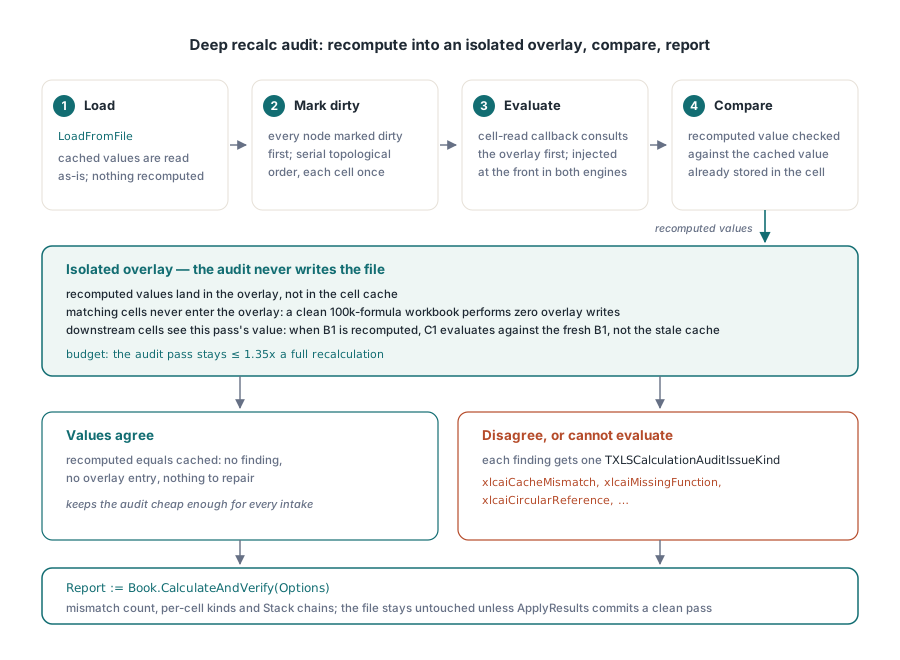
Evaluation follows a serial topological order derived from the dependency graph, with every node marked dirty first, so each cell is computed exactly once after its inputs. If you want the incremental machinery that keeps a live workbook current instead of auditing a stored one, that is a different mechanism, described in incremental recalculation and the dependency graph
Failures are classified, not lumped together
A cell the audit cannot evaluate is not the same finding as a cell whose value disagrees, and TXLSCalculationAuditIssueKind keeps the categories apart. xlcaiCacheMismatch is the value disagreement. xlcaiMissingFunction and xlcaiMissingName say the evaluator met something it does not implement or cannot resolve. xlcaiUnsupportedArguments covers argument shapes outside the supported subset. xlcaiExternalReferenceDenied and xlcaiExternalReferenceMissing separate a policy refusal from an absent workbook. xlcaiCircularReference, xlcaiDataTableSkipped, xlcaiParseFailure, xlcaiCancelled and xlcaiInternalFailure complete the set
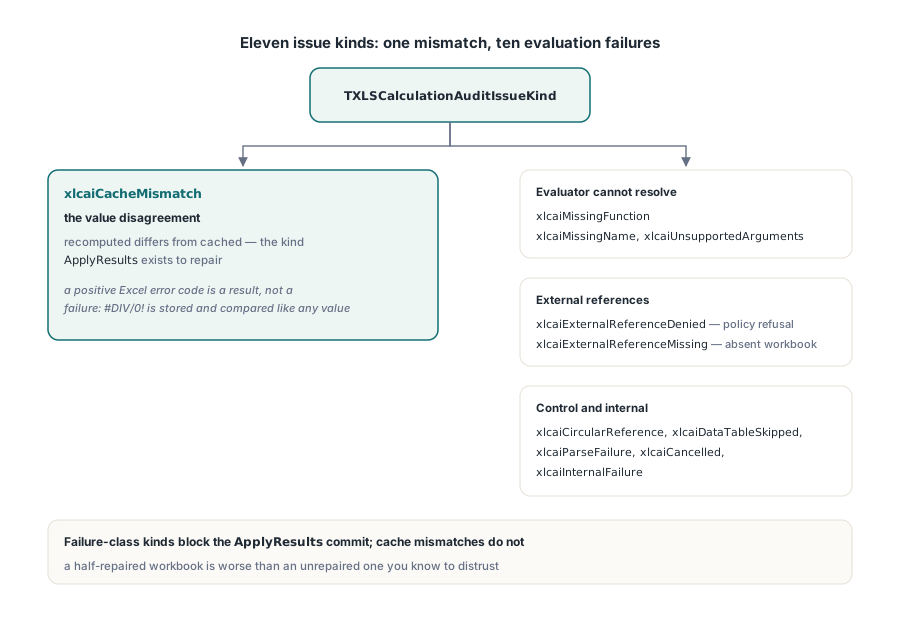
One distinction is worth stating because it inverts a common assumption. A positive Excel error code is a result, not a failure. A cell that legitimately evaluates to #DIV/0! has computed correctly, so the audit stores that error in the overlay and compares it against the cache like any other value. A workbook full of intentional error cells produces zero findings, and a workbook where an error appeared or disappeared since the values were cached produces exactly the findings you want
Circular references get their own treatment. Nodes in a cycle never enter the topological order, so each is reported individually as xlcaiCircularReference, and the audit does not run the iterative solver. That is a deliberate read-only contract: whether iteration is enabled affects how the result code should be interpreted, not what the audit does. The mechanics of iterative evaluation are covered separately in iterative calculation and circular references
Reading a failure chain
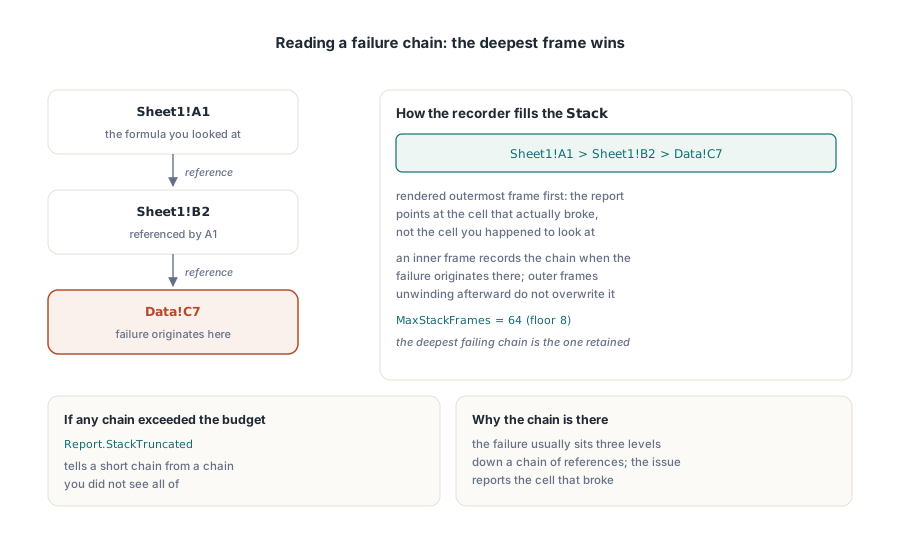
When a formula fails to evaluate, knowing which cell failed is rarely enough, because the failure is usually three levels down a chain of references. Each issue therefore carries a Stack string rendered outermost frame first, in the form Sheet1!A1 > Sheet1!B2 > Data!C7, so the report points at the cell that actually broke rather than the cell you happened to look at
The recorder is bounded. MaxStackFrames defaults to 64 with a floor of 8, and the deepest failing chain is the one retained: an inner frame records the chain when the failure originates there, and outer frames unwinding afterward do not overwrite it. If any chain exceeded the budget, Report.StackTruncated is set, which tells you the difference between a short chain and a chain you did not see all of
// Read-only by default. ApplyResults commits the overlay only after a
// fully successful audit, under a write guard that rejects the commit
// if the workbook structure changed while the audit was running
Options := TXLSRecalcAuditOptions.Default;
Options.ApplyResults := True;
Options.AbsoluteTolerance := 0;     // exact comparison, surfaces drift
Options.RelativeTolerance := 0;
Options.OnProgress := HandleProgress;

Report := Book.CalculateAndVerify(Options);
try
  if Report.Applied then
    Book.SaveAs('quarterly-close-repaired.xls')
  else
    Writeln('not applied: ', Report.Count, ' issues blocked the commit');
finally
  Report.Free;
end;

procedure THarness.HandleProgress(ASender: TObject;
  ACurrent, ATotal: Integer; var ACancel: Boolean);
begin
  ACancel := FUserRequestedStop;   // audit stops at the next node boundary
end;
When should you let the audit repair the workbook?
Only when the audit came back completely clean of failure-class issues, which is precisely the condition ApplyResults enforces for you. The commit happens after a fully successful pass, was not cancelled, and passes a structural guard: the binary engine watches a workbook change identifier, the OOXML engine snapshots a per-worksheet structure generation. If anything moved while the audit was running, the results describe a workbook that no longer exists and the commit is refused
Note the deliberate asymmetry. Cache mismatches do not block the application, because they are exactly what the commit is there to repair. Failure-class issues do block it, because a workbook where some formulas could not be evaluated would be half repaired, and a half-repaired workbook is worse than an unrepaired one that you know to distrust
Tolerance is a policy decision, not a default
The default comparison is a 1E-6 absolute tolerance with relative tolerance disabled, which preserves the classic behavior and quietly accepts a drift of 4E-7. That is usually right: floating-point evaluation order differences between whatever produced the file and the current evaluator will produce differences of that size on long sums, and reporting them as integrity findings is noise
Set both tolerances to zero when the question is different, when you are trying to find out whether an evaluator changed behavior between versions, or whether a third-party tool rewrites values in a subtly different way. At zero, the same 4E-7 drift becomes visible, and so does everything else. Choose the tolerance based on which question you are asking, and record the choice next to the report, because a report without its tolerance is not interpretable
Two neighboring capabilities complete the picture. When you want to know why a single formula produces the value it does, the step-by-step view in the formula evaluation tracer is the right tool. When you deliberately want cached values honored without any recomputation, for example on an intake path that must reproduce the file exactly as it arrived, that mode is described in reading cached formula values without recalculating. The audit is what sits between those two: it tells you whether trusting the cache is safe. It ships with the HotXLS Delphi spreadsheet component for both the binary and OOXML engines