HotXLS, the native Delphi and C++Builder Excel library, reads the value Excel already stored beside a formula through TryGetCachedFormulaValue and IXLSFormulaCacheReader. Neither entry point calls the calculator, decompiles formula tokens, updates dirty state, or writes anything back into the model, so a workbook you only read stays exactly as you opened it
The scenario that drives this is dull and extremely common. A nightly job opens a few hundred workbooks produced by someone else, pulls one column of totals out of each, and pushes the numbers into a warehouse. The totals are already sitting in the files — Excel computed them and saved them. Yet the moment the job asks a formula cell for its value, a library that has only one answer for that question builds a dependency graph and evaluates the whole sheet, and a job that should be I/O bound turns into a calculation benchmark
Why does reading a formula cell cost a full recalculation?
Because a value getter on a formula cell is a request to produce a value, and the only universally correct way to produce one is to evaluate the formula. That is the right default for an application that edits workbooks, and the wrong default for a pipeline that extracts them. Worse, evaluation is not free of side effects: it writes results back into cells, it flips dirty flags, and it can resolve differently from the producing application when a function is unsupported or an external reference is broken. A job you described to your operations team as read-only quietly produces a workbook that no longer matches the one on disk, and if anything later saves it, the file on disk changes too
Cached-value reading is the other half of the contract. It answers a narrower question — what did the producing application store here? — and refuses to answer anything else. When you genuinely want fresh numbers, HotXLS still gives you incremental recalculation driven by a dependency graph; the point is that extraction and evaluation should be two different calls, not one call with two moods
Three orthogonal facts about one cell
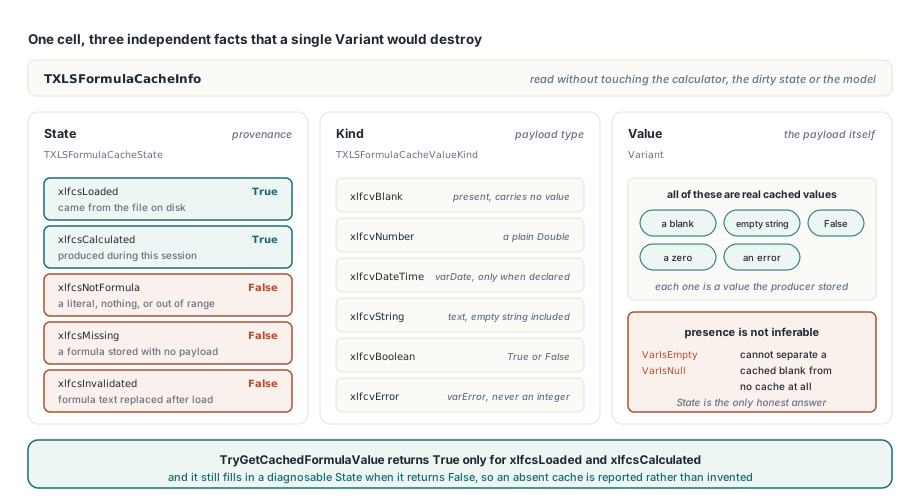
The conclusion first: a cached formula value carries three independent facts, and collapsing them into a single Variant loses information you need. TXLSFormulaCacheInfo keeps them apart as State, Kind and Value. TXLSFormulaCacheState records provenance across five cases — xlfcsNotFormula, xlfcsMissing, xlfcsLoaded, xlfcsCalculated and xlfcsInvalidated — while TXLSFormulaCacheValueKind classifies the payload as xlfcvBlank, xlfcvNumber, xlfcvDateTime, xlfcvString, xlfcvBoolean or xlfcvError. This separation is what lets presence be reported honestly: a cached blank, a cached empty string, a cached False, a cached zero and a cached error are all real values, so presence can never be inferred from VarIsEmpty or VarIsNull. TryGetCachedFormulaValue returns True only for xlfcsLoaded and xlfcsCalculated, and still fills in a diagnosable state when it returns False
var
  Book: TXLSXWorkbook;
  Info: TXLSFormulaCacheInfo;
begin
  Book := TXLSXWorkbook.Create;
  try
    Book.Open('quarterly-model.xlsx');
    // SheetIndex, Row and Col are all 1-based here
    if Book.TryGetCachedFormulaValue(1, 12, 5, Info) then
      Writeln('cached value: ', VarToStr(Info.Value))
    else
      Writeln('no usable cache, state ordinal ', Ord(Info.State));
  finally
    Book.Free;
  end;
end;
Why is the cached value missing?
There are exactly four reasons TryGetCachedFormulaValue hands back False, and the state tells you which one applies. xlfcsNotFormula means the cell holds a literal or nothing at all, and the coordinates being out of range collapses into the same answer. xlfcsMissing means the cell really is a formula but the producer stored no value payload for it — a common outcome when a generator writes formulas and lets Excel fill in results on first open. xlfcsInvalidated means the formula text was replaced after load, so the value that used to be there describes an expression that no longer exists. xlfcsCalculated, by contrast, is a success case: it marks a value your own code or the HotXLS evaluator produced during this session, as opposed to xlfcsLoaded, which came from the file
Honesty about a missing cache matters more than papering over it. HotXLS refuses to invent a value, and on save it is equally strict — only xlfcsLoaded and xlfcsCalculated emit a cached value, while xlfcsMissing and xlfcsInvalidated write the formula alone rather than freezing a stale number into the file. That leaves you three sane responses in a pipeline: skip the row and record the gap, recalculate that one workbook deliberately and accept the cost, or evaluate and reconcile. If the evaluated number disagrees with what the producing application would have written, the formula evaluation tracer is the tool for finding out where the two computations diverge, rather than guessing from the result
One reader across the classic, OOXML and ODF engines
A pipeline should not care whether the file it just opened was BIFF, OOXML or ODF. IXLSFormulaCacheReader is the single read-only entry point for all three: both TXLSWorkbook.CreateFormulaCacheReader and TXLSXWorkbook.CreateFormulaCacheReader return a lightweight adapter over the sparse cell lookup each engine already uses, with identical 1-based sheet, row and column coordinates. The workbook classes deliberately do not implement the interface themselves — an interface reference to the workbook would change its ownership semantics and let callers slip past the lifetime lease. Instead, destroying the workbook clears the raw pointer inside that lease, and any reader still held by your code raises EXLSFormulaCacheReaderInvalidated on its next query instead of dereferencing freed memory. It is fail-fast lifetime checking, not a concurrency guarantee
var
  Reader: IXLSFormulaCacheReader;
  Info: TXLSFormulaCacheInfo;
  Row, Missing, Errors: Integer;
  Total: Double;
begin
  Reader := Book.CreateFormulaCacheReader;
  Total := 0;
  Missing := 0;
  Errors := 0;
  for Row := 2 to LastRow do
    if Reader.TryGetCachedFormulaValue(1, Row, 7, Info) then
    begin
      case Info.Kind of
        xlfcvNumber: Total := Total + Double(Info.Value);
        xlfcvError:  Inc(Errors);
      end;
    end
    else if Info.State = xlfcsMissing then
      Inc(Missing);
  // No calculator ran, no dirty flag moved, Book is unchanged
end;
Where the cached bytes actually live
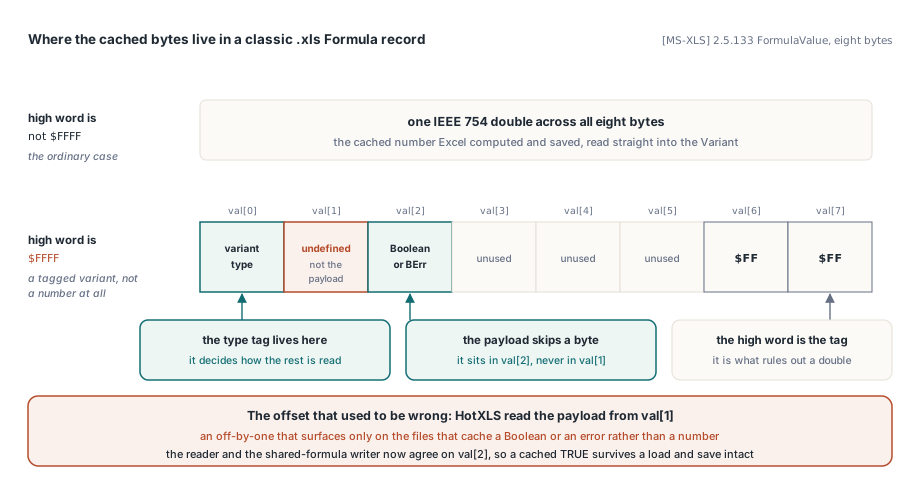
For classic .xls files the cache is the FormulaValue field of the Formula record, eight bytes described by [MS-XLS] §2.5.133. When the high word equals $FFFF the payload is not an IEEE 754 double but a tagged variant, and the layout is easy to get subtly wrong: the variant type sits in val[0] and the boolean or BErr payload sits in val[2], with val[1] undefined. HotXLS previously read the payload from val[1], which is the kind of off-by-one that surfaces only on the specific files that cache a boolean or an error rather than a number. The reader and the shared-formula writer now agree on the same offsets, so a cached TRUE survives a load and save intact instead of decaying into noise
Type fidelity in the package formats is a separate problem with its own trap. In OOXML the cached value hangs off the c element as <v>, with the t attribute naming the type per ECMA-376 Part 1 §18.3.1.4. HotXLS reads t="e" straight into a varError Variant and maps it back to the standard error text on save, so errors never masquerade as ordinary integers — but the Delphi RTL will not help you here, because VarAsType(Integer, varError) raises a conversion exception. The working construction sets TVarData.VType and TVarData.VError directly. Dates follow the same discipline in the opposite direction: t="d" and the ODF date value type are explicit type declarations and become varDate, while a BIFF numeric cache carries no date flag at all and therefore stays a Double. HotXLS never guesses a date from a cell number format, because the number format is presentation and the cache is data. ODF adds one more case worth knowing — office:value-type="void" expresses a cache that is present but carries no value, and since ODF has no error value type, error-looking text is preserved as text rather than promoted to an error
function DescribeCache(const Info: TXLSFormulaCacheInfo): string;
begin
  case Info.State of
    xlfcsNotFormula:  Result := 'not a formula cell';
    xlfcsMissing:     Result := 'formula stored with no cached value';
    xlfcsInvalidated: Result := 'formula replaced since load';
  else
    case Info.Kind of
      xlfcvError:    Result := 'error code ' + IntToStr(TVarData(Info.Value).VError);
      xlfcvDateTime: Result := DateTimeToStr(VarToDateTime(Info.Value));
      xlfcvBoolean:  Result := BoolToStr(Info.Value, True);
      xlfcvNumber:   Result := FloatToStr(Double(Info.Value));
      xlfcvString:   Result := VarToStr(Info.Value);
    else
      Result := 'present but blank';
    end;
  end;
end;
Do shared formulas share their cached values?
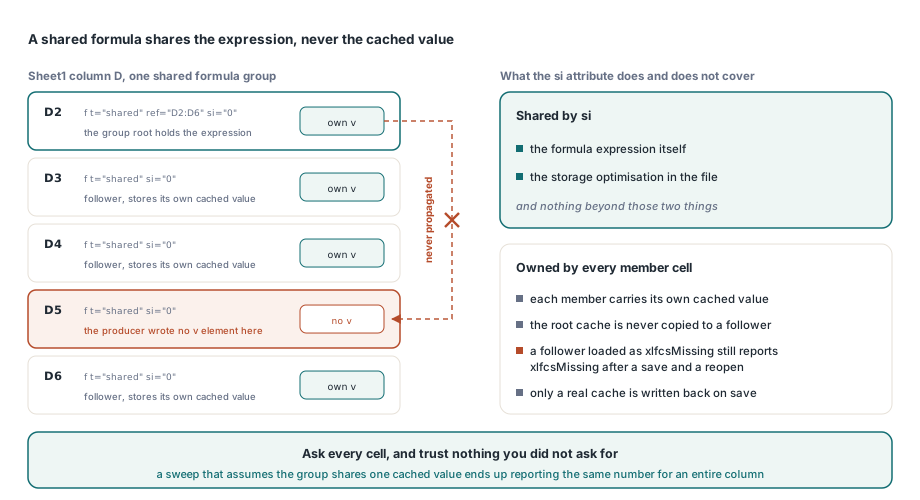
No, and assuming otherwise is how a sweep ends up reporting the same number for an entire column. An OOXML shared formula shares the formula expression and the storage optimization only; every member cell still owns its own <v>. HotXLS therefore never propagates the root member cache to a follower that arrived without a value, and a follower that loaded as xlfcsMissing still reports xlfcsMissing after a save and reopen. If you are working through how the group is stored and expanded in the first place, the mechanics of the shared formula si attribute and its expansion are covered separately; for cache reading, the rule reduces to one line — ask every cell, trust nothing you did not ask for
Cached-value reading, the unified cross-engine reader and the recalculation engine you can choose not to invoke all ship in the standard HotXLS Delphi Spreadsheet Component for Delphi and C++Builder, with no dependency on Excel or on any OLE automation server; the product page carries the full API reference for the workbook and reader entry points shown here