HotXLS's AddCopy method copies a worksheet from one Excel workbook into another by decompiling every formula on that sheet into A1-style text and recompiling the text inside the destination workbook, rather than copying the compiled formula tree directly, because chart series references, rich text font indices, and external-link numbering are all assigned independently inside every workbook file
The failure shows up in exactly the workbook you would expect: a month-end job that pulls one sheet out of every branch office's report and appends it to a summary file. Open the result and a subtotal chart plots a completely different branch's numbers, a note that was bold and red in the source is back to plain black text, and a formula that once pulled a tax rate from a companion lookup workbook now shows a frozen number nobody can explain. Nothing throws an exception here — the file opens, the numbers look plausible, and the damage sits there until someone notices a chart with the wrong title sitting next to it
Why can't AddCopy just copy the compiled formula tree?
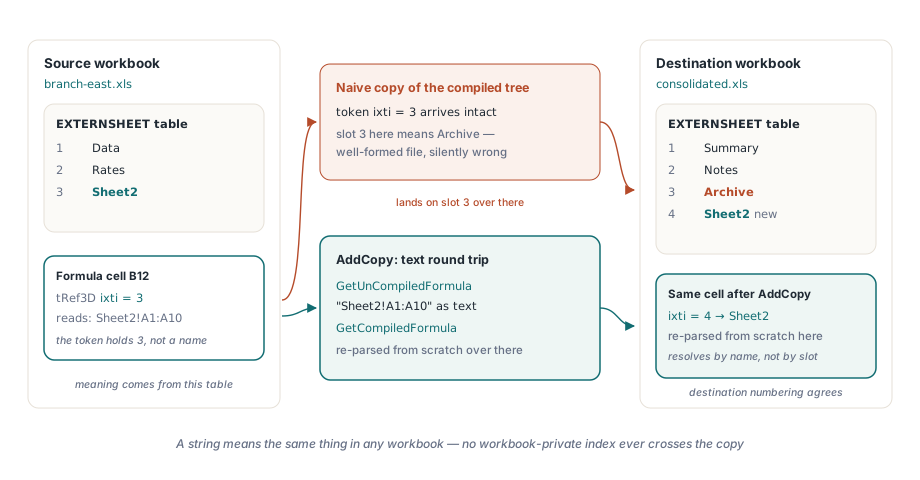
AddCopy cannot move the compiled formula tree unchanged, because a compiled BIFF formula is not free-standing text — it is a sequence of tokens, and several of those tokens are small integers that only resolve correctly inside the workbook that produced them. A 3D reference such as Sheet2!A1:A10 does not carry the literal name Sheet2 once it is compiled; it carries a field the BIFF spec calls ixti (HotXLS keeps the same value in its own compiled tree under the field name FExternID), an index into that workbook's private EXTERNSHEET table, numbered however that particular workbook happened to register its sheets and external books. Move the token unchanged into a workbook whose EXTERNSHEET table was built in a different order and index 3 no longer means Sheet2 — it means whatever sheet happens to occupy slot 3 over there, and Excel has no way to flag the mistake, because as far as the file format is concerned the formula is perfectly well-formed. This is exactly the failure TXLSWorksheets.AddCopy exists to avoid: called from either workbook's own sheet collection in Delphi or C++Builder code, it copies a worksheet — cell values, formats, formulas, charts, comments, merges, page setup, and more — from a source workbook that may or may not be the one you are calling it on, and appends the result to the destination under a name you choose or a disambiguated copy of the original
var
  Summary, Branch: IXLSWorkbook;   // interface-counted: do not Free
begin
  Summary := TXLSWorkbook.Create;
  Branch := TXLSWorkbook.Create;
  Branch.Open('branch-east.xls');

  // Appends a copy of Branch's first sheet onto Summary, renamed to
  // stay unique inside the destination workbook
  Summary.Sheets.AddCopy(Branch.Sheets[1], 'East Detail');
  Summary.SaveAs('consolidated.xls');
end;
The fix: decompile to text, recompile in the destination
HotXLS solves the indexing problem by never letting the compiled tree itself cross the workbook boundary. For every formula cell on a cross-workbook copy, AddCopy decompiles the source formula into the same A1-style text a user would see in Excel's formula bar, then hands that text to the destination workbook, which parses it back into a tree using its own tables from scratch — a sheet-qualified reference such as Data!D2:D100 is just a string at that point, and a string means the same thing in any workbook, so if the destination already has a sheet named Data the reference resolves correctly with no index translation at all, because there was never a raw index in flight to translate. HotXLS only pays for this round trip when it has to: copying a sheet inside the same workbook takes a cheaper path where the compiled tree is simply duplicated in memory, since every index inside it is already valid where it is staying, and the text detour runs only once AddCopy detects that the source and destination are genuinely different workbook instances. It is worth being precise about what this rewrite is not, too. It has nothing to do with the row and column shifting that runs when you insert or delete rows inside a single sheet, which a companion article covers in detail — that engine rewrites A1 text in place to track cells that moved a few rows up or down within one workbook, while this one runs when a formula leaves the workbook that compiled it altogether, where moved rows are not the problem and workbook-private numbering is
// Conceptually, this is what AddCopy does for each formula cell: turn
// the compiled tree back into text using the source workbook's own
// tables, then let the destination workbook parse that text back into
// a tree using its own tables, from scratch
FormulaText := SourceBook.GetUnCompiledFormula(SourceFormula, Row, Col, SourceSheetID);
DestFormula := DestBook.GetCompiledFormula(FormulaText, DestSheetID);
What if the destination doesn't have that sheet, or that name, yet?
AddCopy's recompile only succeeds when the destination workbook already has everything the formula text refers to, and the two gaps that show up in practice are a same-named sheet that has not been copied over yet in this batch, and a workbook-scoped defined name that has never existed in the destination at all. HotXLS does not raise an exception when recompilation fails partway through a sheet copy — the cell's Value assignment quietly stores the formula text as a plain string instead, a deliberate, inspectable failure mode rather than a silent one, since a formula cell that unexpectedly shows literal text like =SUM(Q1!B2:B12) instead of a computed number is the tell that something upstream in the copy did not resolve. Before giving up, AddCopy tries one repair: it walks the failed formula's syntax tree collecting every defined-name ID the formula touches, and for each workbook-scoped name that exists in the source but not yet in the destination, it copies the name across and recompiles the same text a second time. Sheet-scoped names sit outside what this repair can fix, since a name visible only to formulas on one sheet of the source workbook has no equivalent slot to migrate into, and a destination that already owns a name with the same spelling is left untouched rather than overwritten, on the assumption that a name the caller deliberately pre-created is the one they want honored. Inside a single workbook, a cross-sheet formula's name lookup walks from sheet scope up to workbook scope automatically, which is the mechanism HotXLS's defined names and cross-sheet formulas article covers; crossing an actual workbook boundary removes that safety net entirely, and a name has to be deliberately carried across or the formula that depends on it degrades to text
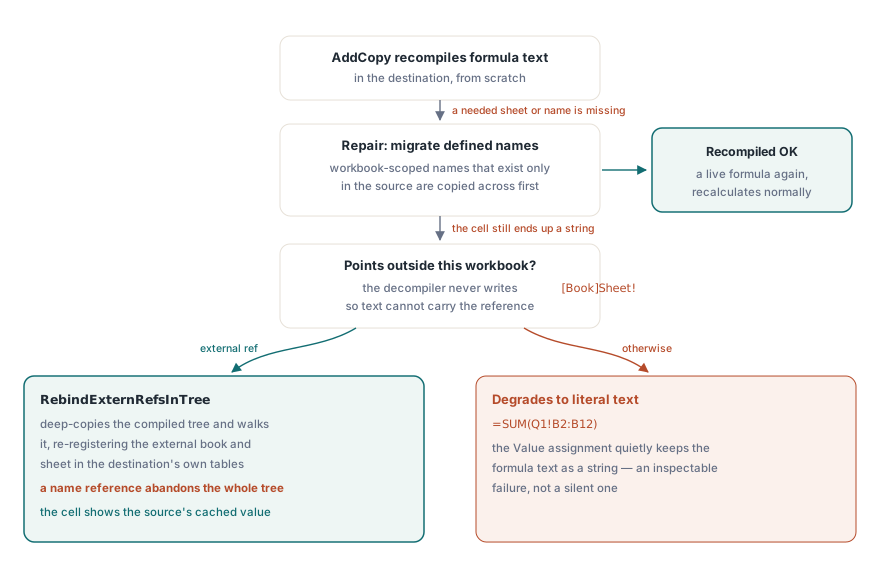
Chart series references need the same fix, but a different code path
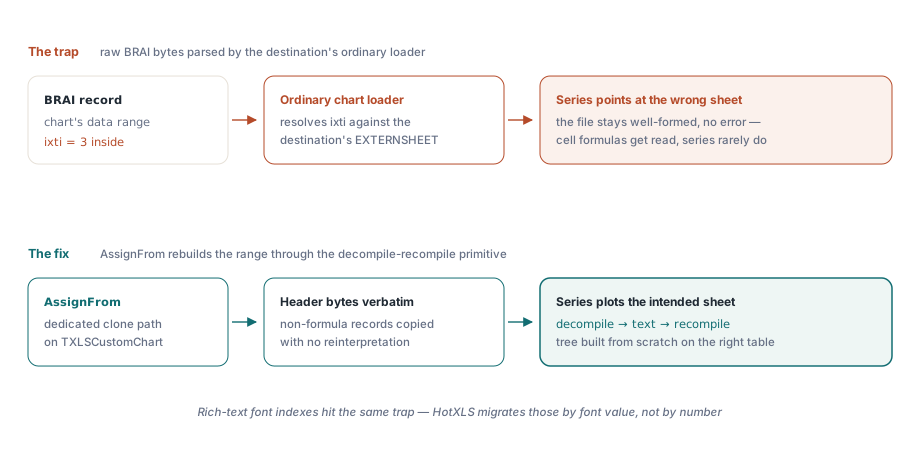
A HotXLS chart series that plots a cell range hits precisely the same numbering problem as an ordinary cell formula, because a chart's data-range reference is a compiled formula token stream too — the BIFF spec calls the record that carries it BRAI ([MS-XLS] section 2.4.51) — but AddCopy cannot fix it by reusing the normal chart-loading path, because that path is exactly what creates the bug. When a chart record is parsed off disk in the ordinary course of opening a file, its formula tree is built by translating the raw bytes through whatever calculator instance is doing the parsing; feed a source chart's raw BRAI bytes through the destination workbook's own ordinary record loader instead, and the ixti embedded in those bytes gets resolved against the destination's EXTERNSHEET table, so the series silently points at whatever sheet occupies that slot over there — the same class of mistake as copying a cell's compiled tree unchanged, just harder to notice because nobody reads chart series formulas the way they read cell formulas. HotXLS avoids the trap with a dedicated clone path instead: TXLSCustomChart.AssignFrom copies each chart record's own non-formula header bytes verbatim, then rebuilds the attached range through the same decompile-and-recompile primitive used for ordinary cells, so the new tree is constructed against the destination's EXTERNSHEET table from scratch rather than reinterpreted against it after the fact
The same numbering problem, one font index at a time
Not every workbook-local number inside a chart or a rich-text cell is a formula, and a font index is the same class of problem in miniature. Rich text runs, along with two more chart record types that carry a caption or axis font, store a font reference as a raw integer index into the owning workbook's own font table, and that index means nothing in a different workbook's table — it could just as easily point at a completely different typeface, size, or color over there. HotXLS resolves this by value rather than by number: it looks up the actual font attributes at that index in the source table, finds or creates a matching entry in the destination's font table, and rewrites the stored index to point at that new slot. One format quirk makes the lookup itself fiddly — the on-file index skips slot 4, a numbering gap [MS-XLS] section 2.5.339 documents, so the code has to shift the index down by one before comparing fonts and back up by one before writing the result
// The file-numbered font index skips slot 4 (MS-XLS section 2.5.339);
// shift into the in-memory slot, migrate the font by value if the
// destination differs, then shift back before writing the result
if Ifnt >= 5 then
  Dec(Ifnt);
if DestFonts.Key[Ifnt] <> SourceFonts.Key[Ifnt] then
  Ifnt := DestFonts.SetKey(0, SourceFonts.Key[Ifnt]);
if Ifnt >= 4 then
  Inc(Ifnt);
What happens to a formula that already points outside the workbook?
A formula that reaches into a third workbook before you ever call AddCopy is the one case the text round trip cannot carry, because HotXLS's own formula-to-text decompiler deliberately does not synthesize [Book]Sheet! bracket text for an external reference, and the compiler on the other end does not accept that syntax as input either — so this one case runs through a second mechanism that never touches text at all. When the name-migration repair described above still leaves a cell as a string, and the source workbook has a real file name, AddCopy switches strategy: it deep-copies the compiled formula tree itself rather than its text, then hands the copy to a dedicated rebinding pass, RebindExternRefsInTree, that walks it node by node. For every range reference it finds, that pass resolves the source's EXTERNSHEET entry back into a pair of sheet names, and registers, or reuses, an equivalent entry in the destination's own external-reference tables, creating a brand-new external-workbook link if the destination has never referenced that source file before
This is where the workbook-local numbering problem is at its most literal, because an external reference token bundles three separate coordinates into one field and every one of them is private to the workbook that wrote it: which external workbook, a slot in the destination's own list of external books assigned in whatever order that workbook happened to register them; which sheet inside that external workbook's own sheet list, stored as a 1-based index scoped to the external book specifically, a different numbering domain entirely from the destination's own internal sheet IDs; and the cell range itself, plain row and column coordinates that need no translation because they were never workbook-relative in the first place. Get either of the first two wrong and Excel still opens the file, still shows a formula, and evaluates it against the wrong external cells without complaint. One kind of node defeats even this tree-level rebind: a reference to a defined name, an index into its own workbook's private name table exactly the way a sheet index is private to its own EXTERNSHEET, with no equivalent tree-level repair available — the moment the rebinding walk meets a name reference anywhere in the tree, it abandons the whole formula rather than write out a partially correct one. Even when the rebind does succeed, the destination cell does not show a freshly recalculated number; it shows the value the source cell already held at copy time, kept in a cached slot the same way Excel itself caches the last-known value of any external reference until you explicitly refresh links, which is the right default, since recomputing across a live link into another file is exactly the kind of operation you want to trigger once, deliberately, rather than on every open
What this design costs you
AddCopy's decompile-and-recompile machinery is not free, and the cost is worth planning around before you script a large consolidation job rather than after. Copying a sheet within the same workbook takes the cheap path, a straight in-memory duplication of the compiled tree, because every index inside it is already valid in the workbook it is staying in; a cross-workbook copy pays for a genuine parse on every formula cell instead, decompile to text and then compile that text again from nothing, and while the difference is not worth measuring on a sheet with a few dozen formulas, a source workbook with tens of thousands of formula cells, copied as one sheet among dozens in a batch job, should expect the recompilation to dominate the run time rather than the file I/O around it. Copy order matters for a second reason beyond speed: a formula that references a sheet AddCopy has not reached yet in this batch fails its recompile for the same reason a formula referencing a genuinely nonexistent sheet does, so a job that copies sheet B before the sheet A formula that depends on it will see that formula degrade exactly as described above, string text or an external-link fallback pointing right back at the source file it just came from. And because each source workbook in a consolidation batch is usually authored independently, it is worth explicitly testing for the one failure mode no single source file could ever have warned you about — five branch workbooks that each total a peer branch's numbers can combine into a genuine circular reference inside the summary workbook without any individual source file ever containing one, a cycle that only exists once every sheet has landed in the same place and recalculation runs over the combined set
Cross-workbook worksheet copying ships as standard behavior of AddCopy in the HotXLS Delphi Excel Component for Delphi and C++Builder; the product page carries the full worksheet and workbook API reference, including the chart, rich-text, and external-reference behavior described here