A reconciliation tool finds 3,000 cells that disagree with the ledger and wants the saved .xls to open with every one of them selected under a frozen header row. On paper that is one Selection record. In bytes it is 9 + 3,000 × 6 = 18,009, and a BIFF8 record body stops at 8,224. The same workbook raises a second question that sounds trivial and is not: on a sheet frozen at B2, "the scroll position" is four panes sharing two row offsets and two column offsets, and those four numbers live in two different records
Both problems are format arithmetic: the selection is cut into records a reader must stitch back together, the pane is named by a code that does not follow reading order, and each scroll axis lands in the record Excel reads it from
Why 3,000 selected areas need three Selection records
[MS-XLS] §2.4.248 lays out the Selection record (0x001D) as a 9-byte fixed part followed by the areas. The fixed part holds the pane byte, rwAct and colAct for the active cell, irefAct for the index of the active area, and cref for the area count. Each area is a RefU structure with two 16-bit rows and two 8-bit columns. The largest count that fits is (8,224 − 9) / 6 rounded down, which gives 1,369 areas and an 8,223-byte body, one byte under the cap
HotXLS uses 1,369 as its per-record ceiling. When TXLSWorksheet saves a selection group with more areas than that, it writes consecutive Selection records for the same pane, 1,369 areas at a time, and each record repeats the same pane byte, active cell and active index. The 3,000-cell reconciliation selection comes out as three records holding 1,369, 1,369 and 262 areas. Callers never see that split; they hand over an array of A1 references
var
  Book: TXLSWorkbook;
  Sheet: TXLSWorksheet;
  Diffs: TXLSSelectedAreas;
  I: Integer;
begin
  Book := TXLSWorkbook.Create;
  try
    Sheet := Book.Sheets.Add;
    Sheet.FreezePanes(1, 1);           // header row and column A stay put

    SetLength(Diffs, 3000);
    for I := 0 to High(Diffs) do
      Diffs[I] := Format('C%d', [I + 2]);

    // FreezePanes clears the stored selection, so select after freezing.
    // 3000 areas are saved as three Selection records: 1369 + 1369 + 262
    if not Sheet.SelectAreas(xlspBottomRight, Diffs, 0) then
      raise Exception.Create('Selection rejected');

    Book.SaveAs('reconciliation.xls');
  finally
    Book.Free;
  end;
end;
Call order matters here. FreezePanes rebuilds the pane layout and clears every per-pane selection the sheet was carrying, so an earlier selection would be gone by save time. On an unfrozen sheet the bottom-right pane does not exist yet, and the same SelectAreas call would simply return False. Freeze, then select
What does irefAct point at when a selection spans several records?
In a split selection, irefAct indexes the whole aggregated sequence of areas across all chunks, and every chunk carries the same value. A selection one area past the limit makes this concrete: 1,370 areas with the last one active become two records, the first with cref 1,369 and the second with cref 1, and both carry irefAct 1,369. In the second record that index is larger than the record's own area count. That looks broken if you read one record at a time, and two kinds of reader trip over it
- A reader that checks
irefActagainstcrefinside each record rejects a perfectly valid file at the second chunk - A reader that replaces its selection state on every Selection record keeps only the last chunk and drops the first 1,369 areas
The HotXLS reader appends consecutive records for the same pane into one group and requires every chunk to agree on the active row, active column and irefAct. The range check on irefAct, and the check that the active cell really sits inside the area it points at, run only when the worksheet's EOF record arrives and the full sequence is known. Checking earlier would be simpler code and the wrong answer for any selection over 1,369 areas
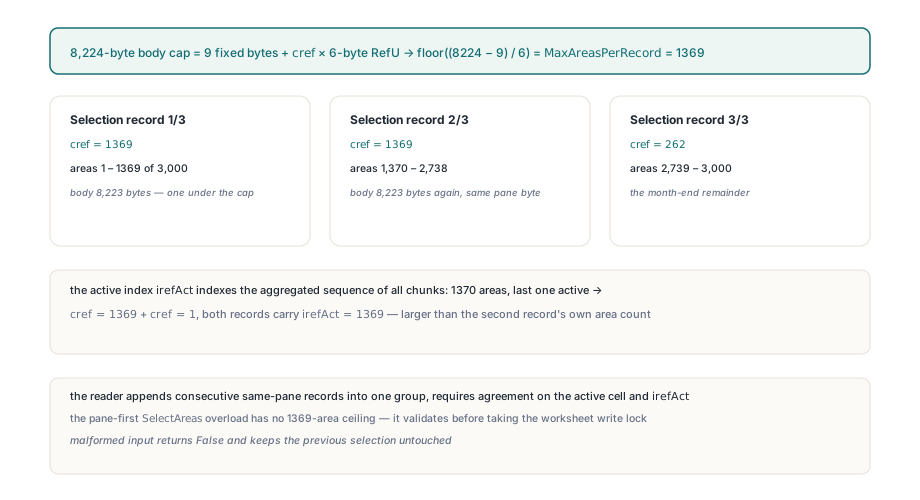
On the writing side, the pane-first SelectAreas overload has no 1,369-area ceiling of its own. It parses every reference before touching the sheet: $ markers are accepted and stripped, a reversed range such as C9:A2 is normalized to A2:C9, and an empty or unparsable entry fails the whole call. The active index has to fall inside the array and stay at or below 32,767, because irefAct is a signed 16-bit field. Any failure returns False and leaves the previous selection exactly as it was
Pane codes do not follow reading order
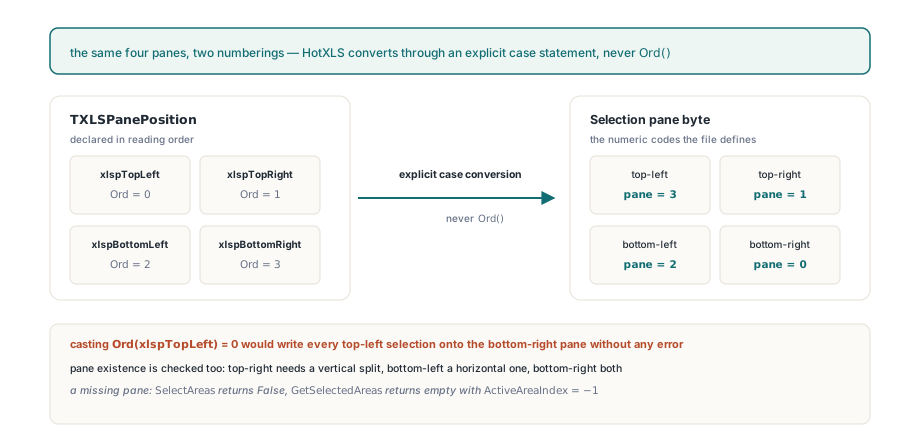
A Selection record names its pane with the numeric code the format defines: 0 for bottom-right, 1 for top-right, 2 for bottom-left and 3 for top-left. The public enumeration TXLSPanePosition is declared in reading order, xlspTopLeft, xlspTopRight, xlspBottomLeft, xlspBottomRight. So Ord(xlspTopLeft) is 0, and 0 in the file means bottom-right. A writer that casts the enum straight into the pane byte puts every top-left selection on the bottom-right pane, and the file stays structurally valid because both are legal pane codes
Every pane-aware entry point in HotXLS converts the enum through an explicit case statement, so application code never handles the numeric codes. Pane existence is checked against the current freeze or split geometry as well. The top-left pane always exists. Top-right needs a vertical split, bottom-left a horizontal one, and bottom-right both. For a pane the sheet does not have, SelectAreas returns False and GetSelectedAreas returns an empty array with ActiveAreaIndex set to -1, and neither call creates a pane, a selection or a cell along the way
The worksheet also keeps the older two-argument SelectAreas(Areas, ActiveAreaIndex), which writes to whichever pane is currently active and returns an Integer status. On a sheet with frozen panes that is often a guess about state you did not set yourself. Use the overload that takes a TXLSPanePosition first for anything that runs on frozen or split sheets; the pane is then part of the call, and a False result tells you the geometry and the request disagree. Reading the result back follows the same shape:
var
  Areas: TXLSSelectedAreas;
  Active: Integer;
begin
  Areas := Sheet.GetSelectedAreas(xlspBottomRight, Active);
  if Active < 0 then
    Memo1.Lines.Add('No usable selection on the bottom-right pane')
  else
    Memo1.Lines.Add(Format('%d areas, active area %s',
      [Length(Areas), Areas[Active]]));
end;
Where does each pane's scroll position live?
The scroll position of each pane is split across two records, because four panes share only two row positions and two column positions. In a classic workbook the upper panes' first visible row and the left panes' first visible column are Window2.rwTop and Window2.colLeft. The lower panes' row and the right panes' column are Pane.rwTop and Pane.colLeft. Top-right therefore takes its row from Window2 and its column from Pane, and bottom-left does the reverse
ScrollWindow and TryGetWindowScroll follow that layout exactly and use 1-based row and column numbers. ScrollWindow(xlspTopRight, R, C) writes Window2.rwTop and Pane.colLeft, which means setting the top-right column also moves the bottom-right pane. That matches Excel, where the two right-hand panes share one horizontal scrollbar. A missing pane makes ScrollWindow return False and makes TryGetWindowScroll set both outputs to zero. An out-of-range row or column is rejected before either axis changes, so a bad column cannot leave a half-applied row behind
var
  Row, Col: Integer;
begin
  Sheet.FreezePanes(1, 1);

  // Bottom-right: lower row axis (Pane.rwTop) and right column axis (Pane.colLeft)
  Sheet.ScrollWindow(xlspBottomRight, 500, 3);

  // Top-right shares the right column axis, so this also moves bottom-right to column 6
  Sheet.ScrollWindow(xlspTopRight, 1, 6);

  if Sheet.TryGetWindowScroll(xlspBottomRight, Row, Col) then
    Memo1.Lines.Add(Format('Bottom-right starts at row %d, column %d', [Row, Col]));
    // Bottom-right starts at row 500, column 6
end;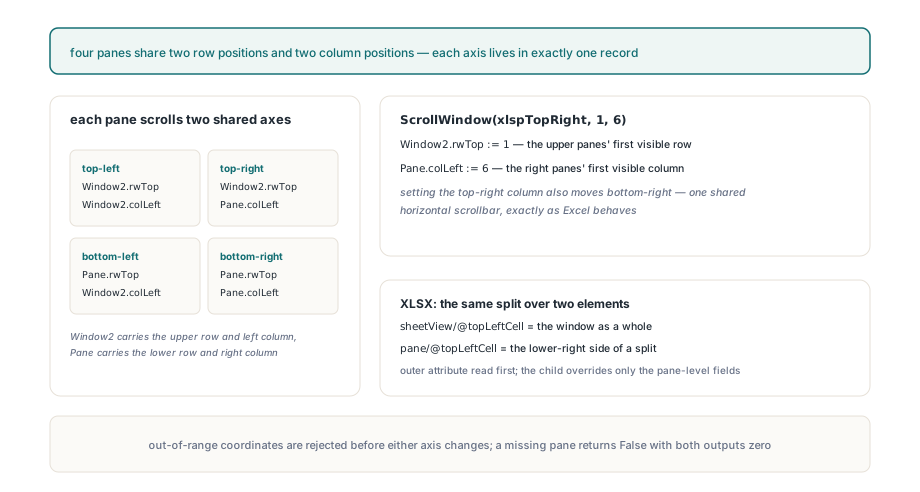
XLSX stores the same two layers in two elements: sheetView/@topLeftCell (ECMA-376 Part 1, §18.3.1.87) for the window as a whole and the child pane/@topLeftCell (§18.3.1.66) for the lower-right side of a split. Both attributes can be present at once. A loader that keeps only one of them loses either the upper rows or the left columns of every frozen sheet it touches. TXLSXWorksheet reads the outer attribute into the window-level fields first, lets the pane child override only the pane-level fields, and writes both back separately. ScrollWindow and TryGetWindowScroll have the same signatures and meaning on TXLSXWorksheet, and copying a worksheet carries both layers in either format
The narrower properties are still there for code that only needs one axis pair: ScrollRow and ScrollColumn on the classic worksheet, and the zero-based SetPaneScroll and GetPaneScroll for the bottom-right pane on XLSX. A rendering control keeps its own TopRow and LeftCol, as the article on rendering workbooks in a custom VCL grid describes, and that runtime state is separate from what gets saved. The freeze and split geometry itself is set with the sheet-level settings covered in sheet protection, page setup, and printing
Corrupt Selection records are kept byte for byte
When a Selection record is malformed, HotXLS keeps its body as opaque bytes, reports diagnostic code 1304 (xlsDiagnosticSelectionRecordInvalid) as a warning, and writes the original body back unchanged on save. Files from unknown exporters or hand-rolled BIFF writers can contain such records. Before a record joins its pane's group, the reader checks for a pane byte of 3 or less, contiguous records per pane, cref between 1 and 1,369 with a body of exactly 9 + cref × 6 bytes, chunks that agree on the active cell and an irefAct without its sign bit, an active column on the grid, and no reversed areas. Problems inside one physical record are reported once per record; contradictions that only show up after aggregation, such as irefAct pointing past the total area count or an active cell outside the indexed area, are reported once per group at EOF
An invalid group stays out of the typed API: GetSelectedAreas returns an empty array with index -1 for that pane, and the other panes keep working normally
var
  I: Integer;
  D: TXLSDiagnostic;
begin
  if Book.Open('supplier-upload.xls') <> 1 then
    Exit;
  for I := 0 to Book.Diagnostics.Count - 1 do
  begin
    D := Book.Diagnostics[I];
    if D.Code = xlsDiagnosticSelectionRecordInvalid then
      // Log is your own TStrings; HotXLS only fills Diagnostics
      Log.Add(Format('%s: record $%.4x kept opaque (%s)',
        [D.SheetName, D.RecordId, D.Message]));
  end;
end;
Repairing the record, by clamping irefAct or dropping the reversed area, was the other option. Preserving it is the safer default: a repaired selection is one nobody chose, and the original bytes would be gone. The diagnostic message names the check that failed, such as "the area count does not match the record length" or "records for the same pane are not contiguous", and RecordId is always $001D for this code
Row and column inserts remap every pane's selection
Inserting or deleting whole rows or columns remaps the selection of every pane through one shared routine, in both the classic and the XLSX engine. Surviving areas keep their order and shift with the cells they cover, and the active area keeps its identity. If the active area is deleted, the first surviving area after it becomes active; if nothing follows, the last surviving area before it does. If every area is deleted, the group collapses to a single cell at the deletion boundary. An active cell that no longer falls inside the chosen area moves to that area's top-left corner, so the index and the coordinate can never contradict each other in the saved file
Groups that were flagged invalid on load are left alone by the remapper, so their original bytes still round-trip after the edit. Changing the selection on one pane rewrites only that pane's records and leaves the other panes' records byte-identical. ODS files carry no pane selection state at all, because OpenDocument has no equivalent per-pane worksheet view structure; selections and pane scroll positions apply to XLS and XLSX
If your application saves workbooks that people open to review flagged cells, pick up where they left off, or read a frozen dashboard, the pane-aware selection and scroll calls ship with the HotXLS Delphi spreadsheet component and behave the same way for .xls and .xlsx output