HotXLS ships TXLSWorkbookViewer, a native VCL control that renders XLS, XLSX, XLSM, and ODS workbooks as an interactive spreadsheet grid inside a Delphi or C++Builder form, without installing Excel or driving it through OLE automation. Building that kind of control well means solving three specific problems: mapping a mouse click that lands inside a merged cell to the correct logical cell, keeping scroll position, header bands, and cell selection consistent as a user pans a sheet far larger than the visible window, and deciding what a click on a comment marker or a hyperlink cell should actually do
Most Delphi shops reach for a spreadsheet viewer for reasons that have nothing to do with editing: an audit station that previews uploaded workbooks before they enter a pipeline, a kiosk or report viewer where Microsoft Office is not part of the deployment image, or a QA tool that needs to show a workbook's contents without the unpredictability of automating a real Excel process over COM. A plain string grid gets you text in cells quickly, but a spreadsheet file is not a plain grid: cells merge into blocks that only exist once in the underlying model, sheets carry fixed header bands and independent horizontal and vertical scroll positions, and individual cells carry comments and hyperlinks that need their own interaction model. TXLSWorkbookViewer is HotXLS's answer to that gap, and its internal design is a reasonable blueprint for anyone building a similar control from scratch
How does a workbook viewer avoid depending on Excel?
TXLSWorkbookViewer avoids Excel entirely by reading through HotXLS's own parsed object model rather than opening a document through Excel and puppeteering it. The Workbook property binds an existing TXLSWorkbook for classic XLS files, and XlsxWorkbook binds a TXLSXWorkbook for XLSX, XLSM, and template variants; either one can already be open elsewhere in the application, and the viewer only reads from it. When the control should own the file itself, LoadFromFile inspects the extension, routes XLSX, XLSM, XLTX, XLTM, and ODS through the modern engine and everything else through the classic one, and frees whichever workbook it created once the control is cleared or destroyed
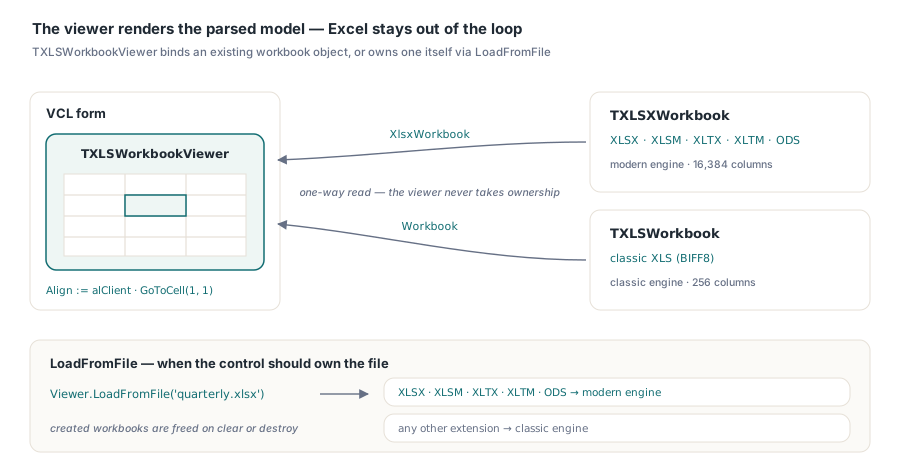
var
  Viewer: TXLSWorkbookViewer;
  Book: TXLSXWorkbook;
begin
  Book := TXLSXWorkbook.Create;
  if Book.Open('quarterly-report.xlsx') <> 1 then
    raise Exception.Create('Could not open workbook');

  Viewer := TXLSWorkbookViewer.Create(Self);
  Viewer.Parent := Self;
  Viewer.Align := alClient;
  Viewer.XlsxWorkbook := Book;        // the viewer does not take ownership
  Viewer.GoToCell(1, 1);

  Caption := Viewer.WorksheetName + ': ' + Viewer.SelectedCellText;
end;
Locating the right cell inside a merged range
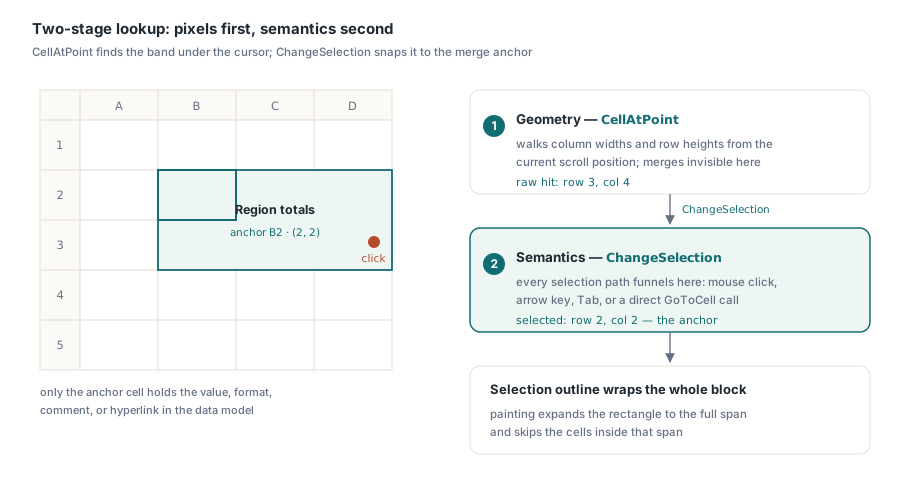
Resolving a click to the correct cell in TXLSWorkbookViewer is a two-stage lookup, and the split matters because pixel geometry and spreadsheet semantics are genuinely different problems. The first stage is pure geometry: a private CellAtPoint method walks column widths and row heights from the current scroll position until it finds the band that contains the clicked X and Y coordinate, with no awareness of merged cells at all. The second stage is semantic: every path that changes the selection, a mouse click, an arrow key, Tab, or a direct call to GoToCell, funnels through one internal ChangeSelection routine, which normalizes the raw row and column against any merge and snaps them to the merge's anchor cell before the selection actually changes
The anchor is the top-left cell of the merged range, and it is the only cell in that block that genuinely holds a value, a format, a comment, or a hyperlink in the underlying workbook model; every other cell the merge visually covers is empty in the data itself. For classic XLS workbooks the anchor comes from Cell.MergeArea, an IXLSRange whose Row and Column point at the owning cell; for XLSX and ODS workbooks, MergedCells.FindAt returns a TXLSXMergedRange exposing the same anchor as Row1 and Col1. Painting solves an equivalent problem independently, expanding a merged cell's rectangle to its full row and column span and skipping the cells inside that span, so the selection outline wraps the entire merged block rather than just its anchor corner, and writing merged layouts rather than just reading them back is a related but distinct problem covered in the companion article on merged-cell layout for report templates
var
  Sheet: TXLSXWorksheet;
begin
  Sheet := Book.Sheets.Add('Summary');
  Sheet.MergeCells(2, 2, 3, 4);       // B2:D3
  Sheet.Cells[2, 2].Value := 'Region totals';

  Viewer.XlsxWorkbook := Book;
  Viewer.GoToCell(3, 4);              // targets the bottom-right corner of the merge
  // SelectedRow is now 2 and SelectedCol is now 2: normalized to the anchor cell
end;
What keeps scrolling, headers, and selection in sync?
TXLSWorkbookViewer keeps three separate pieces of state coherent: the logical scroll position held in TopRow and LeftCol, the native Windows scrollbars the control requests through WS_HSCROLL and WS_VSCROLL in CreateParams, and the current selection in SelectedRow and SelectedCol. Dragging a scrollbar or spinning the mouse wheel fires WM_HSCROLL, WM_VSCROLL, or WM_MOUSEWHEEL, which update TopRow or LeftCol and repaint; the selection does not move, which matches how Excel itself separates panning from selecting. After any of those updates, UpdateScrollBars pushes the new position back into the native scrollbar through SetScrollInfo, so the thumb never drifts out of agreement with what the grid is actually showing
Keyboard navigation runs the same synchronization in the opposite direction: moving the selection past the edge of the visible grid calls EnsureSelectionVisible, which nudges TopRow or LeftCol by accumulating actual column widths and row heights rather than simply incrementing by one, since rows and columns can carry custom sizes, and then calls UpdateScrollBars so the thumb reflects wherever the keyboard just took the view. The row-number and column-letter header bands, sized through RowHeaderWidth and ColumnHeaderHeight, are the part of this control that stays fixed on screen while TopRow and LeftCol scroll the data underneath, and that is the extent of freezing this control does on its own: it is not Excel's Freeze Panes feature, and there is no built-in way to pin an arbitrary data row or column while the rest of the sheet scrolls past it. One boundary worth testing before shipping a viewer over files you do not fully control is that TopRow and LeftCol are not clamped against the worksheet's actual used range, so a thumb dragged to its structural limit can land on row 1,048,576 or column 16,384 and show a blank grid instead of the last row or column that actually holds data; workbooks large enough to make that noticeable are usually also large enough to need the loading-side attention covered in the large workbook performance article
Wiring comments and hyperlinks to mouse and selection events
TXLSWorkbookViewer treats comments and hyperlinks as attributes of whichever cell is currently selected rather than as hover targets, so SelectedCellCommentText, SelectedCellCommentAuthor, and SelectedCellHyperlink update every time OnSelectionChange fires, whether the selection moved by mouse click, arrow key, or a call to GoToCell. A commented cell gets a small red triangle painted in its top-right corner as a visual cue, similar to Excel's own comment flag, but that marker is purely visual; there is no hover-triggered tooltip built into the control, so an application that wants a popup on mouse-over rather than on selection has to build that layer itself. Hyperlink activation works the same selection-first way: double-clicking a cell calls ActivateSelectedCell, which reads SelectedCellHyperlink and, if it is not empty, raises OnHyperlinkClick with the target address and a var Handled: Boolean parameter for the handler to set
What OnHyperlinkClick does not do is just as important: TXLSWorkbookViewer never calls ShellExecute or opens a browser on its own, regardless of whether the handler sets Handled to true or leaves it false. Navigation, and any decision about what counts as a safe target, is entirely the host application's responsibility, which is the right default for a component that has no idea whether it is embedded in a trusted internal tool or a viewer for files a customer just uploaded

procedure TMainForm.ViewerSelectionChange(Sender: TObject; Row, Col: Integer);
begin
  if Viewer.SelectedCellCommentText <> '' then
    StatusBar.SimpleText := Viewer.SelectedCellCommentAuthor + ': ' +
      Viewer.SelectedCellCommentText
  else
    StatusBar.SimpleText := Viewer.SelectedCellHyperlink;
end;

procedure TMainForm.ViewerHyperlinkClick(Sender: TObject;
  const Target: WideString; var Handled: Boolean);
begin
  ShellExecute(0, 'open', PWideChar(Target), nil, nil, SW_SHOWNORMAL);
  Handled := True;
end;
Selection scope and keyboard navigation limits
Selection in TXLSWorkbookViewer is always a single logical cell, tracked as SelectedRow and SelectedCol; there is no rectangular multi-cell range selection in the base control, so any feature that needs to act on a block of cells has to be built above it rather than read off a selection object. Keyboard coverage is deliberately basic: arrow keys move one cell at a time, Home returns to the start of the row or, with Ctrl, to cell A1, Page Up and Page Down jump ten rows, and Tab and Shift+Tab step across columns; there is no Ctrl+Arrow jump to the edge of a data region and no Shift-extended range selection, so users coming straight from Excel will notice the gap on a dense sheet
Column limits are enforced at the same ChangeSelection choke point that handles merge normalization, and they differ by engine on purpose: a viewer bound to a classic TXLSWorkbook clamps at column 256, the structural ceiling of the BIFF8 format, while one bound to TXLSXWorkbook honors the modern 16,384-column limit that XLSX inherited from Excel 2007 onward. Rows are capped at 1,048,576 either way, so the practical difference between opening a legacy XLS file and an XLSX file in the same viewer is entirely about how far right the grid is willing to let you go
None of this is exotic once it is broken down into pixel lookup, anchor normalization, and a handful of message handlers, but getting the three to agree under real files, with real merges, comments, and hyperlinks, is most of the work in a component like this. TXLSWorkbookViewer ships as part of the standard HotXLS Delphi Excel Component for Delphi and C++Builder, alongside the classic and XLSX object models it renders from