HotXLS opens workbooks written by Excel 2.0, 3.0 and 4.0 directly from Delphi and C++Builder. These files predate the OLE compound document container that every later .xls uses, so they are raw BIFF record streams with no storage wrapper at all, and a reader built for BIFF8 will not find a single recognizable structure inside them. Opening one uses the same Open call as any other workbook; the reader detects the format and switches paths
The files still turn up, which is the only reason any of this matters. Engineering archives, government records retention, laboratory data from instruments whose control software was written in 1993, and long-running accounting systems all left BIFF2 and BIFF4 workbooks behind. Modern Excel refuses to open several of them outright, having removed legacy converters for security reasons, which leaves a data set nobody can read with a tool anybody has
What makes a pre-OLE workbook different?
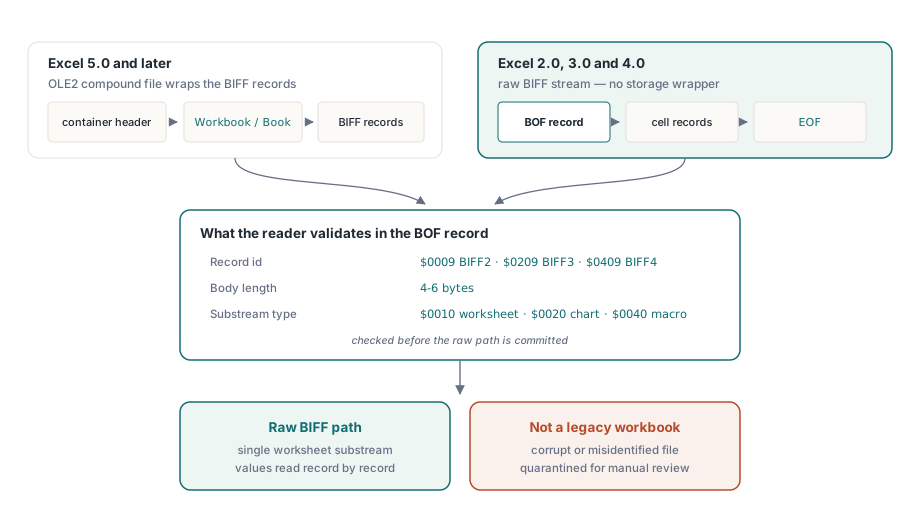
Every .xls from Excel 5.0 onward is an OLE2 compound file, a small file system inside a file, with the workbook living in a stream named Workbook or Book. Parsing one starts by parsing that container, as described in the compound file binary format in Pascal
BIFF2 through BIFF4 have no container. The file starts immediately with a BOF record, and the record number of that BOF encodes the generation: $0009 for BIFF2, $0209 for BIFF3 and $0409 for BIFF4. HotXLS validates the BOF body length, which is between four and six bytes, and the substream type, $0010 for a worksheet, $0020 for a chart and $0040 for a macro sheet, before committing to the raw path. That validation is what keeps a corrupt or misidentified file from being interpreted as a very old workbook
Three generations, three record layouts
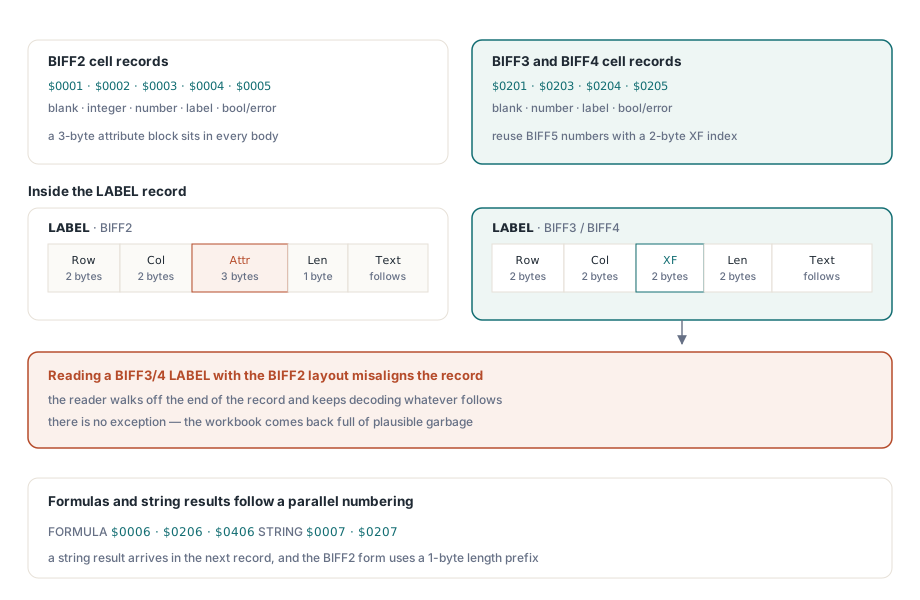
The cell records are where the generations diverge most visibly. BIFF2 occupies a contiguous block of low record numbers, $0001 through $0005 for blank, integer, number, label and boolean-or-error cells, and each body carries a three-byte attribute field where later versions put an extended format index. BIFF3 and BIFF4 abandon that and reuse the BIFF5 record numbers and layouts, $0201, $0203, $0204 and $0205, with a two-byte XF index
That last detail causes a specific and easily misdiagnosed failure. A BIFF3 or BIFF4 LABEL record is structurally identical to its BIFF5 counterpart, row and column followed by the format index and then the character count. Write a reader that assumes the BIFF2 layout and it reads two bytes too few, then walks off the end of the record and misinterprets everything after it. The symptom is not an exception; it is a workbook that reads with plausible garbage in it
Formula records occupy a parallel numbering across all three, $0006, $0206 and $0406. When a formula produces a string result, that string arrives in a separate following record, $0007 or $0207, and the BIFF2 form of it uses a single-byte length prefix rather than the two-byte one used later
Why formulas come back as values, not as text
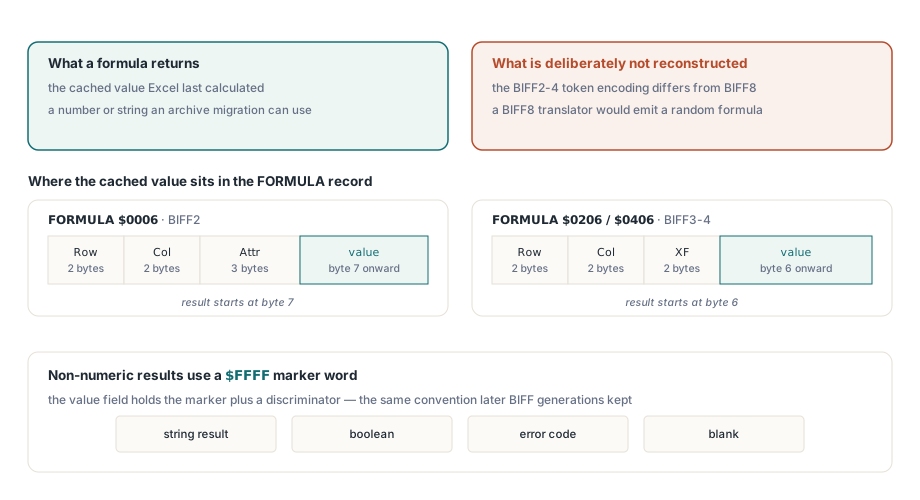
HotXLS reads the cached result of a formula in these files and does not attempt to reconstruct the formula expression. This is a deliberate boundary, not a gap waiting to be filled
The parsed expression in BIFF2 to BIFF4 uses a token encoding that differs from BIFF5 and later in ways that go beyond cosmetics: token lengths are prefixed differently, reference tokens have different sizes, and the function index tables were renumbered between generations. Running those bytes through a BIFF8 expression translator does not produce a wrong formula, it produces a random one. Reading the cached value gives you the number or string that Excel last calculated, which is what an archive migration actually needs
The cached value lives at a generation-dependent offset inside the record: byte 7 for BIFF2 and byte 6 for BIFF3 and BIFF4. Special values, strings, booleans, errors and blanks, are encoded in a marker word of $FFFF with a discriminator, the same convention later BIFF generations kept
Opening one
The calling code is unremarkable, which is the point. Detection happens inside Open:
uses
  lxHandle;

var
  Book: TXLSWorkbook;
  Sheet: TXLSWorksheet;
  R, C: Integer;
  V: Variant;
begin
  Book := TXLSWorkbook.Create;
  try
    if Book.Open('archive\1993-inventory.xls') <> 1 then
    begin
      Writeln('unreadable - quarantine for manual review');
      Exit;
    end;
    Sheet := Book.Sheets[1];          // Sheets[] is 1-based
    for R := Sheet.UsedRange.FirstRow + 1 to Sheet.UsedRange.LastRow + 1 do
      for C := Sheet.UsedRange.FirstCol + 1 to Sheet.UsedRange.LastCol + 1 do
      begin
        V := Sheet.Cells[R, C].Value;
        if not VarIsEmpty(V) then
          Writeln(Format('R%dC%d = %s', [R, C, VarToStr(V)]));
      end;
  finally
    Book.Free;
  end;
end;
Note the index arithmetic in that loop. UsedRange bounds are zero-based while both the sheet collection and cell access are one-based, an inconsistency that predates the current API and is preserved for compatibility. Forgetting the adjustment audits the wrong rectangle and reports nothing unusual while doing it. Cheap pre-checks that avoid loading a file at all are covered in lightweight workbook inspection
What you do not get, and what to do about it
Formatting is not interpreted. HotXLS does not parse the XF and FONT records of these generations, so fonts, colors, borders and number formats are unavailable, and cells that Excel once displayed as dates come back as their raw serial numbers
That last one needs handling in your own code rather than in the reader, and the reason is honest: number formats in BIFF2 to BIFF4 are not reliable enough to drive an automatic date decision. A column of five-digit numbers might be dates, or might be part numbers. Convert deliberately, using the workbook's date system, whose rules are described in date serial numbers, the 1904 system and number formats:
// Decide per column, never per value: a five-digit number can be a
// date or a part number, and the legacy format will not tell you
if ColumnHoldsDates(C) then
begin
  // The two date systems are 1462 days apart, so the same serial
  // denotes two dates four years apart. Read the system from the
  // workbook rather than assuming one
  if Book.Date1904 then
    Writeln(DateToStr(SerialToDate1904(V)))
  else
    Writeln(DateToStr(SerialToDate1900(V)));
end
else
  Writeln(VarToStr(V));
Two structural notes complete the picture. Password protection and code page records appear inside the single worksheet stream rather than in a workbook-level stream, because there is no workbook-level stream to put them in, so they have to be recognized in worksheet context. And a BIFF2 to BIFF4 file contains exactly one sheet substream; multi-sheet workbooks did not exist until the format gained its container
The pragmatic migration path is therefore a two-step one: read the legacy file for its values, then write a modern workbook that carries those values with formatting you apply yourself. Legacy reading, modern writing and everything between run in one library for Delphi and C++Builder, described on the HotXLS Delphi spreadsheet component page