A single flipped byte inside the EncryptedPackage stream of a password-protected .xlsx does not stop AES-CBC from decrypting the whole thing with the right password: the 16-byte block holding the flipped byte turns to noise, and the same bit flips cleanly in the plaintext block after it. Encryption alone cannot tell you that happened. The defense lives in the dataIntegrity element of [MS-OFFCRYPTO] §2.3.4.14, an HMAC over the stored ciphertext that a reader checks before decrypting a single segment
Agile encryption, the scheme Excel writes by default for password-protected workbooks, gives you confidentiality through AES in CBC mode with a key derived from an iterated SHA-512 password hash. CBC is not an authenticated mode, so the cipher has no opinion on whether the ciphertext in front of it is the ciphertext that was written. A modified package usually blows up later as a ZIP or deflate error, because a corrupted compressed stream rarely survives inflation. "Usually" carries a lot of weight in that sentence, and a parser error three layers down is a poor place to learn that someone edited the file in transit
Why does a tampered encrypted workbook still decrypt?
A tampered workbook still decrypts because CBC only chains blocks together; it never authenticates them. Each ciphertext block is decrypted with the key and then XORed with the previous ciphertext block, so a change in block n scrambles plaintext block n and flips exactly the same bits in block n+1. Someone who knows the layout of the plaintext can steer that second effect. Someone who does not can still corrupt data in ways a downstream parser may or may not notice
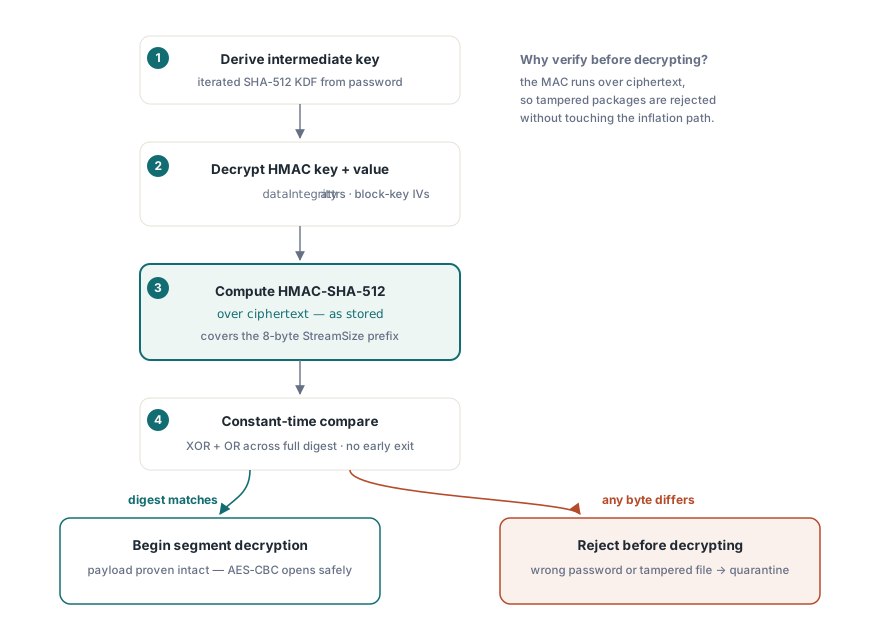
[MS-OFFCRYPTO] answers this with a MAC computed over the encrypted bytes. The writer generates a random HMAC key whose length matches the keyData hash size (64 bytes for SHA-512), computes an HMAC over the complete EncryptedPackage stream, and stores both values in the dataIntegrity element as encryptedHmacKey and encryptedHmacValue. Both are encrypted with the package key, using IVs derived from the keyData salt and two fixed block keys defined by the specification. The HMAC covers the stream as stored, including the 8-byte StreamSize prefix in front of the segments, so even the declared plaintext length cannot be altered without detection
The order HotXLS checks things on open
HotXLS runs the integrity check after the password is proven and before any package segment is decrypted. TXLSXWorkbook.OpenEncrypted first tries the Standard Encryption reader, and when the EncryptionInfo stream carries the Agile signature (version 4.4) the Agile pipeline takes over. That pipeline runs these steps in order:
- Run the iterated password hash with the salt and spin count from the descriptor; a
spinCountabove the specification ceiling of 10,000,000 is treated as a malformed descriptor and rejected before any hashing starts - Decrypt the password verifier, hash it, and compare the result with the stored verifier hash; a mismatch here means a wrong password
- Unwrap the intermediate package key, then decrypt the HMAC key and the HMAC value from the
dataIntegrityattributes - Compute the HMAC over the EncryptedPackage bytes exactly as they sit in the file, and compare it with the stored value
- Only after a match, decrypt the 4096-byte segments and hand the inner ZIP to the normal XLSX loader
Running the MAC over ciphertext is the standard encrypt-then-MAC discipline. A tampered package is rejected before any attacker-controlled byte reaches AES decryption, inflation or the XML parser. Both comparisons in this path, the verifier hash and the HMAC value, OR together the XOR of every byte pair across the full digest instead of returning at the first difference, so response timing does not reveal how many leading bytes matched. The hash algorithm follows the descriptor: Excel declares SHA-512, some third-party writers declare SHA-256, and the HMAC, the IVs and the key derivation switch to whatever the keyData and password key encryptor nodes say
From the caller side, a failed integrity check and a wrong password are the same event. Both make OpenEncrypted raise EXlsxEncryptionNotImplemented with the message "The supplied password is incorrect for this encrypted workbook." A container that is neither Standard nor Agile, or a CFB file that cannot be read, raises the same exception class with a different message. Only a successful decrypt followed by a failed load of the inner workbook comes back as a return value other than 1
uses
  SysUtils, lxHandleX;

// Opens a workbook that is required to arrive encrypted
function OpenIntake(const FileName, Password: WideString): TXLSXWorkbook;
var
  Book: TXLSXWorkbook;
begin
  Book := TXLSXWorkbook.Create;
  try
    // OpenEncrypted falls back to a plain Open for an unencrypted ZIP,
    // so a pipeline that insists on encryption has to check first
    if not Book.CanReadEncrypted(FileName) then
      raise Exception.Create('Not an encrypted package: ' + FileName);
    // Wrong password and HMAC mismatch both raise EXlsxEncryptionNotImplemented
    if Book.OpenEncrypted(FileName, Password) <> 1 then
      raise Exception.Create('Decrypted, but the inner workbook did not load');
    Result := Book;
  except
    Book.Free;
    raise;
  end;
end;

// Caller; Quarantine and ProcessWorkbook are your own routines
try
  Book := OpenIntake('incoming.xlsx', PasswordFromVault);
  try
    ProcessWorkbook(Book);
  finally
    Book.Free;
  end;
except
  on E: EXlsxEncryptionNotImplemented do
    Quarantine('incoming.xlsx', E.Message);
end;
The CanReadEncrypted guard matters more than it looks. It tests for the OLE compound file signature, and without it someone could replace an encrypted workbook with an ordinary .xlsx and OpenEncrypted would load it as if nothing were wrong. A renamed legacy .xls also carries that signature, which is why it gets past the guard and then fails inside OpenEncrypted with the unsupported-encryption-scheme message
Writing packages that carry the block
SaveAsEncryptedAgile is the call that produces a dataIntegrity block. It serializes the workbook to an in-memory XLSX, encrypts it with AES-256-CBC under a SHA-512 key derivation with a spin count of 100,000, computes an HMAC-SHA-512 over the finished EncryptedPackage stream, and writes both encrypted HMAC blobs into the descriptor. SaveAsEncrypted writes ECMA-376 Standard Encryption (AES-128 with a SHA-1 key derivation) instead, and the Standard EncryptionInfo structure defined by [MS-OFFCRYPTO] has no slot for an integrity MAC at all. For anything that crosses a network or sits on a shared drive, use the Agile writer: it costs nothing extra in code and it is the only one of the two whose output a reader can check for tampering
var
  Book: TXLSXWorkbook;
begin
  Book := TXLSXWorkbook.Create;
  try
    BuildPayrollSheets(Book);        // your own code that fills the workbook
    // Re-open the written container through the decrypt pipeline
    // and report failure instead of leaving a broken file behind
    Book.VerifyEncryptedSave := True;
    if Book.SaveAsEncryptedAgile('payroll-2026-10.xlsx', PasswordFromVault) <> 1 then
      raise Exception.Create('Encrypted save failed or did not verify');
  finally
    Book.Free;
  end;
end;
With VerifyEncryptedSave set, the save opens the new file again with the same password, so a verified save has already passed the HMAC check once. The random material, meaning both 16-byte salts, the verifier input, the 32-byte package key and the 64-byte HMAC key, comes from the operating system CSPRNG (CryptGenRandom on Windows). If that source cannot deliver, the Agile writer raises an exception rather than falling back to a time-seeded generator. Those bytes become salts and AES keys; a predictable fallback would produce files that look encrypted, pass every functional test and protect nothing. A failed save is the better outcome here
What happens when a file has no dataIntegrity block?
The file opens normally. A lot of Agile-encrypted workbooks in circulation come from writers that leave dataIntegrity out, and refusing them would break far more legitimate work than it would stop. HotXLS treats the block as present only when both encryptedHmacKey and encryptedHmacValue decode to non-empty, 16-byte-aligned values; otherwise verification is skipped and decryption proceeds after the password check
That compatibility choice has a security consequence worth writing into your threat model. The dataIntegrity element sits in the EncryptionInfo stream, outside the bytes its own MAC covers, so a missing block looks exactly like a block an attacker deleted. If you control both ends of a pipeline and every producer uses SaveAsEncryptedAgile, treat a missing block as a policy failure at the application level. The open call does not report whether verification ran, so enforcing that rule means reading the EncryptionInfo XML yourself with a compound-file reader before handing the file over. For files that come from the outside world, read the check for what it is: a strong signal when the block is there, and no signal at all when it is absent
The OnPassword retry loop and tampered files
The plain Open(FileName, Password) overload also decrypts Standard and Agile packages, and it adds a retry contract that OpenEncrypted does not have. When the result is "wrong password" and OnPassword is assigned, the workbook calls the handler, which can supply another password and set Retry to True; the loop stops after three handler calls. Because an HMAC mismatch produces that same "wrong password" result, a handler that simply re-prompts is called up to three times for a tampered package, every attempt fails, and the loop ends with the incorrect-password message. The correct password fails at the HMAC, and every other password fails at the verifier
procedure TIntakeForm.BookPassword(Sender: TObject;
  var PassWord: WideString; var Retry: Boolean);
begin
  // Also reached for a package whose HMAC did not match.
  // Re-prompting cannot fix that case, so offer a single fallback key
  // and let the next failure surface as an error
  Inc(FPasswordCalls);
  Retry := (FPasswordCalls = 1) and FetchFallbackKey(PassWord); // your own function
end;

// Wiring
FPasswordCalls := 0;
Book.OnPassword := BookPassword;
Book.Open('incoming.xlsx', PasswordFromVault);
For unattended intake, leave OnPassword unassigned and call OpenEncrypted. The first failure then raises immediately, and the quarantine log records one event per file instead of a burst of retries
Password to modify is coordination, not protection
Classic XLS workbooks support a separate mechanism that people often confuse with encryption: the write reservation behind Excel's "password to modify" prompt. HotXLS exposes it on IXLSWorkbook through SetModifyPassword, which takes the password, a recommend-read-only flag and the reserving user name, and reports state through the IsWriteReserved property. Passing an empty password clears the reservation and leaves the separate WRITEACCESS user name untouched
The record layout is short. FILESHARING carries the recommend-read-only flag, a legacy 16-bit password hash and the user name as an uncompressed BIFF8 Unicode string; on save, HotXLS places the empty WRITEPROT marker ahead of WRITEACCESS and FILESHARING whenever a reservation exists, which is the File Protection Block order Excel expects. Reservations that Excel itself wrote survive a HotXLS round trip through the same path. These records are written only for the BIFF8 xlExcel97 format
var
  Book: IXLSWorkbook;   // interface-counted: do not Free
begin
  Book := TXLSWorkbook.Create;
  if Book.Open('shared-model.xls') = 1 then
  begin
    // Recommend read-only, reserved by the reporting service
    Book.SetModifyPassword('edit-me', True, 'Reporting Service');
    if Book.IsWriteReserved then
      Book.SaveAs('shared-model.xls', xlExcel97);
  end;
end;
A 16-bit hash is a checksum, and the sheet data under a write reservation is not encrypted at all; any other tool reads every cell. The feature tells the next person in Excel that someone considers this file theirs to edit, in the same category as the sheet-level controls covered in XLSX sheet protection and allow options. Confidentiality comes from the encrypted save paths described in AES-protected XLSX output, and container-level checks belong even earlier in the chain, since the ZIP structure of a plain package is parsed before any workbook logic runs; ZIP end-of-central-directory validation for untrusted XLSX covers those failure modes
HotXLS reads and writes XLS, XLSX and ODS from Delphi and C++Builder without an Excel installation, and its Standard and Agile encryption code is written in Pascal against [MS-OFFCRYPTO]. The full method reference for OpenEncrypted, SaveAsEncryptedAgile and SetModifyPassword is on the HotXLS Delphi spreadsheet component page