HotPDF verifies digital signatures in loaded PDF documents through three THotPDF methods: GetLoadedSignatureInfo, VerifyLoadedSignature, and VerifyLoadedSignatureEx, introduced in v2.259.0. The component re-hashes the /ByteRange segments of the original file, checks the CMS messageDigest attribute, and runs an RSA PKCS#1 v1.5 verification against the embedded signer certificate, returning svValid when the document bytes are intact
The scenario is mundane and the stakes are not. A counterparty returns a signed contract, your workflow needs to file it, and somebody asks the only question that matters: is this the document we sent, byte for byte, signed by the certificate it claims? Answering that in code is the verification side of the signature story; the signing side, building and embedding PAdES signatures in the first place, is covered in the companion article on creating PAdES digital signatures with HotPDF. This article is about the other direction: a PDF arrives already signed, and you want a programmatic verdict rather than a screenshot of Acrobat's green checkmark
How does a signed PDF prove it has not been tampered with?
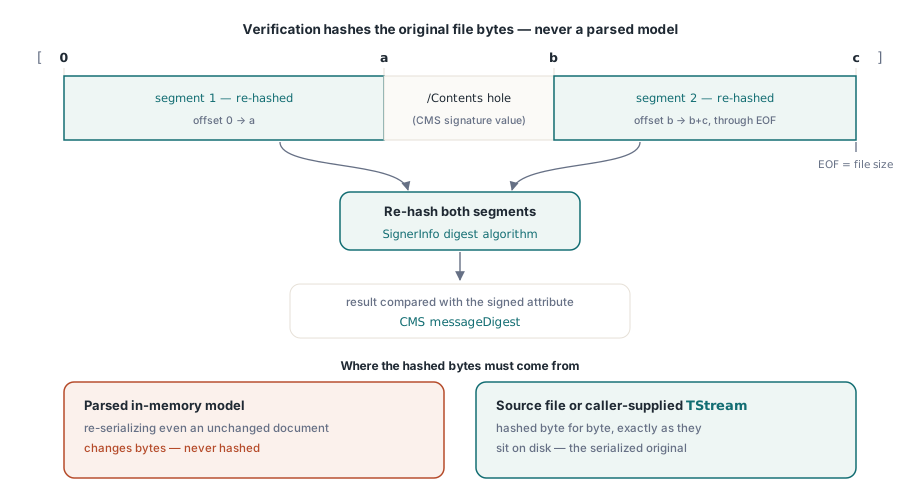
A PDF signature protects specific byte ranges of the file, not an abstract notion of "the document." ISO 32000-1 §12.8 defines the mechanism: the signature form field carries a dictionary whose /Contents entry holds a CMS SignedData container (RFC 5652), and whose /ByteRange array names the exact file regions the signature covers, per §12.8.1. The array is a list of offset and length pairs, in practice two segments: everything before the /Contents hex string, and everything after it. The signature value cannot cover itself, so the file is hashed around that hole
That design has a consequence which shapes the whole API: verification must hash the original serialized bytes, exactly as they sit on disk. A parsed object model is useless for this, because re-serializing even an unchanged document produces different bytes. HotPDF therefore verifies against the source file the document was loaded from, or against a TStream of raw bytes that you supply, never against its in-memory representation
Reading signature metadata before verifying anything
GetLoadedSignatureInfo parses the signature dictionary and its CMS container without touching a single document byte, which makes it the right first call when you only need to display who signed and when. Signature fields are indexed from 0 in form-field order, and GetLoadedSignatureFieldCount tells you how many exist. The returned THPDFSignatureInfo record carries the field name, /SubFilter, the signer certificate's common name, subject and issuer distinguished names, serial number, validity dates, the signing time (from the signed attribute when present, else the dictionary's /M entry), the digest algorithm name, and the /Reason, /Location, and /ContactInfo strings. Its Status member stays svNotVerified, an honest label for "parsed, not checked"
var
  Pdf: THotPDF;
  Info: THPDFSignatureInfo;
  I: Integer;
begin
  Pdf := THotPDF.Create(nil);
  try
    Pdf.LoadFromFile('signed-contract.pdf');
    for I := 0 to Pdf.GetLoadedSignatureFieldCount - 1 do
    begin
      Info := Pdf.GetLoadedSignatureInfo(I);
      Writeln('Field:     ', Info.FieldName);
      Writeln('Signer:    ', Info.SignerName);
      Writeln('Issuer:    ', Info.IssuerDN);
      Writeln('Algorithm: ', Info.HashAlgorithm);
      Writeln('SubFilter: ', Info.SubFilter);
    end;
  finally
    Pdf.Free;
  end;
end;
Running the cryptographic check
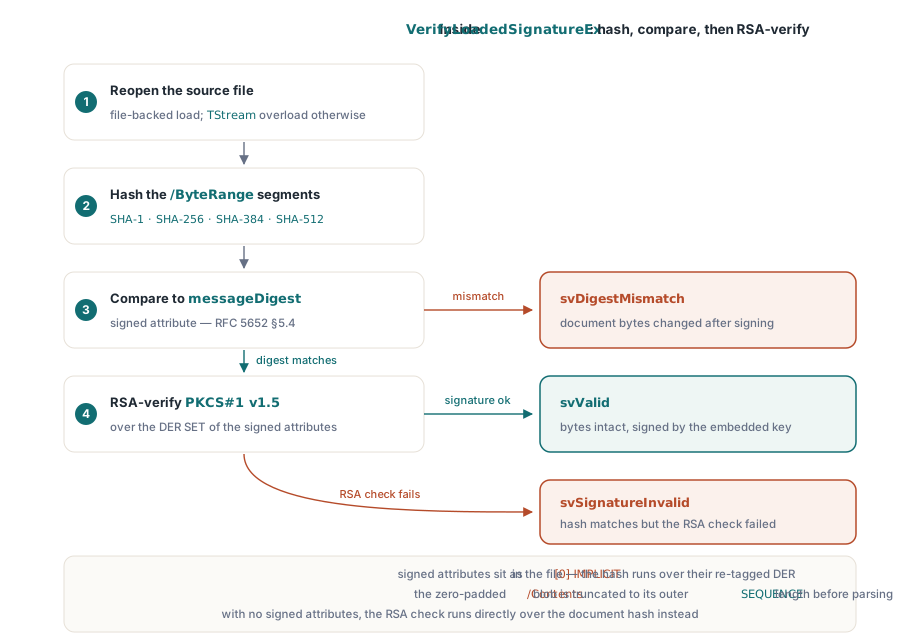
VerifyLoadedSignatureEx performs the full verification for a file-loaded document and hands back the populated info record in one call: it reopens the source file, hashes the /ByteRange segments with the SignerInfo digest algorithm, compares the result against the messageDigest signed attribute (RFC 5652 §5.4), and then RSA-verifies the signature over the DER SET re-encoding of the signed attributes. When a signature carries no signed attributes, the RSA check runs directly over the document hash instead. Supported signatures are RSA PKCS#1 v1.5 with SHA-1, SHA-256, SHA-384, or SHA-512 digests, which covers the adbe.pkcs7.detached and ETSI.CAdES.detached subfilters produced by mainstream signing tools
var
  Status: THPDFSignatureVerifyStatus;
  Info: THPDFSignatureInfo;
begin
  Status := Pdf.VerifyLoadedSignatureEx(0, Info);
  case Status of
    svValid:
      if Info.CoversWholeDocument then
        Writeln('Valid; signature covers the whole file')
      else
        Writeln('Valid; file was extended after signing');
    svDigestMismatch:
      Writeln('Document bytes changed after signing');
    svSignatureInvalid:
      Writeln('RSA check failed over signed attributes');
    svUnsupportedAlgorithm:
      Writeln('Non-RSA key or unknown digest algorithm');
    svMalformed:
      Writeln('CMS container could not be parsed');
    svSourceUnavailable:
      Writeln('No source bytes; use the TStream overload');
  end;
end;
Two implementation details are worth knowing because they explain failures that look mysterious from the outside. First, the signed-attributes check is picky about encoding: inside the file the attributes are tagged [0] IMPLICIT, but the signature was computed over their DER SET OF form, so the verifier re-tags before hashing, exactly as RFC 5652 §5.4 requires. A hand-rolled verifier that hashes the bytes as they appear in the file will reject every properly signed document. Second, /Contents is conventionally zero-padded to a reserved byte budget, so the verifier truncates the DER blob to the actual length of its outer SEQUENCE before parsing; garbage-looking trailing zeros are normal, not corruption. The same family of ASN.1 parsing hazards, on the certificate-import side, is the subject of the article on PKCS#12 and ASN.1 security hardening in HotPDF
What does a valid signature actually guarantee?
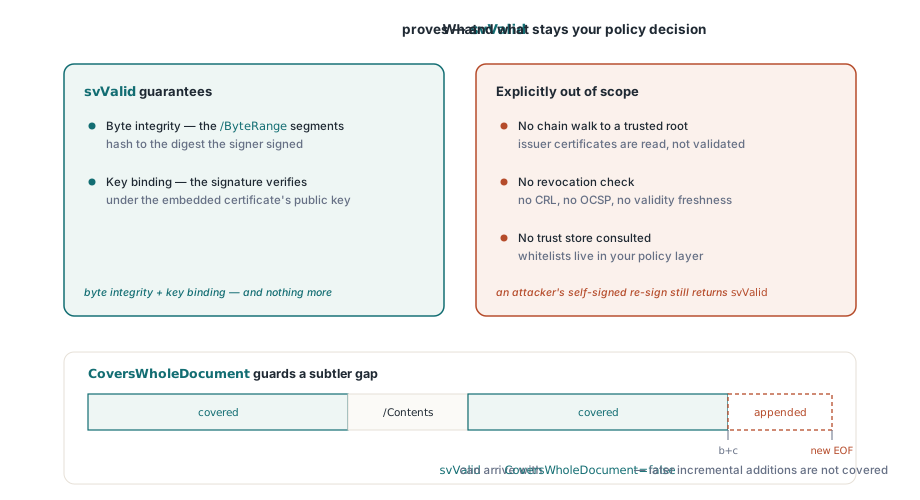
svValid means precisely this: the bytes named by /ByteRange hash to the value the signer signed, and the signature verifies under the public key of the certificate embedded in the CMS container. That is byte integrity plus key binding, and nothing more. Certificate chain and trust validation are explicitly out of scope for HotPDF's verifier: it does not walk the chain to a root, check revocation, or consult any trust store. A self-signed certificate from an attacker who re-signed a modified document will verify as svValid, because the math is internally consistent. Whether the signer is who they claim to be, and whether anyone should trust them, is a policy decision that belongs to a separate layer, whether that is your organization's certificate whitelist, the Windows certificate store, or a validation authority
The CoversWholeDocument flag guards a subtler gap. A signature only ever covers its /ByteRange, and PDF's incremental-update mechanism allows appending content after a signature without invalidating it, which is by design and is how multi-signature workflows function. The flag is computed during verification and is true only when the two segments plus the /Contents gap span the entire file. When svValid arrives with CoversWholeDocument false, the signed revision is intact but the file contains later additions, and what those additions changed is something your workflow should decide whether to tolerate
Stream-loaded and encrypted documents need their own source bytes
The parameterless VerifyLoadedSignature and VerifyLoadedSignatureEx depend on the component remembering which file the document came from. Load the document from a stream, and there is no file name to reopen; the same applies after the password reload path used for encrypted documents, the workflow described in the article on AES-256 PDF encryption with HotPDF. In both cases the file-backed overloads return svSourceUnavailable rather than guessing. The fix is the TStream overload, which lets you hand over the original raw bytes from wherever you kept them, a file you still have, a memory buffer, a database blob
var
  Src: TFileStream;
  Status: THPDFSignatureVerifyStatus;
  Info: THPDFSignatureInfo;
begin
  // Stream-loaded document: the component holds no source
  // file name, so supply the original bytes yourself.
  Src := TFileStream.Create('signed-contract.pdf',
    fmOpenRead or fmShareDenyWrite);
  try
    Status := Pdf.VerifyLoadedSignature(0, Src, Info);
    if Status <> svValid then
      Writeln('Verification failed: ', Ord(Status));
  finally
    Src.Free;
  end;
end;
Reporting what you cannot verify
A verifier that only knows "valid" and "invalid" will misreport documents it merely does not understand, so the status enumeration separates the cases your UI should distinguish. svDigestMismatch means the document bytes changed after signing, the classic tampering signal. svSignatureInvalid means the bytes hash correctly but the RSA check failed, which points at a corrupted or forged signature value. svUnsupportedAlgorithm is the honest answer for ECDSA keys and unrecognized digests: the signature may be perfectly good, HotPDF simply cannot check it, and reporting that as "invalid" would defame a healthy document. svMalformed flags a CMS container that could not be parsed at all. For gate-style checks, VerifyAllLoadedSignatures returns true only when at least one signature field exists and every one of them verifies as svValid, a convenient single boolean for an archive-ingest pipeline that refuses anything less
Signature verification, PAdES signing, AES-256 encryption, and the loaded-document editing API all ship in the same native VCL library for Delphi and C++Builder, with no external DLL dependencies; the full feature list and supported IDE versions are on the HotPDF Delphi Component product page