HotPDF runs Tesseract inside your Delphi process through HPDFCreateTesseractDLLOCREngine, a factory added in v2.772.0 that dynamically loads a Tesseract 5 compatible DLL, drives its C API (TessBaseAPIInit2, TessBaseAPIRecognize, the result iterator) and returns an IHPDFOCREngine. THotPDF.ApplyLoadedOCRTextLayer uses that engine to add an invisible, searchable Unicode text layer to scanned PDF pages
The same recognizer was already reachable through the external tesseract.exe adapter that writes a BMP and parses TSV. That path works, but every page pays for a process launch, a temporary bitmap file and a text format with no baselines and no control over page segmentation. Calling the DLL removes all three. It also removes the process wall, which means a Pascal binding sits directly on top of C structures, C booleans and C-allocated strings. Most of what is worth knowing about this adapter is where that binding can go quietly wrong
How do you run Tesseract in-process from Delphi with HotPDF?
Running Tesseract in-process with HotPDF takes one factory call in the HPDFTesseractRecognition unit and the same ApplyLoadedOCRTextLayer call every HotPDF OCR engine uses. The factory validates eagerly. The DLL file and the tessdata directory must exist, the language identifier may only contain ASCII letters, digits, _ and +, every model in a combination such as chi_sim+eng must have a matching .traineddata file, and all 21 required exports must resolve before the engine is returned. Configuration mistakes raise EArgumentException; a DLL that fails to load raises EOSError with the Windows error code and a hint to check architecture and dependencies
uses
  SysUtils, HPDFDoc, HPDFTesseractRecognition;

procedure MakeSearchable(const SourceFile, TargetFile: string);
var
  Doc: THotPDF;
  Engine: IHPDFOCREngine;
  Options: THPDFOCRTextLayerOptions;
  Info: THPDFOCRTextLayerInfo;
begin
  // A Win64 application needs a 64-bit DLL; dependency DLLs go beside it
  Engine := HPDFCreateTesseractDLLOCREngine('C:\OCR\Win64\libtesseract-5.dll',
    'C:\OCR\tessdata', 'chi_sim+eng');   // THPDFTesseractOptions.Default
  Doc := THotPDF.Create(nil);
  try
    Doc.AutoLaunch := False;
    if Doc.LoadFromFile(SourceFile) < 1 then
      raise Exception.Create('Cannot load ' + SourceFile);
    Options := THPDFOCRTextLayerOptions.Default;   // 300 DPI, MinimumConfidence 0.5
    // An empty page list means every page; pages that already have text are skipped
    if not Doc.ApplyLoadedOCRTextLayer([], Engine, Options, Info) then
      raise Exception.Create(string(Info.Diagnostic));
    Writeln(string(Info.EngineName), ': ', Info.AcceptedWordCount,
      ' words accepted, ', Info.DroppedWordCount, ' dropped');
    Doc.SaveLoadedDocument(TargetFile);
  finally
    Doc.Free;
  end;
end;
THPDFTesseractOptions.Default sets PageSegMode to tpsAuto, EngineMode to temDefault, TimeoutMilliseconds to 60,000 and MaxPixels to 16,777,216. The pixel budget matters more than it looks. A US Letter page at the default 300 DPI renders to 2,550 × 3,300 pixels, about 8.4 million, which fits. The same page at 600 DPI is 5,100 × 6,600, about 33.7 million, and the adapter rejects it before Tesseract sees a pixel. Raise MaxPixels (the ceiling is 67,108,864) or keep the DPI where it is; each side is also capped at 32,767 pixels
The DLL is loaded with LoadLibraryEx using the search flags for the DLL's own folder plus the default safe directories, so the image libraries Tesseract depends on can live next to it without touching PATH or the current directory. HotPDF does not bundle or download any OCR runtime or model; you provision both
What changes compared with the tesseract.exe adapter?
The DLL adapter trades process isolation for richer output and lower per-page overhead. Both adapters plug into the same text-layer pipeline, so coordinate mapping, confidence filtering and the all-or-nothing commit are identical; what differs is how pixels go in and words come out
| Aspect | tesseract.exe adapter | Tesseract DLL adapter |
|---|---|---|
| Factory | HPDFCreateTesseractOCREngine | HPDFCreateTesseractDLLOCREngine |
| Pixels in | BMP file in a private temporary directory | 8-bit grayscale buffer in memory |
| Words out | Word-level TSV, capped at 64 MiB | Result iterator, UTF-8 per word |
| Baselines | Not available | Passed through from TessPageIteratorBaseline |
| Page segmentation and engine mode | Automatic segmentation only | THPDFTesseractPageSegMode, THPDFTesseractEngineMode |
| Timeout | Hard: the child process is terminated | Cooperative: Tesseract must notice |
| Crash and memory isolation | Separate process | None, shares your address space |
One cost does not disappear. Each Recognize call creates its own API instance and calls TessBaseAPIInit2, so the language models are initialized per page rather than once per engine. The operating system file cache softens the reload, but on large multi-language model sets it is still the dominant fixed cost per page, and it counts against the recognition deadline. The in-process RapidOCR DLL engine takes the opposite design and keeps its ONNX models resident for the engine's lifetime; the boundary problems (C ABI, borrowed buffers, uninterruptible native work) are the same family
Why can't Delphi copy the Tesseract monitor struct?
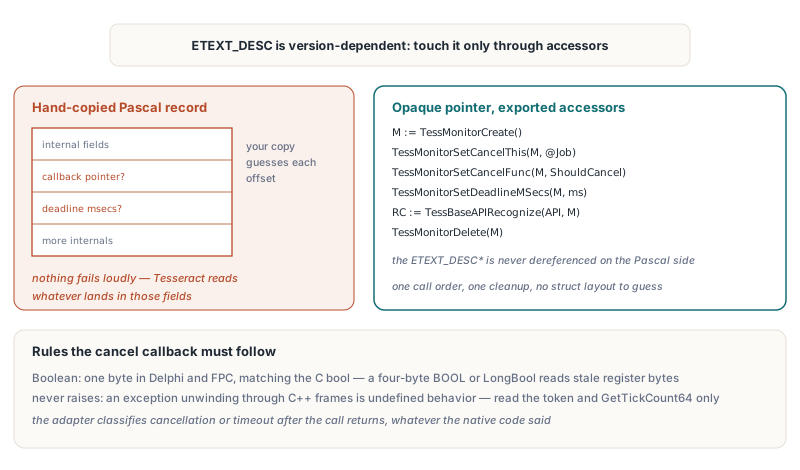
Delphi cannot safely mirror the Tesseract progress monitor because ETEXT_DESC contains version-dependent internal fields, so a hand-copied record puts the cancel callback and deadline at the wrong offsets on some builds. Nothing fails loudly when that happens. Tesseract simply reads your callback pointer from a field that now holds something else, or never sees the deadline at all
HotPDF therefore treats the monitor as an opaque pointer and touches it only through exported functions: TessMonitorCreate, TessMonitorSetCancelThis, TessMonitorSetCancelFunc, TessMonitorSetDeadlineMSecs and TessMonitorDelete. If you bind the C API yourself for another purpose, the same pattern applies. The sketch below is your own binding code, not HotPDF API, and mirrors the declarations HotPDF uses internally
type
  // C: typedef bool (*TessCancelFunc)(void *cancel_this, int words);
  TTessCancelFunc = function(CancelThis: Pointer; Words: Integer): Boolean; cdecl;
  TTessMonitorCreate = function: Pointer; cdecl;   // ETEXT_DESC*, never dereferenced
  TTessMonitorDelete = procedure(Monitor: Pointer); cdecl;
  TTessMonitorSetCancelFunc = procedure(Monitor: Pointer; Func: TTessCancelFunc); cdecl;
  TTessMonitorSetCancelThis = procedure(Monitor, CancelThis: Pointer); cdecl;
  TTessMonitorSetDeadlineMSecs = procedure(Monitor: Pointer; MSecs: Integer); cdecl;
  TTessBaseAPIRecognize = function(Handle, Monitor: Pointer): Integer; cdecl;

  TOCRJob = record
    CancelRequested: Boolean;
    DeadlineTick: UInt64;
  end;
  POCRJob = ^TOCRJob;

function ShouldCancel(CancelThis: Pointer; Words: Integer): Boolean; cdecl;
begin
  // Runs on Tesseract's stack: read flags and the clock, never raise
  Result := (CancelThis = nil) or POCRJob(CancelThis)^.CancelRequested or
    (GetTickCount64 >= POCRJob(CancelThis)^.DeadlineTick);
end;

// Usage, with the function pointers resolved by GetProcAddress:
//   Monitor := MonitorCreate();
//   try
//     MonitorSetCancelThis(Monitor, @Job);
//     MonitorSetCancelFunc(Monitor, ShouldCancel);
//     MonitorSetDeadlineMSecs(Monitor, RemainingMs);
//     RC := BaseAPIRecognize(API, Monitor);
//   finally
//     MonitorDelete(Monitor);
//   end;
Two details in that sketch are deliberate. The callback returns Boolean, which is one byte in both Delphi and Free Pascal, matching the C bool in TessCancelFunc. The four-byte Windows BOOL or Delphi LongBool looks interchangeable and is not: when one side writes a single byte and the other reads four, the upper bytes of the return register are whatever was left there, and a false can arrive as true. The same header complicates things further, because functions such as TessPageIteratorBoundingBox return an int, which HotPDF declares as Integer. Read the C type of every return value instead of assuming one convention for the whole API
The second detail is that the callback never raises. A Delphi exception unwinding through Tesseract's C++ frames is undefined behavior, so HotPDF's callback only reads the cancellation token and a monotonic GetTickCount64 value. The adapter turns the result into a cancellation or timeout diagnostic after TessBaseAPIRecognize returns, and it performs that check regardless of the native return code
Which native pointers does the Delphi side own?
The HotPDF Tesseract DLL adapter owns three native objects per request, the API instance, the monitor and the result iterator, and borrows everything else. Each Recognize call creates its own set and releases it in a finally block: TessResultIteratorDelete, then TessMonitorDelete, then TessBaseAPIDelete. Releasing the engine interface unloads the library
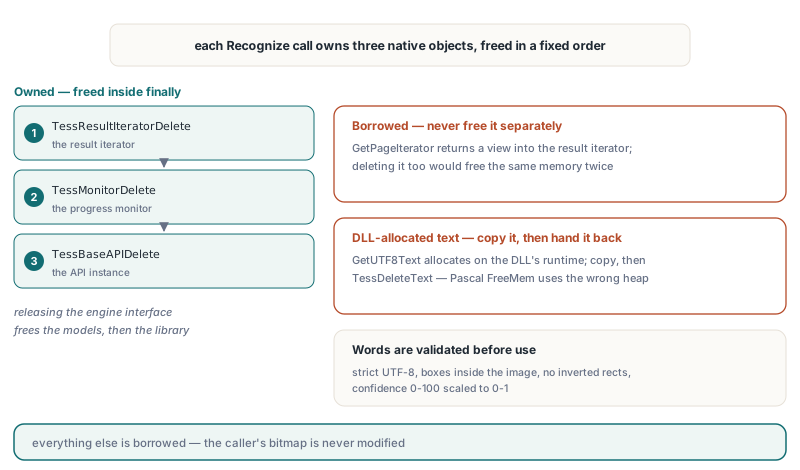
TessResultIteratorGetPageIteratorreturns a borrowed view into the result iterator, not a new object. HotPDF uses it forTessPageIteratorBoundingBoxandTessPageIteratorBaselineand never frees it; deleting it separately would free the same memory twiceTessResultIteratorGetUTF8Textreturns a string allocated by the DLL's own runtime. HotPDF copies it and hands it back throughTessDeleteTextin afinallyblock; PascalFreeMemwould release it on the wrong heap- Word text is decoded with strict UTF-8 validation and length-checked before conversion. Words with control characters, malformed UTF-8, boxes outside the image, inverted rectangles or confidence outside 0–100 fail the request instead of being silently patched
- Total text per request is capped at 1,048,576 UTF-16 code units, and the word count must fit the request budget handed down by
ApplyLoadedOCRTextLayer
Confidence arrives as 0–100 and is scaled to 0–1, so THPDFOCRTextLayerOptions.MinimumConfidence means the same thing for every engine. When Tesseract reports a baseline, both endpoints are passed through; otherwise the text-layer pipeline falls back to its geometric estimate, exactly as it does for TSV input
Why validate an enum before it reaches the DLL?
HotPDF copies the raw ordinal of PageSegMode and EngineMode into an Integer before range-checking, because a compiler may assume an enum variable always holds a declared value and fold Ord(X) > Ord(High(T)) to a constant false. The ordinals are not decoration: THPDFTesseractPageSegMode follows Tesseract's page segmentation numbering from 0 to 13, THPDFTesseractEngineMode follows the engine mode numbering from 0 to 3, and both go to the DLL as plain integers. An options record built with FillChar, filled from a stream, or passed from C++Builder with a cast integer can carry a byte like 200. Validating the copied ordinal turns that into an EArgumentException at factory time instead of an undefined mode inside native code. The factory also rejects tpsOSDOnly and tpsAutoOnly, which produce no words, and requires osd.traineddata for tpsAutoOSD and tpsSparseTextOSD
What does the recognition timeout actually guarantee?
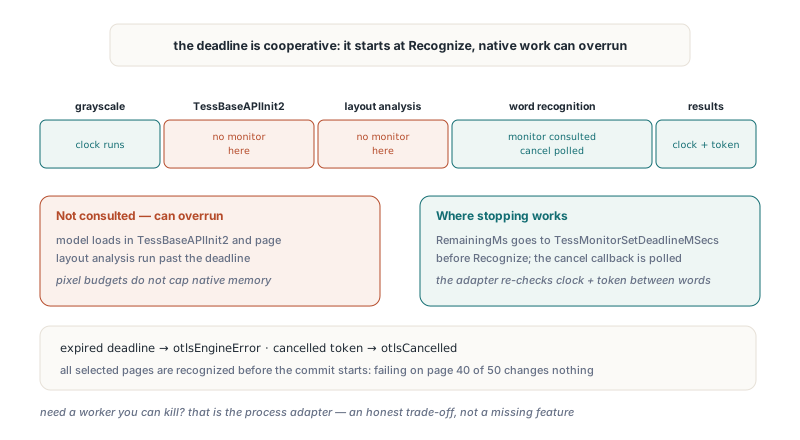
The Tesseract DLL timeout is cooperative: HotPDF can stop its own work and ask Tesseract to stop, but it cannot force native code to return. The clock starts when Recognize begins, so bitmap conversion and model initialization consume the same budget as recognition. HotPDF checks elapsed time and the cancellation token during grayscale conversion and between words while iterating results, and passes the remaining milliseconds to TessMonitorSetDeadlineMSecs before calling TessBaseAPIRecognize
The gap is inside the native call. Tesseract's monitor is consulted during word recognition, not during TessBaseAPIInit2 or page layout analysis, so a slow model load or a pathological layout can run past the deadline before the timeout is reported. Pixel and output budgets also do not cap the native library's own memory use. If you need a worker you can kill, use the process adapter; that is the honest trade-off, not a missing feature
Page segmentation is where the DLL adapter earns its keep on difficult input. Forms, labels and scanned tables with scattered fields often recognize better with tpsSparseText than with automatic segmentation, which tries to assemble columns and paragraphs that are not there
procedure OCRFormPages(Doc: THotPDF; const Pages: array of Integer);
var
  Engine: IHPDFOCREngine;
  TessOptions: THPDFTesseractOptions;
  LayerOptions: THPDFOCRTextLayerOptions;
  Info: THPDFOCRTextLayerInfo;
begin
  TessOptions := THPDFTesseractOptions.Default;
  TessOptions.PageSegMode := tpsSparseText;  // scattered fields, no column assembly
  TessOptions.EngineMode := temLSTMOnly;     // needs LSTM models in tessdata
  TessOptions.TimeoutMilliseconds := 20000;  // includes model initialization
  Engine := HPDFCreateTesseractDLLOCREngine('C:\OCR\Win64\libtesseract-5.dll',
    'C:\OCR\tessdata', 'eng+deu', TessOptions);

  LayerOptions := THPDFOCRTextLayerOptions.Default;
  LayerOptions.MinimumConfidence := 0.6;
  if not Doc.ApplyLoadedOCRTextLayer(Pages, Engine, LayerOptions, Info) then
    case Info.Status of
      otlsCancelled:
        Writeln('OCR cancelled, document unchanged');
      otlsEngineError:
        Writeln('Tesseract failed or timed out: ', string(Info.Diagnostic));
    else
      Writeln(string(Info.Diagnostic));
    end;
end;
A timeout surfaces as otlsEngineError with the diagnostic Tesseract DLL OCR timed out, while a cancelled token surfaces as otlsCancelled. In both cases ApplyLoadedOCRTextLayer has recognized every selected page before it starts the commit transaction, so a failure on page 40 of 50 leaves the loaded document exactly as it was. Note that tpsSingleLine, tpsSingleBlock and tpsSparseText change segmentation only; none of them straightens a skewed scan
Free Pascal and Lazarus: stale pixels and lost Chinese
Both Tesseract factories work in Windows Free Pascal and Lazarus Win32 and Win64 builds since v2.772.1, after two FPC-specific fixes. Rebuild the Lazarus package for the target architecture first; the general port is covered in HotPDF on Free Pascal and Lazarus Win64
The first fix concerns pixels. An LCL TBitmap written through scanlines can update its raw image without refreshing the Windows bitmap handle, so GetDIBits on that handle returns the old pixels. The symptom was baffling: text drawn directly onto a bitmap was recognized, while a page rendered by HotPDF's PDF renderer produced an empty word list. On FPC the adapter now reads a format-aware snapshot through CreateIntfImage, which respects the raw image's pixel format and row order. The Delphi build keeps the GetDIBits path on a private 24-bit copy. Neither build modifies the caller's bitmap
The second fix belongs to the tesseract.exe adapter. FPC's TStringList stores ANSI strings, so assigning decoded UTF-8 TSV text to Lines.Text silently dropped every Chinese or supplementary-plane character the system ANSI code page could not represent. The FPC path now keeps the TSV as UTF-8 bytes, strips the BOM at byte level and decodes each word to UnicodeString individually. The DLL adapter never had this problem because it decodes each word directly from the iterator
Quick reference
- Factory:
HPDFCreateTesseractDLLOCREngine(LibraryPath, TessDataDirectory, Language[, Options])inHPDFTesseractRecognition, added in v2.772.0, FPC support in v2.772.1 - Defaults:
tpsAuto,temDefault, 60,000 ms, 16,777,216 pixels; timeout range 1–3,600,000 ms, pixel ceiling 67,108,864 - Match DLL bitness to the application and place dependency DLLs beside the Tesseract DLL
- Treat the monitor as opaque; never copy
ETEXT_DESCinto a Pascal record - Declare the cancel callback
cdeclwith a one-byteBooleanresult, and never let an exception escape it - Free iterator text with
TessDeleteText; never free the page iterator obtained from the result iterator - Expect the deadline to be cooperative: model initialization and layout analysis can overrun it
- Use the tesseract.exe adapter when you need hard termination or crash isolation
The Tesseract DLL adapter, the process adapters and the built-in OCR engine all ship with the HotPDF Delphi PDF component for Delphi, C++Builder and Free Pascal; see the HotPDF product page for editions and downloads