HotPDF makes scanned PDF pages searchable with in-process RapidOCR through HPDFCreateRapidOCRDLLOCREngine, a factory added in v2.774.0 that loads HotPDFRapidOCR.dll, keeps the ONNX detection, angle classification, and recognition models resident in memory, and returns an IHPDFOCREngine. You pass that engine to THotPDF.ApplyLoadedOCRTextLayer, which renders each page, runs CPU inference without Python or a child process, and commits an invisible Unicode text layer
The motivation is cost per page. The RapidOCR process adapter that shipped earlier, HPDFCreateRapidOCREngine, starts a Python worker for every Recognize call, and that worker imports its runtime and loads its ONNX models before it reads a single pixel. On a 500-page archive that start-up tax repeats 500 times, and deployment means shipping a Python environment next to a Delphi executable. The native DLL loads the models once, when you create the engine, and deployment shrinks to the DLL, its model files, and a character dictionary. What you give up in exchange is the ability to kill a stuck recognizer, and most of the engineering in this adapter is about living with that honestly
How do you make a scanned PDF searchable with the RapidOCR DLL?
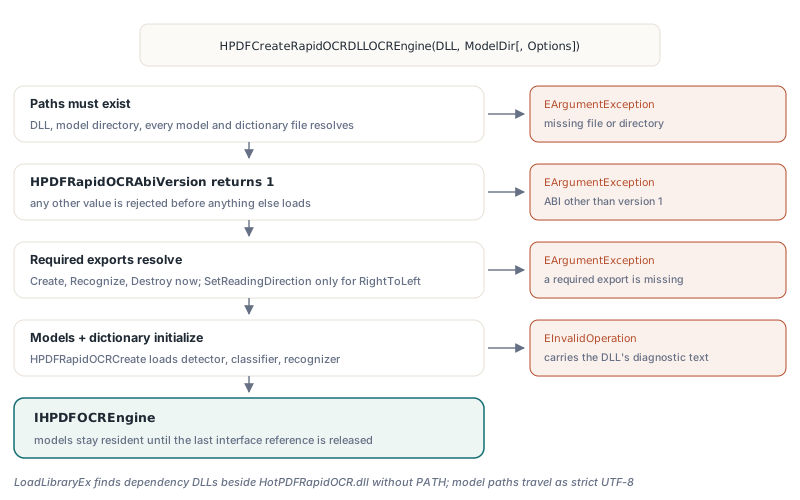
Creating a searchable PDF with the native RapidOCR DLL takes one factory call and the same ApplyLoadedOCRTextLayer call every HotPDF OCR engine uses. The factory lives in the HPDFRapidOCRRecognition unit and validates eagerly: the DLL and model directory must exist, every model and dictionary file must resolve, the ABI version must be 1, and all required exports must be present before any model is initialized. Configuration mistakes raise EArgumentException; a model that fails to load raises EInvalidOperation carrying the diagnostic text the DLL wrote
uses
  SysUtils, HPDFTypes, HPDFDoc, HPDFRapidOCRRecognition;

procedure MakeSearchable(const SourceFile, TargetFile: string);
var
  Doc: THotPDF;
  Engine: IHPDFOCREngine;
  Options: THPDFOCRTextLayerOptions;
  Info: THPDFOCRTextLayerInfo;
begin
  // Models load here, outside any recognition deadline.
  // Relative model names in THPDFRapidOCRDLLOptions.Default resolve
  // against the model directory.
  Engine := HPDFCreateRapidOCRDLLOCREngine(
    'C:\OCR\Win64\HotPDFRapidOCR.dll', 'C:\OCR\models');
  Doc := THotPDF.Create(nil);
  try
    Doc.AutoLaunch := False;
    if Doc.LoadFromFile(SourceFile) < 1 then
      raise Exception.Create('Cannot load ' + SourceFile);
    Options := THPDFOCRTextLayerOptions.Default;  // 300 DPI, MinimumConfidence 0.5
    // an empty page list means every page; pages that already have text are skipped
    if not Doc.ApplyLoadedOCRTextLayer([], Engine, Options, Info) then
      raise Exception.Create(string(Info.Diagnostic));
    Writeln(string(Info.EngineName), ': ', Info.AcceptedWordCount,
      ' lines accepted, ', Info.DroppedWordCount, ' dropped');
    Doc.SaveLoadedDocument(TargetFile);
  finally
    Doc.Free;
  end;
end;
THPDFRapidOCRDLLOptions.Default names ch_PP-OCRv3_det_infer.onnx, ch_PP-OCRv3_rec_infer.onnx, ch_ppocr_mobile_v2.0_cls_infer.onnx, and ppocr_keys_v1.txt, with one CPU thread, a 16,777,216-pixel input limit, and a 60,000 ms recognition deadline. Since v2.775.0, THPDFRapidOCRDLLOptions.ForLanguage swaps in a matching recognition model and dictionary for Traditional Chinese, Russian, Japanese, Arabic, and other profiles; why the model and dictionary must change together is covered in RapidOCR multilingual models and CTC dictionaries in HotPDF. The engine reports itself as RapidOCR (native DLL) in Info.EngineName, which keeps logs unambiguous next to the external Tesseract OCR process adapter and the built-in template-matching OCR engine
Why does the C ABI only speak int32_t and UTF-8 bytes?
The HotPDFRapidOCR.dll ABI uses only fixed-width integers, raw pointers, and explicit byte lengths because Delphi, C++Builder, and Free Pascal share nothing with MSVC beyond the C calling convention. A std::string, a std::vector, or a C++ exception has a layout and an unwinding model that belong to one compiler and one runtime library. Let any of them cross the boundary and the failure is a corrupted stack or a heap block freed by the wrong allocator, not a clean error
ABI version 1 therefore follows a short list of rules. Every export is cdecl and returns an int32_t status, where 1 means success and 0 means failure. Every function that can fail takes a caller-owned diagnostic buffer and its capacity in bytes; the DLL writes a NUL-terminated UTF-8 message truncated to fit, and the adapter decodes it with a hard terminator in the last byte of its own 4,096-byte buffer. Each export body is wrapped in try with both catch (const std::exception &) and catch (...), so an ONNX Runtime error, an OpenCV assertion, or an invalid dictionary becomes status 0 plus text, never an exception escaping into Pascal code
| Export | Role | When the adapter resolves it |
|---|---|---|
HPDFRapidOCRAbiVersion | Returns 1; any other value is rejected | First, before anything else |
HPDFRapidOCRCreate | Loads detection, optional classification, recognition models and the dictionary | In the factory |
HPDFRapidOCRRecognize | Runs one bitmap and emits one callback per text line | In the factory |
HPDFRapidOCRDestroy | Frees the model instance | In the factory |
HPDFRapidOCRSetReadingDirection | Optional right-to-left row order, added in v2.775.0 | Only when RightToLeft is set |
The optional export is resolved lazily on purpose: a v2.774.0 DLL that lacks it still serves left-to-right requests. The DLL is loaded with LoadLibraryEx with search flags that cover the DLL's own folder plus the default safe directories, so ONNX Runtime or OpenCV dependencies placed beside HotPDFRapidOCR.dll are found without touching PATH. Model and dictionary paths travel as UTF-8 and the DLL converts them with MultiByteToWideChar in strict mode before opening files through wide-character APIs, so a model directory under a Chinese or Cyrillic user name works instead of being widened byte by byte into nonsense
One rule lives in the build rather than in the header. The DLL statically links ONNX Runtime and OpenCV, and the default CMake configuration uses the static release CRT (/MT). Static libraries compiled against /MD mixed into a /MT DLL produce link errors at best and two independent heaps at worst, so the provisioned libraries must match whichever CRT mode the DLL uses
What happens between a TBitmap and a text line?
HotPDF hands the DLL an independent top-down BGR snapshot of the rendered page, and the DLL hands back one callback per recognized text line with borrowed UTF-8 text that the adapter must copy before returning
On Delphi the adapter assigns the page bitmap to a private TBitmap, forces pf24bit, and reads rows with GetDIBits using a negative biHeight, which yields top-down rows padded to four-byte alignment; that stride is passed explicitly. On FPC it reads through CreateIntfImage, because LCL scanline writes can update the raw image without refreshing the GDI handle. The caller's bitmap is never modified, and the pixel budget (MaxPixels, 16,777,216 by default and configurable up to 67,108,864) and the 32,767-pixel limit per dimension are checked before the snapshot buffer is allocated
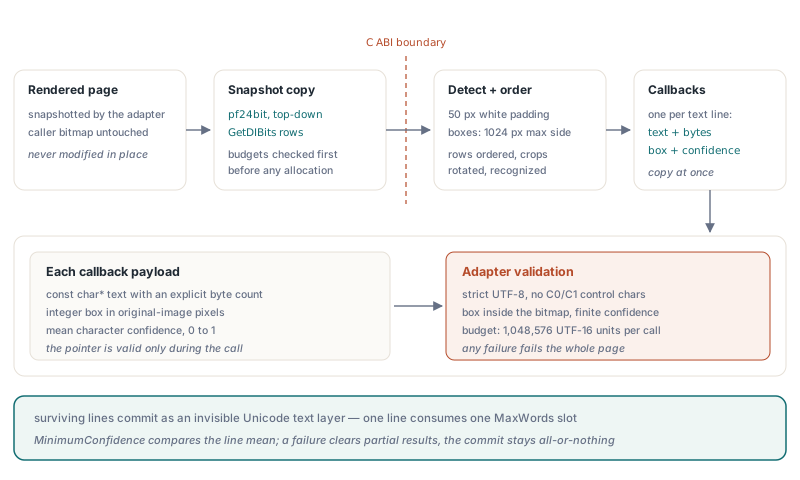
Inside the DLL the snapshot is padded with 50 white pixels, text regions are detected with a 1,024-pixel maximum side, boxes are ordered into horizontal rows, and each crop is optionally rotated by the angle classifier before recognition. Each text line then goes through a callback that receives a const char*, a byte count, an integer box in original-image pixels, and the mean character confidence. The text pointer is valid only during the callback, so the adapter copies it immediately, and it is strict about what it accepts:
- UTF-8 is decoded with
MB_ERR_INVALID_CHARS; a malformed sequence fails the page instead of producing replacement characters in a searchable layer - C0 and C1 control characters are rejected, and whitespace-only lines are skipped
- The box must lie inside the bitmap and the confidence must be a finite value from 0 to 1
- Text is counted against the request's
MaxTextCodeUnitswith a hard ceiling of 1,048,576 UTF-16 units per call, and supplementary-plane characters cost two units - Any Pascal exception inside the callback is caught there, stored, and turned into a 0 return, which makes the DLL stop and report failure; the stored message then becomes the diagnostic
Two consequences matter for tuning. First, the unit of output is a line, not a word: each line consumes one MaxWords slot, Info.AcceptedWordCount and Info.DroppedWordCount count lines, and search highlighting spans the line box. Second, MinimumConfidence (0.5 by default) is compared against the line's mean character confidence, so a line with one unreadable character among twenty clean ones usually survives. The DLL supplies no baseline, so the text-layer pipeline estimates one from the box. An empty page succeeds with zero lines, and any failure clears partial results so the multi-page commit stays all-or-nothing
Model ownership and thread safety
Each RapidOCR DLL engine owns exactly one model instance for its whole lifetime, and calls to Recognize on that engine are serialized by a critical section. Holding the IHPDFOCREngine interface is what keeps the models warm, so the right pattern for batch work is to create the engine once and reuse it across documents
procedure OcrBatch(const Files: TStrings; const OutputDir: string);
var
  Models: THPDFRapidOCRDLLOptions;
  Engine: IHPDFOCREngine;
  Doc: THotPDF;
  Options: THPDFOCRTextLayerOptions;
  Info: THPDFOCRTextLayerInfo;
  I: Integer;
begin
  Models := THPDFRapidOCRDLLOptions.Default;
  Models.UseAngleClassifier := False;    // upright scans: no classifier model is loaded
  Models.Threads := 4;                   // 1..64, capped at the logical processor count
  Models.TimeoutMilliseconds := 120000;  // per Recognize call, cooperative
  Engine := HPDFCreateRapidOCRDLLOCREngine(
    'C:\OCR\Win64\HotPDFRapidOCR.dll', 'C:\OCR\models', Models);
  Options := THPDFOCRTextLayerOptions.Default;
  for I := 0 to Files.Count - 1 do
  begin
    Doc := THotPDF.Create(nil);
    try
      Doc.AutoLaunch := False;
      if (Doc.LoadFromFile(Files[I]) > 0) and
        Doc.ApplyLoadedOCRTextLayer([], Engine, Options, Info) then
        Doc.SaveLoadedDocument(IncludeTrailingPathDelimiter(OutputDir) +
          ExtractFileName(Files[I]))
      else
        Writeln(Files[I], ': ', string(Info.Diagnostic));
    finally
      Doc.Free;
    end;
  end;
end;  // last reference released: models destroyed, then the DLL is unloaded
The Threads value sets both the intra-op and inter-op thread counts of each ONNX session, and the DLL clamps it to the active processor count. Two threads sharing one engine do not run in parallel; the second waits for the lock. That wait is not a blind EnterCriticalSection: the adapter calls TryEnterCriticalSection every 25 ms and checks the cancellation token and the deadline between attempts, so a queued request can still be cancelled or time out. If you need true parallelism, create one engine per worker and accept that each engine holds its own copy of the models in memory
Teardown order is fixed by the engine destructor: HPDFRapidOCRDestroy frees the model instance first, then FreeLibrary unloads the DLL. On the native side, model initialization is equally careful; when the recognition model fails after the detector and classifier sessions were already built, those sessions are released before the error is reported, and the dictionary class count is checked against the model output during initialization rather than on the first page
Why can't a native OCR call be killed mid-inference?
A native RapidOCR call cannot be killed mid-inference because it runs on your thread, inside your process, in the middle of an ONNX Runtime session that does not accept interruption. Cancellation in HotPDF's DLL adapter is therefore cooperative: the DLL calls an abort callback before and after detection, after classification, and after each recognized line, and stops at the first checkpoint where the callback returns 0. A single ONNX Run that has started will finish first
The alternatives are worse than waiting. TerminateThread would leave the CRT heap lock, ONNX Runtime's thread pool, and any OpenCV state in whatever condition they happened to be in, poisoning the rest of the process. FreeLibrary while a call is still executing unloads code that is on the stack. Neither can be made safe, so the adapter never attempts them. The deadline in TimeoutMilliseconds is consequently a cooperative deadline, and an expired deadline surfaces as an engine error with a timed-out diagnostic, while a cancelled token surfaces as otlsCancelled:
// Token is created by the caller and shared with the UI thread,
// which calls Token.Cancel when the user presses Stop
Options := THPDFOCRTextLayerOptions.Default;
Options.CancellationToken := Token;
if not Doc.ApplyLoadedOCRTextLayer([], Engine, Options, Info) then
  case Info.Status of
    otlsCancelled:
      // returned at the next stage or line boundary; document unchanged
      Writeln('Cancelled');
    otlsEngineError:
      // includes a cooperative deadline expiry and native diagnostics
      Writeln('Engine: ', string(Info.Diagnostic));
    otlsBudgetExceeded:
      Writeln('Budget: ', string(Info.Diagnostic));
  else
    Writeln(string(Info.Diagnostic));
  end;
This is the core trade-off between HotPDF's process adapters and the in-process DLL, and neither side wins on every row:
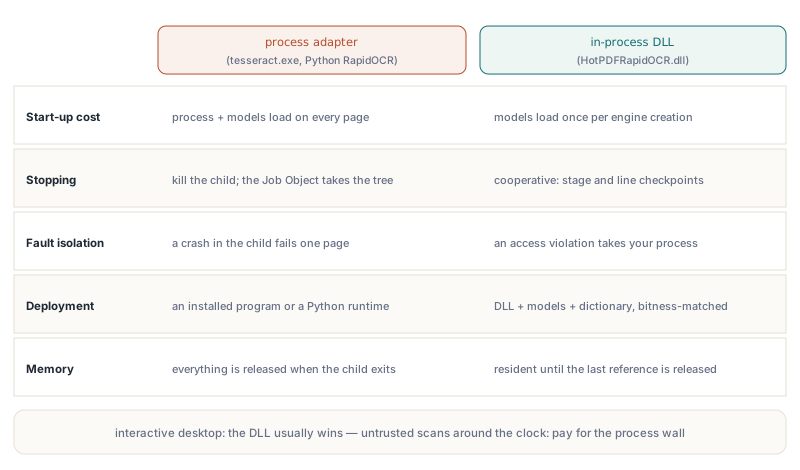
- Start-up cost: the Tesseract and Python RapidOCR adapters launch a process and load models for every page; the DLL loads models once per engine
- Stopping: a child process can be terminated outright, and the Python worker runs inside a kill-on-close Job Object so its whole process tree goes with it; the DLL can only stop at stage and line boundaries
- Fault containment: a crash in
tesseract.exefails one page; an access violation inside the DLL takes your process down - Deployment: process adapters need an installed program or a Python environment; the DLL needs itself, its models, and its dictionary, matched to the application's bitness
- Memory: process adapters release everything when the child exits; a DLL engine keeps its models resident until the last interface reference is released
For an interactive desktop application that OCRs a page at a time, the DLL's responsiveness usually wins. For a server that ingests untrusted scans around the clock, the process boundary is worth its start-up cost
Building and deploying HotPDFRapidOCR.dll
HotPDFRapidOCR.dll is built from the C++ sources in Native/RapidOCR with MSVC, C++17, a Windows SDK, and CMake 3.20 or later, using a helper script that takes the native network sources, ONNX Runtime, and OpenCV directories plus a Win32 or Win64 platform. Build both if you ship both, because a 32-bit Delphi application cannot load a 64-bit DLL, and the static libraries you provision must match the target architecture as well as the CRT mode
The model side has its own compatibility limits. The detector is a DB text detector; the recognizer accepts CTC models in NCHW layout with a fixed input height of 32 or 48, and uses 48 for models with a dynamic height. The bundled static ONNX Runtime cannot load models saved with a newer IR version, so recent PP-OCRv5 exports fail initialization with a diagnostic instead of loading partially. The dictionary must be UTF-8 without a BOM, in exactly the model's character order, and its class count must match the model output; CRLF line endings are accepted. Recognition is offline: the DLL never downloads a missing model
Quick reference
- Factory:
HPDFCreateRapidOCRDLLOCREngine(LibraryPath, ModelDirectory[, Options])inHPDFRapidOCRRecognition, available since v2.774.0 in Delphi, C++Builder, and Windows FPC/Lazarus builds - Keep the returned
IHPDFOCREnginealive across pages and documents; releasing it destroys the models and unloads the DLL - One engine runs one recognition at a time; create several engines for parallel workers and budget memory for each model copy
- Output is one entry per text line with mean character confidence, filtered by
THPDFOCRTextLayerOptions.MinimumConfidence - Cancellation and
TimeoutMillisecondsare cooperative; an ONNX run in progress always completes - Match DLL bitness to the application and the CRT mode of the static ONNX Runtime and OpenCV libraries to the DLL
- Choose a language profile per engine with
THPDFRapidOCRDLLOptions.ForLanguage(v2.775.0); one engine does not detect languages on its own
The native RapidOCR adapter, the process-based OCR adapters, the page renderer that feeds them, and the invisible Unicode text-layer writer all ship together in HotPDF, a native VCL PDF component for Delphi and C++Builder. If your document capture or archiving application needs searchable output without a Python runtime on the target machine, the HotPDF Delphi PDF component provides the whole pipeline with only the DLL and its models left to deploy