HotPDF performs Chinese and multilingual OCR in Delphi through its native RapidOCR DLL adapter: THPDFRapidOCRDLLOptions.ForLanguage maps a language tag such as 'zh-CN', 'zh-TW', 'ru' or 'ar' to a matched recognition model and character dictionary, and THotPDF.ApplyLoadedOCRTextLayer turns the recognized lines into an invisible, searchable Unicode text layer on scanned PDF pages
Getting a Latin-script demo to work is the easy part. The interesting failures start when you switch to Traditional Chinese or Russian and the output turns into confident, well-formed nonsense, or when every line silently loses its last character, or when an Arabic page comes back with its text boxes in the wrong order. None of these raise an exception on their own. The language presets added in HotPDF v2.775.0 exist mostly to close those gaps, and the four pitfalls below are worth understanding even if you never touch the native code, because each one explains a symptom you could otherwise spend a day chasing
How does ForLanguage choose a model and dictionary?
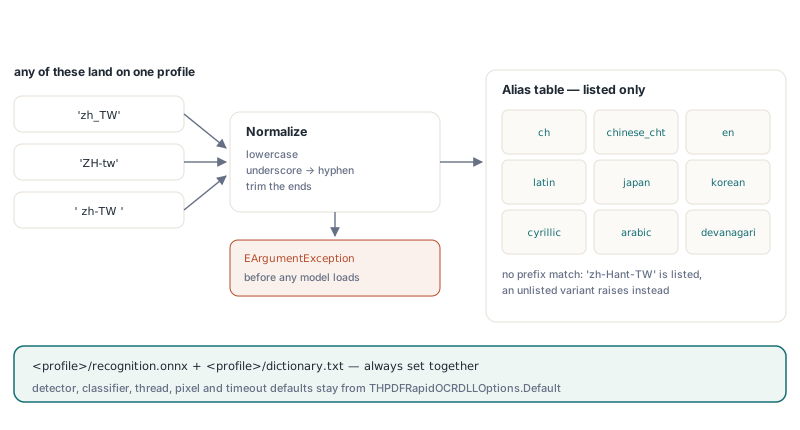
THPDFRapidOCRDLLOptions.ForLanguage resolves a tag to one of nine profiles and returns options that point at <profile>/recognition.onnx and <profile>/dictionary.txt below your model directory, while keeping the shared detector, the optional angle classifier, and the thread, pixel and timeout defaults from THPDFRapidOCRDLLOptions.Default. The method lowercases the tag, turns underscores into hyphens and trims surrounding whitespace, so 'zh_TW', 'ZH-tw' and ' zh-tw ' all land on the same profile. Aliases are an explicit list rather than a prefix match: 'zh-Hant-TW' is accepted because it is listed, while an arbitrary regional variant that is not listed raises EArgumentException before any model is loaded
| Profile | Languages | Example tags | Pinned model |
|---|---|---|---|
ch | Simplified Chinese and English | zh, zh-CN, zh-Hans, chi_sim | PP-OCRv4 |
chinese_cht | Traditional Chinese | zh-TW, zh-HK, zh-Hant, chi_tra | PP-OCRv3 |
en | English | en, en-US, en-GB, eng | PP-OCRv4 |
latin | French, German, Spanish, Portuguese, Italian, Dutch, Turkish | fr, de, es-419, pt-BR, tr | PP-OCRv3 |
japan | Japanese | ja, ja-JP, jpn | PP-OCRv4 |
korean | Korean | ko, ko-KR, kor | PP-OCRv4 |
cyrillic | Russian, Ukrainian, Bulgarian, Belarusian | ru, ru-RU, uk, bg | PP-OCRv3 |
arabic | Arabic, Persian, Urdu | ar, ar-SA, fa, ur | PP-OCRv4 |
devanagari | Hindi, Marathi, Nepali | hi, mr, ne | PP-OCRv4 |
The adapter itself never downloads anything. You provision the files once with the bundled helper, for example tools/Install-RapidOCRModels.ps1 -Destination C:/OCR/models -Language ch,chinese_cht,cyrillic (or -Language All for all nine profiles), and the helper places a shared detector and classifier at the root filenames that Default expects. After that, a Simplified Chinese scan becomes searchable with a few lines. The engine plumbing is the same IHPDFOCREngine seam described in the article on the in-process RapidOCR DLL and its ABI boundary, so this one stays focused on languages
uses
  SysUtils, HPDFDoc, HPDFRapidOCRRecognition;

procedure MakeChineseScanSearchable(const SourceFile, TargetFile: string);
var
  Doc: THotPDF;
  Engine: IHPDFOCREngine;
  Models: THPDFRapidOCRDLLOptions;
  Layer: THPDFOCRTextLayerOptions;
  Info: THPDFOCRTextLayerInfo;
begin
  // ch/recognition.onnx + ch/dictionary.txt, shared detector and classifier
  Models := THPDFRapidOCRDLLOptions.ForLanguage('zh-CN');
  Engine := HPDFCreateRapidOCRDLLOCREngine(
    'C:\OCR\Win64\HotPDFRapidOCR.dll', 'C:\OCR\models', Models);
  Doc := THotPDF.Create(nil);
  try
    Doc.AutoLaunch := False;
    if Doc.LoadFromFile(SourceFile) < 1 then
      raise Exception.Create('Cannot load ' + SourceFile);
    Layer := THPDFOCRTextLayerOptions.Default;  // 300 DPI, MinimumConfidence 0.5
    // an empty page list means every page; pages that already have text are skipped
    if not Doc.ApplyLoadedOCRTextLayer([], Engine, Layer, Info) then
      raise Exception.Create(string(Info.Diagnostic));
    Writeln(string(Info.EngineName), ': ', Info.AcceptedWordCount,
      ' lines, ', Info.UniqueScalarCount, ' distinct characters');
    Doc.SaveLoadedDocument(TargetFile);
  finally
    Doc.Free;
  end;
end;
Two details in that output deserve a note. The native pipeline returns one result per detected text line, not per word, so AcceptedWordCount counts lines here, and MinimumConfidence is compared against the mean character confidence of the whole line: a line averaging 0.45 is dropped as a unit. UniqueScalarCount reports how many distinct Unicode scalars the text layer had to map into its font and ToUnicode table, a useful sanity check that CJK text actually arrived instead of a handful of Latin fallbacks. Keep the engine interface alive across documents, because model initialization happens in the factory and is the expensive step
Why does switching only the recognition model produce garbage?
A CTC recognition model never outputs characters, only class indices, and the dictionary is the sole thing that turns index 1,204 into a glyph. Swap ch/recognition.onnx for cyrillic/recognition.onnx but keep the Chinese dictionary, and the model will happily emit valid Cyrillic indices that the old dictionary translates into random Han characters. The result looks like text, passes UTF-8 validation, and is searchable for exactly nothing. That is why ForLanguage always sets RecognitionModel and CharacterDictionary together, and why hand-built options should never change one without the other
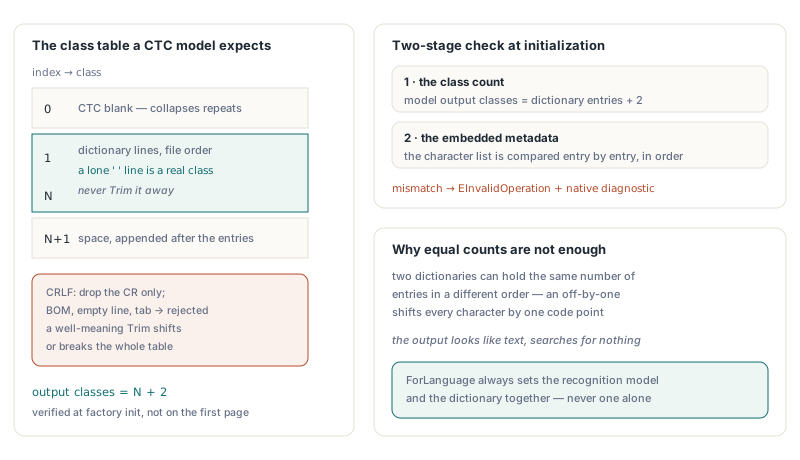
The obvious safety check, comparing the dictionary size with the model output width, is necessary but not sufficient. Two dictionaries can have the same number of entries in a different order, and an off-by-one in the order shifts every character by one code point. HotPDF therefore checks in two stages when the factory initializes the model. First, the output class count must equal the dictionary entries plus two. Second, when the ONNX file embeds a character metadata list, every dictionary entry is compared with it in order, and a mismatch fails initialization with EInvalidOperation and a native diagnostic instead of producing plausible garbage later
The "plus two" comes from the class layout. Class 0 is the CTC blank, classes 1 to N are the dictionary lines in file order, and the final class is a space. Some dictionaries also carry their own space entry, and that line must be kept exactly as it is. This is where a well-meaning Trim does real damage: it turns a single-space entry into an empty string and shifts or breaks the table. The only normalization that is safe is removing a trailing carriage return, so a dictionary saved with CRLF line endings loads correctly, while a UTF-8 byte order mark, an empty line, or an entry containing a tab is rejected. The sketch below shows the layout in Pascal; it is explanatory code, not a HotPDF API
// Illustration only: the class table a CTC recognizer expects
uses
  SysUtils, IOUtils;

function BuildCTCClassTable(const FileName: string): TArray<string>;
var
  Text, Entry: string;
  Lines: TArray<string>;
  I, Last: Integer;
begin
  Text := TEncoding.UTF8.GetString(TFile.ReadAllBytes(FileName));
  if (Text <> '') and (Text[1] = #$FEFF) then
    raise EArgumentException.Create('Dictionary must be UTF-8 without a BOM');
  Lines := Text.Split([#10]);
  Last := High(Lines);
  if (Last >= 0) and (Lines[Last] = '') then
    Dec(Last);                                   // newline at end of file
  SetLength(Result, Last + 3);
  Result[0] := '';                               // class 0: CTC blank
  for I := 0 to Last do
  begin
    Entry := Lines[I];
    if (Entry <> '') and (Entry[Length(Entry)] = #13) then
      SetLength(Entry, Length(Entry) - 1);       // CRLF: drop the CR only
    if (Entry = '') or (Pos(#9, Entry) > 0) then
      raise EArgumentException.Create('Invalid dictionary entry');
    Result[I + 1] := Entry;                      // never Trim: ' ' is a class
  end;
  Result[Last + 2] := ' ';                       // final class: space
  // Length(Result) must equal the model output class count
end;
What does greedy CTC decoding actually do?
Greedy CTC decoding picks the highest-scoring class at every time step, collapses consecutive repeats into one character, and drops the blank class; the blank is what allows genuinely doubled letters to survive. A recognition model looks at a text line as a sequence of narrow vertical slices, and for each slice, or time step, it outputs a probability for every class. A line containing AA中 might produce the argmax sequence A A blank A 中 space. Collapsing the first two A steps gives one A, the blank separates it from the next A, and the result is AA中 with the trailing space intact. Without the blank rule, book and bok would be indistinguishable
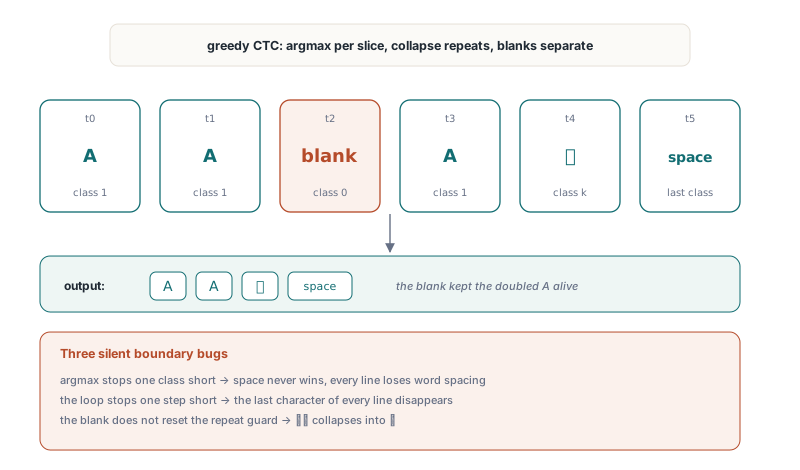
Since the decoder is only a dozen lines, it is easy to get the boundaries wrong, and the failures are silent. If the inner argmax loop stops one class short, the space class can never win and every line comes back without word spacing, which wrecks phrase search on English and Latin pages. If the outer loop stops one time step short, the last character of every line disappears, which for a short line can be a third of the text. And if the repeat guard is not reset by a blank, doubled characters such as ll or Chinese reduplications such as 谢谢 collapse into one. The HotPDF decoder includes the last class and the last time step, keeps blank-separated repeats, and additionally rejects scores that are not finite or fall outside 0 to 1, and any class count that does not match the dictionary. Here is the same logic as a Pascal illustration
// Illustration only: greedy CTC decoding with correct boundaries.
// Scores holds Steps * Classes probabilities, one row per time step
function GreedyCTCDecode(const Scores: array of Single;
  Steps, Classes: Integer; const Characters: array of string): string;
var
  Step, C, Best, Previous: Integer;
  BestScore: Single;
begin
  if (Classes < 3) or (Length(Characters) <> Classes) or
    (Length(Scores) <> Steps * Classes) then
    raise EArgumentException.Create('Model output does not match the dictionary');
  Result := '';
  Previous := 0;                            // class 0 is the CTC blank
  for Step := 0 to Steps - 1 do             // include the last time step
  begin
    Best := 0;
    BestScore := Scores[Step * Classes];
    for C := 1 to Classes - 1 do            // include the last class (space)
      if Scores[Step * Classes + C] > BestScore then
      begin
        Best := C;
        BestScore := Scores[Step * Classes + C];
      end;
    if (Best <> 0) and (Best <> Previous) then
      Result := Result + Characters[Best];
    Previous := Best;                       // a blank resets the repeat guard
  end;
end;
Greedy decoding is not the most accurate CTC strategy available; beam search with a language model can fix some ambiguous slices. For printed documents at 300 DPI the greedy result is usually what the model has to offer, and the decoder is not the place to compensate for model weaknesses. The Latin PP-OCRv3 model, for instance, can read ñ as n even on clean input. HotPDF does not paper over that with post-processing character replacements, because a substitution table that fixes Spanish breaks something else, and a wrong character in a searchable layer is worse than an honest miss
How does HotPDF order text lines, including right-to-left Arabic?
HotPDF sorts detected text boxes top to bottom, groups boxes into a row when they overlap vertically by at least half of the smaller box height, and orders each row left to right, or right to left when RightToLeft is enabled; the characters inside each recognized line are never reversed. The grouping matters because a detector often splits one visual line into several boxes, for example a label and a value separated by a wide gap, and a pure top-coordinate sort would interleave them with the neighboring line whenever their tops differ by a pixel or two
The Arabic preset sets RightToLeft := True, which tells the DLL to order the boxes in each row by their right edge, from the right margin inward. That is the entire effect. The text the model returns for a line is already in Unicode logical order, the order in which an Arabic reader reads and types it, and that is also the order PDF text extraction and search expect. Mechanically reversing the string to make it "look right" in a debugger would break search, copy and paste, and screen readers. Bidirectional display and glyph shaping are the viewer's job
One engine serves one language profile. There is no automatic script detection, so a document that mixes scripts needs one engine per profile, applied to the pages that use it. Because ApplyLoadedOCRTextLayer takes an explicit page list and commits each call as its own all-or-nothing transaction, that is straightforward
uses
  SysUtils, HPDFDoc, HPDFRapidOCRRecognition;

function CreateRapidEngine(const Tag: string): IHPDFOCREngine;
var
  Models: THPDFRapidOCRDLLOptions;
begin
  // raises EArgumentException for an unknown tag, before any model loads
  Models := THPDFRapidOCRDLLOptions.ForLanguage(Tag);
  Models.MaxPixels := 33554432;          // room for A3 pages at 300 DPI
  Result := HPDFCreateRapidOCRDLLOCREngine(
    'C:\OCR\Win64\HotPDFRapidOCR.dll', 'C:\OCR\models', Models);
end;

procedure OCRMixedArchive(Doc: THotPDF);
var
  Chinese, Arabic: IHPDFOCREngine;
  Layer: THPDFOCRTextLayerOptions;
  Info: THPDFOCRTextLayerInfo;
begin
  Chinese := CreateRapidEngine('zh-TW');  // chinese_cht profile
  Arabic := CreateRapidEngine('ar-SA');   // arabic profile, RightToLeft = True
  Layer := THPDFOCRTextLayerOptions.Default;
  if not Doc.ApplyLoadedOCRTextLayer([0, 1, 2], Chinese, Layer, Info) then
    raise Exception.Create(string(Info.Diagnostic));
  if not Doc.ApplyLoadedOCRTextLayer([3], Arabic, Layer, Info) then
    raise Exception.Create(string(Info.Diagnostic));
end;
The MaxPixels line is there for a reason. The DLL options default to 16,777,216 pixels per request, which covers A4 and US Letter at 300 DPI comfortably, but an A3 page at 300 DPI is about 3508 by 4961 pixels, roughly 17.4 million, and the request is refused as over budget. Raise MaxPixels (the ceiling is 67,108,864) or lower THPDFOCRTextLayerOptions.DPI for large formats. Right-to-left ordering uses the optional HPDFRapidOCRSetReadingDirection export of ABI version 1; the adapter only requires it when RightToLeft is set, so an older DLL keeps serving left-to-right languages and fails at engine creation with an EArgumentException naming the missing export for Arabic
Why do newer OCR models fail to load?
The HotPDF RapidOCR DLL links a static ONNX Runtime 1.14, which cannot read models saved with ONNX IR version 10, and newer exports such as PP-OCRv5 models can require a newer runtime than that; such a model fails at engine creation with a native diagnostic. That constraint is the reason the language packs are pinned to specific PP-OCRv3 and PP-OCRv4 recognizer and dictionary pairs instead of "latest", and why the table above mixes the two generations: every pinned pair is one that loads and verifies under that runtime
The installer enforces the pairing. Every file in its manifest carries a SHA256 hash, an existing file with a different hash stops the install rather than being overwritten, and each download lands under a temporary name and only moves into place after its hash matches. That protects against the quiet version of the dictionary problem: someone drops a newer recognition.onnx into a profile folder by hand, the class count happens to match, and nothing fails until a customer reports that search does not find words they can plainly see. At runtime the adapter stays offline and never fetches a missing model. The recognizer also validates the model shape at load time, accepting NCHW input with a fixed height of 32 or 48 pixels or a dynamic height, which it runs at 48
If you need a script that none of the nine profiles cover, you can still point RecognitionModel and CharacterDictionary at your own files. The same checks apply, which is the point: a mismatched pair fails at initialization, not in your customer's archive. For pages where neither RapidOCR profile fits, the Tesseract adapter for searchable PDF plugs into the same ApplyLoadedOCRTextLayer call, and for machine-printed ASCII forms the built-in template-matching OCR engine needs no models at all
Quick reference: multilingual RapidOCR checklist
- Create options with
THPDFRapidOCRDLLOptions.ForLanguageand treatEArgumentExceptionas an unsupported tag, not a runtime fault - Change
RecognitionModelandCharacterDictionarytogether, never one alone; equal class counts do not prove equal character order - Keep dictionaries as UTF-8 without a BOM, never trim entries, and expect the model to have N + 2 classes: blank, N entries, space
- A custom CTC decoder must cover the last class and the last time step and keep repeats separated by a blank
- Use one engine per language profile and pass explicit page lists for mixed-script documents
RightToLeftchanges box order only; recognized text stays in Unicode logical order- Install models with
Install-RapidOCRModels.ps1so SHA256 pins hold the model and dictionary pairing; setUseAngleClassifier := Falseif you installed with-SkipClassifier - Raise
MaxPixelsabove the 16,777,216 default before running A3 or larger pages at 300 DPI
The RapidOCR language presets, the native DLL adapter and the OCR text layer pipeline are part of the HotPDF Delphi PDF Component for Delphi, C++Builder and Windows FPC/Lazarus, starting with v2.775.0 for the multilingual profiles