HotPDF, the Delphi PDF component, now rejects signature wrapping: since v2.759.0 both VerifyLoadedSignatureEx and the batch validator require the gap between the two /ByteRange segments to be exactly the /Contents hex string, delimiters included, and v2.761.0 adds AddLoadedSignedSignatureField so a second signature can be appended to an already signed PDF as a clean incremental revision. The two changes belong together, because a correct second signature is precisely the layout the stricter verifier expects
The situation that exposed the problem is ordinary. A contract is signed by the vendor, then routed to an approver who must countersign without disturbing the first signature. The second revision is appended after the first one, its own /ByteRange spans the whole grown file, and both signatures should verify. Getting there by hand meant writing an incremental section yourself, and the test fixture that did exactly that turned out to be a textbook signature-wrapping structure that the old verifier happily accepted. If you have not looked at the verification API before, the guide to verifying PDF digital signatures with HotPDF covers the basics this article builds on
What exactly belongs in the ByteRange gap?
The gap must contain the complete /Contents value and nothing else: ISO 32000-1 §12.8.3.3 says the hexadecimal string, with its < and > delimiters, fits precisely in the space between the two byte ranges, and ISO 32000-2 §12.8.1 carries the same rule forward. Table 252 and the PAdES documents only say that the digest excludes the Contents value, which is easy to read as excluding just the hex digits. Earlier HotPDF releases read it that way: PreparePDFForSigning and the streaming CMS preparation hashed the angle brackets too, with a source comment insisting the brackets had to be covered. Validators that compare the gap against the signature value flag that layout as an invalid byte range, so v2.759.0 moves both delimiters out of the signed ranges. A quick independent check on any signed file is to look at two bytes: the byte at offset ByteRange[1] must be < and the byte at offset ByteRange[2] - 1 must be >
![Anatomy of a correctly filled PDF signature ByteRange in HotPDF: the first range covers the file from byte zero, the gap holds the complete /Contents hex string including the less-than and greater-than delimiters, the second range covers the trailer to the end, and two one-byte checks at ByteRange[1] and ByteRange[2] - 1 confirm the layout on any signed file](../../assets/media/HotPDF-ByteRange-Gap-Anatomy.svg)
Why does a non-empty gap check miss signature wrapping?
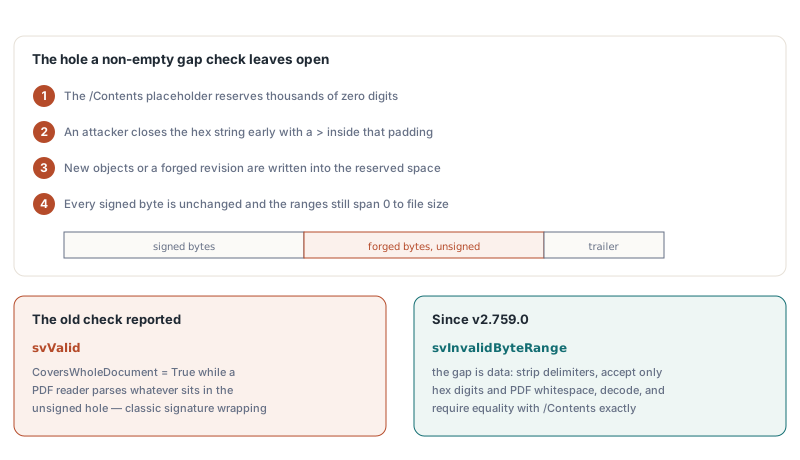
A non-empty gap check only proves that something was left out of the digest, not what was left out, and that is the whole attack surface. The /Contents placeholder is reserved with thousands of zero digits, while a real CMS container rarely fills it. An attacker can close the hex string early inside that zero padding with a >, write new objects or a forged revision into the rest of the reserved space, and leave the byte ranges untouched. The CMS signature still verifies because every signed byte is unchanged, the ranges still start at 0 and end at the file size, and the old HotPDF verifier reported svValid with CoversWholeDocument set to True. A PDF reader, meanwhile, parses whatever sits in that unsigned hole
HotPDF now treats the gap as data to be validated byte by byte. The verifier reads the gap, strips the delimiters, accepts only hex digits plus PDF whitespace (tab, line feed, form feed, carriage return, space), decodes the digits and requires the result to equal the signature dictionary /Contents exactly. Anything else downgrades the result to svInvalidByteRange. The check runs in both the single-signature path and ValidateLoadedSignatureBatch, which kept its own coverage logic and needed the same fix. Files produced by HotPDF before v2.759.0, whose gap held only digits with the brackets sitting just inside the ranges, still verify, so archived documents do not suddenly turn red
var
  Pdf: THotPDF;
  Info: THPDFSignatureInfo;
  Status: THPDFSignatureVerifyStatus;
  I: Integer;
begin
  Pdf := THotPDF.Create(nil);
  try
    Pdf.LoadFromFile('SignedTwice.pdf');
    for I := 0 to Pdf.GetLoadedSignatureFieldCount - 1 do
    begin
      Status := Pdf.VerifyLoadedSignatureEx(I, Info);
      case Status of
        svValid:
          if Info.CoversWholeDocument then
            Writeln(Info.FieldName, ': valid, covers the whole file')
          else
            Writeln(Info.FieldName, ': valid, ',
              Info.UnsignedTrailingBytes, ' bytes appended later');
        svInvalidByteRange:
          Writeln(Info.FieldName, ': ByteRange gap rejected (wrapping?)');
      else
        Writeln(Info.FieldName, ': failed, status ', Ord(Status));
      end;
    end;
  finally
    Pdf.Free;
  end;
end;
How do you add a second signature to an already signed PDF?
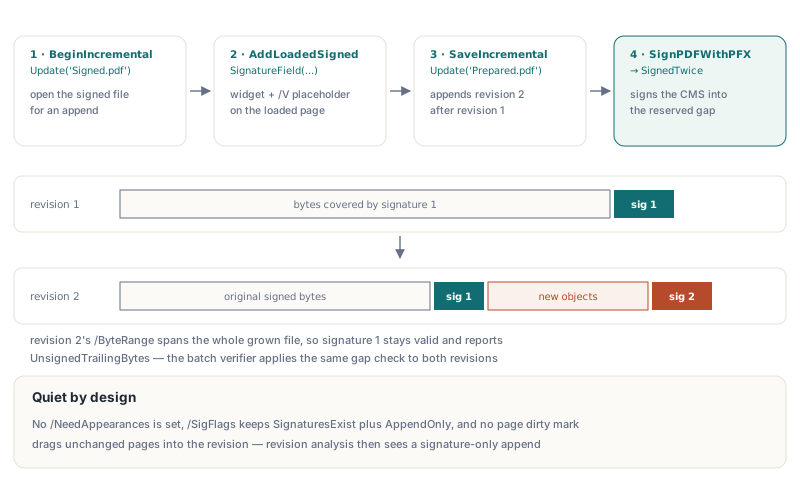
Open the signed file with BeginIncrementalUpdate, call AddLoadedSignedSignatureField, save with SaveIncrementalUpdate, then sign the prepared file with the class function THotPDF.SignPDFWithPFX. Before v2.761.0 the documented recipe of calling THPDFPage.AddSignedSignatureField after BeginIncrementalUpdate could not work, because CurrentPage is nil in incremental mode and nothing could attach a /V placeholder to a field on a loaded document. The new method creates the widget on the loaded page and hangs the same placeholder dictionary the new-document path uses under /V, so both signing routes share one serialization. For the first signature itself, the article on creating PAdES digital signatures in Delphi walks through the PFX pipeline
var
  Pdf: THotPDF;
  FieldIndex: Integer;
begin
  Pdf := THotPDF.Create(nil);
  try
    Pdf.BeginIncrementalUpdate('Signed.pdf');
    // Page 0, widget rectangle in points, 8192 bytes reserved for the CMS
    FieldIndex := Pdf.AddLoadedSignedSignatureField(0, 320, 60, 520, 120,
      'ApproverSignature', 8192);
    if FieldIndex < 0 then
      raise Exception.Create('Page index out of range');
    Pdf.SaveIncrementalUpdate('Prepared.pdf');
  finally
    Pdf.Free;
  end;

  if not THotPDF.SignPDFWithPFX('Prepared.pdf', 'SignedTwice.pdf',
    'approver.pfx', 'pfx-password') then
    raise Exception.Create('Second signature failed');
end;
AddLoadedSignedSignatureField is deliberately quieter than its siblings. The other AddLoaded* field creators set /NeedAppearances true on the AcroForm, which tells a viewer to regenerate field appearances; on a signed document that regeneration can rewrite signed content, so the new method removes the flag again unless the source already carried it. /SigFlags keeps its original value OR 3 (SignaturesExist plus AppendOnly, ISO 32000-1 Table 219). You also do not need to call MarkDirty on the page: adding to /Annots and /Fields propagates the dirty flag to the owning indirect object, and an explicit page mark would only drag an unchanged page dictionary into the new revision, which revision analysis then reports as a page modification. Finally, the placeholder writes /ByteRange before /Contents, because the patcher locates the sentinel /ByteRange first and searches forward for the matching hex string
What changes when an external signer or HSM produces the CMS?
Nothing changes in the workflow, but the offsets now mean what the specification says. PreparePDFForSigning returns two 0-based ranges whose gap is the whole /Contents string, and ContentsHexStart is the 1-based index of the first hex digit in the AnsiString. A shorter CMS is padded with 0 at the end, before the closing >. Because PreparePDFForSigning patches the first unpatched sentinel it finds, prepare exactly one placeholder per revision, and prefer InsertSignatureHexAt with the returned offsets over the search-based InsertSignatureHex when earlier signatures already exist in the file
var
  Bytes, ToSign, CmsHex: AnsiString;
  R1Start, R1Len, R2Start, R2Len, HexStart, HexLen: Integer;
begin
  Bytes := LoadFileAsAnsiString('Prepared.pdf');   // your helper
  if not THotPDF.PreparePDFForSigning(Bytes, R1Start, R1Len,
    R2Start, R2Len, HexStart, HexLen) then
    raise Exception.Create('No signature placeholder found');

  // The gap is the whole hex string: '<' ends range 1, '>' precedes range 2
  Assert(Bytes[R1Start + R1Len + 1] = '<');
  Assert(Bytes[R2Start] = '>');

  ToSign := Copy(Bytes, R1Start + 1, R1Len) + Copy(Bytes, R2Start + 1, R2Len);
  CmsHex := SignDetachedWithHsm(ToSign);           // your CMS signer, hex DER
  if not THotPDF.InsertSignatureHexAt(Bytes, HexStart, HexLen, CmsHex) then
    raise Exception.Create('CMS does not fit the reserved space');
  SaveAnsiStringToFile(Bytes, 'SignedTwice.pdf');  // your helper
end;
Where are the limits of the new checks?
The gap check closes one specific hole and should not be oversold. svValid still means byte integrity plus a key that matches the embedded certificate; trust in that certificate is a separate decision. The gap is validated only when the verifier has source bytes, which VerifyLoadedSignatureEx reads from the loaded file and the TStream overloads take from you. For the first signature in a countersigned file, CoversWholeDocument is correctly False, and whether the appended revision only added a signature or also changed pages is a question for DocMDP, FieldMDP and revision analysis in HotPDF. Note too that the attached PDF MAC check compares offsets against the < and > positions, so it accepts both the old and the new layout; any tool of your own that hard-codes the pre-v2.759.0 offsets will fail first when it meets a freshly signed file
If your Delphi or C++Builder application signs, countersigns or audits PDFs, the safest path is to let one library produce and verify the same layout. HotPDF, the native Delphi PDF component ships the stricter gap validation, incremental second signatures and the external-signer hooks shown above in a single component