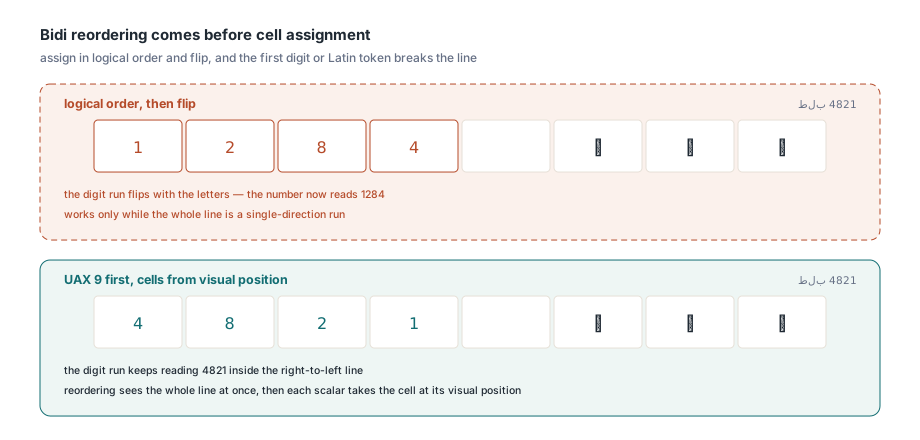
A ten-box comb field holding the Arabic reference طلب 4821 can end up showing 1284 in its number boxes. That happens when a writer gives cells out in typing order and then mirrors the whole row because the text is right-to-left: the digits get mirrored along with the letters. The letters fare no better under a per-character loop, since each one is drawn alone in its box, in its isolated form, with a lam-alef pair crushed into a single cell. Two decisions sit behind all of it: which unit owns a cell, and when the line is reordered. A comb filler has to get both right before a single Arabic or Hebrew form looks correct
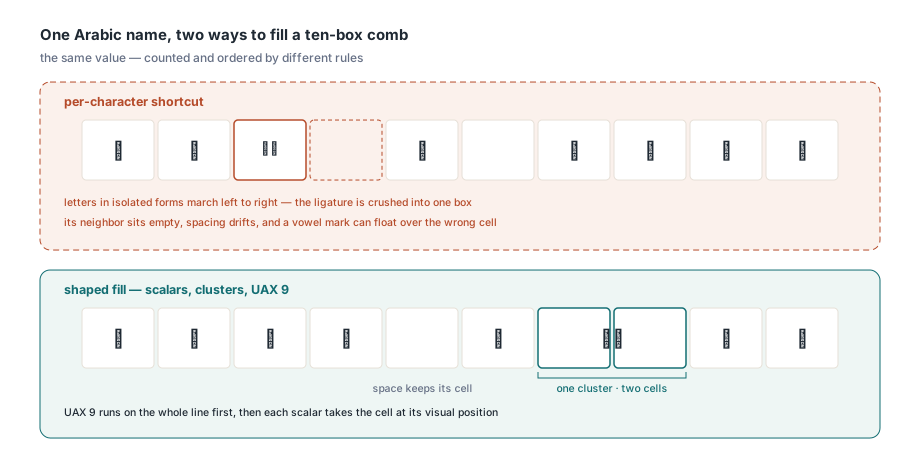
What the Comb flag asks for, and what it leaves open
The Comb flag asks a PDF writer to divide the field into exactly MaxLen equally spaced positions and put one character in each. ISO 32000-1 §12.7.4.3 defines Comb as bit position 25 in Table 228, the flags specific to text fields. It only has meaning when the MaxLen entry from Table 229 is present and the Multiline, Password and FileSelect flags are clear. In the 32-bit /Ff value the bit is $1000000. It is also the first bit to disappear when a flags value takes a detour through a floating-point variable, which the article on 32-bit AcroForm field flags walks through
The specification says "character" and stops. It was written with fixed-pitch Latin boxes in mind, and it says nothing about what a character is when an Arabic letter pair becomes one glyph or a vowel mark has no width of its own. Any implementation has to pick a unit. HotPDF picks the Unicode scalar. Its headless document API (THPDFHeadlessDocument) enforces the structural rules around it strictly: a comb field that is also multiline, or that has no positive MaxLen, raises an EHPDFHeadlessDocumentError with the code hdInvalidDocument, and a password field that also carries the Comb bit is refused the same way
Why count Unicode scalars instead of UTF-16 units, glyphs or graphemes?
THPDFHeadlessDocument.SetTextFieldValueWithFamilies counts comb cells in Unicode scalars because that is the same unit it uses to enforce MaxLen. The grid and the length check have to agree. If they don't, a value can pass validation and still not fit its boxes, and the user gets a field that looks broken for no visible reason. Each alternative fails on a concrete case
- UTF-16 code units are what Delphi's
Lengthreturns, so a supplementary character such as U+20BB7 would take two boxes and two slots of the field budget - Glyph counts depend on the font: most Arabic faces turn lam plus alef into one glyph, so the number of cells would change when you switch typefaces
- Grapheme counts merge a base letter with its marks, which leaves the grid disagreeing with a
MaxLencheck that counts every scalar the user typed
The MaxLen check in THPDFHeadlessDocument walks the string only when its UTF-16 length is over the limit. When it does walk, a valid surrogate pair counts once and an unpaired surrogate is rejected outright. We pinned the unit down by counting the same short values every way we could — UTF-16 units, glyphs, graphemes, scalars — and U+20BB7 settled it: Delphi's Length put it in two boxes while the scalar budget called it one. A UI that wants to warn while the user is still typing, instead of catching an exception after the call, should count exactly the same way
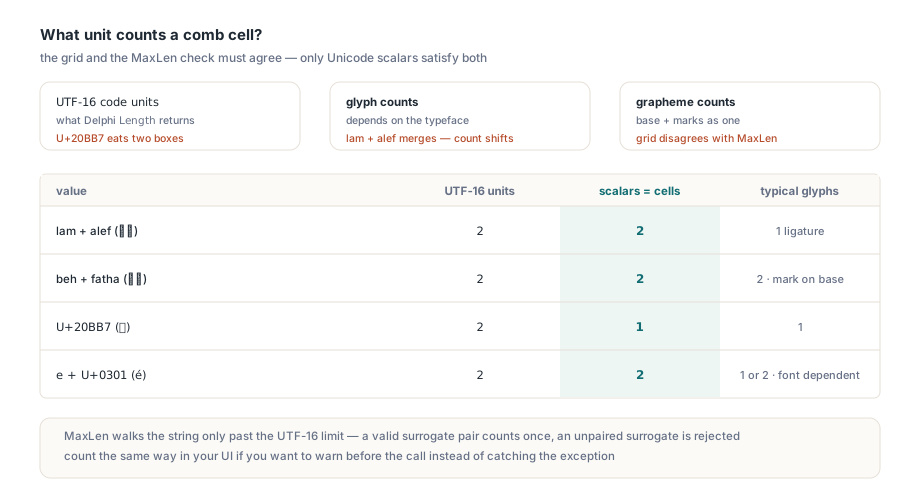
Four short values show how far the units drift apart
| Value | UTF-16 units | Scalars (cells) | Typical glyphs |
|---|---|---|---|
| Lam + alef (لا) | 2 | 2 | 1 ligature |
| Beh + fatha (بَ) | 2 | 2 | 2, mark attached to base |
| U+20BB7 (𠮷) | 2 | 1 | 1 |
| Decomposed e + U+0301 | 2 | 2 | 1 or 2, font dependent |
The two helpers below are not part of the library. They are code you would add to your own form layer: one counts scalars the way the comb grid does, the other removes the invisible direction marks discussed in the next section
// Your own helper, not a HotPDF API: counts Unicode scalars the
// way the comb grid and the MaxLen check do (a valid surrogate
// pair is one scalar)
function CountScalars(const S: UnicodeString): Integer;
var
  I: Integer;
begin
  Result := 0;
  I := 1;
  while I <= Length(S) do
  begin
    if (Ord(S[I]) >= $D800) and (Ord(S[I]) <= $DBFF) and
       (I < Length(S)) and
       (Ord(S[I + 1]) >= $DC00) and (Ord(S[I + 1]) <= $DFFF) then
      Inc(I, 2)
    else
      Inc(I);
    Inc(Result);
  end;
end;

// Your own helper, not a HotPDF API: drops LRM, RLM, ALM and the
// embedding / isolate controls, each of which would hold a blank cell
function StripDirectionalControls(const S: UnicodeString): UnicodeString;
var
  I: Integer;
  C: Word;
begin
  Result := '';
  for I := 1 to Length(S) do
  begin
    C := Ord(S[I]);
    case C of
      $061C, $200E, $200F, $202A..$202E, $2066..$2069: ; // skip
    else
      Result := Result + S[I];
    end;
  end;
end;
How ligatures and combining marks share their cells
A shaped cluster that covers k scalars occupies k contiguous cells and is centered as one block across them. After shaping, HotPDF maps every cluster back to the exact stretch of source text it came from, so it knows which scalars the cluster owns and therefore which cells. The lam-alef ligature gets two boxes and sits centered across both. A beh carrying a shadda and a fatha is three scalars, so it gets three boxes, and the marks stay on the letter
Centering looks like a per-glyph job. Do exactly that and a mark drifts away from its base, because a mark's position only means something relative to the letter it sits on. HotPDF keeps every glyph inside a cluster at its shaped advance and X/Y offsets, then centers the cluster using the combined horizontal extent of the natural advance, the positioned glyph origins and the real glyph ink. Nothing inside the cluster moves relative to anything else
Directional controls are the easy-to-miss case. U+200F RIGHT-TO-LEFT MARK, U+061C ARABIC LETTER MARK, U+200E and the embedding and isolate controls (U+202A–U+202E, U+2066–U+2069) are Unicode scalars with no glyph. Each one counts against MaxLen and holds a cell that stays blank. Strip them before filling a comb field. Text pasted from right-to-left user interfaces or exported from other systems can carry these marks invisibly, and the result is a field with an unexplained gap that rejects the value one character earlier than the user expects
Why must bidi reordering happen before cells are assigned?
HotPDF runs the complete line through the Unicode Bidirectional Algorithm (UAX #9) first and only then gives each scalar the cell at its visual position. Assigning cells in logical order and mirroring afterwards works for a pure Arabic string. It falls apart as soon as the line contains digits or a Latin token, because those runs keep reading left to right inside the right-to-left line. The reference from the opening keeps 4821 in the right order only if reordering sees the whole line at once. The complex-script text shaping overview covers logical versus visual order in more depth
Alignment then places the block of used cells inside the field. The field's inherited /Q entry wins when it exists; Options.Alignment applies only when no /Q is found on the field or its parents. This bites right-to-left forms in practice. A short Arabic value in a comb field whose /Q is 0 fills the leftmost boxes, which is exactly what the specification asks for and almost never what the form designer meant. Fix it in the form itself by setting /Q to 2. If you can't touch the form and it has no quadding at all, htaRight does the job from code. Widget rotation comes from the /MK /R entry, and at 90 or 270 degrees the text viewport swaps width and height while the cell logic stays the same
Filling a mixed-font comb field from Delphi
Mixed-font comb text uses one cell grid, one font size and one baseline for every supplied font. With FallbackFontFamilies set to True, HotPDF picks a font for each complete grapheme from the supplied families in order, so an Arabic face can carry the letters while a Latin face carries an embedded product code. Every font span is shaped with the whole line as context, a mark is never split from its base across fonts, and no ligature is invented across a font boundary. Giving each span its own little grid, or scaling it to its own bounding box, would be simpler to write; it would also shift cell positions and break rotated fields whenever fallback changed fonts mid-line
uses
  System.SysUtils, System.IOUtils,
  HPDFHeadlessDocument, HPDFHeadlessAppearance;

procedure FillArabicComb(const SourceFile, TargetFile, Value: string);
var
  Doc: THPDFHeadlessDocument;
  Field: THPDFHeadlessFormField;
  Families: THPDFHeadlessRichTextFontFamilies;
  Options: THPDFHeadlessTextAppearanceOptions;
  FieldIndex: Integer;
begin
  Doc := THPDFHeadlessDocument.Create;
  try
    Doc.LoadFromFile(SourceFile);
    FieldIndex := Doc.FindFormField('applicant.name_ar');
    if FieldIndex < 0 then
      raise Exception.Create('Field not found');
    Field := Doc.GetFormField(FieldIndex);
    if (Field.Flags and $1000000) = 0 then   // Table 228 position 25: Comb
      raise Exception.Create('Not a comb field');

    SetLength(Families, 2);                  // one to sixteen families
    Families[0].FamilyName := 'Noto Naskh Arabic';  // labels must differ
    Families[0].Fonts[hrfsRegular] :=
      TFile.ReadAllBytes('NotoNaskhArabic-Regular.ttf');
    Families[1].FamilyName := 'Noto Sans';
    Families[1].Fonts[hrfsRegular] :=
      TFile.ReadAllBytes('NotoSans-Regular.ttf');

    Options := THPDFHeadlessTextAppearanceOptions.Default;
    Options.ShapeComplexText := True;        // already the default
    Options.FallbackFontFamilies := True;    // default is False
    Options.FontSize := 0;                   // auto-fit, capped at 12
    Options.Alignment := htaRight;           // used only when /Q is absent

    Doc.SetTextFieldValueWithFamilies(FieldIndex,
      StripDirectionalControls(Value), Families, Options);
    Doc.SaveToFile(TargetFile);              // must differ from SourceFile
  finally
    Doc.Free;
  end;
end;
Several members are missing from that example on purpose. During document filling, Width, Height, Rotation and CombCells are derived from each widget rectangle, its /MK entry and the field's MaxLen, so anything you assign to them is overwritten. Note also that the headless GetFormField hands back the document's own field record, not a fresh object, so the example never frees it; that is the opposite of the loaded-PDF THotPDF.GetFormField, whose THPDFLoadedFormField you own and must free. A zero FontSize asks for automatic sizing: every cluster's extent is checked against the width of its k cells, and the height against the shared metric and ink range of all participating fonts, with 12 points as the ceiling. A fixed size is clipped to the widget instead. CharacterSpacing and WordSpacing never move comb positions, since the grid alone decides where a cluster lands
Leave FallbackFontFamilies on for any comb field that may receive Arabic or Hebrew mixed with Latin codes. With it off, the first family has to cover every character in the value, and a single Latin letter outside an Arabic-only face turns into a missing-glyph failure at fill time. Deployment matters too. Shaping and reordering run on HarfBuzz and FriBidi, loaded the first time a value actually needs them: libharfbuzz-0.dll and libfribidi-0.dll on Windows, libharfbuzz.so.0 and libfribidi.so.0 on Linux, with HOTPDF_HARFBUZZ_LIBRARY and HOTPDF_FRIBIDI_LIBRARY overriding the paths. Set them to trusted absolute paths before the first shaped fill. A value that needs no shaping, such as plain Latin text, is laid out directly, one glyph per cell, without loading either library. For the wider loaded-PDF fill workflow, including permissions and saving, see setting form field values in a loaded PDF
What readers and text extractors see in the result
A shaped comb appearance gets three things right every time: each scalar lands in its cell, clusters stay whole, and the logical value survives. Two other properties follow from the box layout itself: how cursive joins look, and what a text extractor gets back
Cursive joins across cells are the first. Arabic letters are still shaped with full-line context, so each one takes its correct initial, medial or final form. The fixed cell pitch, though, puts space between separate clusters, and the connecting strokes stop short of each other instead of meeting as they do in running text. Centering only moves a cluster within its own k cells; the gap between neighboring clusters is fixed by the cell pitch
Text extraction is the second. The appearance carries one /ActualText span (ISO 32000-1 §14.9.4) holding the complete input, and extractors that honor ActualText recover the original string. Extractors that ignore it rebuild text from glyph positions and may return a different order or repeat cluster text, because a multi-glyph cluster has no single Unicode value per glyph. The field itself sidesteps both cases: its /V holds the plain logical value, exactly as it was passed to SetTextFieldValueWithFamilies
Comb text must be a single line without tabs. A value with more scalars than cells is refused, never truncated, and because CombCells equals MaxLen, the refusal arrives from the length check as hdLimitExceeded. A failed fill (missing glyph, invalid font, budget overrun, cancellation) leaves the previous value and appearances in place, so a rejected call cannot leave a half-drawn field in the saved file
try
  Doc.SetTextFieldValueWithFamilies(FieldIndex, Value, Families, Options);
except
  on E: EHPDFHeadlessDocumentError do
    // hdLimitExceeded also covers object and font budgets;
    // compare CountScalars(Value) with Field.MaxLength to be sure
    if E.Code = hdLimitExceeded then
      ShowFieldError('The value has more characters than the field allows')
    else
      raise;
  on E: EHPDFHeadlessAppearanceError do
    if E.Failure = haMissingGlyph then
      ShowFieldError('None of the supplied fonts covers this text')
    else
      raise;
end;
// ShowFieldError is your own UI routine; on either error the field
// keeps its previous value and appearance
Shaped comb filling pays off on forms that already exist and were designed around Latin boxes: tax returns, visa applications, bank onboarding packs and ID registrations with boxed fields, now filled in Arabic, Hebrew, Persian or Urdu. One test string exercises every rule above: an Arabic word, a four-digit number and a letter with a combining mark. Filled correctly, it shows the digits in reading order, each mark on its base letter and no blank cell between clusters. The headless document API, comb shaping and font fallback all ship with the HotPDF Delphi PDF component