HotPDF Delphi Component can search and replace text inside an existing PDF from Delphi and C++Builder. SearchLoadedPageText and SearchLoadedDocumentText locate every occurrence of a string with glyph-level precision, and ReplaceLoadedPageText and ReplaceLoadedDocumentText rewrite the matched bytes in place — provided every replacement character can be re-encoded through the original font, a physical constraint this article treats honestly rather than hiding in a footnote
The request behind this feature is always mundane. A company renames itself and three thousand archived invoices still carry the old name. A contract template shipped with last year's expiry date. A product code was retired and every datasheet that mentions it needs the successor code instead. In a word processor each of these is a thirty-second job. In a PDF it is a genuinely hard problem, and understanding why makes the difference between using the API well and filing a bug report that is really a spec citation
Why is replacing text in a PDF so hard?
Replacing text in a PDF is hard because a PDF page does not contain editable text — it contains positioned glyphs. Under the text-showing model of ISO 32000-1 §9.4, a content stream drives operators like Tj and TJ that paint sequences of character codes at coordinates established by the text matrix. Those codes are not Unicode; they are indices into whatever encoding the page's font declares, and the mapping back to readable characters may live in a /ToUnicode CMap, an encoding difference array, or a CID mapping chain. There is no paragraph object, no text flow, and no guarantee that one visual word is even stored as one string
Replacement adds a second layer of difficulty on top of decoding: you must know exactly which bytes of the original stream produced each glyph, so you can splice new bytes into precisely that span and nothing else. A text extractor can afford to throw the byte positions away once it has the Unicode out. A replacer cannot. That is why HotPDF split the work across two releases — v2.251.0 built the offset-tracking and search layer, and v2.252.0 built the rewriting layer on top of it
Finding text: glyph-level search with byte-offset tracking
HotPDF's SearchLoadedDocumentText finds every occurrence of a needle by matching against the decoded Unicode glyph sequence of each page, not against raw stream bytes, so a hit is a hit regardless of how the font encoded it. The infrastructure underneath was introduced in v2.251.0: the content-stream tokenizer records a StartOfs/EndOfs byte span for every string operand — including its ( ) or < > delimiters — and every decoded glyph carries a TokenIndex/ItemIndex/ByteOffset triple pointing back to the exact operand, TJ-array item, and code unit that produced it. The same glyph interpreter powers the extraction API described in extracting text from a loaded PDF in Delphi; search simply keeps the provenance that extraction discards
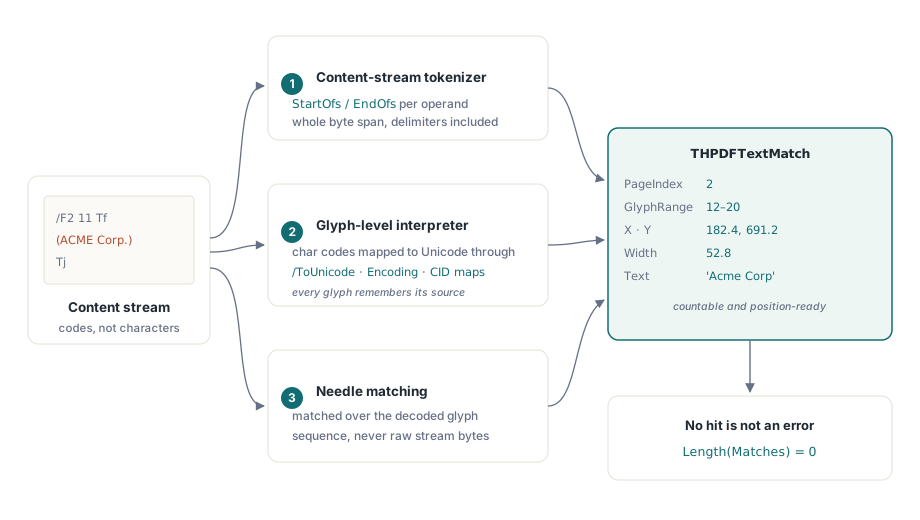
Each match comes back as a THPDFTextMatch record carrying the page index, the inclusive glyph range, the user-space X/Y origin and width of the hit, the source token and item index, and the matched text itself. That is enough to drive a highlight overlay, a review UI, or the replace step. A search that finds nothing returns an empty array rather than failing, so the calling pattern stays simple
var
  Pdf: THotPDF;
  Matches: THPDFTextMatchArray;
  I: Integer;
begin
  Pdf := THotPDF.Create(nil);
  try
    if Pdf.LoadFromFile('invoices-2025.pdf') > 0 then
    begin
      if Pdf.SearchLoadedDocumentText('Acme Corp', False, Matches) then
        for I := 0 to Length(Matches) - 1 do
          WriteLn(Format('page %d at (%.1f, %.1f): "%s"',
            [Matches[I].PageIndex, Matches[I].X, Matches[I].Y,
             Matches[I].Text]));
    end;
  finally
    Pdf.Free;
  end;
end;
One deliberate design choice deserves a note. When CaseSensitive is False, the comparison folds case for ASCII characters only, by design: full Unicode case folding behaves differently across the Delphi 5 through XE toolchains HotPDF supports, and a search API that finds different matches depending on which compiler built your application is worse than one with a documented, predictable limit. For Latin business text — names, codes, dates — ASCII folding covers the practical cases
Replacing text: reverse encoding and surgical splicing
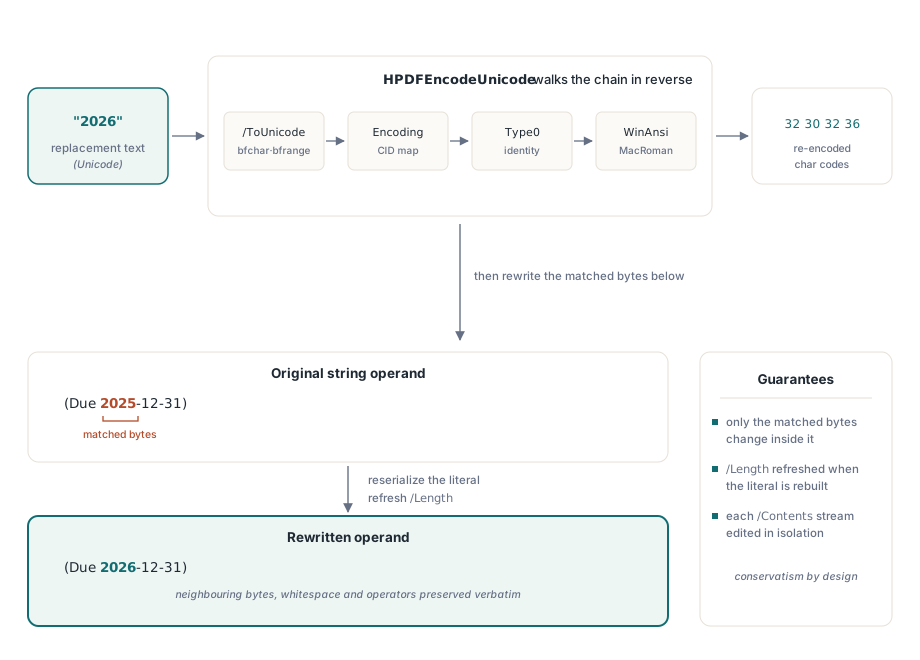
ReplaceLoadedDocumentText, added in HotPDF v2.252.0, rewrites every occurrence of a needle by running the decoding machinery backwards. The HPDFEncodeUnicode function is the inverse of the char-code decoder: it walks the same strategy chain in reverse — /ToUnicode bfchar and bfrange lookup, encoding-stream CID mapping, Type0 identity mappings, and the predefined WinAnsi and MacRoman tables — to turn each replacement character back into the char-code bytes the original font expects. The re-encoded bytes are then serialized into a well-formed string literal or hex string, mirroring the tokenizer's own escaping rules so that a parse → re-serialize round trip is stable
The splice itself is surgical rather than wholesale. Only the code-byte range covered by the match is replaced inside the string operand; non-matched bytes in the same operand, the whitespace between tokens, and every surrounding operator are preserved verbatim, byte for byte. Replacing bca inside abcabc yields a + replacement + bc, not a clobbered operand. Replacements may be shorter or longer than the needle — the literal is reserialized and the stream's /Length refreshed — and each /Contents stream of a multi-stream page is processed in isolation so the page stays well-formed
var
  Pdf: THotPDF;
  ReplaceCount: Integer;
begin
  Pdf := THotPDF.Create(nil);
  try
    if Pdf.LoadFromFile('contract-draft.pdf') > 0 then
    begin
      if Pdf.ReplaceLoadedDocumentText('2025-12-31', '2026-12-31',
        True, ReplaceCount) then
        WriteLn(Format('%d operand rewrites performed', [ReplaceCount]));
      Pdf.SaveLoadedDocument('contract-final.pdf');
    end;
  finally
    Pdf.Free;
  end;
end;
Note what the API does not do: it does not re-typeset the page. PDF has no reflow, so a replacement that is visually wider than the original will simply occupy more horizontal space and may crowd whatever was painted to its right. Same-length or near-length substitutions — dates, version strings, part numbers, name corrections — are the sweet spot. Wholesale rewording belongs in the source document, not the PDF
Why can't you replace text with characters the font subset never included?
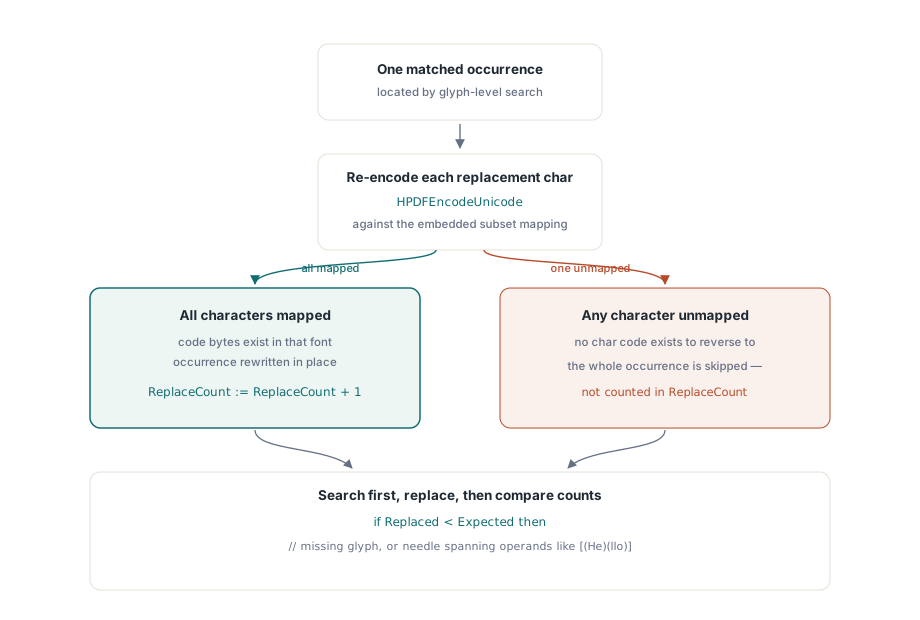
You cannot replace text with a character the embedded font subset never included, because the byte sequence that would select that character simply does not exist in the font's mapping tables. When a PDF producer embeds a subset font, its /ToUnicode CMap and encoding structures cover only the glyphs the original document actually used. HPDFEncodeUnicode can only reverse a mapping that is present: if the document never contained the letter E in that font, there is no char code for E to reverse to. This is a physical property of the file, not a limitation of any particular library — no tool can conjure a glyph mapping that was never embedded
HotPDF handles the failure conservatively. If any single character of the replacement cannot be re-encoded, that entire needle occurrence is skipped — no exception, no partial garbage text, and the occurrence is simply not counted in ReplaceCount. The practical consequence: check ReplaceCount against the match count from a prior search, and treat a shortfall as a signal. In the date example above, the digit 6 must appear somewhere in the document's text in that same font for the rewrite to succeed — likely in an invoice, never guaranteed in general. When the characters you need are simply not available and the goal is to remove sensitive text rather than reword it, true content removal is the better tool anyway; see redacting and restructuring loaded PDFs in Delphi for that path
var
  Matches: THPDFTextMatchArray;
  Expected, Replaced: Integer;
begin
  Pdf.SearchLoadedDocumentText('Acme Corp', True, Matches);
  Expected := Length(Matches);
  Pdf.ReplaceLoadedDocumentText('Acme Corp', 'Apex Corp', True, Replaced);
  if Replaced < Expected then
    WriteLn(Format('%d occurrence(s) skipped: characters missing ' +
      'from the font subset, or match spans multiple operands',
      [Expected - Replaced]));
end;
The second skip condition in that message is the other documented boundary: a needle that spans multiple string operands — Hello split across [(He)(llo)] TJ items, for instance — is found by search, because search matches the decoded glyph sequence, but is skipped by replace, because rewriting across operand boundaries would require merging adjacent byte spans. Search-then-verify makes both limits visible instead of silent
What changes in the file when you save?
A replaced /Contents stream is saved uncompressed. FlateDecode-compressed streams are decompressed for editing, and when HotPDF writes the rebuilt bytes it drops the stream's /Filter entry and refreshes /Length rather than recompressing. The resulting PDF is fully valid and renders normally in mainstream viewers; the trade-off is a larger file for each edited stream. For a batch pipeline that processes thousands of documents, budget for that growth or run a separate compression pass downstream. How rewritten objects interact with the document's cross-reference structure on save is its own topic, covered in object streams and incremental updates in HotPDF
Everything else about the file is left alone. Untouched streams keep their compression, fonts and images are not rewritten, and the operand-level splice means even the edited streams differ from the original only where a match landed. That conservatism is deliberate: the more of a loaded document a library rewrites, the more opportunities it has to break a producer quirk it did not anticipate
Text search and replace joins extraction, redaction, and page rendering in HotPDF's loaded-document toolset, all driven by the same content-stream interpreter and available from Delphi 5 through the current RAD Studio releases without external dependencies. The full API reference and trial download are on the HotPDF Delphi Component product page