HotPDF writes native PDF 2.0 documents from Delphi and C++Builder, including the three PDF/A-4 archival profiles and PDF/UA-2 accessible output with namespaced structure elements. Selecting them is a matter of two properties, but the standards behind those properties changed more than the version number suggests: PDF/A-4 dropped the conformance letters that everyone learned with PDF/A-2, and PDF/UA-2 introduced structure namespaces that a part 1 document never had
This article covers what actually changes in the generated file, and which mistakes HotPDF turns into an exception at EndDoc rather than into a document that fails validation at the customer's site
How PDF/A-4 identification differs from part 2 and 3
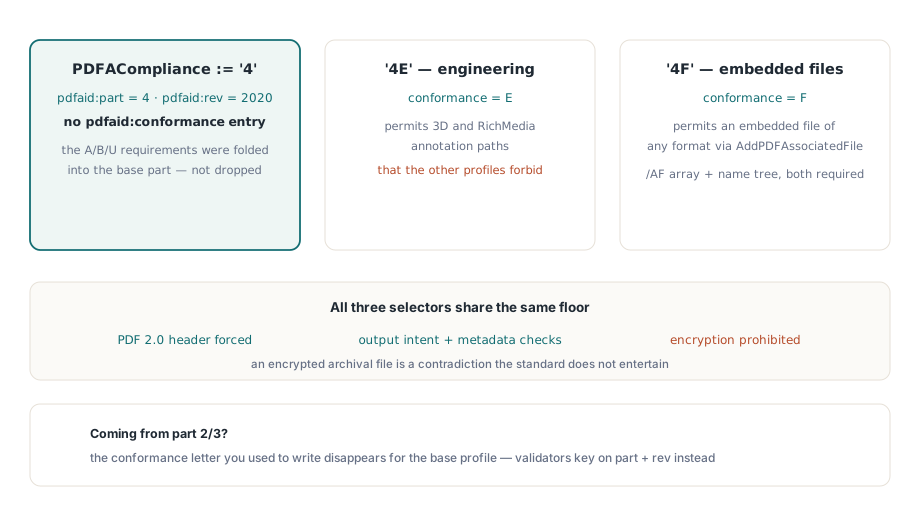
PDF/A-4 identifies itself by part number and revision year, with no conformance letter for the base part. Set PDFACompliance to '4' and HotPDF emits pdfaid:part=4 with pdfaid:rev=2020 and no pdfaid:conformance entry at all. The letter did not go missing — part 4 has no A/B/U levels, because the requirements that used to separate them were folded into the base part
Two extensions keep a letter. '4E' selects PDF/A-4e for engineering documents and emits conformance E, which permits the 3D and RichMedia annotation paths that the other profiles forbid. '4F' selects PDF/A-4f and emits conformance F, which permits an embedded file of any format. All three force a PDF 2.0 header, require the usual PDF/A output intent and metadata checks, and prohibit encryption — an encrypted archival file is a contradiction the standard does not entertain
var
  Pdf: THotPDF;
begin
  Pdf := THotPDF.Create(nil);
  try
    Pdf.FileName := 'invoice-archive.pdf';
    Pdf.PDFACompliance := '4F';   // PDF/A-4f: associated files of any format
    Pdf.BeginDoc;
    Pdf.CurrentPage.SetFont('Arial', [], 11);
    Pdf.CurrentPage.TextOut(50, 760, 0, 'Invoice 2026-0731');
    Pdf.AddPDFAssociatedFile('invoice.xml', 'text/xml',
      'Structured invoice data', 'Data', LoadInvoiceBytes);
    Pdf.EndDoc;
  finally
    Pdf.Free;
  end;
end;
AddPDFAssociatedFile embeds the file, builds its FileSpec with an /AFRelationship, and registers it in both the Catalog /AF array and the EmbeddedFiles name tree. Both registrations are required; a file listed in only one of them is the single most common reason a hybrid invoice passes a quick eyeball check and fails a real validator. The relationship string accepts Source, Data, Alternative, Supplement or Unspecified, and the active profile must be PDF/A-3, PDF/A-4e or PDF/A-4f — the base part 4 profile does not admit associated files. The older AddPDFA3AssociatedFile name still works for existing code
What PDF/UA-2 asks for that PDF/UA-1 did not
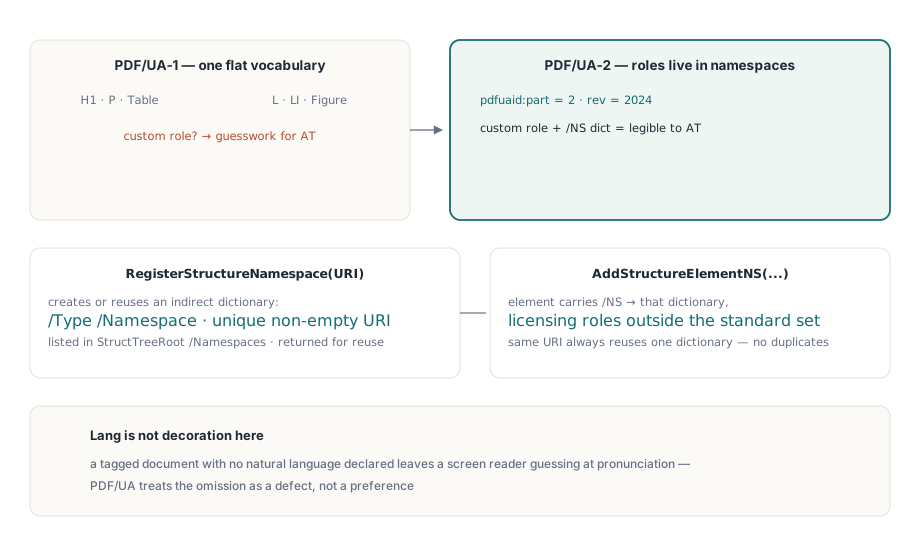
PDF/UA-2 forces PDF 2.0 and emits pdfuaid:part=2 with pdfuaid:rev=2024, and it introduces namespaces into the structure tree. A part 1 document had one flat vocabulary of standard roles. A part 2 document can carry custom roles as long as each one belongs to a declared namespace, which is what makes domain-specific tagging legible to assistive technology instead of guesswork
Two methods implement this. RegisterStructureNamespace creates or reuses an indirect /Type /Namespace dictionary and lists it in StructTreeRoot /Namespaces, returning the dictionary so you can reuse it. AddStructureElementNS creates a structure element whose /NS entry points at that dictionary, which is what licenses a role name outside the standard set. Repeated calls with the same URI reuse one dictionary rather than piling up duplicates
var
  Root: THPDFDictionaryObject;
begin
  Pdf.PDFUACompliance := True;
  Pdf.PDFUAPart := 2;             // part 2 forces PDF 2.0
  Pdf.Lang := 'en-US';
  Pdf.BeginDoc;
  Root := Pdf.AddStructureElement('Document', nil);
  Pdf.AddStructureElementNS('WidgetGroup',
    'https://example.com/ns/widgets', Root);
  Pdf.EndDoc;
end;
Lang is not decoration here. A tagged document with no natural language declared leaves a screen reader guessing at pronunciation, and PDF/UA treats the omission as a defect rather than a preference
Which structure errors does EndDoc catch?
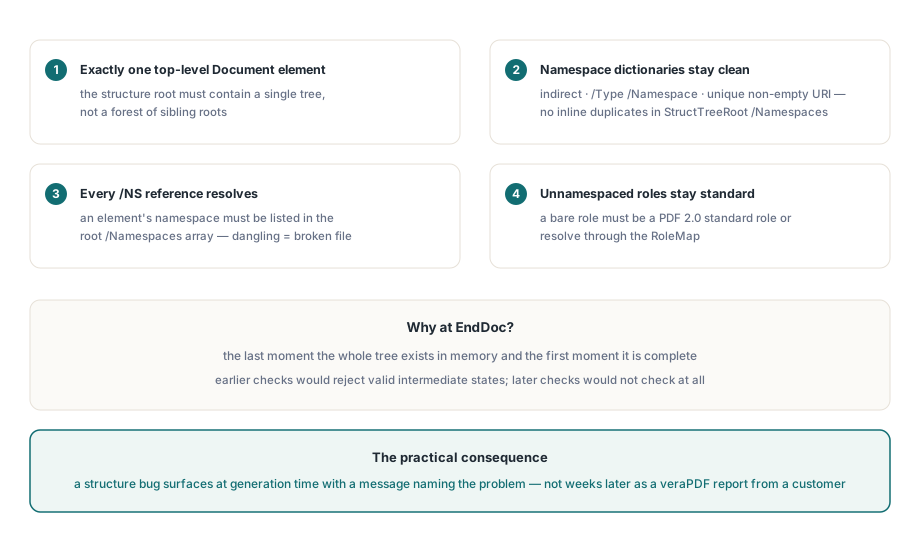
Four, and each one corresponds to a document that would otherwise reach a validator broken. The structure root must contain exactly one top-level Document element. Every namespace dictionary must be indirect, typed as Namespace, and carry a unique non-empty URI. Every structure-element /NS reference must resolve to a dictionary actually listed in the root /Namespaces array. And an unnamespaced role must be a PDF 2.0 standard role or resolve through the RoleMap
These fire at EndDoc because that is the last moment the whole tree exists in memory and the first moment it is complete. Catching them earlier would mean rejecting valid intermediate states; catching them later would mean not catching them at all. The practical consequence for your code is that a structure bug surfaces at the end of generation with a message naming the problem, instead of surfacing weeks later as a veraPDF report someone forwards from a customer
The PDF 2.0 roles worth knowing about
The typed role enum gains DocumentFragment, Aside, Title, FENote, Sub, Em, Strong and Artifact. Three of those change how you tag ordinary business documents. Aside finally gives sidebars and pull quotes a home that is not a misused Sect. FENote marks footnotes and endnotes as what they are, so a reader can offer them rather than interleaving them with body text. Em and Strong replace the semantic guesswork that came from tagging emphasis as span-level formatting
The string overload additionally accepts the open-ended Hn form, including H7 and beyond. PDF 1.7 stopped at H6, which forced deep technical documents to flatten their outline or reuse levels. If you generate standards documents, legal codes or parts catalogs, this alone can be the reason to move output to PDF 2.0
What to check before switching production output
PDF 2.0 is a header change with a long tail. Older archive ingest tools, some print RIPs and a surprising number of line-of-business viewers accept only up to PDF 1.7, and they fail on the header rather than on anything you did wrong. Before switching, confirm the consuming systems, and remember that selecting a PDF/A-4 profile selects PDF 2.0 whether you asked for it or not
A safe sequence is to keep PDF/A-3 for documents that go outward to unknown readers, use PDF/A-4f for internal archives where you control ingest, and adopt PDF/UA-2 only where the accessibility policy names it. If you are working through the archival side first, the guides to PDF/A, PDF/X and PDF/UA validation and to ZUGFeRD and Factur-X hybrid invoices on PDF/A-3 cover the profile choices that matter before the version number does, and the notes on automated preflight reporting show how to make the verdict part of your build rather than a manual step
HotPDF ships the whole PDF 2.0 authoring surface as native VCL code for Delphi and C++Builder, so PDF/A-4 and PDF/UA-2 output need no external engine or redistributable — the HotPDF Delphi component page lists the supported profiles and RAD Studio versions