HotPDF generates, detects, and validates ZUGFeRD and Factur-X electronic invoices from Delphi and C++Builder. AddFacturXAssociatedFile embeds the EN 16931 invoice XML into a PDF/A-3 container, DetectFacturXInvoice recognizes an incoming hybrid invoice, and HPDFValidateEInvoice runs the official EN 16931 Schematron business rules against the embedded XML. This article walks through all three steps and is honest about where the validation engine stops
The pressure behind this feature set is regulatory, not technical. Germany and France are phasing in mandatory structured e-invoicing for domestic B2B transactions, and both mandates converge on the same hybrid model: the PDF invoice your ERP already produces must carry a machine-readable XML twin inside it. A Delphi accounting or ERP application that emits plain PDF invoices today has a hard deadline to start emitting Factur-X or ZUGFeRD, and the difference between the two names is smaller than the marketing suggests — Factur-X and ZUGFeRD are the same Franco-German standard published under two labels
What makes a PDF a valid Factur-X invoice?
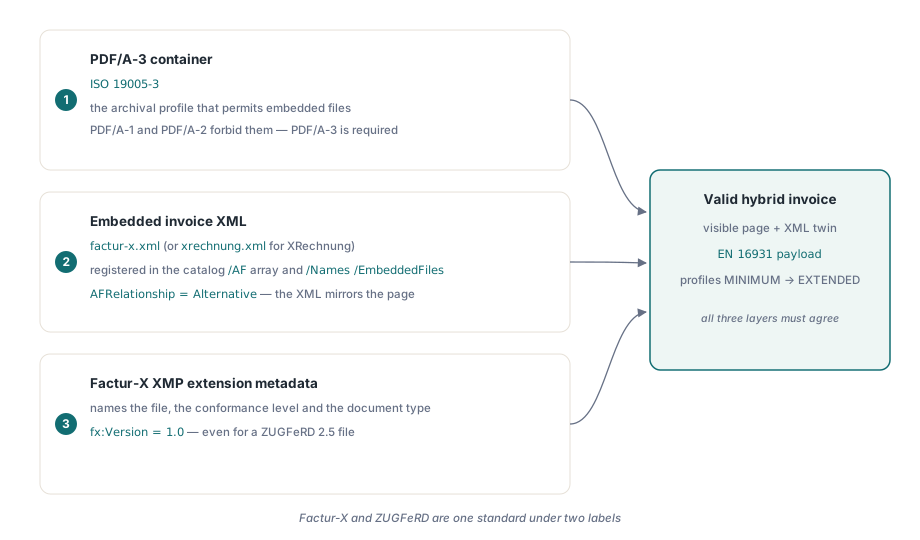
A valid Factur-X invoice is a PDF/A-3 file (ISO 19005-3) that embeds exactly one structured invoice XML as an associated file, links it from the document catalog, and declares it in XMP extension metadata. Three layers have to agree. First, the container must conform to PDF/A-3, the archival profile that — unlike PDF/A-1 and PDF/A-2 — permits embedded files of any type. Second, the invoice XML, named factur-x.xml for standard profiles or xrechnung.xml for the German XRechnung variant, must be registered in the catalog /AF array and the /Names /EmbeddedFiles tree, with an AFRelationship entry that states what the attachment is: Alternative means the XML is an equivalent representation of the visible invoice, which is the semantics most profiles require. Third, the Factur-X XMP extension schema must name the embedded file, its conformance level, and the document type, so a receiving system can classify the invoice without parsing the XML at all
The XML payload itself follows the EN 16931 semantic model, the European Norm that defines the core invoice: buyer, seller, line items, tax breakdown, payable amount, each with a business term number (BT-1 for the invoice number, BT-5 for the currency, and so on). EN 16931 validation therefore happens on two distinct layers. XML schema validation checks that the document is well-formed CII with the right element names. The Schematron business rules check that the content is coherent — that BR-CO-15 holds and the invoice total actually equals the sum of line net amounts plus VAT, that mandatory terms are present for the declared profile. A file can pass schema validation and still be an invalid invoice, which is why the business-rule layer exists
Why ZUGFeRD 2.5 does not need a new container
ZUGFeRD 2.5 changes nothing at the PDF container level: the guideline URNs, the XMP schema, and the version token are identical to ZUGFeRD 2.3 / Factur-X 1.0. This surprises most implementers, so it is worth quoting the source. The Factur-X 1.09 specification states that the version number in the URI of the PDF/A extension schema is not related to the version number of the XML data specification, and that the versioning of Factur-X invoice instances remains 1.0 — in XMP fx:Version and in BT-24 of factur-x.xml alike. The official ZUGFeRD 2.5 sample corpus confirms it: every sample embeds factur-x.xml under a urn:factur-x.eu:1p0 guideline URN with fx:Version of 1.0. What 2.5 actually adds lives inside the XML data model — new elements such as sub-invoice lines and batch identifiers — which is the business layer your application generates, not the container layer the PDF library manages
HotPDF encodes this finding directly. AddFacturXAssociatedFile accepts a Version argument and normalizes it through HPDFFacturXNormalizeVersion before writing XMP, so a caller passing the 2p5 alias still emits the spec-compliant token instead of inventing a 2p5 XMP version that no validator would accept. The detection helpers treat 2p5 as equivalent when reading, so round-trips stay symmetric. If a library or tool tells you it writes a special ZUGFeRD 2.5 container, the specification itself says there is no such thing
Embedding the invoice XML from Delphi
THotPDF.AddFacturXAssociatedFile turns a regular PDF/A-3 generation run into a Factur-X invoice with one call: it embeds the XML bytes as an associated file, registers factur-x.xml in the catalog /AF array and the /Names /EmbeddedFiles tree, and emits the matching Factur-X XMP extension metadata. You draw the human-readable invoice page with the normal HotPDF canvas API; the container work is a single line between BeginDoc and EndDoc
var
  Pdf: THotPDF;
  InvoiceXML, UBLXML: TBytes;
begin
  Pdf := THotPDF.Create(nil);
  try
    Pdf.FileName := 'invoice-2026-0042.pdf';
    Pdf.PDFACompliance := '3B';            // PDF/A-3b container
    Pdf.BeginDoc;
    // embed the EN 16931 CII invoice XML as factur-x.xml
    InvoiceXML := BuildInvoiceXML;         // produced by your business layer
    Pdf.AddFacturXAssociatedFile(InvoiceXML, 'EN 16931');
    // optional: attach a UBL view as a supplementary representation
    UBLXML := BuildUBLXML;
    Pdf.AddUBLSupplementaryFile(UBLXML);   // factur-xubl.xml, Alternative
    // ... draw the visible invoice page here ...
    Pdf.EndDoc;
  finally
    Pdf.Free;
  end;
end;
The defaults follow the specification: file name factur-x.xml, relationship Alternative, version 1.0. AddUBLSupplementaryFile implements section 6.4 of the Factur-X 1.09 specification, which allows a UBL representation of the same invoice to ride along as a second attachment named factur-xubl.xml with MIME type application/xml and the Alternative relationship. Order matters here, and HotPDF enforces the constraint the specification implies: the UBL file is a supplementary view, never the primary invoice, so it must be added after AddFacturXAssociatedFile has registered the CII master. Note that the drawn page and the embedded XML must state the same invoice — a PDF that displays one total and encodes another is exactly the failure mode hybrid invoicing is designed to prevent. The PDF/A-3 side of this workflow, OutputIntent and font embedding included, is covered in more depth in the companion article on PDF/A, PDF/X, and PDF/UA validation in Delphi
How do you detect a Factur-X invoice in an incoming PDF?
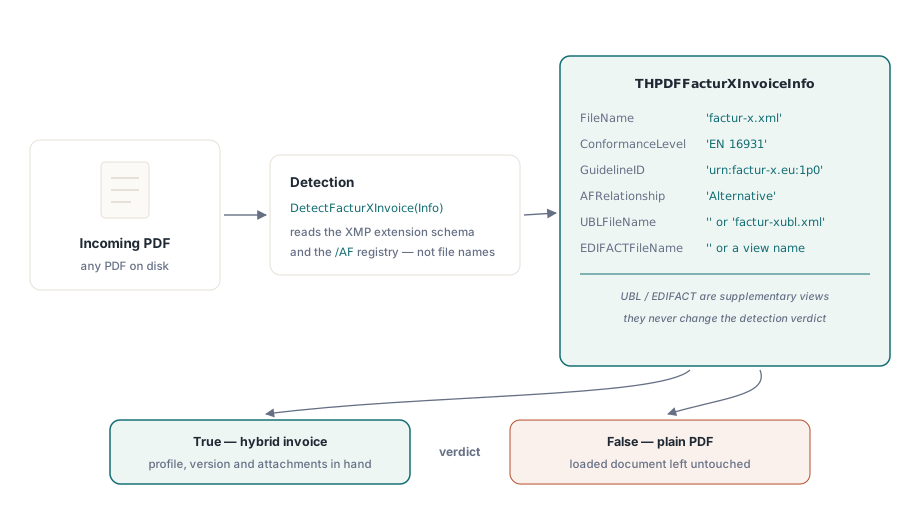
THotPDF.DetectFacturXInvoice answers the receiving side of the mandate: load any PDF and learn in one call whether it is a hybrid invoice, which profile it declares, and which attachments it carries. The function returns a THPDFFacturXInvoiceInfo record with the embedded XML file name, the XMP-declared document file name and type, the version token, the conformance level, the guideline URN, and the AFRelationship value. Two further fields report supplementary views: UBLFileName is filled when a factur-xubl.xml attachment is present, and EDIFACTFileName when an EDIFACT view rides along — neither affects the detection verdict, because a supplementary representation cannot exist without the primary CII invoice
var
  Reader: THotPDF;
  Info: THPDFFacturXInvoiceInfo;
begin
  Reader := THotPDF.Create(nil);
  try
    if Reader.LoadFromFile('incoming-invoice.pdf') <= 0 then
      raise Exception.Create('No pages loaded.');
    if Reader.DetectFacturXInvoice(Info) then
    begin
      Writeln('Invoice XML:    ', string(Info.FileName));
      Writeln('Conformance:    ', string(Info.ConformanceLevel));
      Writeln('Guideline URN:  ', string(Info.GuidelineID));
      Writeln('Relationship:   ', string(Info.AFRelationship));
      if Info.UBLFileName <> '' then
        Writeln('UBL view:       ', string(Info.UBLFileName));
    end
    else
      Writeln('Not a Factur-X / ZUGFeRD hybrid invoice.');
  finally
    Reader.Free;
  end;
end;
Detection reads the same signals a compliant validator reads — the XMP extension schema and the associated-file registry — rather than guessing from file names alone. The same loaded-document object also exposes the XMP and Info-dictionary metadata for inspection or correction, a workflow described in the article on editing metadata in loaded PDF documents
Business rules or schema: what does EN 16931 validation mean?
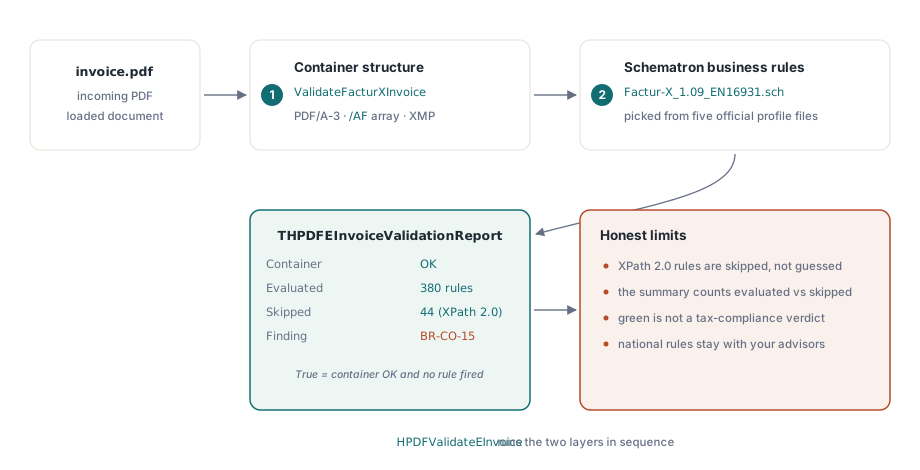
HPDFValidateEInvoice, a standalone function in the HPDFEInvoiceValidator unit, runs both validation layers in sequence: first the container-structure check via ValidateFacturXInvoice, then the EN 16931 Schematron business rules against the extracted invoice XML. HotPDF ships the five official Factur-X 1.09 rule files — MINIMUM, BASIC WL, BASIC, EN 16931, and EXTENDED — under Lib/resources/Schematron/, and HPDFSchematronFileForProfile picks the file matching the detected conformance level, so an EN 16931 invoice is automatically checked against Factur-X_1.09_EN16931.sch. The function returns True only when the container is valid and no business rule fired
uses HPDFEInvoiceValidator;

var
  Reader: THotPDF;
  Report: THPDFEInvoiceValidationReport;
  I: Integer;
begin
  Reader := THotPDF.Create(nil);
  try
    Reader.LoadFromFile('incoming-invoice.pdf');
    if HPDFValidateEInvoice(Reader, SchematronDir, Report) then
      Writeln('Container and business rules: OK')
    else
      Writeln('Validation found issues.');
    if Report.BusinessRulesEvaluated then
    begin
      Writeln(Report.BusinessSummary.Evaluated, ' rules evaluated, ',
        Report.BusinessSummary.Skipped, ' skipped (XPath 2.0)');
      for I := 0 to High(Report.BusinessRules) do
        if (not Report.BusinessRules[I].Skipped) and
           (Report.BusinessRules[I].Severity = stsError) then
          Writeln(string(Report.BusinessRules[I].RuleID), ': ',
            string(Report.BusinessRules[I].Message));
    end;
  finally
    Reader.Free;
  end;
end;
Each entry in BusinessRules carries the rule identifier parsed from the assertion text — BR-45, BR-CO-17, and the rest of the EN 16931 naming scheme — plus the rule context XPath, the test expression, and a severity mirroring the Schematron flag attribute. That makes the report actionable: instead of a bare pass/fail you get the exact business term that is inconsistent, which is what your support team needs when a customer asks why an invoice bounced. Teams that already generate structured conformance reports for archival PDFs can fold these results into the same pipeline described in the article on automating PDF preflight reports
Where the validator stops, honestly
The Schematron engine is built on MSXML, which evaluates XPath 1.0. The EN 16931 rule file declares queryBinding="xslt2" and carries 424 assertions, most of which use only XPath 1.0 functions such as string-length and substring-after — those run natively. A minority rely on XPath 2.0 constructs like xs:decimal casts or exists(); HotPDF pre-scans each test expression for known XPath 2.0 tokens and marks those rules Skipped with severity info rather than attempting an evaluation that would silently misfire. The summary record reports the evaluated and skipped counts separately, so your log always states exactly how much of the rule set was exercised. On Delphi 7, where MSXML bindings are unavailable, the unit compiles a stub that reports the engine as unavailable without disturbing the container verdict; the full engine requires Delphi XE2 or later
The second boundary matters even more. A green result from HPDFValidateEInvoice means the container structure conforms and no evaluated business rule fired — it is not a tax-compliance endorsement. National extension rules, receiver-specific requirements, and the legal obligations around invoice content sit above the EN 16931 core and outside any library. Treat the validator as the gate that keeps structurally broken invoices out of your outbox and flags inconsistent ones in your inbox, run a full XPath 2.0 validator in your release pipeline when certification demands it, and let your tax advisors own the compliance question. The embedding, detection, and validation APIs shown here are part of the standard HotPDF Delphi Component for Delphi and C++Builder, with a complete E-Invoice sample covering all seven ZUGFeRD and Factur-X profiles