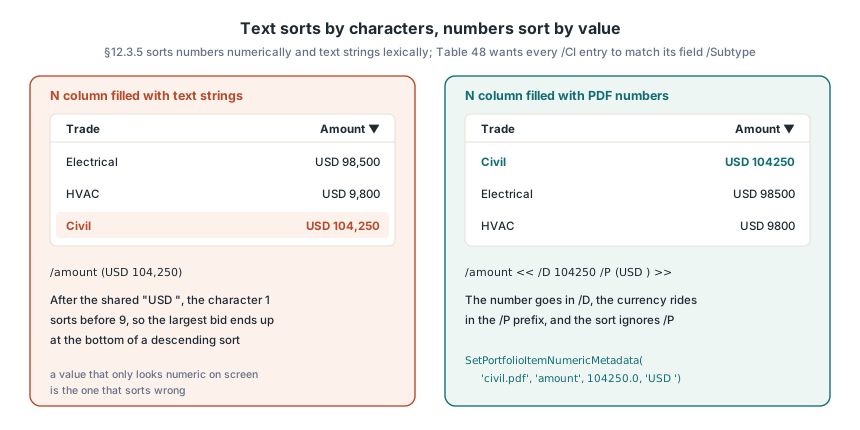
Three bids go into a PDF Portfolio, and the viewer's descending Amount column lists the USD 104,250 bid last, below USD 9,800 — the amounts went in as text. Column values live in each attached file's /CI entry, and SetPortfolioItemNumericMetadata in HotPDF writes them there as PDF numbers, so the sort compares 104250 with 9800 rather than two strings
What makes a PDF open as a Portfolio?
One catalog key decides it. ISO 32000-1 §12.3.5 says that when a /Collection dictionary is present, a conforming reader shall present the document as a portable collection (the specification's name for what Acrobat calls a PDF Portfolio), and every file in the /Names /EmbeddedFiles name tree is a member; attachments outside that tree are not. A PDF with ten attachments and no /Collection is just a PDF with a busy attachments panel, which is the right shape when a single machine-readable file rides along, as the XML does in a ZUGFeRD or Factur-X e-invoice. The dictionary is small and almost entirely optional; table numbers shifted between the two editions, so both are listed:
| Entry | What it controls | ISO 32000-1 | ISO 32000-2 |
|---|---|---|---|
/View, /D | Initial view (D details, T tiles, H hidden, plus C for a navigator in PDF 2.0) and the name-tree key of the file shown first | Table 155 | Table 153 |
/Schema | The columns of the file list | Tables 156, 157 | Tables 154, 155 |
/Sort | Sort fields and directions | Table 158 | Table 156 |
/Colors | Suggested DeviceRGB palette for the layout | none | Table 157 |
/Split | Splitter bar direction and position | none | Table 158 |
/Folders | Root of the folder tree | none | Table 159 (§12.3.5.2) |
The container's own pages still matter, because they are the cover sheet. When /D is missing, the initial document is the container itself; ISO 32000-2 adds that a /D naming no existing file makes the reader select the first file in the list instead. A viewer with no portfolio support ignores /Collection and shows only those pages, and NOTE 2 in §12.3.5 asks for a title and an introductory paragraph there; the usual answer is one page saying what the package holds and that it needs a portfolio-capable viewer. ConfigurePortfolio(Name, View, InitialDocument) sets the view and /D in one call, and ConfigurePortfolioView switches between pvmDetails, pvmTile and pvmHidden later. View C needs a navigator dictionary (ISO 32000-2 Table 160); for a bid package or a handover set, details view with a sensible sort is what users expect
Schema fields and the values behind each column
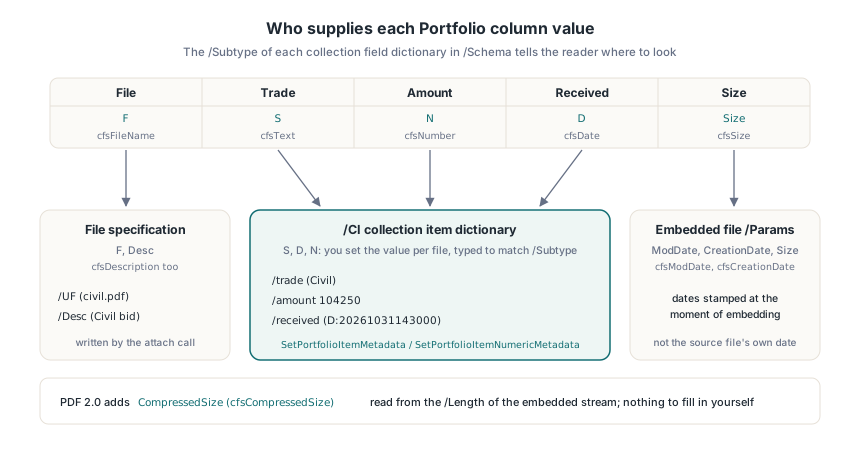
Columns come from the collection schema dictionary, one collection field dictionary per key you choose. Most of a field is presentation — /N is the header, /O the column position, /V and /E the initial visibility and editability, passed to THotPDF.AddPortfolioSchemaField as DisplayName, Order, Visible and Editable. /Subtype is the decision with consequences. It says who supplies the value:
/Subtype | HotPDF constant | Value comes from |
|---|---|---|
| S, D, N | cfsText, cfsDate, cfsNumber | You, per file, in /CI |
| F, Desc | cfsFileName, cfsDescription | The file specification (/UF or /F, /Desc) |
| ModDate, CreationDate, Size | cfsModDate, cfsCreationDate, cfsSize | The embedded file's /Params |
| CompressedSize (PDF 2.0) | cfsCompressedSize | The /Length of the embedded stream |
Per-file values sit in the collection item dictionary that the file specification's /CI entry points to (ISO 32000-1 §7.11.6 Table 48, Table 46 in part 2). Each entry is a text string, a date, a number, or a collection subitem dictionary (Table 49, or Table 47 in part 2) whose /D holds the data and whose /P holds a display prefix that sorting ignores. The specification's own Example 2 shows why the prefix exists: an email subject stored as /D (Let's have lunch on Friday!) with /P (Re:), so a reply sorts next to the message it answers. Oddly, both editions say that example's schema is in §12.4.2, Page Labels; they mean Example 1 directly above it. As for file-related columns, AddDocumentAttachment stamps /Params dates with the moment of embedding, so a cfsModDate column shows when the package was built. Reviewers who need the source file's own date get a D column you fill yourself, like received below
uses
  System.SysUtils, HPDFDoc;

procedure BuildBidPackage;
const
  Files: array[0..2] of string =
    ('bids\civil.pdf', 'bids\electrical.pdf', 'bids\hvac.pdf');
  Trades: array[0..2] of AnsiString = ('Civil', 'Electrical', 'HVAC');
  Amounts: array[0..2] of Double = (104250.0, 98500.0, 9800.0);
var
  Pdf: THotPDF;
  SortKeys: THPDFPortfolioSortKeyArray;
  Key: AnsiString;
  Stamp: TDateTime;
  I: Integer;
begin
  Pdf := THotPDF.Create(nil);
  try
    Pdf.AutoLaunch := False;
    Pdf.Version := pdf17;
    Pdf.FileName := 'bid-package.pdf';
    Pdf.BeginDoc;
    // Cover sheet: all that a viewer without portfolio support will show
    Pdf.CurrentPage.SetFont('Arial', [], 16);
    Pdf.CurrentPage.TextOut(50, 760, 0, 'Riverside depot - bid package');
    Pdf.CurrentPage.SetFont('Arial', [], 10);
    Pdf.CurrentPage.TextOut(50, 736, 0,
      'Three bids are attached. Open this PDF Portfolio in a portfolio-capable viewer.');

    Pdf.ConfigurePortfolio('', 'D', 'civil.pdf');
    Pdf.AddPortfolioSchemaField('file', 'File', cfsFileName, 0);
    Pdf.AddPortfolioSchemaField('trade', 'Trade', cfsText, 1);
    Pdf.AddPortfolioSchemaField('amount', 'Amount', cfsNumber, 2);
    Pdf.AddPortfolioSchemaField('received', 'Received', cfsDate, 3);
    Pdf.AddPortfolioSchemaField('size', 'Size', cfsSize, 4, False); // hidden at first

    for I := 0 to High(Files) do
    begin
      Pdf.AddDocumentAttachment(Files[I], Trades[I] + ' bid');
      Key := AnsiString(ExtractFileName(Files[I]));   // the name-tree key
      Pdf.SetPortfolioItemMetadata(Key, 'trade', Trades[I]);
      Pdf.SetPortfolioItemNumericMetadata(Key, 'amount', Amounts[I], 'USD ');
      if FileAge(Files[I], Stamp) then
        Pdf.SetPortfolioItemMetadata(Key, 'received',
          AnsiString('D:' + FormatDateTime('yyyymmddhhnnss', Stamp)));
    end;

    SetLength(SortKeys, 2);
    SortKeys[0].Key := 'amount';
    SortKeys[0].Ascending := False;   // largest bid on top
    SortKeys[1].Key := 'trade';
    SortKeys[1].Ascending := True;    // tie-breaker
    Pdf.SetPortfolioSortOrder(SortKeys);
    Pdf.EndDoc;
  finally
    Pdf.Free;
  end;
end;
SetPortfolioItemMetadata and SetPortfolioItemNumericMetadata raise when the schema key is unregistered or no embedded file has the given key, so register the schema, attach the file, then set values. Their FileName argument is the name-tree key, which for AddDocumentAttachment is the file name without its directory. Keys are byte strings compared case-sensitively (§7.9.6), as with named destinations in the /Dests tree, so Civil.pdf will not find civil.pdf. When two source files share a base name, HotPDF keeps both and gives the second a numbered key such as hvac (2).pdf, which the metadata calls must then use
How does a 104,250 bid end up below 9,800?
It was stored as text. The sort rules in §12.3.5 depend on the data type — numbers numerically, dates from oldest to newest, text strings lexically, with NOTE 3 leaving the details of lexical order to each reader. Table 48 (Table 46 in part 2) requires every /CI entry to match its field's /Subtype, so "USD 104,250" written as text into an N column already breaks the rule. The reader is left comparing strings. After the shared "USD ", the character 1 sorts before 9, and a descending sort puts the largest bid last. SetPortfolioItemMetadata always writes a text /D, right for S fields and date strings. For N fields, SetPortfolioItemNumericMetadata(FileName, Key, Value, Prefix, UseSubitemDictionary) writes a PDF number and carries the currency symbol in /P, which the sort ignores. Keep units and currency symbols in the prefix on every numeric column: a value that only looks numeric on screen is the one that sorts wrong. With an empty prefix and UseSubitemDictionary set to False, the number goes straight into /CI
Dates follow the same logic. A D field expects a PDF date string (§7.9.4) such as D:20261031143000; 31/10/2026 from the Windows locale is text in a date column and lands wherever its characters fall. The sort itself lives in the collection sort dictionary: /S is one field name or an array in which each later name breaks ties left by the earlier ones, and /A is a boolean or a parallel array of booleans, with surplus entries ignored and missing ones read as true, meaning ascending. SetPortfolioSortOrder takes an array of THPDFPortfolioSortKey records and writes the single-name form for one key, the array form for several. Use the keys you registered in the schema; /S may only name fields described in the parent collection dictionary
PDF 2.0 folders live in the file names
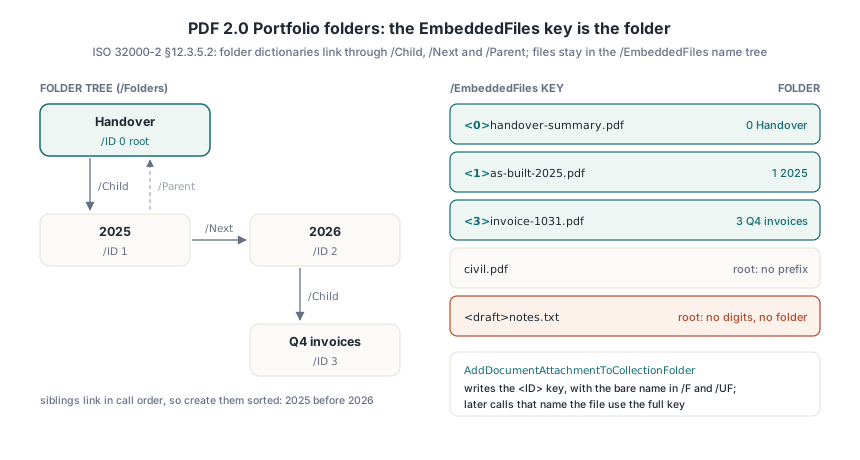
A folder holds no files inside the PDF. ISO 32000-2 §12.3.5.2 defines folder dictionaries as indirect objects linked into one tree: /Folders points to the root, each child carries /Parent, a folder reaches its first child through /Child, and siblings chain through /Next. Every folder has a required /Name and a non-negative integer /ID unique in the document, and the root's /Free array lists ID ranges still unused. Membership is encoded in the EmbeddedFiles key: one that starts with <, continues with digits and closes with > belongs to the folder with that ID, and the rest is the file name, so <3>invoice-1031.pdf is invoice-1031.pdf in folder 3. The key is the folder. Any key outside the convention belongs to the root, which is how invoices meant for a 2026 folder end up at the top level — attached with plain AddDocumentAttachment, their keys carry no prefix at all
HotPDF builds the tree with three calls. EnsureCollectionRootFolder(RootName, Description) creates the root with ID 0, or returns the existing root's ID. AddCollectionChildFolder(ParentFolderID, FolderName, Description) appends a child, returns its new ID and keeps /Free current. AddDocumentAttachmentToCollectionFolder(FolderID, FileName, Description) embeds the file under <FolderID>name and writes the bare name into /F and /UF, which is what a cfsFileName column shows. Every later call that names the file needs the full key, including InitialDocument in ConfigurePortfolio and the metadata calls. Folders, /Split and /Colors are PDF 2.0 entries, so set Version to pdf20 before BeginDoc
procedure BuildHandoverPackage;
var
  Pdf: THotPDF;
  RootID, Year2025, Year2026, Q4: Integer;
begin
  Pdf := THotPDF.Create(nil);
  try
    Pdf.AutoLaunch := False;
    Pdf.Version := pdf20;          // /Folders, /Split and /Colors are PDF 2.0
    Pdf.FileName := 'handover.pdf';
    Pdf.BeginDoc;
    Pdf.CurrentPage.SetFont('Arial', [], 16);
    Pdf.CurrentPage.TextOut(50, 760, 0, 'Project handover - PDF Portfolio');

    Pdf.ConfigurePortfolio('', 'D', '<0>handover-summary.pdf');
    Pdf.AddPortfolioSchemaField('file', 'File', cfsFileName, 0);
    Pdf.AddPortfolioSchemaField('amount', 'Amount', cfsNumber, 1);

    RootID := Pdf.EnsureCollectionRootFolder('Handover', 'All deliverables'); // 0
    Year2025 := Pdf.AddCollectionChildFolder(RootID, '2025');                 // 1
    Year2026 := Pdf.AddCollectionChildFolder(RootID, '2026');                 // 2
    Q4 := Pdf.AddCollectionChildFolder(Year2026, 'Q4 invoices', 'Oct-Dec');   // 3

    Pdf.AddDocumentAttachmentToCollectionFolder(RootID,
      'out\handover-summary.pdf', 'Read this first');  // <0>handover-summary.pdf
    Pdf.AddDocumentAttachmentToCollectionFolder(Year2025,
      'out\as-built-2025.pdf', 'As-built drawings');   // <1>as-built-2025.pdf
    Pdf.AddDocumentAttachmentToCollectionFolder(Q4,
      'out\invoice-1031.pdf', 'October invoice');      // <3>invoice-1031.pdf

    Pdf.SetPortfolioItemNumericMetadata(
      AnsiString(Format('<%d>invoice-1031.pdf', [Q4])), 'amount', 10400.0, 'USD ');

    Pdf.SetPortfolioSplit(csdVertical, 30);    // splitter at 30 % of the window
    Pdf.SetPortfolioColor('Background', 0.96, 0.97, 0.98);
    Pdf.EndDoc;
  finally
    Pdf.Free;
  end;
end;
Sibling order is a recommendation in the standard: siblings should follow the collection sort key, or folder names when there is none. AddCollectionChildFolder links siblings in call order, so create them sorted, as the example does with 2025 before 2026. The /Split position (ISO 32000-2 Table 158) is a percentage from 0 to 100, hence 30 and not 0.3. The naming rules after Table 159 apply to folder names and to files inside folders, and since those names usually come from users or upload forms, filter them before the call; AddCollectionChildFolder itself refuses slashes, control characters and a sibling name that repeats an existing one when ASCII letter case is ignored:
- between 1 and 255 characters, with no embedded NUL
- none of
/ \ : * " < > |anywhere in the name - no full stop as the last character
- no two sibling folders, and no two files in the same folder, whose names differ only by case
Reading a Portfolio written by another producer
A reader has to accept every legal shape of /CI, because producers differ: some wrap each value in a subitem dictionary, others write bare strings and numbers, and the specification's Example 2 mixes both inside one item. Code that only looks for a string under a subitem /D shows empty columns for the second group. GetLoadedCollectionItemFields(FileName) returns one THPDFCollectionItemFieldValue per entry with IsSubitemDictionary, IsNumeric, NumericValue, StringValue and Prefix filled in. GetLoadedCollectionInfo returns schema, sort keys, split, colors and the folder nodes of GetLoadedCollectionFolderTree in tree order, each with ID, Name, ParentID, FirstChildID and NextSiblingID. Each file's folder comes from its key, and the parse must follow the rule literally: digits only between the angle brackets. A key such as <draft>notes.txt from a producer that knows nothing about folders has no digits there, so the file belongs to the root; cutting everything up to the first > would invent a folder named draft
procedure DumpPortfolio(const PdfFile: string);
var
  Pdf: THotPDF;
  Info: THPDFCollectionInfo;
  Keys: THPDFAnsiStringArray;
  Fields: THPDFCollectionItemFieldValueArray;
  BareName: AnsiString;
  I, J, FolderID: Integer;
  Line: string;

  // ISO 32000-2 12.3.5.2: '<' digits '>' file name; any other key is root
  function FolderOfKey(const Key: AnsiString; RootID: Integer;
    out Name: AnsiString): Integer;
  var
    P: Integer;
  begin
    Result := RootID;
    Name := Key;
    if (Length(Key) < 3) or (Key[1] <> '<') then
      Exit;
    P := 2;
    while (P <= Length(Key)) and (Key[P] in ['0'..'9']) do
      Inc(P);
    if (P = 2) or (P > Length(Key)) or (Key[P] <> '>') then
      Exit;
    Result := StrToIntDef(string(Copy(Key, 2, P - 2)), RootID);
    Name := Copy(Key, P + 1, MaxInt);
  end;

begin
  Pdf := THotPDF.Create(nil);
  try
    if Pdf.LoadFromFile(PdfFile) <= 0 then
      Exit;
    if not Pdf.GetLoadedCollectionInfo(Info) then
    begin
      Writeln('No /Collection in the catalog: plain attachments only');
      Exit;
    end;
    for I := 0 to High(Info.FolderNodes) do
      Writeln(Format('folder %d "%s" parent %d',
        [Info.FolderNodes[I].ID, Info.FolderNodes[I].Name,
         Info.FolderNodes[I].ParentID]));

    Keys := Pdf.GetLoadedEmbeddedFileNames;
    for I := 0 to High(Keys) do
    begin
      if Info.HasFolderTree then
        FolderID := FolderOfKey(Keys[I], Info.RootFolderID, BareName)
      else
      begin
        FolderID := -1;            // no folders: a flat list
        BareName := Keys[I];
      end;
      Line := Format('[%d] %s:', [FolderID, BareName]);
      Fields := Pdf.GetLoadedCollectionItemFields(Keys[I]);
      for J := 0 to High(Fields) do
        if Fields[J].IsNumeric then
          Line := Line + Format(' %s=%s%g',
            [Fields[J].Key, Fields[J].Prefix, Fields[J].NumericValue])
        else
          Line := Line + Format(' %s=%s%s',
            [Fields[J].Key, Fields[J].Prefix, Fields[J].StringValue]);
      Writeln(Line);
    end;
  finally
    Pdf.Free;
  end;
end;
Expected for the handover file: four folder lines with the root at ID 0 and Q4 invoices under parent 2, then [3] invoice-1031.pdf: amount=USD 10400 flagged as numeric. Run the same loop over the bid package and every amount entry comes back with IsNumeric set; an amount that arrives only in StringValue is the one that will sort 104,250 below 9,800. That check fits in a few lines next to the code that builds packages with the HotPDF component for Delphi and C++Builder