HotPDF adds bookmarks to an existing PDF in Delphi through AddLoadedOutline, which creates outline entries at any nesting level on a loaded document, and it reads and writes named destinations through ResolveLoadedNamedDestination and AddLoadedNamedDestination. Load the file, build the tree, call SaveLoadedDocument, and the reader sidebar that used to be blank now carries a working table of contents
The scenario that motivates all of this is depressingly common. You merge a dozen contracts into one review packet, or stitch three product manuals into a single distributable file, and the output is structurally fine: every page present, every font intact. Then someone opens it in Acrobat and the bookmarks panel is empty. A 400-page document with no navigation is technically complete and practically unusable, and until version 2.347.0 HotPDF could read, modify, and delete bookmarks on loaded documents but never create them. That gap is now closed, and this article walks through the new API surface and the one piece of PDF arcana, the /Count key, that will bite you if you treat it as a simple entry counter
What the outline tree actually is
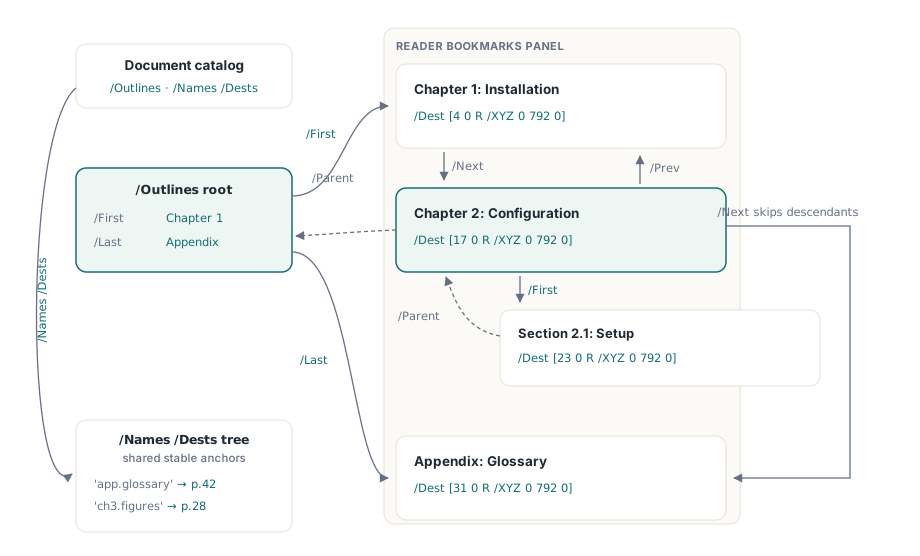
A PDF outline is a doubly linked tree of dictionaries, not a flat list, and that structure explains every parameter in the API. ISO 32000-1 §12.3.3 defines it: the document catalog points to an /Outlines root, the root points to its first and last children via /First and /Last, and siblings chain through /Next and /Prev while every entry points back up through /Parent. Each entry carries a /Title string and, usually, a /Dest that says where clicking it should take the reader
Destinations come in two flavors, and ISO 32000-1 §12.3.2 keeps them deliberately separate. An explicit destination is an inline array such as [page /XYZ x y zoom]: a direct reference to a page object plus a view specification. A named destination instead stores a name string, and the actual target lives in the document catalog under the /Names /Dests name tree, one level of indirection that lets many links share one target and lets the target move without touching the links. HotPDF writes explicit /XYZ destinations when it creates bookmarks, and gives you separate calls for reading and extending the name tree
How do you add bookmarks to an existing PDF in Delphi?
Call AddLoadedOutline(ParentIndex, DestPageIndex, Title, X, Y, Zoom) after LoadFromFile: pass ParentIndex = -1 for a top-level entry, or the zero-based index of an existing top-level entry to nest beneath it. The function creates the /Outlines root if the document never had one, builds the entry dictionary, writes a /Dest [page /XYZ x y zoom] array pointing at the zero-based DestPageIndex, and links the new entry into the sibling chain. It returns 0 on success and -1 on failure, for example when DestPageIndex is out of range
One linking detail matters for ordering: a new entry is inserted at the head of its parent's child chain, as the new /First. So if you add "Chapter 1" and then "Chapter 2" as top-level entries, Chapter 2 appears above Chapter 1 in the sidebar, and Chapter 1 has shifted to top-level index 1. The practical pattern is either to add entries in reverse reading order, or to add each parent and immediately populate its children while it still sits at index 0
var
  Pdf: THotPDF;
begin
  Pdf := THotPDF.Create(nil);
  try
    if Pdf.LoadFromFile('merged-manual.pdf', '') > 0 then
    begin
      // Add chapters in reverse reading order: each new
      // top-level entry becomes /First (index 0).
      Pdf.AddLoadedOutline(-1, 40, 'Chapter 2: Configuration', 0, 792, 0);
      Pdf.AddLoadedOutline(-1, 0, 'Chapter 1: Installation', 0, 792, 0);
      // Chapter 1 is now top-level index 0; nest sections
      // under it (children also prepend, so reverse order).
      Pdf.AddLoadedOutline(0, 12, 'License activation', 0, 792, 0);
      Pdf.AddLoadedOutline(0, 3, 'System requirements', 0, 792, 0);
      Pdf.SaveLoadedDocument('merged-manual-toc.pdf');
    end;
  finally
    Pdf.Free;
  end;
end;
The X, Y, and Zoom parameters map straight onto the /XYZ destination and all default to 0. PDF puts the coordinate origin at the bottom-left corner, so Y = 792 targets the top of a US Letter page, and per ISO 32000-1 a zero value in an /XYZ slot tells the viewer to retain its current setting, which is exactly what you want for zoom in almost every case. Everything happens on the loaded object graph in memory; nothing touches disk until SaveLoadedDocument runs, the same edit-then-save model the loaded-document API uses for rewriting title, author, and XMP metadata on loaded PDFs
Retargeting bookmarks: page jumps versus URI actions
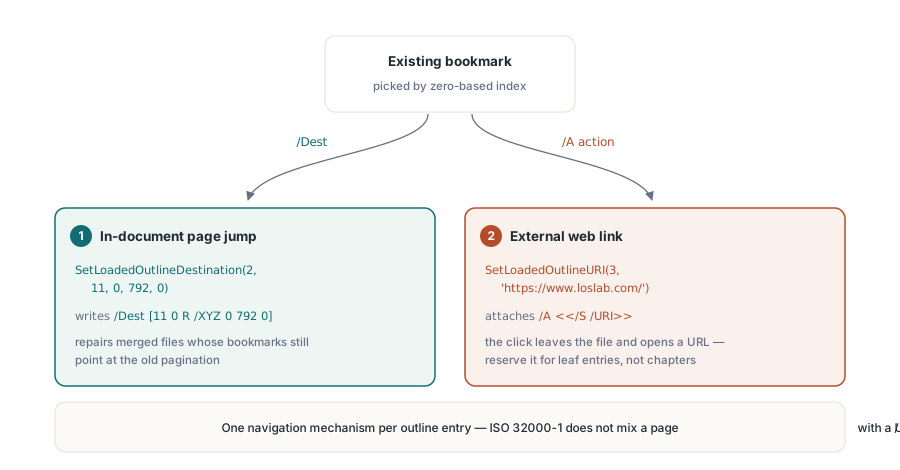
Existing bookmarks can be rewired without recreating them, and HotPDF gives the two cases two distinct calls because the PDF constructs underneath are genuinely different. SetLoadedOutlineDestination(Index, DestPageIndex, X, Y, Zoom) replaces the /Dest of the top-level entry at Index with a fresh /XYZ array, the tool for the classic post-merge failure where every bookmark still points at the page numbers of the original, pre-merge file. SetLoadedOutlineURI(Index, URI) does something structurally different: it attaches an /A action dictionary with /S /URI, turning the bookmark into a web link instead of an in-document jump
// The merge shifted everything by 10 pages: repoint the
// third top-level bookmark at page 12 (zero-based 11).
Pdf.SetLoadedOutlineDestination(2, 11, 0, 792, 0);

// Turn the last entry into an external link.
Pdf.SetLoadedOutlineURI(3, 'https://www.loslab.com/');

Pdf.SaveLoadedDocument('retargeted.pdf');
Keep the two mechanisms straight when you design the tree. A /Dest is pure navigation inside the document; a URI action leaves the document entirely, and ISO 32000-1 expects an outline entry to navigate through one mechanism or the other, not both. So reserve SetLoadedOutlineURI for entries that do not already carry a page destination, a "Product homepage" or "Report an issue" leaf at the end of the tree rather than a converted chapter heading. The URI action written here is the same /S /URI construct used for link annotations on page content, covered in more depth in the guide to creating hyperlinks in PDF documents with HotPDF
How do named destinations work on a loaded PDF?
Named destinations are the stable-anchor mechanism of ISO 32000-1 §12.3.2.3: instead of embedding a page reference in every link, the document keeps a name-to-destination map in the catalog's /Names /Dests name tree, and links refer to entries by name. ResolveLoadedNamedDestination(Name) looks a name up in that tree and returns the zero-based page index it points to, or -1 if the name is absent. The resolver handles both storage forms the spec allows for the mapped value: a bare destination array like [page /XYZ x y zoom] and the dictionary form that wraps the array under a /D key
AddLoadedNamedDestination(Name, DestPageIndex, X, Y) goes the other way: it registers a new anchor in the /Names /Dests tree, creating the tree itself when the document has none, and returns True on success. Together the pair covers the workflow where a merged document must honor anchors that upstream tools wrote, and publish new ones for downstream links to target
var
  PageIdx: Integer;
begin
  // Honor an anchor another tool wrote into /Names /Dests.
  PageIdx := Pdf.ResolveLoadedNamedDestination('chapter.3.figures');
  if PageIdx >= 0 then
    Pdf.AddLoadedOutline(-1, PageIdx, 'Chapter 3: Figures', 0, 792, 0);

  // Publish a new anchor for other links to target.
  if Pdf.AddLoadedNamedDestination('appendix.glossary', 42, 0, 792) then
    Pdf.SaveLoadedDocument('anchored.pdf');
end;
The honest boundaries: the destinations HotPDF writes, for bookmarks and named anchors alike, are /XYZ destinations. The other explicit types the spec defines, /Fit, /FitH, /FitB and friends, are not emitted by these calls, though /XYZ with zero zoom covers the dominant use case of "go to this spot, keep my zoom". And GetLoadedBookmarkPageIndex(Title), the convenience lookup that takes a bookmark title and returns its destination page, scans the top level of the outline tree, so use it to verify the chapter-level entries you just created rather than deeply nested leaves
The /Count trap: it counts descendants, not entries
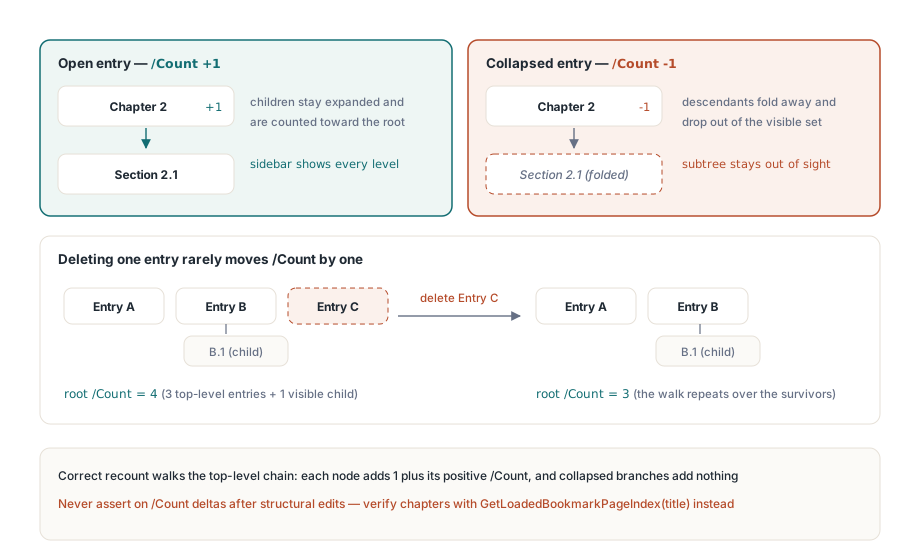
The /Count key on the outline root does not mean what most developers assume, and the wrong assumption produces test failures that look like data corruption. ISO 32000-1 §12.3.3 defines /Count as the total number of visible descendants at all levels, not the number of top-level entries. On an individual entry the sign carries meaning too: a positive value means the entry is open and that many descendants show in the sidebar, while a negative value means the entry is collapsed and |N| descendants are hidden inside it
This came out of HotPDF's own regression suite while the loaded-document bookmark APIs were being built. A test document held three top-level bookmarks, one with a child; after deleting one top-level entry, GetLoadedOutlineCount, which reads the root /Count, reported 1 instead of the expected 2. Nothing was corrupted: the initial 3 had never been "three top-level entries" in the first place, and the correct recalculation has to walk the top-level chain accumulating each node plus its positive /Count, skipping descendants of collapsed nodes. The lesson for your own code is direct: never assert on /Count deltas after structural edits, because the value moves non-linearly with visible descendants. Verify structure by content instead
// After edits, verify by title lookup, not by /Count deltas.
if Pdf.GetLoadedBookmarkPageIndex('Chapter 1: Installation') = 0 then
  ShowMessage('Outline verified');
Where this fits in the loaded-document toolset
Bookmark and named-destination creation completes a picture the loaded-document API has been filling in for a while: the same load-edit-save cycle already rewrites document metadata, adds link annotations, and round-trips annotations through XFDF import and export. The pattern is uniform, LoadFromFile, a sequence of *Loaded* calls against the in-memory object graph, then one SaveLoadedDocument, which makes it straightforward to fold outline construction into an existing merge or stamping pipeline as one more step before the save
The APIs discussed here, AddLoadedOutline, SetLoadedOutlineDestination, SetLoadedOutlineURI, ResolveLoadedNamedDestination, AddLoadedNamedDestination, and GetLoadedBookmarkPageIndex, ship in the standard HotPDF Delphi Component for Delphi and C++Builder, with no external dependencies and no separate viewer runtime required