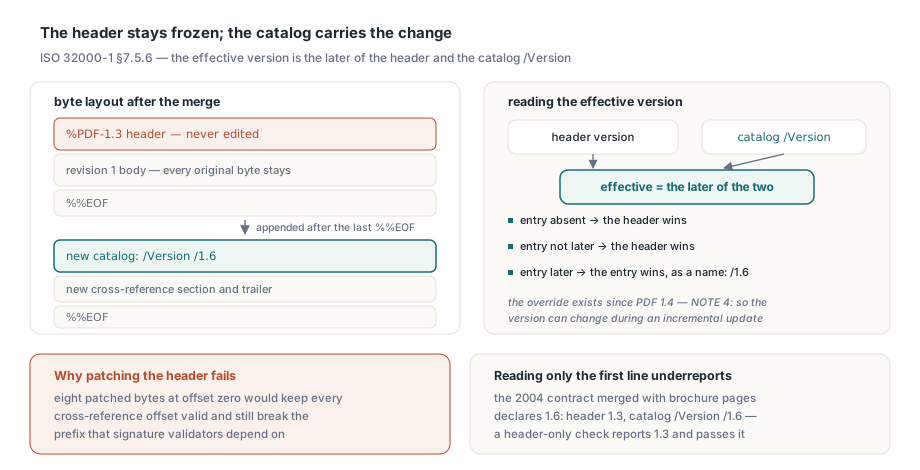
A contract scanned in 2004 starts with %PDF-1.3, and after a naive merge adds two brochure pages carrying an embedded OpenType font and a 16-bit photo, pdfinfo still reports PDF 1.3. The right version goes into the catalog of the appended revision as /Version /1.6, which ISO 32000-1 §7.5.6 permits and HotPDF page import writes from the objects it copies
Why can't an incremental save rewrite %PDF-1.3?
Because the old bytes stay a prefix of the new file. An incremental update appends a new body, a new cross-reference section and a new trailer after the last %%EOF, and leaves every earlier byte alone. Signature validators depend on that, since the /ByteRange of an existing signature covers the old header. Revision-diff tools go further and treat "the original file is a prefix of the new one" as the definition of an incremental save. Patching eight bytes at offset zero would keep every cross-reference offset valid and still break the prefix. The specification saw this coming. Since PDF 1.4 a writer may override the header with the catalog's Version entry, and §7.5.6 NOTE 4 says the entry exists so the version can change during an incremental update. Table 28 adds the reading rules. The value is a name object (/1.6, not the number 1.6); it applies only when it is later than the header; when the header is later or the entry is absent, the header wins. The effective version is the larger of the two. A reader that checks only the first line of the file underreports every incrementally upgraded document
Copied objects that raise the required version
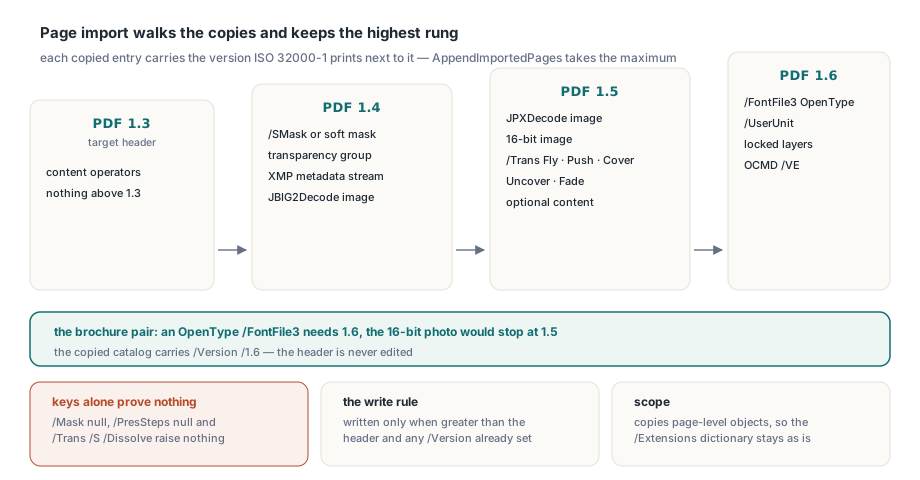
The required version comes from features, not from the source file's header. THPDFHeadlessDocument.AppendImportedPages walks the page dictionaries and resources it clones and records the highest version any copied, non-null entry needs. The tags are the same ones used when saving to an exact PDF version with feature checks; here they run upward, raising the declared level. Each row pairs a check the import applies with the version ISO 32000-1 prints next to the entry:
| Copied content | Needs | Where the spec says so |
|---|---|---|
Transparency group, soft mask (/SMask) or transparent ExtGState parameters | PDF 1.4 | Transparency model, §11 |
XMP metadata stream (/Type /Metadata /Subtype /XML) | PDF 1.4 | §14.3.2 |
Image data compressed with JBIG2Decode | PDF 1.4 | §7.4.7 |
Image data compressed with JPXDecode | PDF 1.5 | §7.4.9 |
| 16-bit image, whether an image XObject or an inline image in the content stream | PDF 1.5 | Table 89, §8.9.7 |
Non-null /PresSteps, or a /Trans of style Fly, Push, Cover, Uncover or Fade, or one with /SS or /B | PDF 1.5 | Table 30, Table 162 |
| Optional content brought along with the pages | PDF 1.5 | §8.11 |
/FontFile3 with /Subtype /OpenType | PDF 1.6 | Table 126 |
Page /UserUnit, locked layers, or an OCMD visibility expression /VE | PDF 1.6 | Table 30, §8.11 |
Older transition styles such as Dissolve, Wipe or Split date from PDF 1.1 and raise nothing, so the import reads the /S value of a transition dictionary; the bare presence of /Trans proves nothing. Writing comes after the walk. A /Version name goes into the new revision when a required version exists and it is greater than both the target's header version and any /Version the catalog already carries; otherwise the catalog gets no /Version entry. The header is never edited. The same paragraph of §7.5.6 asks a writer to update the catalog's /Extensions dictionary when an update adds or removes developer extensions. Page import copies page-level objects only, so /Extensions stays as the target had it
uses
  SysUtils, HPDFHeadlessDocument;

procedure AppendBrochurePages(const ContractFile, BrochureFile, OutputFile: string);
var
  Target, Source: THPDFHeadlessDocument;
  Options: THPDFHeadlessPageImportOptions;
  Outcome: THPDFHeadlessPageImportResult;
begin
  Target := THPDFHeadlessDocument.Create;
  Source := THPDFHeadlessDocument.Create;
  try
    Target.LoadFromFile(ContractFile);   // header: %PDF-1.3
    Source.LoadFromFile(BrochureFile);   // PDF 1.7 export: /FontFile3 /OpenType + 16-bit photo

    Options := THPDFHeadlessPageImportOptions.Default;
    // Page indices are zero-based: copy the cover and the spec sheet
    Outcome := Target.AppendImportedPages(Source, [0, 2], Options);

    // Saved as an incremental update: the old bytes stay a prefix.
    // Expected: the new catalog revision carries /Version /1.6,
    // and the first line of the file still reads %PDF-1.3
    Target.SaveToFile(OutputFile);
    WriteLn(Format('%d pages added, %d annotations flattened',
      [Outcome.AddedPages, Outcome.FlattenedAnnotations]));
  finally
    Source.Free;
    Target.Free;
  end;
end;
For this pair the OpenType font program sets the requirement at 1.6, and the 16-bit photo alone would have stopped at 1.5. Source and target must be two different loaded documents. A target that is already signed or certified is refused, because appending pages changes what the signature attests
Inline images live inside the content stream
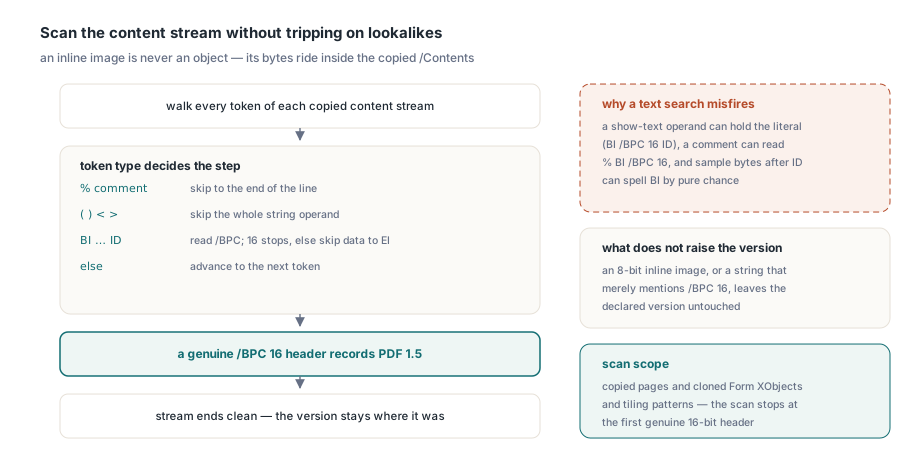
An inline image is never an object. ISO 32000-1 §8.9.7 defines it as a BI … ID … EI sequence written straight into a content stream, with abbreviated keys such as /BPC for /BitsPerComponent, and recommends the form only for small images of 4 KB or less. A 16-bit depth there needs PDF 1.5 just as it does on an image XObject, but an object walk never meets it, because those bytes ride along inside the copied /Contents. So the import also decodes the content streams of each copied page, and of every Form XObject and tiling pattern it clones, and scans them once for a BI header whose depth is 16. A text search would misfire. The operand of a show-text operator can hold the literal (BI /BPC 16 ID), and a comment line can read % BI /BPC 16. After ID, a single white-space byte gives way to raw binary samples that run until an EI token with white space on both sides — and those sample bytes can spell BI by chance. The scanner therefore steps over literal and hexadecimal strings, comments and inline sample data, and stops at the first genuine 16-bit header. An 8-bit inline image, or a string that merely mentions /BPC 16, leaves the version where it was
Does the source file's header decide the version?
No. The selected pages decide it. Stamping the brochure's 1.7 onto the merge overstates the result whenever those pages use nothing beyond PDF 1.3 drawing operators. An overstated version can send a plain document down the wrong path in a print workflow or archive gateway that sorts files by version. Matching keys while ignoring their values errs in the same direction. /Mask null, /PresSteps null and a /Trans dictionary with /S /Dissolve all contain the interesting key, none of them needs a newer version, and a scanner that reacts to key names raises the version for files that never needed it
A PDF 1.3 feature in a PDF 1.2 file is declared as 1.4
The subtle case sits at the bottom of the version range. Explicit and color-key image masks (/Mask in Table 89) are tagged PDF 1.3. Copy such an image into a %PDF-1.2 document and the strict requirement is 1.3. But /Version dates from PDF 1.4. Writing /Version /1.3 into a 1.2 file uses a mechanism the declared level does not have, so a strict reader has no reason to honor it. HotPDF declares 1.4 in that case: an image mask entering a document whose header is below 1.3 lifts the requirement straight to 1.4, the first version in which the override is legal. A target already at 1.3 needs no override at all for the same image
How do you read the effective version back?
Take the header version, find the catalog /Version name, and use whichever is later. A full parser reaches the catalog through the trailer's /Root. For a quick gate in a batch job a byte scan is often enough, with one caveat stated up front: it finds the entry only when the newest catalog revision is written as a plain object, outside any compressed object stream. Search from the end. An incrementally updated file can hold one catalog per revision: the original, then a complete replacement copy in each update. Readers use the most recent copy of every object (§7.5.6), so the last /Version in the file normally belongs to the live catalog. An empty result means this scan found no plain-text override; a parser may still find one inside an object stream. The function returns the effective version as a string such as 1.6, and the gate after it protects a PDF/A-1 channel, whose base standard ISO 19005-1 is built on PDF 1.4:
uses
  SysUtils, IOUtils;

function EffectivePdfVersion(const FileName: string): string;
const
  Key: RawByteString = '/Version';
var
  Bytes: TBytes;
  Text: RawByteString;
  P, Q: Integer;
  Declared: string;
begin
  Result := '';
  Bytes := TFile.ReadAllBytes(FileName);
  if Length(Bytes) < 8 then
    Exit;                                     // too short for '%PDF-1.x'
  SetString(Text, PAnsiChar(@Bytes[0]), Length(Bytes));
  if Copy(Text, 1, 5) <> '%PDF-' then
    Exit;
  Result := string(Copy(Text, 6, 3));        // '%PDF-1.3' -> '1.3'

  // The newest revision sits at the end, so search backwards
  P := Length(Text) - Length(Key) + 1;
  while (P > 0) and (Copy(Text, P, Length(Key)) <> Key) do
    Dec(P);
  if P = 0 then
    Exit;                                     // no plain-text override found

  Q := P + Length(Key);
  while (Q <= Length(Text)) and (Text[Q] in [#0, #9, #10, #12, #13, #32]) do
    Inc(Q);
  if (Q < Length(Text)) and (Text[Q] = '/') then
  begin
    Declared := string(Copy(Text, Q + 1, 3)); // name object: /1.6
    if Declared > Result then                 // header wins when it is later
      Result := Declared;
  end;
end;

procedure RequirePdfA1Channel(const FileName: string);
var
  Version: string;
begin
  Version := EffectivePdfVersion(FileName);
  if Version > '1.4' then
    raise Exception.CreateFmt(
      '%s declares PDF %s; the PDF/A-1 channel takes PDF 1.4 at most',
      [ExtractFileName(FileName), Version]);
end;
The string comparison works because every published PDF version has a single-digit minor number, and 2.0 still sorts above every 1.x value. Notice what the gate leaves alone. It does not strip /Version to sneak the file through, and it never trusts the header by itself. A header-only check would pass the merged contract. The file still carries a PDF 1.6 font format
Refusing or downgrading for a 1.4-only pipeline
Deleting the override is the wrong repair. The objects that required 1.6 are still in the file, so a version-aware reader would see a 1.3 document using a 1.6 font format, and preflight tools report that mismatch. A channel genuinely limited to 1.4 leaves two sound options. Reject the merge before it is saved, with the effective version as the test, or bring the source pages down to the target level first — convert the font and image content in the authoring tool, then import the result. Rejecting early is the better default. The error names the file and the version while the job is still running, which costs far less to support than a validation failure nobody can explain a week later. One requirement can be dropped at import time: with Options.RemovePresentationSteps := True the copied pages leave out /PresSteps, so sub-page navigation adds nothing to the required version. Where the decision belongs at save time, a version pre-check before saving stops the job before any bytes are written
For the 2004 contract the number to look for is 1.6. Call EffectivePdfVersion on the merged output in the same service that ran AppendImportedPages from the HotPDF Delphi PDF component. A 1.4-only channel can then turn the job away while the error still names the brochure pages that raised it