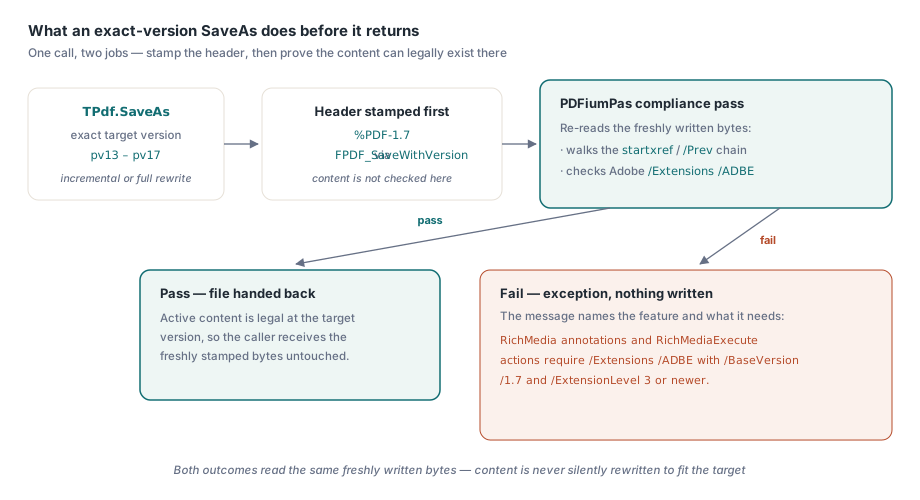
PDFiumPas, the Delphi and C++Builder wrapper around Google's PDFium engine, saves a document at an exact PDF version from 1.3 through 1.7 through the TPdf.SaveAs method's PdfVersion parameter. PDFium's own FPDF_SaveWithVersion call only rewrites the %PDF-M.m header, without checking whether the document's actual content is legal at that version. PDFiumPas closes that gap with a post-save compliance pass that walks the active cross-reference revision chain and checks Adobe Extension Level declarations before the file leaves the method
That distinction matters most in print production, where a PDF/X profile names an exact PDF version and a preflight tool or RIP rejects anything that quietly disagrees with its own header, a scenario covered from the output side in validating print-ready PDF/X documents with PDFiumPas. SaveAs exposes the target as the TPdfVersion enum, pv13 through pv17 alongside the older pv10 to pv12 values, plus an independent TSaveOption for incremental or full rewrites. Pass PdfVersion and PDFiumPas does two jobs in one call: it asks PDFium to stamp the requested header, then re-reads the freshly written bytes and refuses to hand back a file whose active content cannot legally exist at that version
var
  Pdf: TPdf;
begin
  Pdf:= TPdf.Create(nil);
  try
    Pdf.FileName:= 'source.pdf';
    Pdf.Active:= True;
    try
      Pdf.SaveAs('press-ready.pdf', saNoIncremental, pv17);
    except
      on E: Exception do
        // E.Message names the offending feature and the version or
        // extension level it actually needs, for example:
        // "RichMedia annotations and RichMediaExecute actions require
        // /Extensions /ADBE with /BaseVersion /1.7 and /ExtensionLevel 3
        // or newer."
        raise;
    end;
  finally
    Pdf.Free;
  end;
end;
Why Is the Last Object Definition in the File the Wrong Thing to Trust?
The last physical object with a given number in a PDF file is not necessarily the object a conforming reader would resolve for that number today. A PDF that has been through several incremental updates does not have one object graph, it has a history of them layered inside a single file, and every append cycle can free an object, redefine it under a new generation number, or leave its old physical body sitting between two endobj markers with no cross-reference entry pointing at it anymore
PDFiumPas hit exactly that failure mode before it tracked xref revisions explicitly: a Redact annotation orphaned by a later page-object rewrite, or a /MarkInfo dictionary left physically present with no xref entry pointing at it, could still turn up in a byte scan and still trip a version-feature check that no longer applied to the document a reader would actually open. The failure direction was false rejection, not false acceptance: a file that had genuinely moved past a feature in its current revision could still get blocked from saving at a lower version because of content nobody could reach anymore
How Does PDFiumPas Determine Which Object Definitions Are Actually Active?
PDFiumPas resolves the active object set the same way a conforming reader does, by walking the cross-reference chain instead of scanning bytes for object headers. The resolver starts at the last startxref offset in the file and follows each /Prev link backward through older revisions, parsing classic cross-reference tables, hybrid /XRefStm-linked streams, and pure cross-reference streams along the way. The walk runs newest-to-oldest and settles each object number the first time it is seen, so a free entry in a later revision correctly shadows an object body written in an earlier one, and a redefinition under a new offset or generation always wins over what it replaced
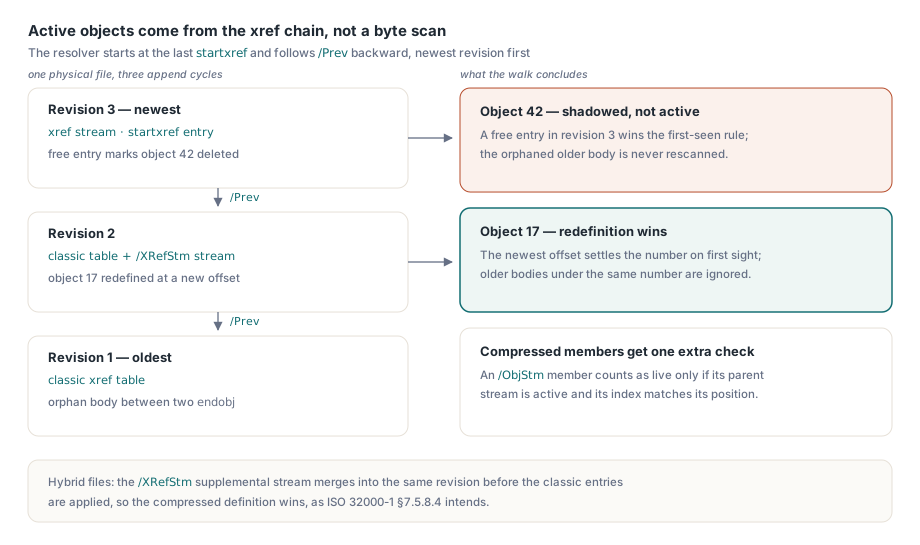
Object-stream members get an extra check a plain offset lookup cannot provide on its own, a mechanism covered in more depth in validating object and cross-reference streams with PDFiumPas. A compressed object recovered from an /ObjStm must have its parent stream confirmed active in the same walk, and its index has to agree with the member's own position inside that stream's header before PDFiumPas treats it as live content. ISO 32000-1 section 7.5.8.4 even describes a hybrid-reference case where a classic compatibility table marks an object free while the trailer's /XRefStm entry simultaneously defines that same object as a compressed member elsewhere; PDFiumPas merges the supplemental xref stream into the same revision before the classic entries are applied, so the compressed definition wins the way the specification intends
Adobe Extension Levels: The Gate Above the Version Number
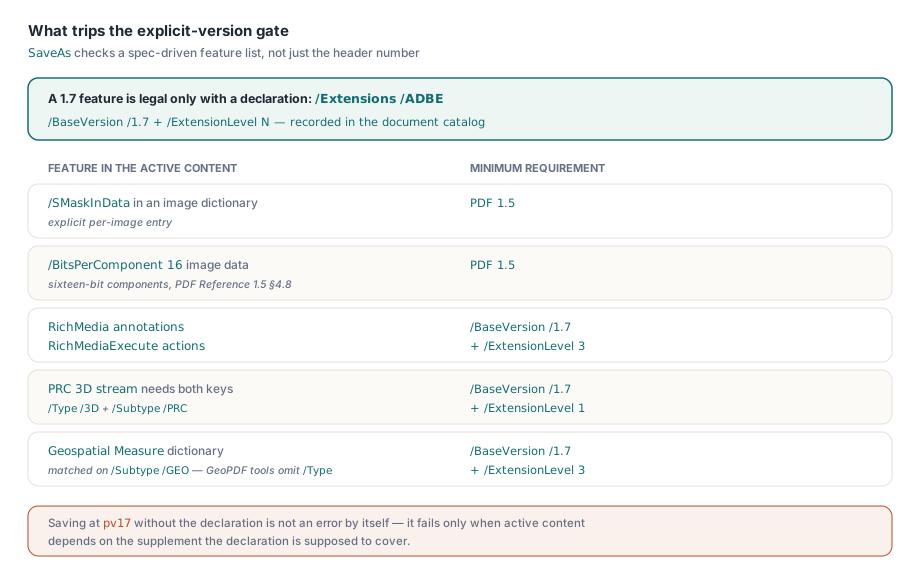
A %PDF-1.7 header only promises the feature set ISO 32000-1 standardized in 2008, while several capabilities PDF producers rely on today shipped afterward as Adobe-only supplements layered on top of that same version number. Adobe registered each supplement as a BaseVersion and ExtensionLevel pair recorded in the document catalog's /Extensions dictionary under a developer prefix, ADBE for Adobe's own extensions, so a reader can tell a plain PDF 1.7 file apart from one that also implements a numbered extension level. Saving at pv17 without that declaration is not an error by itself; it only becomes one the moment the active content actually depends on a feature the declaration is supposed to cover
Which High-Version Features Trip the Explicit-Version Gate?
PDFiumPas checks a specific, spec-driven list rather than guessing from the version number alone. Image dictionaries carrying an explicit /SMaskInData entry or a /BitsPerComponent value of 16 both require PDF 1.5, with the sixteen-bit case following PDF Reference 1.5 section 4.8's image-component rules directly. RichMedia annotations and RichMediaExecute actions require /BaseVersion /1.7 with /ExtensionLevel 3 or higher. PRC 3D streams, identified by a dictionary carrying both /Type /3D and /Subtype /PRC, require the same base version but only /ExtensionLevel 1. Geospatial Measure dictionaries and Projection annotations require /BaseVersion /1.7 with /ExtensionLevel 3, the same Adobe supplement RichMedia depends on
The geospatial check carries a spec-reading detail worth knowing if you ever build your own version-gated logic on top of PDFiumPas. ISO 32000-1 Table 254 marks the Measure dictionary's /Type entry as optional, noting only that "if present, shall be Measure," while Table 311 makes /Type mandatory for the 3D stream dictionary PRC content lives in. Real-world GeoPDF output from mapping tools routinely omits /Type on the Measure dictionary and writes only /Subtype /GEO, so PDFiumPas's geospatial detector matches on /Subtype alone rather than requiring both keys the way its PRC 3D detector safely can. Requiring /Type on both dictionaries would have let conforming GeoPDF content slip past the gate undetected, landing in a plain PDF 1.7 file with no extension level declaration to back it up
Does PDFiumPas Automatically Downgrade Unsupported Features?
Not as a general capability, and assuming otherwise is the mistake to avoid here. SaveAs funnels the target version through an internal routine, ValidatePdfVersionCompliance, and when that routine finds a feature the target version or its extension level declaration cannot support, SaveAs raises an exception carrying the routine's error text instead of writing the file; the caller gets a precise, feature-named reason back, never a silently rewritten document. The one place PDFiumPas does rewrite content automatically is a PDF 1.3 target, where it strips the semantically neutral /BM /Normal, /CA 1, and /ca 1 transparency defaults that PDFium always writes into ExtGState dictionaries regardless of target version, because those specific values carry no visual meaning and PDF 1.3 predates the keys entirely
// PDF 1.3 targets rewrite the saved bytes to strip transparency
// defaults PDFium always emits, so incremental mode cannot apply
Pdf.SaveAs('legacy-archive.pdf', saIncremental, pv13);
// raises: PDF 1.3 normalization is incompatible with incremental
// save mode
Genuine non-default transparency and image soft masks still fail outright at a PDF 1.3 target, because removing them would change how the page actually looks, and PDFiumPas will not make that call on your behalf. Two related limits are worth planning around before an exact version goes into a batch pipeline. Explicit-version output never carries an /Encrypt dictionary; the save fails immediately if the source is protected, which happens to line up with PDF/X and PDF/A profiles that forbid encryption anyway, but it does mean decryption is a separate step in your workflow rather than something SaveAs does for you. PDFiumPas also has no public method for writing an /Extensions /ADBE declaration onto a catalog, so a source file that contains RichMedia, PRC 3D, or geospatial content but lacks that declaration will not pass the gate no matter what PdfVersion you request; the declaration has to already exist in the source, typically because the authoring tool wrote it, or the feature has to come out before the save. The read-only TPdf.PdfVersion property is worth checking before an exact-version save is even attempted, since it resolves the same catalog-aware effective version, header or /Version override, whichever is current, that the save-time validator itself relies on
Pdf.FileName:= 'incoming.pdf';
Pdf.Active:= True;
// PdfVersion resolves the same catalog-aware effective version the
// save-time validator uses, so a mismatch here is worth investigating
// before spending a full SaveAs attempt on it
LogSourceVersion('incoming.pdf', Pdf.PdfVersion);
Treat a SaveAs exception on an exact version target as a preflight report rather than a bug: the message names the exact clause the source document is violating, which is precisely the information a print shop or archive pipeline needs before a file goes any further. The explicit-version save path, the active xref revision resolver, and the Adobe Extension Level checks described here ship as part of the standard PDFiumPas Component for Delphi and C++Builder; the product page carries the full TPdf.SaveAs reference alongside the rest of the compliance and forms API