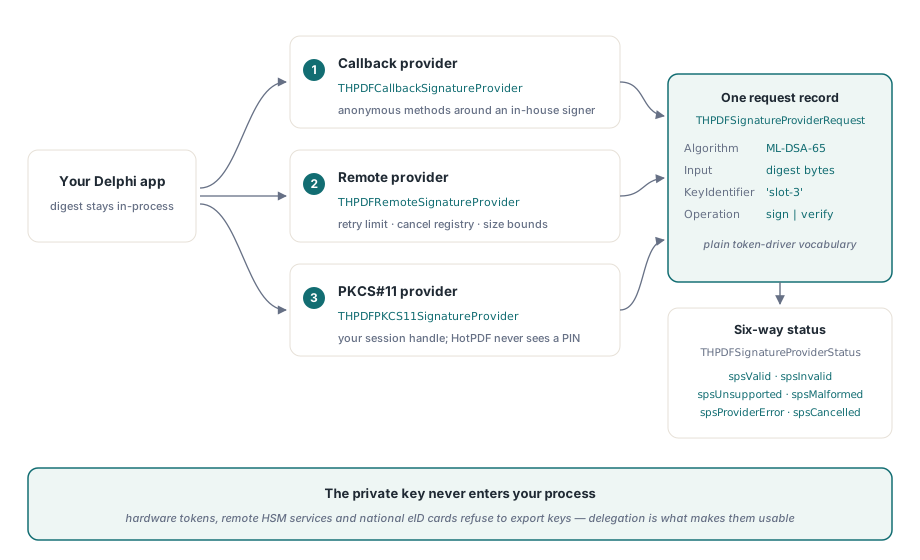
HotPDF verifies ML-DSA-44, ML-DSA-65, ML-DSA-87, Ed25519 and Ed448 CMS signatures in loaded PDF documents, and it signs through pluggable providers so the private key never has to live inside your Delphi process. That second half is the part most teams need first. A hardware token, a remote signing service and a national eID card all refuse to hand over a key, and until the signing pipeline is split from the key store, none of them can be used at all
The split is the point of THPDFSignatureProvider. HotPDF keeps the parts it should own — parsing CMS, building SignedData, laying out the /ByteRange — and delegates the one operation it cannot own, which is turning a digest into a signature with a key it is not allowed to see. Everything below follows from that division
Why does a valid ML-DSA signature fail to verify?
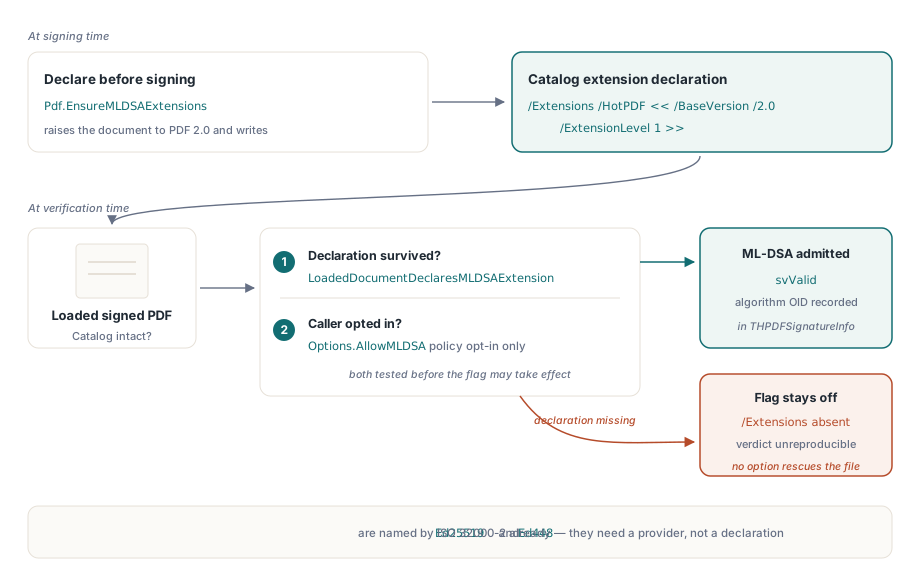
Because HotPDF refuses ML-DSA on a loaded document that does not declare the extension for it. ML-DSA — the lattice signature scheme standardized as FIPS 204, and the reason people say "post-quantum PDF" — has no ISO 32000-2 registration yet. A PDF that carries one is using an algorithm the base standard does not name, and a file that silently uses an unnamed algorithm is a file whose verdict cannot be reproduced by anyone else
So HotPDF makes the claim explicit. EnsureMLDSAExtensions raises the document to PDF 2.0 where permitted and writes /Extensions /HotPDF << /BaseVersion /2.0 /ExtensionLevel 1 >> into the Catalog. On the reading side, LoadedDocumentDeclaresMLDSAExtension reports whether that declaration survived, and VerifyLoadedSignatureWithOptions applies the same test before it will honor Options.AllowMLDSA. Set the flag on an undeclared document and it stays off — the option can loosen policy, never the structural requirement
var
  Pdf: THotPDF;
begin
  Pdf := THotPDF.Create(nil);
  try
    Pdf.FileName := 'contract-pq.pdf';
    Pdf.BeginDoc;
    Pdf.CurrentPage.SetFont('Arial', [], 11);
    Pdf.CurrentPage.TextOut(50, 720, 0, 'Supply agreement 2026-114');
    Pdf.EnsureMLDSAExtensions;   // declare before the signature is written
    Pdf.EndDoc;
  finally
    Pdf.Free;
  end;
end;
Call it before saving, not after. The declaration is part of the signed byte range, and a Catalog patched afterward is either an unsigned change to a signed file or a second revision that a validator will report as a modification
Three algorithm families, one verification entry point
All three families arrive through VerifyLoadedSignatureWithOptions, which takes a signature index, the source stream, a THPDFCMSVerifyOptions record and an out parameter for the signature details. The record has exactly three fields, and each answers a question that used to require a rebuild
SignatureProvider substitutes your own provider for the built-in platform one. OpenSSLLibraryPath selects an OpenSSL 3 library, which is what supplies the pure-mode Ed25519 and Ed448 verification that Windows CNG does not offer everywhere. AllowMLDSA opts into the lattice algorithms, subject to the extension check above. The exact algorithm OID that was recognized comes back in THPDFSignatureInfo.SignatureAlgorithmOID, so an audit log can record what was verified rather than what was requested
var
  Opts: THPDFCMSVerifyOptions;
  Info: THPDFSignatureInfo;
  Status: THPDFSignatureVerifyStatus;
  Src: TFileStream;
begin
  Opts := THPDFCMSVerifyOptions.Default;
  Opts.OpenSSLLibraryPath := 'C:\openssl3\libcrypto-3-x64.dll';
  Opts.AllowMLDSA := Pdf.LoadedDocumentDeclaresMLDSAExtension;
  Src := TFileStream.Create('contract-pq.pdf', fmOpenRead or fmShareDenyWrite);
  try
    Status := Pdf.VerifyLoadedSignatureWithOptions(0, Src, Opts, Info);
    if Status = svValid then
      Memo1.Lines.Add('signed with OID ' + string(Info.SignatureAlgorithmOID));
  finally
    Src.Free;
  end;
end;
Ed25519 and Ed448 need no extension declaration, because ISO 32000-2 already admits them. They do need a provider that implements them, which on most Windows deployments means pointing OpenSSLLibraryPath at a library you ship and control rather than at whatever happens to be on the machine
What does a signing provider actually promise?
A provider promises one thing: given a request, return a status and, when signing, bytes. THPDFSignatureProviderRequest carries the algorithm and its OID, the digest OID, the PSS salt length, whether the input is a message or an already-computed digest, the input itself, the public key or certificate, a key identifier and an operation identifier. Nothing in that record is HotPDF-specific — it is the vocabulary a token driver or a signing service already speaks
Three implementations ship with the library. THPDFCallbackSignatureProvider wraps anonymous methods, which is the shortest path from an existing in-house signing routine to a working PDF signature. THPDFRemoteSignatureProvider wraps a transport callback with a retry limit, a cancellation registry and bounds on input and signature size, so a hung HSM cannot become a hung application. THPDFPKCS11SignatureProvider serializes RSA operations against a caller-owned, already-authenticated PKCS#11 session and private-key handle — HotPDF never logs in, never sees a PIN, and never closes a session it did not open
var
  Provider: THPDFRemoteSignatureProvider;
begin
  Provider := THPDFRemoteSignatureProvider.Create(
    function(const Req: THPDFSignatureProviderRequest; Attempt: Integer;
      out Signature: TBytes): THPDFSignatureProviderStatus
    begin
      // POST Req.Input to the signing service; Req.KeyIdentifier selects the key
      if PostToSigningService(Req.KeyIdentifier, Req.Input, Signature) then
        Result := spsValid
      else
        Result := spsProviderError;
    end,
    3,          // RetryLimit
    1048576,    // MaxInputBytes
    65536);     // MaxSignatureBytes
  try
    // hand Provider to the signing call
  finally
    Provider.Free;
  end;
end;
Why the status enum has six values instead of a boolean
THPDFSignatureProviderStatus distinguishes spsValid, spsInvalid, spsUnsupported, spsMalformed, spsProviderError and spsCancelled, and collapsing them costs you the ability to act correctly. A signature that is cryptographically wrong (spsInvalid) is a security event. An algorithm the provider does not implement (spsUnsupported) is a deployment gap. A transport failure (spsProviderError) is worth retrying, and a user-canceled token prompt (spsCancelled) is not worth retrying at all
The rule for signing is narrow: a signing provider returns spsValid only with a non-empty signature. Verification providers return spsValid or spsInvalid, and the other four stay distinct on both paths. If you write a provider, resist the temptation to map everything you do not recognize onto spsInvalid — that turns a missing DLL into a report that the customer's signature is forged
Where the signature actually lands in the file
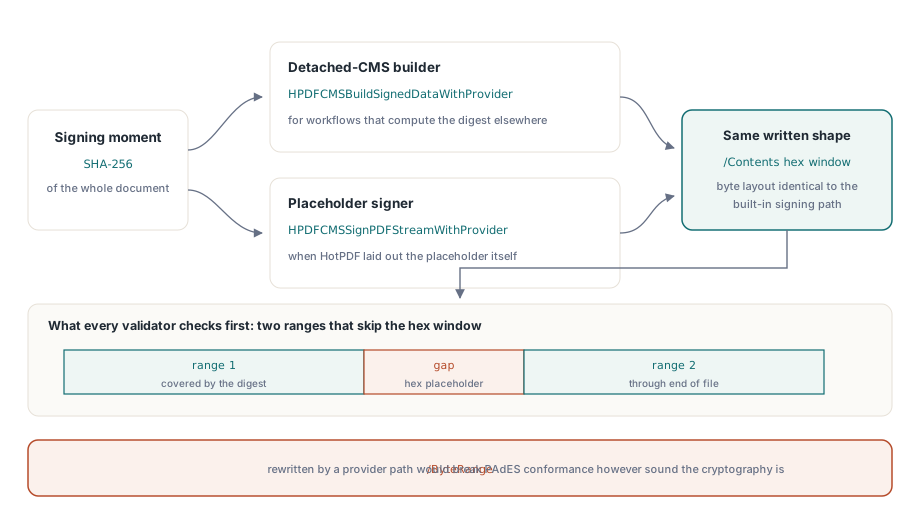
Two functions connect providers to real PDF bytes. HPDFCMSBuildSignedDataWithProvider builds detached CMS from a document SHA-256 digest, which is the right entry point when your workflow computes the digest elsewhere. HPDFCMSSignPDFStreamWithProvider signs an existing signature placeholder in a PDF stream and preserves the standard /ByteRange pipeline, which is the right entry point when HotPDF laid out the placeholder itself
Preserving that pipeline matters more than it sounds. The /ByteRange convention — two ranges that skip the hex signature window — is what every validator checks first, and a provider-based path that rewrote it would break PAdES conformance no matter how sound the cryptography was. HotPDF keeps the layout identical to the built-in signing path, so a document signed through a PKCS#11 token verifies with the same signature verification code as one signed from a PFX file. For the profile rules that sit above the algorithm choice, see the walkthrough of PAdES baseline signatures in Delphi, and for the ECDSA-specific encoding traps that predate this provider model, the notes on ECDSA CMS verification and P1363 signature formats
A migration order that does not strand your documents
Post-quantum readiness is a schedule problem, not a switch. Almost no deployed PDF viewer validates ML-DSA today, so a document signed with it alone is, from the reader's point of view, a document with an unverifiable signature. The order that survives contact with real archives is: keep RSA or ECDSA as the signature a validator will judge, add the extension declaration and a second ML-DSA signature where a policy demands quantum-resistant evidence, and move the primary signature only when the consuming systems have caught up
What HotPDF gives you today is the ability to write and verify both, from the same code, with the algorithm recorded honestly in the file and in the verification result. HotPDF is a native VCL PDF component for Delphi and C++Builder with no external PDF runtime, so the signing and verification paths ship inside your executable rather than alongside it — see the HotPDF Delphi PDF component page for the full feature list and trial download