HotPDF converts HTML into PDF pages through THPDFHTMLImporter.RenderHTML5, a versioned paged-media profile with a real DOM, a real CSS cascade, tables, page breaks and optional AcroForm generation from HTML form controls. It runs entirely in-process: no browser engine, no Chromium, no external converter, and by default no file or network access at all
The reason a separate entry point exists rather than an improved RenderHTML is compatibility. The older method has been rendering invoices and letters in production applications for years, and a lenient DOM with a full cascade changes the output of documents that were tuned against the old behavior. So the old method keeps its exact semantics and everything new lives behind RenderHTML5, whose profile version is reported by HTML5ProfileVersion and whose supported milestones are listed by HTML5ProfileMilestones
What does the HTML5 profile actually add?
Four capabilities matter in practice. A structural DOM where html and body are containers rather than text nodes. A CSS cascade with correct precedence. Table layout. And explicit page-break control, which is what "paged media" means: HTML was designed for a scrolling viewport, and turning it into pages requires deciding where content is allowed to break
The container point sounds like an implementation detail and is actually the difference between working and not working. If the root elements are treated as text containers, the entire DOM collapses into one text block at parse time, and every stylesheet rule, page break, table and form subtree afterward is applied to nothing. Any HTML renderer that produces one undifferentiated wall of text from a structured document has made exactly this mistake
Cascade order, spelled out
CSS precedence is not a single sort. HotPDF applies normal declarations from matching rules in order of specificity and then source order, applies inline normal declarations on top, then the !important declarations from matching rules, and finally inline !important. Four passes, in that order
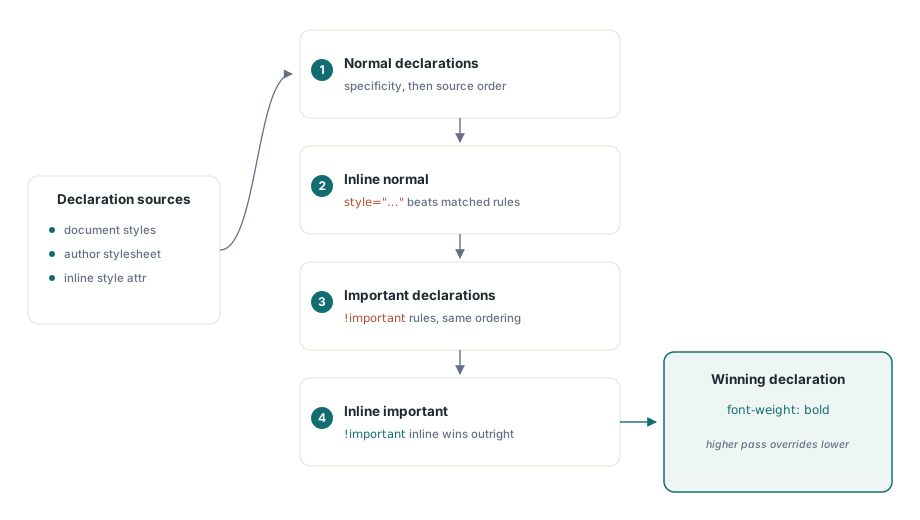
Implementations that collapse this into "later wins" get the common cases right and the interesting ones wrong, which is worse than getting them uniformly wrong, because the failure only appears in templates that use !important to override a base stylesheet — precisely the templates written by people who expect the cascade to work:
uses
  HPDFDoc, HPDFHTMLImport;

var
  Pdf: THotPDF;
  Importer: THPDFHTMLImporter;
  Html, Css: WideString;
begin
  Pdf := THotPDF.Create(nil);
  Importer := THPDFHTMLImporter.Create(Pdf);
  try
    Pdf.FileName := 'statement.pdf';
    Pdf.BeginDoc;

    Importer.Margin := 56;              // points
    Importer.BaseFontName := 'Arial';
    Importer.BaseFontSize := 10;
    Importer.CreateAcroForms := False;  // render controls, do not author fields

    Css := '@page { margin: 56pt } ' +
           'table { border-collapse: collapse } ' +
           'tr.total { page-break-inside: avoid; font-weight: bold }';
    Html := LoadTemplate('statement.html');

    if not Importer.RenderHTML5(Html, Css) then
      raise Exception.Create('nothing was emitted - check the markup');

    Pdf.EndDoc;

    Writeln(Format('profile=%d nodes=%d rules=%d layout ops=%d',
      [Importer.Statistics.ProfileVersion,
       Importer.Statistics.ParsedNodeCount,
       Importer.Statistics.CSSRuleCount,
       Importer.Statistics.LayoutOperationCount]));
  finally
    Importer.Free;
    Pdf.Free;
  end;
end;
The second argument is an author stylesheet applied alongside whatever the document carries, which is the clean way to enforce house rules such as page margins and widow control without editing every template
Why does the importer never fetch anything?
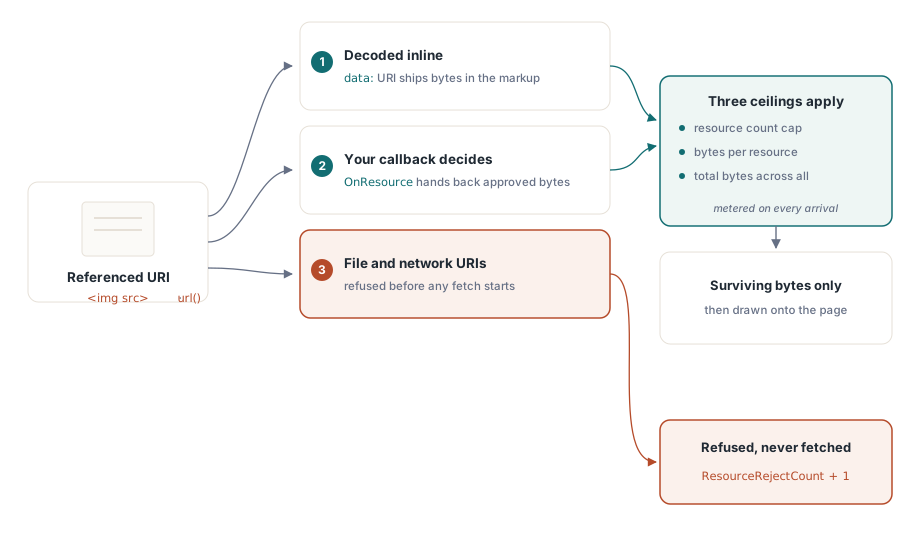
An HTML-to-PDF converter that resolves external references is a server-side request forgery engine wearing a document-generation costume. Point it at user-supplied markup and it will happily fetch http://169.254.169.254/ or a file URL from your application server and embed the result in a PDF that someone downloads
HotPDF therefore reads neither files nor network by default. Images and other resources arrive in exactly two ways: as data: URIs inside the markup, or through the OnResource callback, where your code decides what a URI means and supplies the bytes:
procedure TReportForm.SupplyResource(Sender: TObject;
  const URI: WideString; ResourceKind: THPDFHTMLResourceKind;
  var Data: TBytes; var ContentType: string; var Handled: boolean);
begin
  Handled := False;
  // Only serve from an allow-listed local asset directory. Never
  // pass the URI to an HTTP client, and never join it onto a path
  // without validating it first
  if StartsText('asset:', URI) then
  begin
    Data := LoadAssetBytes(Copy(URI, 7, MaxInt));
    ContentType := 'image/png';
    Handled := Length(Data) > 0;
  end;
end;
Every resource that does arrive is still counted against three separate ceilings: how many resources, how many bytes each, and how many bytes in total. A callback that faithfully returns whatever it is asked for cannot be talked into exhausting memory by a document that references the same 50 MB image two hundred times
Four budgets, one failure mode
Parser nodes, CSS rules, layout operations and resources are metered independently, because they fail independently. A document can be small and pathologically expensive to lay out; another can be shallow with a stylesheet designed to explode selector matching. Exhausting any of them raises EHPDFHTMLImportBudget, a dedicated exception class so budget exhaustion can be caught separately from malformed input
Statistics reset at the start of each RenderHTML5 call, so the numbers describe one import rather than the lifetime of the importer object. In a service that renders untrusted templates, log ParsedNodeCount, LayoutOperationCount and ResourceRejectCount per document: a rising reject count usually means a template author is referencing assets your callback does not recognize, and a layout operation count near the ceiling means the next slightly larger document will fail
Choosing between HTML import and the layout API
HTML import wins when the content is authored as HTML by people who are not Delphi developers, when templates change more often than code, or when the same content must also be sent as email. The declarative layout tree described in declarative PDF layout with tagged output wins when the document is generated from data by your own code, when you need PDF/UA structure emitted automatically, or when precise control over pagination matters more than authoring convenience
They are not exclusive. A common shape is HTML import for the body of a report, with header, footer and signature blocks drawn directly, since those are fixed geometry that no template should own. Tables are the one area where it is worth measuring both: complex financial tables sometimes paginate better through the dedicated table path described in generating tables in PDF
Set CreateAcroForms deliberately. Off, HTML form controls render as static artwork, which is what a printed statement wants. On, they become real interactive AcroForm fields, which is what a fillable form wants, and the field behavior that follows is covered in adding form fields to a loaded PDF
HTML import, declarative layout and the direct drawing API all target the same document object in Delphi and C++Builder; the complete feature list is on the HotPDF Delphi PDF component page