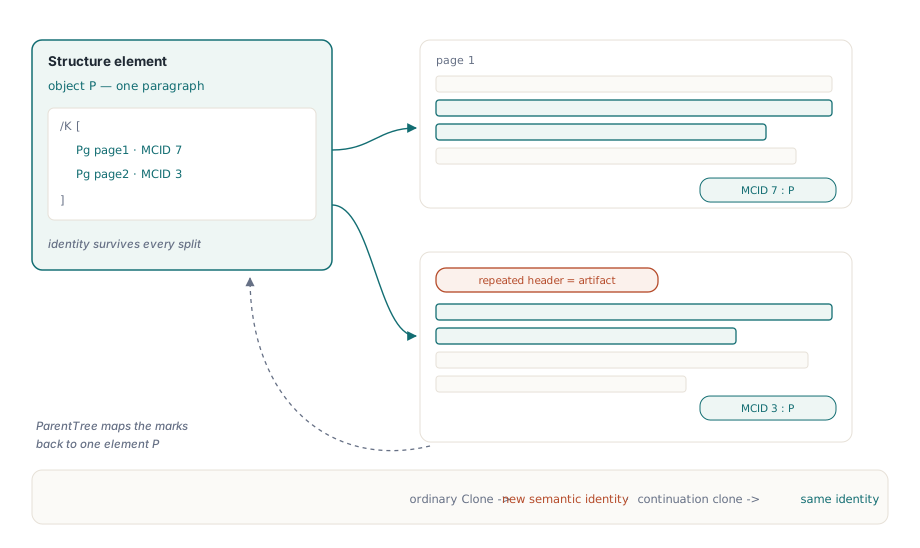
A paragraph that starts at the bottom of page 4 and finishes at the top of page 5 is one paragraph to the person reading it. In a tagged PDF it lives in two content streams, and each page numbers its marked-content sequences on its own, so the structure tree needs a single P element whose /K array points at, say, MCID 7 on page 4 and MCID 3 on page 5. Draw the pages with coordinate code and bolt tagging on afterwards, and the tag tree in an accessibility checker typically shows two paragraphs where there was one, plus a set of column titles repeated inside the data of every continued table
The coordinate approach has a second cost that arrives earlier. The first version of a report works. Then a customer address grows to three lines, a localized heading wraps, a table gains forty rows, and every y position below that point is wrong. Page-break checks end up scattered through business logic, and code that only ever knew about x and y has no idea where a paragraph begins when the accessibility requirement shows up two years later
Building a HotPDF layout tree in Delphi
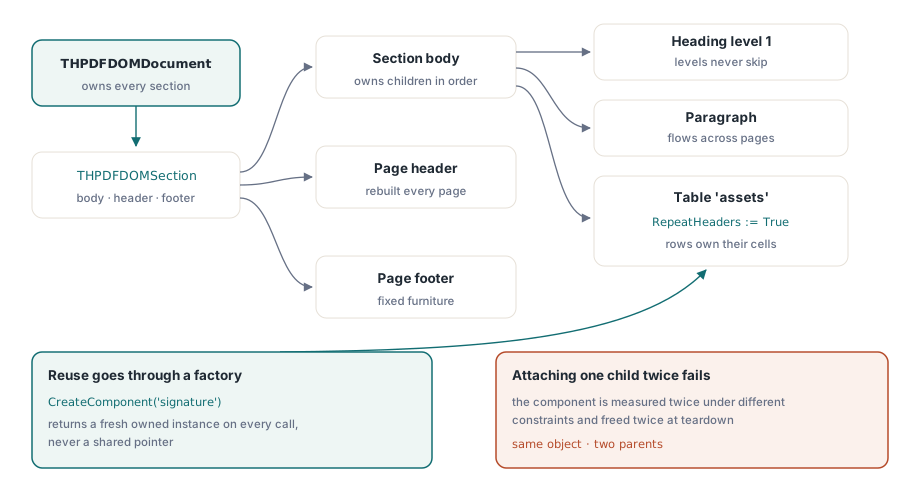
HotPDF answers both problems with a declarative layout tree in the HPDFLayoutDOM unit. A THPDFDOMDocument holds sections; each THPDFDOMSection has a page size, margins, an optional header and footer, and a Body stack into which you add text, headings, spacers, lists, images, containers and tables. Nothing in the tree carries a y coordinate. THPDFDOMRenderer measures the tree, decides the page breaks, draws the header and footer on each page and, because GenerateStructure defaults to True, writes the structure tree as it goes
Ownership in the tree is strict. The document owns its sections, a section owns its body, header and footer, and stacks, containers and tables own their children, so Section.Body.Add(Table) hands the table over for good. A component attached to two parents would be measured twice under different constraints and freed twice at teardown. Repeated pieces such as a signature block therefore come from Clone, from SetHeaderClone / SetFooterClone, or from a factory registered with RegisterComponent, after which every CreateComponent('signature') call returns a fresh instance
uses
  SysUtils, HPDFDoc, HPDFLayoutDOM;

type
  TAssetRow = record                    // your own data type
    Name, ServiceDate, Status: WideString;
  end;

function BuildMaintenanceReport(const Assets: array of TAssetRow): THPDFDOMDocument;
var
  Doc: THPDFDOMDocument;
  Section: THPDFDOMSection;
  Heading: THPDFDOMText;
  Table: THPDFDOMTable;
  Row: THPDFDOMTableRow;
  I: Integer;
begin
  Doc := THPDFDOMDocument.Create;       // GenerateStructure = True, Language = 'en-US'
  try
    Section := Doc.AddSection;          // A4 portrait, 36 pt margins by default
    Section.MarginLeft := 56;
    Section.MarginRight := 56;
    Section.Style.FontName := 'Helvetica';
    Section.Style.FontSize := 10;
    Section.Style.LineHeight := 13;
    Section.Body.Style.Spacing := 6;    // gap between body children
    Section.Footer := THPDFDOMText.Create('Plant maintenance - internal');

    Heading := Section.Body.AddHeading('Annual maintenance report', 1);
    Heading.Style.FontSize := 18;
    Heading.Style.LineHeight := 22;     // LineHeight does not follow FontSize
    Section.Body.AddText('Every asset inspected during the reporting ' +
      'period is listed below, grouped by site.');

    Table := THPDFDOMTable.Create('assets');  // RepeatHeaders is True by default
    Table.AddColumn(3);                 // weights, not widths in points
    Table.AddColumn(1);
    Table.AddColumn(1);
    Row := Table.AddRow(18, True);      // header rows must come first
    Row[0].Text := 'Asset';
    Row[1].Text := 'Last service';
    Row[2].Text := 'Status';
    for I := 0 to High(Assets) do
    begin
      Row := Table.AddRow(16);
      Row[0].Text := Assets[I].Name;
      Row[1].Text := Assets[I].ServiceDate;
      Row[2].Text := Assets[I].Status;
    end;
    Section.Body.Add(Table);            // the body owns the table from here on
    Result := Doc;
  except
    Doc.Free;
    raise;
  end;
end;
Two defaults in that listing catch people. LineHeight resolves to 12 points unless a style in the chain sets it, whatever FontSize says, so an 18 pt heading without its own LineHeight gets 12 pt lines and overlaps the next one. And a table row is exactly as tall as the height passed to AddRow: cell text goes out on one line, so size rows for the font you chose
Render opens and closes the document itself
THPDFDOMRenderer.Render(Doc, Pdf) calls BeginDoc on the target, renders every section, and calls EndDoc before it returns. Do not wrap it in your own BeginDoc / EndDoc pair. Anything that has to be set before the document starts goes on the THotPDF instance first: FileName, Title, and PDFUACompliance if the output has to claim PDF/UA. When structure generation is on, Render also switches on EnableTaggedPDF and copies Doc.Language into Pdf.Lang if you left it empty
var
  Doc: THPDFDOMDocument;
  Pdf: THotPDF;
  Renderer: THPDFDOMRenderer;
  Stats: THPDFDOMRenderStatistics;
begin
  Doc := BuildMaintenanceReport(Assets);
  Pdf := THotPDF.Create(nil);
  Renderer := THPDFDOMRenderer.Create;
  try
    Pdf.FileName := 'maintenance-report.pdf';
    Pdf.Title := 'Annual maintenance report';
    Pdf.PDFUACompliance := True;        // also enables the figure alt-text check
    // No BeginDoc / EndDoc here: Render opens and closes the document
    Stats := Renderer.Render(Doc, Pdf);

    Writeln(Format('%d page(s), %d placement(s), %d split(s)',
      [Stats.PageCount, Stats.PlacementCount, Stats.SplitCount]));
    Writeln(Format('structure elements=%d marked content=%d artifacts=%d',
      [Stats.StructureElementCount, Stats.MarkedContentCount,
       Stats.ArtifactCount]));
    Writeln(Format('header draws=%d footer draws=%d deepest chain=%d',
      [Stats.HeaderDrawCount, Stats.FooterDrawCount,
       Stats.MaximumContinuationDepth]));
  finally
    Renderer.Free;
    Doc.Free;
    Pdf.Free;
  end;
end;
Log the statistics record on every run, because it shows template regressions that never cause an exception. SplitCount jumping after a template change usually means some component now measures taller than the space it used to fit in. MaximumContinuationDepth creeping upward points at a component whose Split moves too little content per page. ArtifactCount covers page headers and footers, decorative borders such as the table's default 0.5 pt frame, and repeated header rows, so compare it between runs of the same template rather than against a hand-computed target
How does a long table paginate without copying itself on every page?
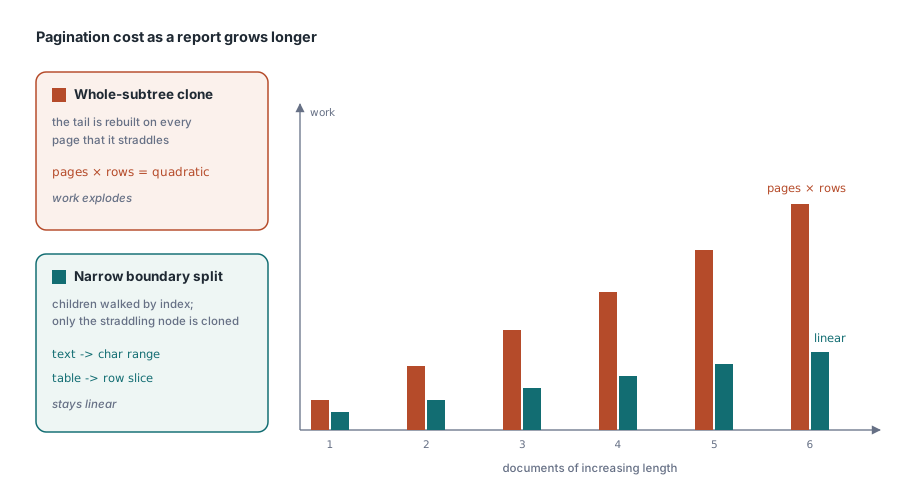
The renderer splits only what straddles the page boundary. The naive way to paginate a tree is to clone whatever did not fit and carry the copy to the next page; for a table with 10,000 rows that clones the remaining rows once per page and turns a linear job into a quadratic one. HotPDF walks the body children by index and never clones a whole section or body. A nested stack or container that crosses a page boundary gets only its affected subtree cloned, and the two heavy leaf types carry a cursor instead of a copy
A continued paragraph is a reference to the original text plus the character range it still owes, and it reuses the line breaks already computed for that width. A continued table is a reference to the original table plus the slice of rows still to place. A 300-line paragraph costs the same whether it breaks once or five times
Placement itself goes through the public THotPDF.PlaceLayoutElement. It measures the element against the remaining body height, draws it whole if it fits, and otherwise asks it to Split, re-measures the placed half, draws it, and returns the remainder as an overflow object that the renderer carries to a fresh page. Measure must never draw anything; it can run several times for one placement. The DOM renderer adds page furniture, spacing between children and fresh-page decisions on top of that routine
Why can one header row stop the whole render?
Repeated table headers carry two rules, and both exist to stop a report from producing pages without data. Header rows must form the first run of rows: AddRow(Height, True) after any body row raises EInvalidOpException with "Table header rows must precede body rows". And the first split of a table must fit every header row plus at least one body row. A table that would leave the header stranded at the foot of a page moves to the next page instead
The second rule has a hard edge. If the header rows plus one body row do not fit even on an empty page, there is no page on which the table can start, and Render raises "Layout component ... cannot fit an empty body page" with the component path, for example Sections[0]/Body/Items[2]/assets. That is the behavior worth having. A layout engine that kept adding pages in the hope that the next one would be roomier would turn one oversized header into a disk-filling loop
Custom components get the same protection. Subclass THPDFDOMComponent, implement Clone, Measure, Draw and Split, and the renderer counts how many continuations each body child produces. Above THPDFDOMRenderer.MaximumContinuationDepth (100,000 by default) the render stops with "exceeded the continuation depth limit". A Split that keeps returning an equivalent tail, so it never makes progress, fails with a component path instead of running until the disk is full
On continuation pages the header rows are drawn again inside an /Artifact marked-content sequence, and the structure tree keeps the original TR once. Text extraction therefore does not insert a duplicate header row between data rows, and assistive technology does not announce the column titles again in the middle of the table. Each header cell is tagged TH with a /Scope /Column attribute
One logical paragraph, several page fragments
A split paragraph stays one P structure element. Each visible fragment opens a new marked-content sequence on its own page, and HotPDF appends a marked-content reference dictionary, << /Type /MCR /Pg page /MCID n >>, to that element's /K array and registers the MCID in the page's ParentTree entry pointing back to the same element. That is the arrangement ISO 32000-1 §14.7.4 describes for content items spread across pages, and it is what lets a tag-tree view show one paragraph where the pages show two pieces
Semantic identity is why continuation copies behave differently from your own clones. Calling Clone means "new logical content", and the result gets a new structure element when it is drawn. The copies made during pagination inherit the identity of the component they continue, so a stack split over three pages still produces one Div, and a list split over two still produces one L. Page headers and footers take a different route: they are wrapped as /Artifact << /Type /Pagination /Subtype /Header >> (or /Footer) on every page and never enter the structure tree
Structure rules checked while the tree renders
With GenerateStructure on, the renderer refuses structure that PDF/UA validation would reject later. The first heading must be H1 and later headings may not skip a level, so an H3 straight after an H1 raises "Semantic heading levels cannot skip an intermediate level". LI needs an L parent, Lbl and LBody need an LI, TR needs a table or row group, and TH / TD need a TR. When the target has PDFUACompliance set, a Figure without alternate text is rejected as well. Each violation stops Render with an exception
var
  List: THPDFDOMList;
  Bmp: TBitmap;                         // Vcl.Graphics
begin
  Section.Body.AddHeading('Findings', 2);     // H1 came first, so H2 is legal

  List := THPDFDOMList.Create('Decimal');     // tagged L, ListNumbering /Decimal
  List.AddItem('1.', 'Replace the intake filter on pump P-14');
  List.AddItem('2.', 'Re-torque the flange bolts on line 3');
  Section.Body.Add(List);                     // AddItem builds LI, Lbl and LBody

  Bmp := TBitmap.Create;
  try
    Bmp.LoadFromFile('site-plan.bmp');
    // The image copies the graphic; an empty alt text fails under PDFUACompliance
    Section.Body.Add(THPDFDOMImage.Create(Bmp, 240, 160,
      'Site plan of plant 3 with the inspected pumps circled'));
  finally
    Bmp.Free;
  end;
end;
Checking during the render is the right place for these rules. Timing is the reason. A validator that reports a missing alternate text after the file is written tells you that a batch of 10,000 statements has to be regenerated; an exception during Render names the rule that failed while the record that produced it is still in scope. Formal conformance checking still belongs in the pipeline, and because the document's objects remain readable after Render returns, it can run right away. PDF/A, PDF/X and PDF/UA validation covers that step, and structure order and text extraction shows how the tag tree drives what extraction tools read back
When to keep drawing by hand
The tree draws onto the same THPDFPage objects as the direct API. Because Render owns the document from BeginDoc to EndDoc, hand-positioned artwork such as a signature image belongs inside the tree: a custom component's Draw receives the page and its bounds and can call the ordinary page methods there. Page closing stays with AddPage and EndDoc, so with ImmediateFlushLayout set on the THotPDF instance, finished pages are written out as the render proceeds and the renderer holds no completed pages; memory then depends on the open continuations, font resources and the document's object graph
The DOM text component breaks lines from an estimated average advance of 0.55 × font size per character and gives every line the resolved LineHeight. That keeps measurement cheap and the same on every machine, and it is plenty for data-driven reports. Text with wide glyphs, such as all caps, bold runs or CJK, comes out wider than the estimate, so leave slack in those column widths and test the layout once with the longest real string. Typeset pages with exact glyph metrics, mixed fonts inside one line, or justified paragraphs are better served by the direct text API; text justification walks through that path, and if table pagination is the only thing hurting, generating tables in PDF is the smaller change
The layout tree, its renderer, the tagging described here and the direct drawing API all ship in one component for Delphi and C++Builder; editions and the full feature list are on the HotPDF Delphi PDF component page