A brochure headline that reads "Bold words" on screen comes out of a naive text extractor as "Bold wordsBold words". Every character decoded correctly, and the headline really is in the content stream twice: the producer had no bold face, so it showed the string, nudged the text position right by a few tenths of a point, and showed it again. The only way to get one "Bold words" back is to decide which of two valid glyphs is the copy, without also eating the second l in "fill" or the identical cells of a price table
That decision is geometric. Two copies of a letter that sit almost on top of each other are one painted character; two copies a full advance width apart are two letters. Everything below is about where that line is drawn, plus a second extraction trap with a similar feel, CID width arrays written out of order, that makes the ends of lines disappear
Why does fake bold produce doubled text in PDF extraction?
Fake bold doubles extracted text because both passes are real text-showing operations. Many generators emulate bold by issuing the same string with Tj or TJ, moving the text position with a small Td, and issuing it again. On screen the two passes merge into a heavier stroke. In the content stream there are two complete runs of character codes, and ISO 32000-1 §9.4 gives an extractor no flag that marks either run as decoration
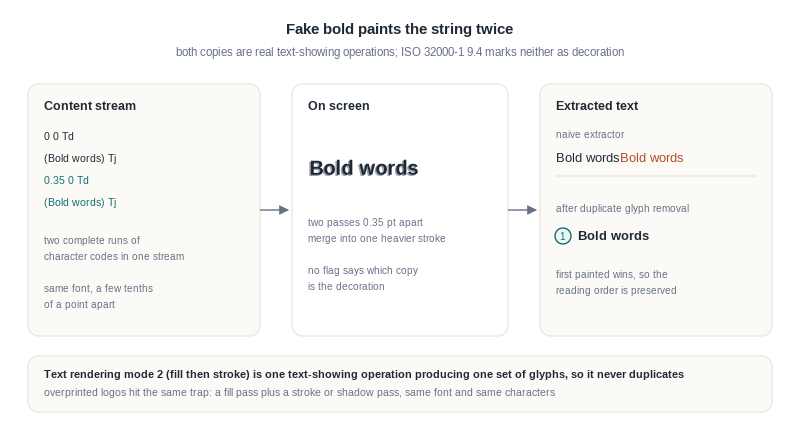
Overprinted logos arrive at the same place by a different road. A logotype gets painted once as a fill and again as a stroke or a slightly offset shadow, same font, same characters. An extractor that walks the content stream in painting order emits the whole first run and then the whole second run, which is why the output reads "Bold wordsBold words" and never "BBoolldd". A substring search over that text still finds the phrase, but word counts, layout output and any comparison against a known value come out wrong
Text rendering mode 2 (fill, then stroke, ISO 32000-1 §9.3.6) does not cause any of this. It is one text-showing operation and produces one set of glyphs. Duplicates only show up when the producer issues the text twice
The five tests a glyph pair must pass in HotPDF
HotPDF Delphi Component reads two glyphs as one painted character when they carry the same Unicode value, run in the same writing direction, are within 5% of each other in size, and sit no more than 0.1 of the glyph size apart along the baseline and no more than 0.2 of the glyph size apart across it. The glyph painted first is kept; the later one is dropped. Each number has a job:
- Same Unicode, same direction. Only identical characters can be duplicates, and a horizontal glyph is never compared with a vertical (WMode 1) one
- Size within 5%. A large heading letter and a small caption letter that happen to overlap belong to different text
- 0.1 of the size along the baseline. Fake bold offsets are a few percent of a normal text size. Two genuine neighbors, even a tightly kerned "ll", are about one advance width apart, roughly ten times this tolerance
- 0.2 of the size across the baseline. Shadow and outline passes often shift down as well as right, so the vertical allowance is looser, and still far short of the next line
- First painted wins. The surviving glyphs come from the first run, so the extracted text keeps the order the producer wrote it in
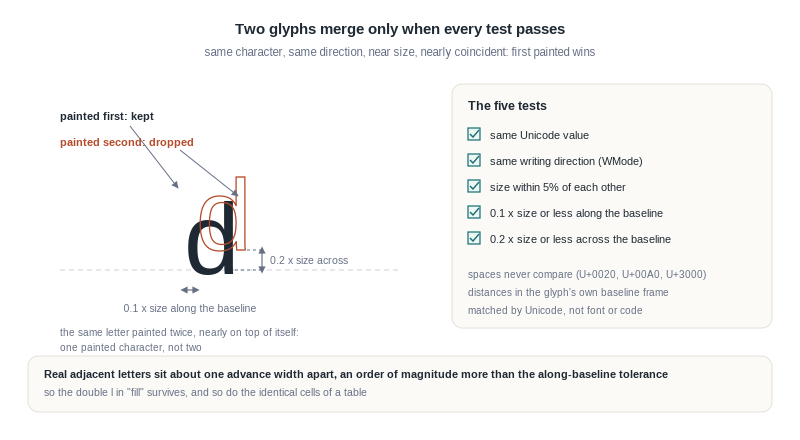
The offsets are measured in the first glyph's own baseline frame, so rotated text and text on a slanted baseline get the same tolerances as an ordinary horizontal line. "Size" means the size the glyph ends up at on the page: HotPDF scales the Tf size by how far the glyph's advance actually travels in user space, and falls back to the height of the glyph's quad when there is no advance to go on. That matters for files that set Tf to 1 and do all their scaling through the text matrix. Measured against a raw size of 1, the along-baseline tolerance would shrink to a tenth of a point whatever the visible size, and a typical fake-bold offset would never match
Blank glyphs never take part. Every code point up to U+0020, the no-break space U+00A0 and the ideographic space U+3000 are skipped, because a space carries no ink to duplicate and dropping one would glue two words together. A glyph whose code resolved to Unicode 0 is skipped too, since there is nothing to compare it on
Keeping the check fast on dense pages
Comparing every glyph with every other glyph would be correct and far too slow. A page of small print can carry tens of thousands of glyphs, and the check runs on every text extraction call
The check sorts the non-blank glyphs by Unicode value, then by origin X, then by painting order, with a stable merge sort. After that, every possible duplicate of a glyph sits right behind it in the sorted list, and the scan from each glyph only walks forward while the Unicode value matches and the X difference stays within 0.25 of the glyph size. That window is wider than the 0.1 along-baseline limit on purpose: on a slanted baseline a genuine pair can differ more in raw X than along the baseline itself, and it still has to land inside the window before the precise test runs. The whole pass costs about n log n
Triple strikes need one more rule. If the scan starting at glyph A meets a matching glyph that was painted earlier than A, then A is the copy: A is dropped and its scan stops, and the earlier glyph carries on comparing against whatever lies further along. Three passes of the same headline therefore collapse to the first one, just as two do
The comparison is on Unicode value, ignoring which font or character code produced it. A fill pass set in one embedded subset and a stroke pass set in another subset of the same face still collapse to one character, as long as both map to the same code point. Glyphs that map to nothing are the weak spot, which is one more reason to watch the unresolved glyph count described in extracting text from loaded PDFs with HotPDF
Which HotPDF extraction calls remove duplicate glyphs?
Every call that produces page text removes duplicates; the raw glyph and search calls do not. The filter lives in THotPDF.ExtractVisibleLoadedPageGlyphs, which collects the glyphs of the page and of the Form XObjects it paints, drops glyphs whose center falls outside the visible box, and then collapses overprints. ExtractLoadedPageText, ExtractLoadedPageTextLayout, ExtractLoadedPageTextColumns and the semantic text analysis all read from it
THotPDF.ExtractLoadedPageGlyphs keeps every glyph the page content stream paints, overprints included, and SearchLoadedPageText matches against that full sequence. That split is deliberate. Highlighting, redaction and search-and-replace work on what was drawn, and each painted copy of a headline is its own operand in the content stream. A replacement that rewrote only the first pass of a fake-bold heading would leave the old wording showing through the second
For ordinary text work nothing changes in calling code. This loop finds the phrase once in the page text and also prints how many painted copies the search sees:
uses
  System.SysUtils, HPDFDoc, HPDFContentStream;

var
  Pdf: THotPDF;
  PageCount, I: Integer;
  PageText: UnicodeString;
  Hits: THPDFTextMatchArray;
begin
  Pdf := THotPDF.Create(nil);
  try
    PageCount := Pdf.LoadFromFile('brochure.pdf');
    for I := 0 to PageCount - 1 do
    begin
      // Page text: overprinted copies already collapsed
      if Pdf.ExtractLoadedPageText(I, PageText) and
         (Pos('Bold words', PageText) > 0) then
        Writeln('Page ', I + 1, ': phrase found in page text');
      // Search: one match per painted copy in the page content stream, so a fake-bold heading usually counts twice
      if Pdf.SearchLoadedPageText(I, 'Bold words', True, Hits) and
         (Length(Hits) > 0) then
        Writeln('Page ', I + 1, ': ', Length(Hits), ' painted occurrence(s)');
    end;
  finally
    Pdf.Free;
  end;
end;
Layout and column output gain the most, because a duplicated run would otherwise shove the rest of the line sideways on the character grid. The filter runs before column splitting, so the gap multiplier of ExtractLoadedPageTextColumns behaves the same with or without overprinted text on the page:
var
  Grid, Columns: UnicodeString;
begin
  // Needs System.IOUtils for TFile
  if Pdf.ExtractLoadedPageTextLayout(0, Grid) then
    TFile.WriteAllText('page1-layout.txt', Grid, TEncoding.UTF8);
  // A new column starts where a gap exceeds 3x the median glyph advance
  if Pdf.ExtractLoadedPageTextColumns(0, Columns, 3.0) then
    TFile.WriteAllText('page1-columns.txt', Columns, TEncoding.UTF8);
end;
Word spacing and line breaks are decided after the filter and are not affected by it; how HotPDF places word spaces and line breaks in page text covers those rules, and search and replace in an existing PDF covers the operand-level side
When a heading still extracts twice
The tolerances are tight on purpose, and tight is the right default. A missed duplicate costs one doubled heading that anyone reading the output will spot. An over-eager merge deletes a letter from "fill" or collapses two identical table cells into one, and that kind of loss goes unnoticed until a lookup against the extracted data fails. So a second pass offset by more than 0.1 of the glyph size along the baseline, or drawn at a noticeably different size, extracts as its own text. Past that offset the effect stops looking like bold anyway and starts looking like misregistered print
The opposite case is a footer painted twice at exactly the same position. HotPDF reads it once. A glyph sitting precisely on top of an identical glyph cannot be seen as a second character, so one copy is what the page shows. Text repeated somewhere else on the page, a running header in a hidden optional content layer for instance, is a different matter and stays in the output
When a heading does come out doubled, measure it. The painted glyph count against the text glyph count tells you whether anything was filtered at all, and listing nearby same-character pairs shows how far apart the passes really are:
// Reader-side diagnostic, not a library function: compares painted and
// text glyph counts, then lists same-character pairs close to each other
function GlyphHeight(const G: THPDFGlyphRecord): Double;
begin
  Result := Sqrt(Sqr(G.QuadX[3] - G.QuadX[0]) + Sqr(G.QuadY[3] - G.QuadY[0]));
end;

procedure ReportOverprints(Pdf: THotPDF; PageIndex: Integer);
var
  Painted, Visible: THPDFGlyphArray;
  I, J: Integer;
  H: Double;
begin
  if not (Pdf.ExtractLoadedPageGlyphsWithForms(PageIndex, Painted) and
          Pdf.ExtractVisibleLoadedPageGlyphs(PageIndex, Visible)) then
    Exit;
  // The difference also counts glyphs outside the crop box
  Writeln(Format('%d painted, %d read as text',
    [Length(Painted), Length(Visible)]));
  // Quadratic on purpose: run it on one problem page, not a whole batch
  for I := 0 to High(Painted) - 1 do
  begin
    H := GlyphHeight(Painted[I]);
    if (Painted[I].Unicode <= 32) or (H <= 0) then
      Continue;
    for J := I + 1 to High(Painted) do
      if (Painted[J].Unicode = Painted[I].Unicode) and
         (Abs(Painted[J].X - Painted[I].X) < H) and
         (Abs(Painted[J].Y - Painted[I].Y) < H) then
        Writeln(Format('U+%.4X: dx=%.3f dy=%.3f, size %.2f',
          [Integer(Painted[I].Unicode), Painted[J].X - Painted[I].X,
           Painted[J].Y - Painted[I].Y, H]));
  end;
end;
The painted side uses ExtractLoadedPageGlyphsWithForms because the text calls include Form XObject glyphs too. A dx above a tenth of the size means the passes sit farther apart than a fake-bold offset, and the heading extracts twice by design
Why can line endings go missing in CID font text?
Line ends vanish from CID-keyed (Type 0) font text when the font's /W width array is not sorted by CID and the extractor looks widths up with a binary search. ISO 32000-1 §9.7.4.3 defines the /W format but sets no order for its entries, and some generators write them in the order glyphs were first used in the document
A binary search over an unsorted /W misses most CIDs. Each miss falls back to the default width /DW, and a font that omits /DW gets 1000 units, a full em. Latin text is then laid out as if every letter were full width, the line runs far past the right edge of the page, and the glyphs that land outside the visible box are dropped from extraction. The page renders perfectly. The text output simply stops partway through each line, and a search for the last word of a sentence comes back empty
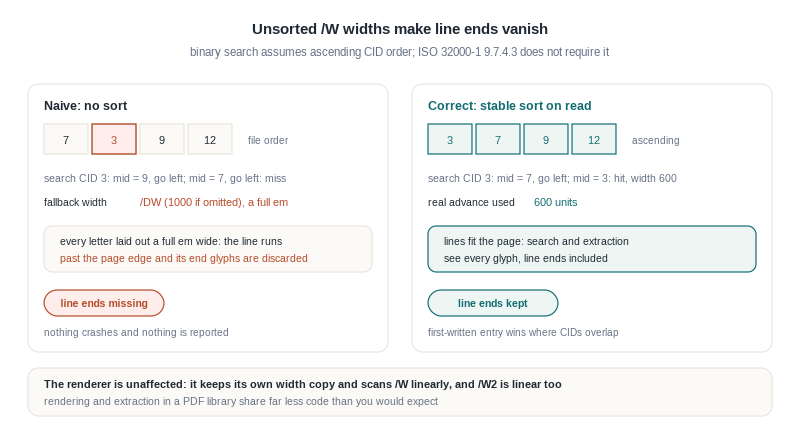
HotPDF sorts the /W ranges by first CID with a stable merge sort as soon as it reads them, and skips the sort when the array is already in order. The sort is stable, so entries that start at the same CID keep their file order. The page renderer keeps its own copy of the width data and scans it linearly, and the vertical metrics in /W2 are short enough that a linear scan is the simpler choice there too, so entry order never changes how the page looks
That mismatch is the tell. When a Type 0 page renders fine but its extracted lines are cut short, check the /W array order before suspecting the /ToUnicode map
Collapsing overprinted glyphs and sorting CID widths on read are both built into the HotPDF Delphi PDF component. Text pulled from a loaded PDF in Delphi or C++Builder reads the way the page looks, and the same component covers PDF creation, editing and rendering