A PDF opened in a text editor grows by exactly one byte when /Rotate 90 becomes /Rotate 180. That single byte pushes every later object one position down the file, so each cross-reference row past the edit now points one byte early, and the startxref number at the very end points one byte short of the table it is meant to locate. Some viewers reject the file outright. Others rebuild the table on the fly by scanning, so whether you notice anything depends on which viewer you happened to test with. Hand-editing only becomes a dependable debugging technique when something recomputes the offsets, stream lengths and trailer from the bytes actually on disk, and leaves every byte you did not touch exactly as it was
What a diagnostic save writes, and what it leaves alone
THotPDF.SaveLoadedDocumentDiagnostic writes the loaded document in a layout meant for a person with a text editor. For the duration of that one call it switches six output settings and then restores them, so the next ordinary save on the same component behaves exactly as configured. Dictionary keys are written in a deterministic order, the same behavior the DeterministicDictionaryOrder property gives you, which means two diagnostic saves of one document diff cleanly. Object streams are off (UseObjectStreams), so no object hides inside a compressed container. Cross-reference streams are off (UseXRefStream), so the table at the end is plain text. Linearization is off (LinearizeOutput). The save is always a full rewrite rather than an appended incremental revision. And the header gets a marker
That marker is two comment lines after the usual %PDF- line and binary comment: %QDF-1.0 followed by % HotPDF diagnostic output. THotPDF.RepairDiagnosticDocument requires %PDF- at byte zero and %QDF-1.0 somewhere in the first 4096 bytes, and it refuses anything else with the status drsNotDiagnostic. The refusal is on purpose. A production file that keeps most of its objects inside object streams and indexes them with a cross-reference stream stores them where a byte scanner cannot see them, and a table rebuilt from what is visible would simply leave those objects out
What the diagnostic save does not do is decode stream payloads. A /FlateDecode content stream stays Flate-encoded, and so do images and embedded fonts. That is the right call for a debugging format. A decoded copy would be friendlier to read, but it would differ from the original in precisely the bytes you are trying to investigate, and a font program that went through a different encoder is no longer the same evidence. In practice the editable surface is the dictionaries: /MediaBox, /Rotate, /Kids and /Count, /Annots arrays, annotation flags, resource names. To change drawing operators inside a compressed content stream, replace its payload with plain operators and delete the /Filter entry yourself; the repair step will measure the new payload and write the matching /Length

uses
  HPDFDoc;

var
  Pdf: THotPDF;
begin
  Pdf := THotPDF.Create(nil);
  try
    Pdf.AutoLaunch := False;
    // LoadFromFile returns the page count; 0 or less means it did not load
    if Pdf.LoadFromFile('invoice.pdf') <= 0 then
      Exit;
    // One indirect object per block, classic xref table, %QDF-1.0 marker
    Pdf.SaveLoadedDocumentDiagnostic('invoice-diagnostic.pdf');
  finally
    Pdf.Free;
  end;
end;
Why does a one-byte edit break three separate records?
A PDF records byte positions and byte counts in three places, and an edit can invalidate all of them at once. Every cross-reference row stores a ten-digit byte offset for one object (ISO 32000-1 §7.5.4). The startxref value stores the offset of the table itself (§7.5.5). And every stream dictionary carries a /Length giving the exact number of payload bytes between the stream line and endstream (§7.3.8.2). Change anything before the end of the file and the first two go stale; change the payload of an unfiltered stream and the third goes stale with them
A few layout rules decide whether an edited file can be repaired at all. New objects belong before the xref line, because the scanner stops at the first xref keyword it meets outside an object; a block pasted after the trailer is never seen. Between objects, only PDF whitespace and % comments are allowed, so a stray word left behind from a half-finished paste fails the whole run with drsInvalidObject. Deleting an object block is fine structurally: its number becomes a free row in the rebuilt table. The final strict reload confirms that the document loads and reports pages. An /Annots entry that still points at the deleted number is yours to find
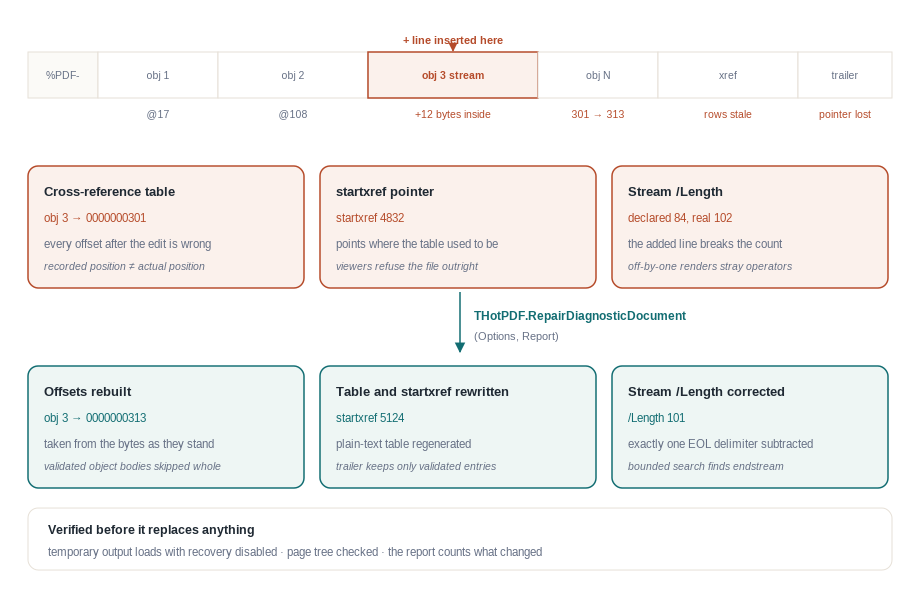
Running RepairDiagnosticDocument from Delphi
RepairDiagnosticDocument is a static class function, so no component instance is needed. It takes a source path, a target path, a THPDFDiagnosticRepairOptions record and an out THPDFDiagnosticRepairReport, and returns True only when the target has been written. The target directory must already exist; a missing one comes back as drsInvalidArguments before anything is read
var
  Options: THPDFDiagnosticRepairOptions;
  Report: THPDFDiagnosticRepairReport;
begin
  Options := THPDFDiagnosticRepairOptions.Default;
  // Default already sets VerifyOutput := True; shown here to make it explicit
  Options.VerifyOutput := True;
  // Options.Password := 'owner';  // only needed to reload an encrypted result

  if THotPDF.RepairDiagnosticDocument('invoice-diagnostic.pdf',
       'invoice-fixed.pdf', Options, Report) then
    Writeln(Format('%d objects, %d streams, %d lengths rewritten, ' +
      '%d xref rows, %d pages verified, startxref %d -> %d',
      [Report.ObjectCount, Report.StreamCount,
       Report.RepairedStreamLengthCount, Report.RebuiltXRefEntryCount,
       Report.VerifiedPageCount, Report.OriginalStartXRef,
       Report.RebuiltStartXRef]))
  else
    Writeln(Format('repair failed (%d): %s',
      [Ord(Report.Status), string(Report.Diagnostic)]));
end;
THPDFDiagnosticRepairOptions.Default sets MaxInputBytes to 8 GiB, MaxObjectCount and MaxObjectNumber to 2,000,000 each, VerifyOutput to True and Password to an empty string. The password is used only by the verification reload, which has to open an encrypted result just like any other reader would. Comparing OriginalStartXRef with RebuiltStartXRef tells you how many bytes your edits added or removed in total, which is a quick sanity check after a long editing session
Leave VerifyOutput on. With it off, the rebuilt file is moved into place without ever being loaded, and a page tree you broke by hand reaches the target path looking perfectly healthy. That default is the safer one, and the only good reason to clear it is a batch job that runs its own loader over every output afterward
Why the repair copies bytes instead of reloading the document
RepairDiagnosticDocument never builds a document model and writes it back out. It copies the byte range of each validated object verbatim, copies the header and any comments between objects as they are, and changes exactly one kind of value: the /Length of a stream. A wrong direct number is overwritten with the measured length. An indirect length such as /Length 12 0 R is replaced by the measured integer, and object 12 stays in the file unreferenced. A stream dictionary with no /Length at all gets one inserted just before its closing >>. All three cases count toward RepairedStreamLengthCount
Load-and-save would have been far simpler to build, and it would have rewritten the file behind your back. Unusual but legal syntax gets normalized, string escapes come out in the writer's preferred form, and already-encoded payloads risk being re-encoded. You changed one number; the diff between the diagnostic file and the repaired one should show that number plus a /Length or two. When you need to see exactly what differs between two arbitrary files, that is a comparison job, covered in comparing two PDF files by structure and pixels

How the scanner avoids inventing objects
A byte scanner looking for N G obj headers has an obvious trap waiting for it. Text that looks exactly like an object header can sit inside a content stream, inside a string, or inside an uncompressed font program, and a naive scan would emit a cross-reference row pointing into the middle of some other object. The resulting file would be broken in a new and far more confusing way than the one you started with
The rule that prevents this is simple. Once an object validates, the scanner jumps to that object's end offset, the byte after its endobj, and resumes from there, so nothing inside an object body is ever a candidate. The gaps between validated objects are then checked byte by byte against the whitespace-and-comments rule from earlier
Stream ends need the same care, because a hand edit is exactly what makes a declared /Length untrustworthy. When the declared length lands on endstream followed by endobj, it is accepted as is. When it does not, the repairer searches forward from the start of the payload for the first endstream that is followed by endobj, bounded by MaxInputBytes, and then subtracts exactly one end-of-line marker: CRLF, LF or a lone CR. ISO 32000-1 §7.3.8.1 recommends that EOL before endstream and excludes it from /Length. Count it as data and every repaired stream gains a byte it never had. Strip two and the last real byte of the payload disappears
Trailer rules, safe output and the failure codes
The rebuilt trailer is assembled, not copied. /Size is recomputed as the highest object number plus one, and /Root must match the single object whose dictionary says /Type /Catalog, number and generation both. /Info and /Encrypt survive only if they reference an object that exists in the file; /ID survives only if it parses as one PDF value. /Prev, /XRefStm and anything else describing the old layout are dropped. Two catalog objects fail with drsMissingCatalog, which is what you typically get after pasting a block of objects from another file
Output goes to a temporary file in the target directory, named after the target with a .hotpdf-qdf- suffix. The verification pass loads that file with XRefRecoveryMode set to xrrmDisabled, so a file that would only open through cross-reference recovery counts as a failure. Only after the reload reports at least one page does the temporary file replace the target. On any failure the temporary file is deleted and an existing target is left untouched
The object-number ceiling is worth respecting. The rebuilt table has one 20-byte row for every number from 0 up to the highest one used, so for a file that declares a single object numbered 1,500,000 the table alone comes to roughly 30 MB of free entries. Classic tables also cap each offset at ten decimal digits, a format limit that the 8 GiB default input budget stays below. Each failure status maps to a different fix, and the handler below turns them into messages a person can act on
// Suggested helper for your own code; not part of HotPDF
function DescribeRepairFailure(
  const Report: THPDFDiagnosticRepairReport): string;
begin
  case Report.Status of
    drsNotDiagnostic:
      Result := 'Source lacks the %QDF-1.0 marker; save it with ' +
        'SaveLoadedDocumentDiagnostic first';
    drsInvalidObject:
      Result := 'An object does not parse, or stray text sits between objects';
    drsDuplicateObject:
      Result := 'The same object number is defined twice';
    drsMissingCatalog:
      Result := 'Need exactly one /Type /Catalog object';
    drsInvalidTrailer:
      Result := 'Trailer /Root, /Info, /Encrypt or /ID does not check out';
    drsObjectLimitExceeded:
      Result := 'Object count or object number exceeds the options';
    drsValidationFailed:
      Result := 'Structure rebuilt, but the strict reload found no pages';
  else
    Result := 'Repair failed';
  end;
  Result := Result + ' (' + string(Report.Diagnostic) + ')';
end;
drsValidationFailed deserves a second look when it appears. It means the bytes are now consistent but the page tree does not load, and the typical cause is a /Kids array edited out of step with its /Count. Open the diagnostic file again, compare the two, and rerun the repair
Keeping the workflow sane
Keep the diagnostic file and treat it as the editing base, so the next experiment starts from readable bytes instead of from a repaired copy. Do not ship diagnostic output to anyone: with every object written out on its own it is noticeably larger than a normal save, and the compact production route is the ordinary save path described in object streams and incremental updates. When the question is what is wrong with a file rather than what happens if you change it, preflight report automation gets you an answer faster than reading bytes
Diagnostic saving and byte-level repair ship with the HotPDF component for Delphi and C++Builder alongside preflight and document comparison; licensing and the full feature set are on the HotPDF Delphi PDF component page