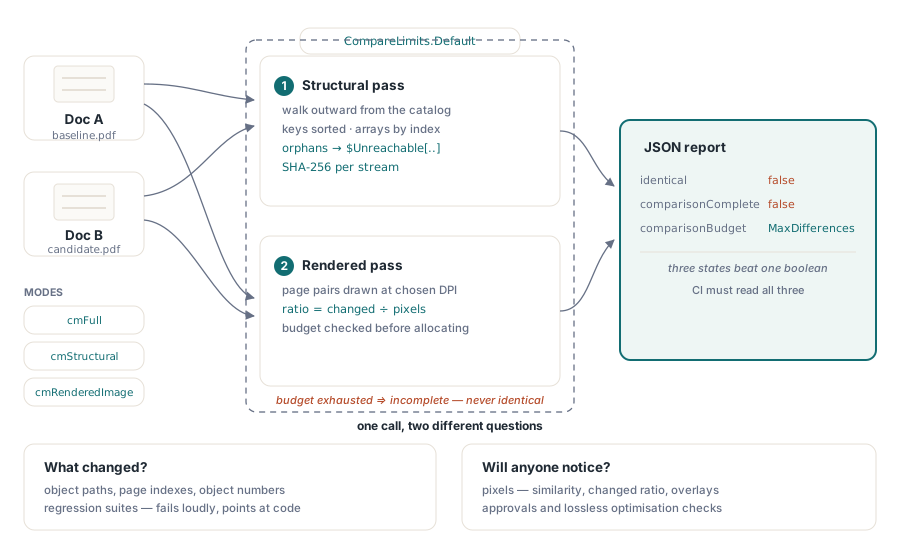
HotPDF compares two PDF documents from Delphi through THPDFDocComparison, which walks the object graph of both files from the catalog outward and, when asked, also renders each page pair and measures the pixels that differ. The result is a JSON report naming every difference it found, the budget it consumed, and whether the comparison ran to completion. Both passes matter, because a structural diff and a visual diff answer different questions
The question behind the feature is usually a release question. A report engine gets a change, the output is regenerated, and someone has to decide whether anything moved. Opening both files side by side scales to about three pages before attention fails. Comparing raw bytes fails immediately, since two runs of the same generator produce different bytes for reasons that have nothing to do with what a reader sees
Why can PDFs be byte-different and visually identical?
Two independently generated PDFs that print identically routinely differ in their bytes, and the reasons are structural rather than cosmetic. Object numbers are assigned in the order objects happen to be written. Font subsets allocate CIDs in the order glyphs are first encountered, so a subset built during a slightly different traversal produces different content stream bytes for the same visible text. Cross-reference offsets shift whenever anything upstream changes length
This is why object numbers cannot be used as cross-document identity. HotPDF instead builds each snapshot by traversing from the catalog, expanding dictionaries in the byte order of their keys and arrays by index, so every object is named by the path that reaches it. Objects the traversal cannot reach from the root fall back to a synthetic $Unreachable[...] path carrying the object number and generation, which keeps orphaned content visible in the report instead of silently absent
Streams are not compared by copying. Each stream contributes an incremental SHA-256 signature, computed while restoring the original stream position afterward, so comparing two hundred-megabyte files does not mean materializing two hundred megabytes twice
Aligning pages when one document has an insertion
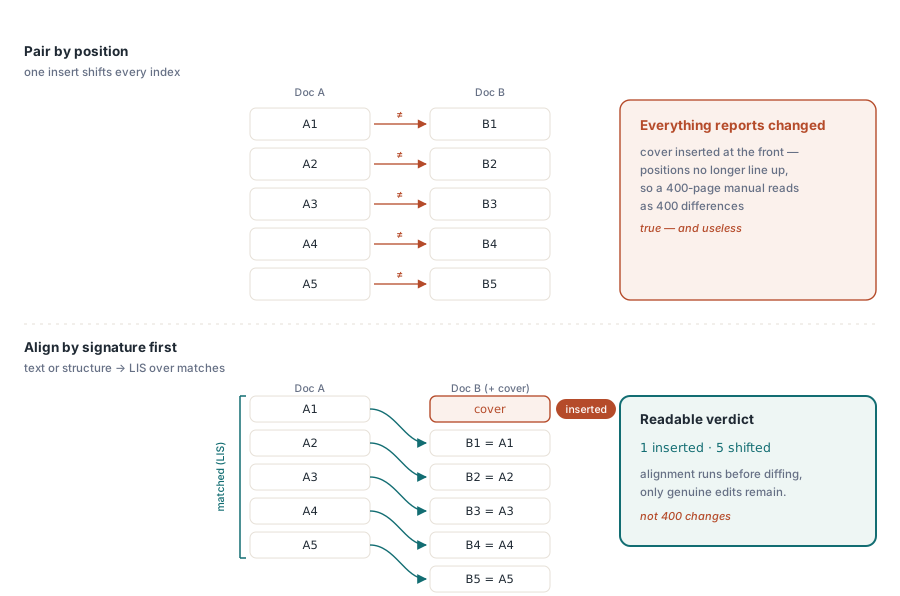
Comparing page 1 against page 1, page 2 against page 2 and so on is correct only when nothing was inserted. Insert a cover page and a naive comparison reports every page as changed, which is technically true and operationally useless
HotPDF aligns pages before diffing them. It builds a signature per page from extractable text, falls back to a structural signature for pages without text, and then computes the longest increasing subsequence over the matched target indices. Pages inside that subsequence are the ones that merely shifted; pages outside it are genuine moves. The distinction is what makes a diff of a 400-page manual readable, because the report says one page was inserted rather than four hundred pages changed
Running a structural comparison
The simplest call takes two loaded documents and a mode. cmStructural performs the object graph walk, cmRenderedImage performs the pixel comparison, cmFull does both, and the lighter modes cmPageCount, cmPageText and cmObjectCount exist for cheap smoke checks:
uses
  HPDFDoc, HPDFDocCompare;

var
  DocA, DocB: THotPDF;
  Report: AnsiString;
begin
  DocA := THotPDF.Create(nil);
  DocB := THotPDF.Create(nil);
  try
    if (DocA.LoadFromFile('baseline.pdf') <= 0) or
       (DocB.LoadFromFile('candidate.pdf') <= 0) then
      Exit;
    Report := THPDFDocComparison.Compare(DocA, DocB, cmStructural);
    with TFileStream.Create('diff.json', fmCreate) do
    try
      WriteBuffer(Report[1], Length(Report));
    finally
      Free;
    end;
  finally
    DocB.Free;
    DocA.Free;
  end;
end;
The report distinguishes three states that a boolean cannot. identical says whether anything differed, comparisonComplete says whether the walk finished, and comparisonBudget names the limit that stopped it if one did. A comparison that exhausts a budget reports comparisonComplete=false and identical=false together, because a truncated walk has no basis for claiming equality. Any automation that reads only identical will eventually treat a budget stop as a real difference, so read all three
What limits keep the walk bounded?
The defaults in THPDFStructuralCompareLimits.Default are sized for real documents rather than for adversarial ones, and every semantically relevant budget has its own ceiling: 250,000 objects, 2,000,000 edges, depth 128, 10,000 reported differences, 64 MB per stream and 512 MB of stream bytes in total, 1 MB per value and 4,096 bytes per path. Raise them deliberately when you know your corpus, and lower them when comparing files that arrived from outside:
var
  Limits: THPDFStructuralCompareLimits;
  Options: THPDFRenderedCompareOptions;
begin
  Limits := THPDFStructuralCompareLimits.Default;
  Limits.MaxDifferences := 200;        // fail fast in CI
  Limits.MaxTotalStreamBytes := 128 * 1024 * 1024;

  Options := THPDFRenderedCompareOptions.Default;
  Options.DPI := 150;                  // default is 72
  Options.ColorTolerance := 2;         // ignore 1-2 level rounding noise
  Options.MinimumSimilarity := 0.9995;
  Options.MaxChangedPixelRatio := 0.0005;
  Options.GenerateHeatmaps := True;    // write overlay images for review

  Report := THPDFDocComparison.CompareWithOptions(DocA, DocB, cmFull,
    Limits, Options);
end;
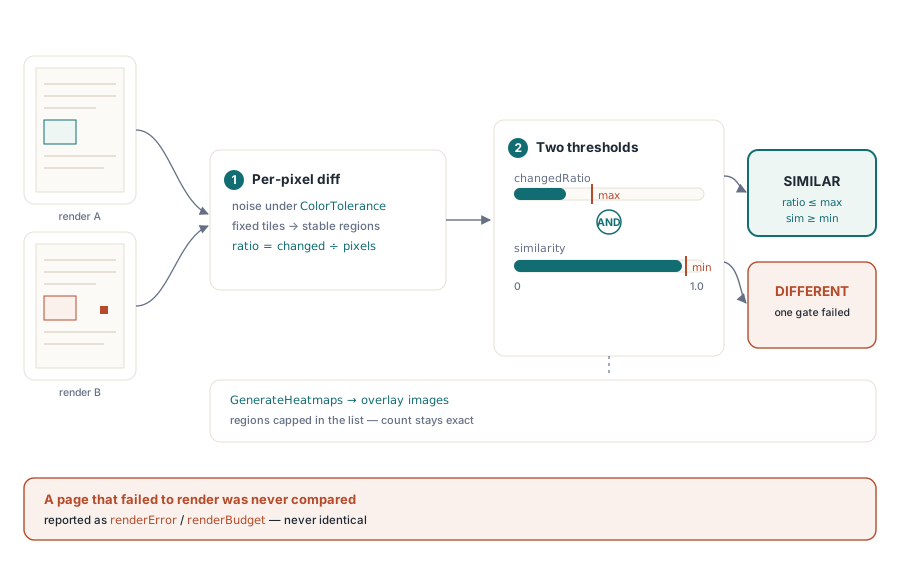
The rendered pass estimates pixel count from the page dimensions and the requested DPI before any bitmap is allocated, and rechecks the actual bitmap afterward, so a malformed page geometry cannot slip past the budget by lying about its size. Raising DPI raises fidelity and cost quadratically: 150 DPI is four times the pixels of 72, and the per-page and total pixel ceilings exist precisely because a batch job at 300 DPI will otherwise allocate its way into trouble
How similar is similar enough?
Two pages count as similar only when both conditions hold: the changed pixel ratio is at or below MaxChangedPixelRatio and the similarity is at or above MinimumSimilarity. Two thresholds instead of one, because a handful of catastrophically wrong pixels and a broad wash of tiny color shifts are different failures, and either alone can be acceptable in one workflow and disqualifying in another. Threshold tests use unrounded values; the six decimal places in the JSON exist to keep reports stable and diffable, not to define the comparison
Changed pixels are grouped into regions using fixed-size tiles as nodes with four-way adjacency, rather than per-pixel flood fill. That keeps the memory bounded and the region list stable across runs. Truncating the retained region detail affects only the listing, not the reported region count, so a page with more changed regions than MaxChangedRegions still reports how many there were
One behavior is worth stating plainly because it inverts the usual instinct. Renderer failures, allocation failures and overlay failures are never swallowed. Anything of that kind is recorded as renderError or renderBudget and forces renderComparisonComplete=false, because a page that failed to render is a page nobody compared, and reporting it as identical is worse than reporting nothing
Where each mode belongs in a pipeline
Structural comparison answers what changed and is the right default for regression suites: it names the path, the page index and the object numbers involved, so a failure points at the code that produced it. Rendered comparison answers whether anyone will notice, which is the question for approvals and for verifying that an optimization pass really was lossless
They combine well. Run cmStructural on every build and let it fail loudly on unexpected object-level changes; run cmFull with heatmaps before a release, when a human is available to look at the overlays. For pipelines that already emit page markup for other reasons, the text output described in exporting PDF pages to SVG gives a third, human-diffable view, and the automated checks in preflight report automation cover conformance questions that neither diff mode is meant to answer
Comparison, preflight and rendering share the same loaded-document object model, so a single pass over a file can feed all three. The complete feature list for Delphi and C++Builder is on the HotPDF Delphi PDF component page