A Hexachrome carton proof, CMYK plus orange and green in one /DeviceN space, renders its product photo as diagonal stripes in any decoder that reads four components per sample. The right stride is the length of the DeviceN names array — six components here — which HotPDF's Delphi renderer applies to every sample, Decode pair, color key and mesh vertex
How many colorants can one DeviceN space carry?
As many as its names array lists. A DeviceN space is written as [/DeviceN names alternateSpace tintTransform attributes], and ISO 32000-1 §8.6.6.5 makes that array the whole definition of the component count: six names, six components, in that order. Annex C, Table C.1, lists 32 DeviceN components among the minimum architectural limits that conforming readers should accommodate, so a portable file stays at or below 32; ISO 32000-2 keeps the number only as that earlier recommendation. Production jobs sit well inside it. Hexachrome needs six inks, and a CMYK job with three Pantone spots needs seven. The optional attributes dictionary does not change the count either. An NChannel space (PDF 1.6) adds /Colorants and /Process entries that say which names are spot inks and which are process components, yet each sample still carries one value per name
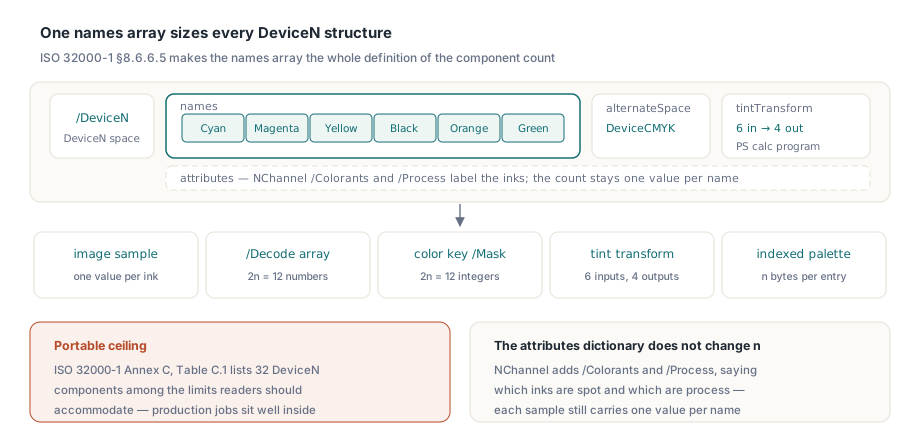
The ink count also sets the input count of the tint transform, the function that maps n tints to the alternate space for display. The note on Type 4 functions in §7.10.5 uses Hexachrome as its own example: a six-in, four-out transform sampled at m points per input needs 4 × m6 values, so at m = 16 the table would hold over 67 million numbers. That is why most producers write a six-ink tint transform as a short PostScript calculator program. What the alternate space shows, and when a device paints the real ink, is where rendering Separation and DeviceN spot colors picks up. Everything below happens earlier. The renderer is still pulling raw numbers out of the file
Which data structures are sized by n?
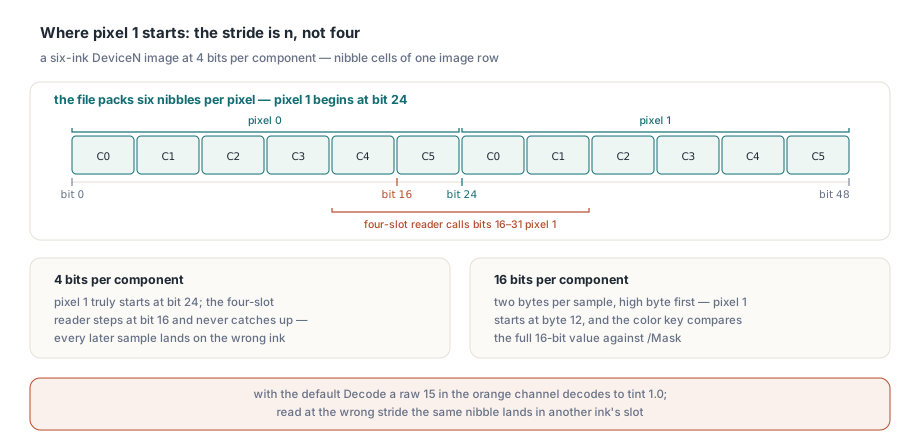
Every structure that holds one value per component, and the specification states the size each time. A renderer with a fixed four-slot buffer decodes the first pixel correctly by accident and every later pixel wrong, because the read position drifts two components per sample:
| Structure | Size for n colorants | Rule |
|---|---|---|
| Image sample | n components of BitsPerComponent bits each | §8.9.2 |
/Decode array | 2n numbers, one min/max pair per component | §8.9.5.2 |
Color key /Mask | 2n integers, compared before decoding | §8.9.6.4 |
| Indexed lookup table over DeviceN | n × (hival + 1) bytes | §8.6.6.3 |
| Uncolored tiling pattern | n tints in front of the pattern name in scn | §8.7.3.3 |
| Shading color (Types 1–7) | n values, or the outputs of /Function | §8.7.4.5 |
| Mesh vertex (Types 4–7) | n color values, or a single parameter t when the shading has a /Function | §8.7.4.5.5 onward |
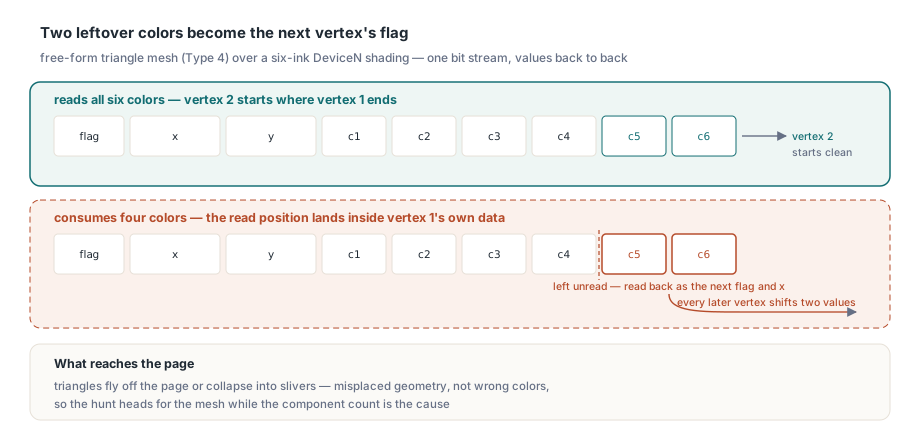
A shading can break in its function or in its mesh. An axial or radial shading takes its color from /Function, which may be one function with n outputs or an array of n one-output functions, one per ink; a renderer that evaluates four of them leaves orange and green at zero, and the gradient across the lid drifts toward plain CMYK. The /Background entry is n values as well. The mesh case is the nastiest. A free-form triangle mesh packs flag, coordinates and color into one bit stream per vertex, so a decoder that consumes four color values for a six-ink space leaves two unread, and those become the next vertex's flag and x coordinate. Triangles fly off the page or collapse into slivers. The output shows misplaced triangles, not wrong colors, which sends people hunting for a geometry bug
Indexed images over a six-ink base are milder but just as visible. The palette entry for index i starts at byte 6i, not 4i, so every entry after index 0 picks up a mix of its neighbor's inks. A full 256-entry palette over that base is 1,536 bytes. Written as a hex string it needs 3,072 hex digits, and §7.3.4.3 lets whitespace sit between them and treats an odd final digit as if a 0 followed it. HotPDF reads binary and hex palettes at the base's real width and clamps an image index above hival to hival, so a stray out-of-range sample paints the last palette entry. The rules for the other base spaces, and for palettes whose base refers back to itself, are in Indexed palettes and their base color spaces
Sub-byte and 16-bit samples, Decode and the color key
Any legal bit depth can appear. Packaging files carry 1-bit varnish or white-ink plates and 4-bit spot layers, and the image dictionary allows 16 bits per component from PDF 1.5 onward. The mapping in §8.9.5.2 is linear over 0 to 2bpc − 1, so a 4-bit sample of 15 is full strength; code that divides every sample by 255 prints that plate at about six percent. At 16 bits each sample is two bytes, high byte first, mapped from 0..65535 onto the Decode range. HotPDF decodes Separation and DeviceN images at 1, 2, 4, 8 and 16 bits per component with that formula
Color key masking adds a timing rule. The /Mask array holds 2n integers, §8.9.6.4 compares them with the raw samples before Decode is applied, and a pixel whose every component falls inside its range is not painted. For a six-ink 8-bit image, [0 0 0 0 0 0 0 0 0 0 0 255] masks out every pixel with no ink in the first five colorants, whatever its sixth, and at 16 bits the ranges run to 65535. The helpers below follow that reading order; each image row starts on a byte boundary:
const
  MaxColorants = 32;                   // ISO 32000-1 Annex C, Table C.1
type
  TColorantTints = array[0..MaxColorants - 1] of Double;

// Raw value of component C of pixel X in one row packed at Bpc (1, 2, 4, 8, 16)
function RawComponent(const Row: TBytes; X, C, N, Bpc: Integer): Cardinal;
var
  BitPos, ByteIdx: Integer;
begin
  if Bpc = 16 then
  begin
    ByteIdx := (X * N + C) * 2;        // big-endian: high byte first
    Result := (Cardinal(Row[ByteIdx]) shl 8) or Row[ByteIdx + 1];
    Exit;
  end;
  BitPos := (X * N + C) * Bpc;
  Result := (Row[BitPos div 8] shr (8 - Bpc - BitPos mod 8)) and ((1 shl Bpc) - 1);
end;

// Color key test on raw samples: Mask holds 2n integers
function IsKeyedOut(const Row: TBytes; X, N, Bpc: Integer;
  const Mask: array of Integer): Boolean;
var
  C: Integer;
  V: Integer;
begin
  for C := 0 to N - 1 do
  begin
    V := Integer(RawComponent(Row, X, C, N, Bpc));
    if (V < Mask[2 * C]) or (V > Mask[2 * C + 1]) then
      Exit(False);
  end;
  Result := True;
end;

// Linear Decode mapping over 0..2^bpc - 1, one Decode pair per colorant
procedure DecodePixel(const Row: TBytes; X, N, Bpc: Integer;
  const Decode: array of Double; var Tints: TColorantTints);
var
  C: Integer;
  MaxRaw: Double;
begin
  MaxRaw := (1 shl Bpc) - 1;           // 65535 at 16 bpc
  for C := 0 to N - 1 do
    Tints[C] := Decode[2 * C] + RawComponent(Row, X, C, N, Bpc) *
      (Decode[2 * C + 1] - Decode[2 * C]) / MaxRaw;
end;
With a six-ink, 4-bit image and the default Decode [0 1 0 1 0 1 0 1 0 1 0 1], a raw 15 in the orange channel should come out of DecodePixel as tint 1.0. A four-component reader puts the same nibble on another channel entirely. Pixel 1 starts at bit 24, not bit 16. The 16-bit branch reads two bytes per component, so the same pixel of a 16-bit image starts at byte 12, and IsKeyedOut compares the full 16-bit value with the key
What does HotPDF check before it decodes a six-ink image?
Whether the image and its color space agree on n. GetLoadedImageInfo reports the color space family, the component count taken from the names array, the bit depth and a Decodable flag, so a six-ink image announces itself before any pixel is read. An image whose declared component count disagrees with its color space is not decoded at all, and ExtractLoadedImage returns nil for it; a guessed stride would only reproduce the stripes from the carton proof. An inline image (BI … ID … EI) may name a DeviceN space from the page's /ColorSpace resources under §8.9.7, and HotPDF resolves that name and reads the inline samples at the same n. Tint transforms carry one trade-off. A cubic sampled function reads four lattice points per input, 4n in all, so above four inputs HotPDF interpolates the sample table multilinearly, which reads 2n points and keeps the lookup cost bounded. For a six-input transform that is 64 reads per output value against 4,096. The saving grows fast
var
  Pdf: THotPDF;
  Info: THPDFLoadedImageInfo;
  Inks: THPDFAnsiStringArray;
  Proof, Plate: TBitmap;
  I: Integer;
begin
  Pdf := THotPDF.Create(nil);
  try
    Pdf.LoadFromFile('carton-hexachrome.pdf');

    // Which images use a many-colorant space, and can they be decoded?
    for I := 0 to Pdf.GetLoadedImageCount - 1 do
      if Pdf.GetLoadedImageInfo(I, Info) then
        Writeln(Format('image %d: %s, %d components, %d bpc, decodable=%s',
          [I, string(Info.ColorSpace), Info.ColorComponents,
           Info.BitsPerComponent, BoolToStr(Info.Decodable, True)]));

    // Colorant names from every Separation / DeviceN space on page 1
    Inks := Pdf.GetLoadedPageSpotColorants(0);
    for I := 0 to High(Inks) do
      Writeln('colorant on page 1: ', string(Inks[I]));

    // Composite proof with overprint simulation, then one plate on its own
    Pdf.RenderOverprintPreview := True;
    Proof := Pdf.RenderLoadedPageToBitmap(0, 150);
    try
      Proof.SaveToFile('carton-proof.bmp');
    finally
      Proof.Free;
    end;
    Plate := Pdf.RenderLoadedPageSeparationPlate(0, 150, 'Orange');
    try
      Plate.SaveToFile('carton-orange-plate.bmp');
    finally
      Plate.Free;
    end;
  finally
    Pdf.Free;
  end;
end;
Separation plates and NChannel process names
Plates settle arguments. When a supplier's file renders one way in their tool and another way in yours, a single plate is more persuasive than a composite: a correctly decoded Orange plate shows the orange artwork and nothing else, whereas a stride error smears it across neighboring plates. GetLoadedPageSpotColorants reports colorant names as each Separation or DeviceN names array writes them, following XObjects, patterns, shadings and soft masks, so a Hexachrome space contributes all six names, Cyan through Green. A plate list that must tell process inks from spot inks can read the NChannel attributes: the /Process dictionary names the process components in its /Components array, and every spot name gets its own Separation space under /Colorants (§8.6.6.5). Prefer that over guessing from names like Cyan, because the specification lets a non-CMYK process component carry any name. For the composite, RenderOverprintPreview simulates inks printing on top of each other, and the device settings in CMYK overprint proofing and render devices decide how far that simulation goes
Start with the image that stripes. If GetLoadedImageInfo says six components and your own decoder steps four, the stride is at fault, and an Orange plate rendered with the HotPDF Delphi PDF component shows the supplier which pixels belong to that ink