Put a one-page cover sheet in front of a 12-page statement, render both versions, and compare page 1 with page 1, page 2 with page 2, and so on. The report can come back with as many as 12 changed pages and one unmatched page at the end, even though only the cover is new. A useful visual diff has to answer two questions in order: which page in the new file corresponds to which page in the old one, and then whether the paired pages look different to a person reading them
The second question sounds easy until you look at what changes between two builds of the same template. Content streams get reordered, fonts get re-subset, object numbers shift. Meanwhile a single moved operand can push a total three points to the right without changing any text an extractor would report. Rendered pixels are the only layer where "it looks the same" can be tested directly
Why does a page-by-page pixel loop fall apart?
An index loop assumes the page sequence never moves, and real document changes break that assumption constantly: a cover sheet, a removed appendix, an extra terms page inserted halfway through. Every page after the insertion point is offset by one, and the comparison reports differences that exist only because of the misalignment. The fix is to pair pages first and compare second, which is how PDFlibPas splits the job between two calls
TPDFlib.CompareRenderedPagesWith compares one page pair you have already chosen and returns pixel counts, change regions, an optional mask and an optional overlay image. TPDFlib.CompareDocumentVisualsWith and TPDFlib.CompareFileVisuals work on whole documents: they pair pages across the two files, detect inserted and removed pages, compare every pair, and return the result as a JSON string. The options record and result types live in the PDFlibVisualCompare unit
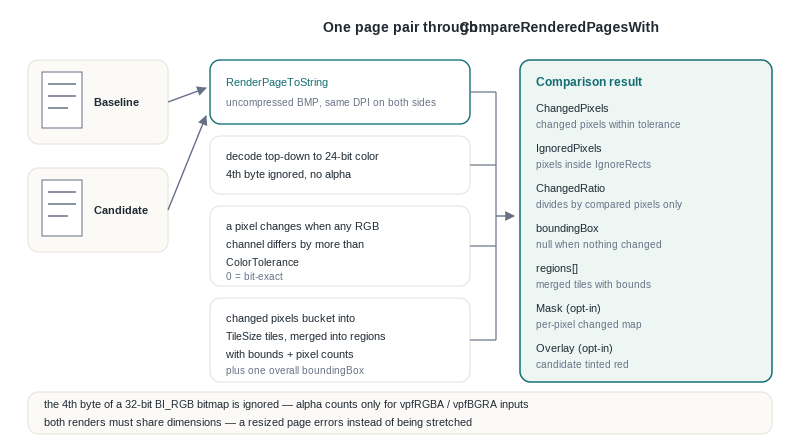
Both levels compare what a reader would see on a white page. Each page goes through RenderPageToString as an uncompressed BMP and is decoded into a top-down 24-bit bitmap. The decoder drops the fourth byte of a 32-bit BI_RGB bitmap, because the BMP format leaves that byte undefined: some writers fill it with 0, some with 255, some with whatever was in the buffer. Reading it as opacity would let a renderer that writes zeros turn every page into blank white, and two blank documents compare as identical. If you feed your own bitmaps to PLCompareVisualBitmaps, alpha counts only when you declare the format as vpfRGBA or vpfBGRA, and then each pixel is composited over white before the channels are compared
Comparing one page pair with CompareRenderedPagesWith
Reach for CompareRenderedPagesWith when you know which pages belong together and want detail. A pixel counts as changed when its red, green or blue channel differs by more than ColorTolerance; 0 means bit-exact. PLDefaultVisualCompareOptions starts you at tolerance 0, 32-pixel tiles, no ignore regions, and neither mask nor overlay
uses
  SysUtils, PDFlibrary, PDFlibVisualCompare;

var
  Baseline, Candidate: TPDFlib;
  Options: TPDFVisualCompareOptions;
  Comparison: TPDFVisualCompareResult;
  ErrorText: WideString;
begin
  Baseline := TPDFlib.Create;
  Candidate := TPDFlib.Create;
  try
    if (Baseline.LoadFromFile('invoice-v1.pdf', '') = 1) and
       (Candidate.LoadFromFile('invoice-v2.pdf', '') = 1) then
    begin
      Options := PLDefaultVisualCompareOptions;
      Options.ColorTolerance := 8;
      Options.IncludeOverlay := True;
      // Mask out the print timestamp: rendered pixels at 96 DPI,
      // top-left origin, Right and Bottom exclusive
      SetLength(Options.IgnoreRects, 1);
      Options.IgnoreRects[0].Left := 600;
      Options.IgnoreRects[0].Top := 20;
      Options.IgnoreRects[0].Right := 790;
      Options.IgnoreRects[0].Bottom := 50;

      if Baseline.CompareRenderedPagesWith(Candidate, 1, 1, 96, Options,
        Comparison, ErrorText) then
      begin
        if Comparison.ChangedPixels > 0 then
          Writeln(PLVisualCompareResultToJSON(Comparison));
      end
      else
        Writeln('Compare failed: ', ErrorText);
    end;
  finally
    Candidate.Free;
    Baseline.Free;
  end;
end;
The ignore rectangle is where most first attempts go wrong. Its coordinates are rendered pixels with a top-left origin and half-open intervals, so Right and Bottom are exclusive, and the same four numbers cover a different part of the page as soon as you change the DPI. A US Letter page at 96 DPI renders as 816 by 1056 pixels; at 150 DPI the timestamp box above lands somewhere in the header text instead. If your template coordinates are in points, scale them by DPI / 72 (and by the instance render scale if you changed it) before filling the record. Rectangles that overlap are counted once, ignored pixels are reported in IgnoredPixels, and ChangedRatio divides by ComparedPixels only, so masking a big area does not dilute the ratio
Tolerance deserves an actual number. Anti-aliasing at glyph edges can shift a channel by a few levels between renderer builds, while a changed character moves channels by far more than that. We would set the value from a known-good run: render the baseline twice through the two environments you intend to compare, read the largest channel jitter, and set the tolerance just above it. A guessed 30 will absorb jitter, and it will also hide a light gray watermark that moved
Two behaviors of the result are worth knowing before you build a report on it. Changed pixels are bucketed into TileSize squares, and tiles that share an edge merge into one region whose bounds are the tight box around its changed pixels; larger tiles give fewer, coarser regions. The overlay in Comparison.Overlay is a raw RGB copy of the second page in which changed pixels are blended halfway toward red. Turning it into a PNG for CI artifacts is your code. The single-page call also refuses pages whose rendered sizes differ and returns an error message, because stretching one bitmap onto another would make every pixel look changed
How are pages paired when a document gains or loses pages?
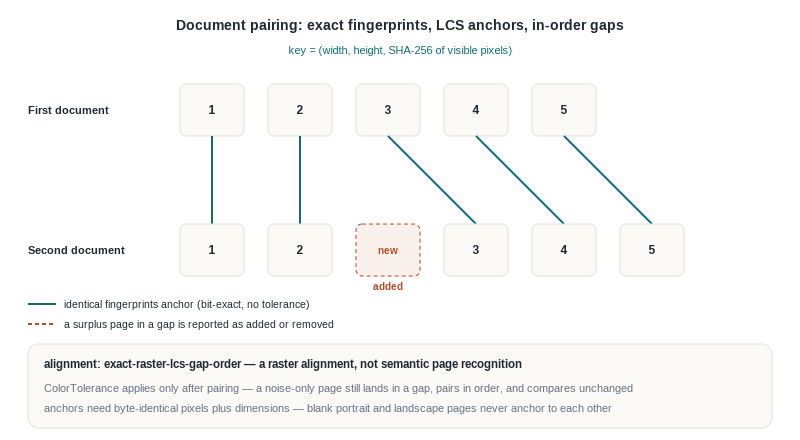
CompareDocumentVisualsWith pairs pages with a longest common subsequence over exact pixel fingerprints. Each page is rendered and reduced to a key built from its pixel width, its pixel height and a SHA-256 digest of the decoded pixels. Pages with identical keys on both sides become anchors, the longest ordered chain of anchors wins, and the pages between two consecutive anchors are paired in order. When one side of a gap has more pages, the surplus comes back as added or removed
The dimensions in the key look redundant, and they are not. An all-white portrait Letter page and an all-white landscape Letter page produce byte-identical pixel buffers, since at 96 DPI both are 816 × 1056 pixels' worth of 255. Without width and height in the key they would anchor to each other
var
  Options: TPDFVisualCompareOptions;
  Report: WideString;
begin
  // Baseline and Candidate loaded as before; both instances must use
  // the same render scale, crop type and rendering engine
  Options := PLDefaultVisualCompareOptions;
  Options.ColorTolerance := 8;
  Options.TileSize := 64;
  Report := Baseline.CompareDocumentVisualsWith(Candidate, 96, Options);
  if Baseline.LastErrorCode <> 0 then
    Writeln('Visual diff failed: ', Report)
  else
    Writeln(Report);
end;
Anchors are bit-exact on purpose, and ColorTolerance plays no part in the fingerprint. A page that differs only by anti-aliasing noise will not anchor, but it still sits in a gap, gets paired in order with its counterpart, and then compares as unchanged under the tolerance. Fuzzy anchors would forgive more and predict less: blank separator pages and repeated terms pages would start matching whichever near-twin happened to be closest. We prefer the strict version, because a wrong anchor silently rearranges the whole report while a missed anchor usually costs nothing
The JSON calls this alignment exact-raster-lcs-gap-order, and the name is honest about its limits. It is raster alignment with no idea what a page means. Suppose a gap holds one original page on the left, and on the right an inserted page followed by the rewritten version of that original. In-order pairing compares the original against the insertion, marks that pair changed, and reports the rewrite as added. Documents made of many identical pages are ambiguous in the same way. When a verdict depends on which page matched which, read the pairs rows and not just the counters
Reading the JSON report in a test runner
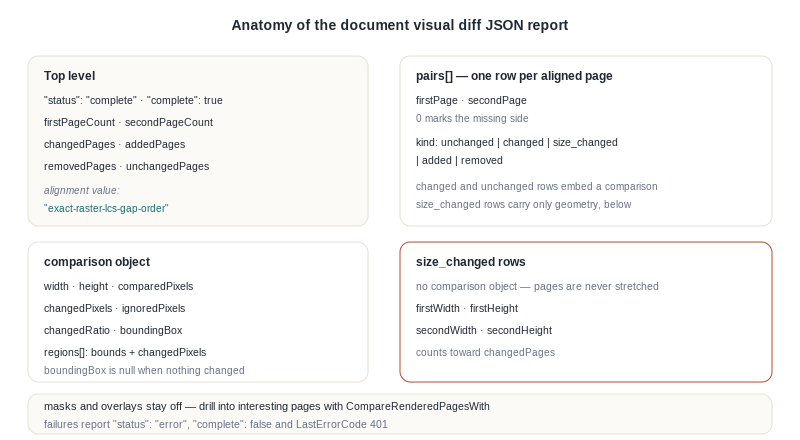
The document report has a fixed shape, which makes it easy to assert on. A successful run carries "status":"complete", "complete":true, the alignment name, firstPageCount and secondPageCount, and four counters: changedPages, addedPages, removedPages and unchangedPages. The pairs array lists one row per pairing with firstPage, secondPage (0 for the missing side) and a kind of unchanged, changed, size_changed, added or removed
Rows of kind changed and unchanged embed a comparison object with width, height, comparedPixels, changedPixels, ignoredPixels, changedRatio, a boundingBox that is null when nothing changed, and a regions list of bounds plus changedPixels. A size_changed row has no comparison at all. It reports firstWidth, firstHeight, secondWidth and secondHeight, and it counts toward changedPages
Masks and overlays never appear in the document report. CompareDocumentVisualsWith turns IncludeMask and IncludeOverlay off whatever your options say, so memory does not grow with a full-page preview per pair as the page count climbs. The workflow that follows from this is a two-step one: let the document report find the pages that changed, then call CompareRenderedPagesWith on just those pairs to get an overlay for the bug ticket. Failures return "status":"error", "complete":false and an error string
CompareFileVisuals and matching render settings
TPDFlib.CompareFileVisuals is the one-call form for a build pipeline. Its signature is CompareFileVisuals(OtherFileName, Password, DPI, ColorTolerance); it loads the other file into a temporary instance, copies the current instance's render settings onto it, and returns the same document JSON. The tolerance must be 0 to 255 and the DPI finite and positive
uses
  SysUtils, PDFlibrary;

var
  Lib: TPDFlib;
  Report: WideString;
begin
  Lib := TPDFlib.Create;
  try
    if Lib.LoadFromFile('baseline\statement.pdf', '') = 1 then
    begin
      Report := Lib.CompareFileVisuals('build\statement.pdf', '', 96, 8);
      // Test the report itself: on a load failure LastErrorCode carries
      // the loader's code, so checking for 401 alone misses that case
      if Pos('"complete":true', Report) = 0 then
        raise Exception.Create('Visual diff did not complete: ' + Report);
      if Pos('"changedPages":0,"addedPages":0,"removedPages":0', Report) = 0 then
        Writeln('Visual differences found: ', Report);
    end;
  finally
    Lib.Free;
  end;
end;
The error handling in that snippet is the trap. Invalid tolerance and failed pairing set LastErrorCode to 401, but when the second file cannot be loaded, LastErrorCode mirrors whatever the loader reported. A test runner that only looks for 401 will log that run as a pass. Checking "complete":true in the string covers every failure path with one test. (The substring check on the counters relies on their fixed order in the report; a JSON parser is the sturdier choice if you already have one in the project)
The settings copy is the main reason to prefer this call over two hand-built instances. The temporary instance takes the render scale, the crop type and the graphics settings, plus the Cairo or PDFium engine choice when those are compiled in. Build both instances yourself for CompareDocumentVisualsWith and keeping them identical is your job. A render scale mismatch shows up as size_changed on every row, because pixel size is page size × render scale × DPI / 72; a different engine rasterizes glyph edges its own way, which surfaces as changed rows throughout the report. The one thing CompareFileVisuals cannot take is ignore regions, so a template with a timestamp needs the typed API
Resolution, limits and what pixels cannot see
PDFlibPas bounds the work so a huge or hostile input fails with an error message instead of exhausting memory. A rendered page may not exceed 64 Mi pixels, which a Letter page passes somewhere a little above 840 DPI. The tile grid is capped at 4 Mi tiles, and the error text tells you to raise TileSize. Page alignment refuses inputs where the two page counts add up to more than 8192 or the LCS matrix would exceed 4 Mi cells: two 2,100-page files stay under the first limit and still fail the second, since 2,101 × 2,101 cells is more than 4,194,304
Cost scales with DPI squared, and document comparison renders each paired page twice, once for its fingerprint and again for the pixel compare. At 96 DPI a Letter page is about 0.86 million pixels; at 300 DPI it is about 8.4 million, roughly ten times the work per render. For regression suites we would run 72 to 96 DPI by default. That catches moved text, swapped fonts and broken layout, and saves the high-resolution pass for the few pairs the report flags
Pixels answer one question well: would a reader notice? They cannot show an annotation placed outside the visible page, or an incremental update that replaced a form field value with the same visible text. That layer belongs to a structural check, and classifying what changed in a PDF after it was signed covers the revision-level diff. Renderer choice drives every pixel in a baseline, so read multi-engine PDF rendering in Delphi before you pin a baseline to one engine
The page-pair compare, document pairing and JSON report described here are part of the PDFlibPas PDF library for Delphi