A signature over a PDF does not forbid later changes. It fixes a byte range, and an incremental update appends new bytes after it, so the signature stays mathematically valid while the document acquires new content. Whether that content is acceptable is a policy question, and DocMDP is where the author states the policy: no changes at all, form filling and signing only, or those plus annotations. Enforcing it means classifying what actually changed, which is what AnalyzeModifications does. Point it at an earlier revision, then read GetModificationLevel for the overall verdict and the per-finding accessors for the level, object number and description of each difference
With that in place, DocMDP enforcement collapses into a comparison: is the computed level at or below the level the policy permits
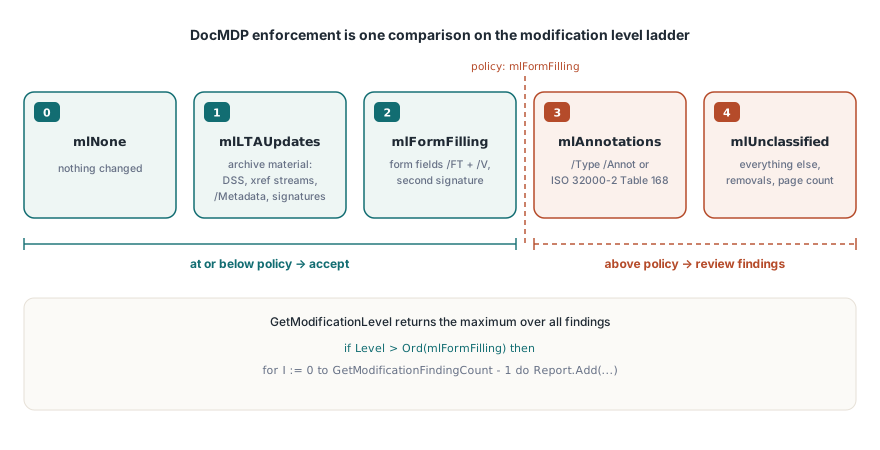
Why a signed PDF is expected to change
Three legitimate cases, and they cover most of what you will see. A second signer adds their signature. A recipient fills form fields the author left open. And long-term validation material is appended: OCSP responses and CRLs written into the document security store so the signature remains verifiable after the responders are gone. That last one is not merely permitted, it is what a well-managed archive does to signed documents on purpose
So "the file grew after signing" carries no information. The question is always what was added, and the answer has to come from comparing document states rather than from watching bytes. The append mechanics themselves are covered in the incremental update article
Classify by the shape of the object, not by the path that produced it
The classifier looks at what an object is after the change, not at which library call created it. That is deliberate, because the analysis runs against files produced by other software, where no call path is available to inspect
Four shapes are recognized. Document security store and validation-related information dictionaries, cross-reference stream objects, the catalog metadata entry, and signature dictionaries carrying a byte range are long-term-archive material. An object carrying both a field type and a field value is form filling. An object whose type is annotation, or whose subtype is one of those listed in ISO 32000-2 Table 168, is an annotation change. Everything else is unclassified
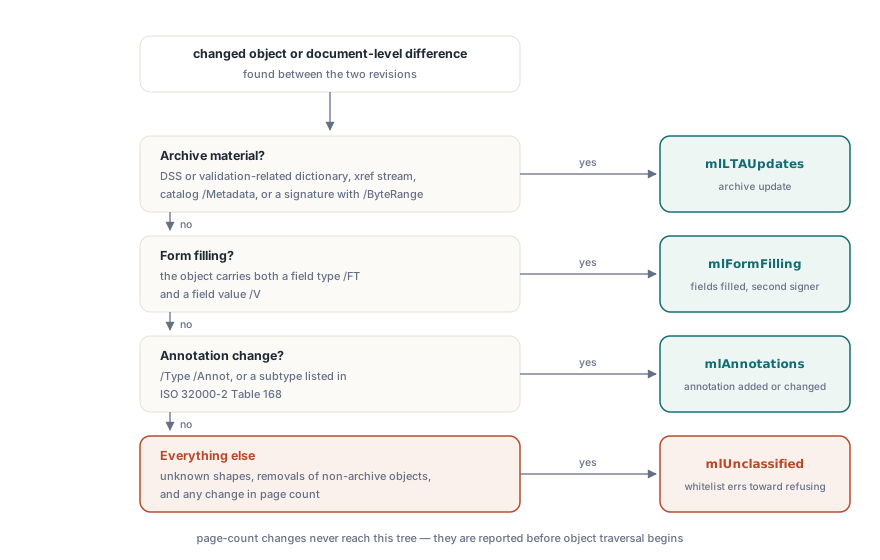
Removals are treated more strictly than additions. A removed object is whitelisted only when the object on the old side was itself archive material, which covers the normal case of a security store being replaced by a newer one. Every other removal is unclassified, because deleting content from a signed document is not something a permission level authorizes. Document-level differences are stricter still: a change in page count goes straight to unclassified without examining individual objects, since no DocMDP level permits adding or removing pages
The whitelist errs toward refusing
This is the design rule that governs every borderline decision. A change wrongly classified as permitted is a signature that validates over content the author never authorized. A change wrongly classified as unclassified is a document that gets flagged and reviewed by a person. Those two errors are not symmetrical, so the whitelist stays narrow and unrecognised shapes fall through to unclassified rather than being guessed at
That has a practical consequence worth anticipating: files from unusual producers will sometimes report unclassified changes that are, on inspection, benign. The right response is to look at the finding detail and object number rather than to widen the whitelist, because a whitelist that grows to silence individual reports stops being a security control
uses
  PDFlibrary, PDFlibCompare;

var
  Pdf: TPDFlib;
  I, Level: Integer;
begin
  Pdf := TPDFlib.Create;
  try
    Pdf.LoadFromFile('contract-countersigned.pdf', '');
    if Pdf.AnalyzeModifications('contract-as-signed.pdf', '') < 0 then
      raise Exception.Create('the earlier revision could not be loaded');

    // TPLModificationLevel ordered mlNone, mlLTAUpdates, mlFormFilling,
    // mlAnnotations, mlUnclassified; the getter returns its ordinal
    Level := Pdf.GetModificationLevel;
    // DocMDP enforcement is now one comparison against the policy
    if Level > Ord(mlFormFilling) then
      for I := 0 to Pdf.GetModificationFindingCount - 1 do
        Report.Add(Format('object %d, level %d: %s',
          [Pdf.GetModificationFindingObjNum(I),
           Pdf.GetModificationFindingLevel(I),
           Pdf.GetModificationFindingDetail(I)]));
  finally
    Pdf.Free;
  end;
end;
The overall level is the maximum over all findings, which is the only defensible aggregation: a document containing ninety-nine archive additions and one unclassified change is an unclassified change
Underneath: fingerprints, not cryptographic hashes
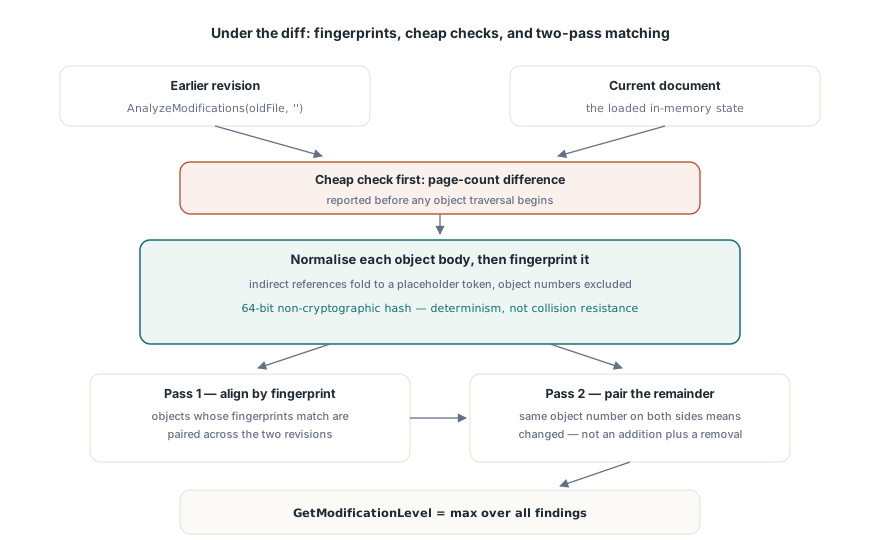
The comparison engine that CompareWith exposes, and that the modification analysis is built on, identifies objects by a fingerprint of their normalized body using a non-cryptographic 64-bit hash rather than SHA-256. That is a considered choice. What structural comparison needs is determinism: the same object body must always produce the same fingerprint within a run. It does not need collision resistance, because an attacker who controls both sides of the comparison has already won by other means, and paying for a full cryptographic hash over every object in a million-object document is a real cost for no benefit
Two normalization rules matter more than the hash choice. Indirect references fold to a placeholder token instead of being expanded into the referenced content: expanding would copy a shared object's body into every referrer, so one small edit to a shared font descriptor would invalidate the fingerprint of every object that reaches it, and the report would be unreadable. And object numbers themselves are excluded from the fingerprint, because a rewrite can renumber objects without changing anything semantic
Matching then runs in two passes, aligning by fingerprint first and pairing the remainder by object number to identify changes rather than an addition plus a removal. Cheap checks come first throughout: a page-count difference is reported before any object traversal begins
A trap: self-comparison is not guaranteed to be identical
The natural first test for a diff engine is to compare a file against itself and assert the result is identical. That assertion does not hold here, and the reason is instructive. The public load path and the lower-level document load path do not configure decoding identically, so the same file loaded through the two routes can produce fingerprints that differ for some objects. The engine is not wrong; the two loads genuinely produced different in-memory states
Rather than force the two paths together, the comparison semantics are stated narrowly: the analysis compares the current document state against an earlier revision, and reports identical only when the two fingerprint sets coincide exactly. That is the question users actually ask, and it does not require the two loaders to be interchangeable. When you are designing a comparison feature, defining what "the same" means is more of the work than computing it
Where to use it
Two places. In a validation report, alongside signature checking, so a reviewer sees not only whether the signature is cryptographically intact but what happened to the document afterward; the signature side is covered in PAdES signing and validation. And in an intake gate, where a document arriving from outside is checked against the copy you sent, so a returned contract with an added annotation is treated differently from one with an edited page
One caveat on scope. This analysis tells you what changed between two revisions of the same document lineage. It does not tell you whether visible content is misleading, whether a form field appearance stream matches its value, or whether text hidden under an overlay is still present in the content stream. Those need separate treatment, and the content-removal side of it is covered in the true redaction article. The analysis and comparison entry points are documented on the losLab PDF Developer Library product page