Validating one PAdES signature means checking three independent things, and a green check mark in a viewer only tells you about the third. First, the /ByteRange array has to cover the right bytes: the spans it names must reconstruct the exact input the CMS digest was taken over, with no signed bytes left outside them. Second, the certificate inside the CMS has to chain to a root you trust and carry the signed signing-certificate attribute PAdES requires. Third, if the profile claims a timestamp, an RFC 3161 token has to bind the signature value to a point in time before the certificate expired. Acrobat collapses all three into one icon; a conformance checker keeps them separate, and so should the code that produces these files. losLab PDF Library (PDF Library for Delphi) gives you the signing side of that, the timestamp re-embedding, and the audit calls to inspect a ByteRange before you trust it
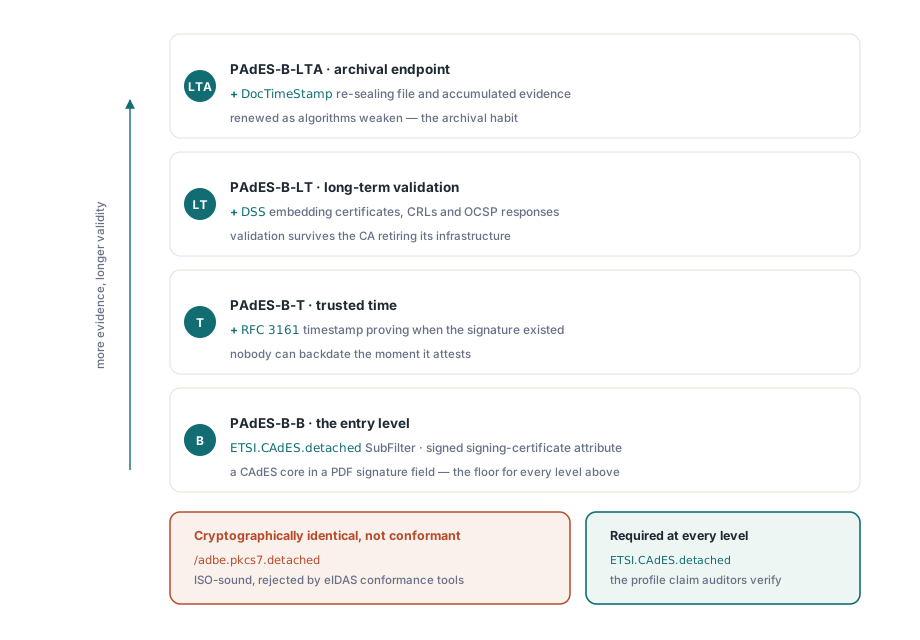
One distinction trips up almost every first PAdES implementation, so it is worth stating before any code. A signature written with /SubFilter /adbe.pkcs7.detached is a perfectly sound ISO 32000-1 §12.8 signature that Acrobat will report as valid. It is also not a PAdES signature, because ETSI EN 319 142-1 requires ETSI.CAdES.detached at every baseline level. An eIDAS conformance checker rejects the first and accepts the second even though the cryptography is identical. The profile is a claim the document makes about itself, and getting that claim right is one call in PDF Library for Delphi
What turns a PDF signature into a PAdES signature
ETSI EN 319 142-1 defines four baseline levels stacked on the CMS format. PAdES-B-B is the entry point: a CAdES signature in a PDF signature field with the ETSI.CAdES.detached SubFilter and a signed signing-certificate attribute. PAdES-B-T adds an RFC 3161 timestamp over the signature value, proving the signature existed before a point in time nobody can backdate. PAdES-B-LT embeds the certificates, CRLs, and OCSP responses needed for validation into a Document Security Store, so the file remains verifiable after the issuing CA retires its infrastructure. PAdES-B-LTA caps the stack with a document timestamp that re-protects the accumulated evidence as algorithms weaken
PDF Library for Delphi maps these concepts onto its sign-process API. The profile marker is SetSignProcessCustomSubFilter. If your policy needs a commitment-type indication (proof of origin, proof of approval, or one of the other ETSI identifiers numbered 1 through 6), that goes through SetSignProcessCommitmentType. An explicit signature policy attaches with SetSignProcessSignaturePolicy, which takes the policy OID and its digest. One default deserves attention: with the digest algorithm left on auto, the library selects SHA-256 for ETSI and adbe.pkcs7.detached signatures and falls back to SHA-1 only on the legacy adbe.pkcs7.sha1 path. Set it explicitly anyway. Auditors ask which hash you used, and an explicit value in the code is easier to defend than a default you have to go read the manual to explain
Producing the baseline signature
The flat API drives signing as a one-shot state machine: open a process on the source file, configure it, finish to an output file, read the result code. The sequence below produces a PAdES-B-B signature with SHA-256. The line that matters most has nothing to do with the signature itself. It is the deliberately oversized /Contents reservation, because that is the one thing you cannot change later if a timestamp ever has to be added to this signature
var
  Pdf: TPDFlib;
  SignId: Integer;
begin
  Pdf := TPDFlib.Create;
  try
    SignId := Pdf.NewSignProcessFromFile('invoice.pdf', '');
    if SignId = 0 then
      raise Exception.Create('cannot open source PDF');
    Pdf.SetSignProcessField(SignId, 'Sig1');
    Pdf.SetSignProcessPFXFromFile(SignId, 'company.pfx', PfxPassword);
    Pdf.SetSignProcessInfo(SignId, 'Approved', 'Vienna', 'billing@example.com');
    Pdf.SetSignProcessCustomSubFilter(SignId, 'ETSI.CAdES.detached');
    Pdf.SetSignProcessDigestAlgorithm(SignId, 2);          // SHA-256
    Pdf.SetSignProcessReserveContentsBytes(SignId, 8192);  // room for a timestamp later
    Pdf.EndSignProcessToFile(SignId, 'invoice-signed.pdf');
    if Pdf.GetSignProcessResult(SignId) <> 1 then
      raise Exception.CreateFmt('signing failed, code %d',
        [Pdf.GetSignProcessResult(SignId)]);
    Pdf.ReleaseSignProcess(SignId);
  finally
    Pdf.Free;
  end;
end;
NewSignProcessFromFile returns 0 when the source cannot be opened at all. After that, GetSignProcessResult separates the failure modes that actually occur in production: 4 means a wrong PDF password, 7 a wrong PFX password, 9 a certificate file with no private key, 10 an unwritable output path, 11 a failure while applying the signature bytes. Logging the numeric code next to the input file name converts a vague support ticket into a one-minute diagnosis
Adding the RFC 3161 timestamp the library will not fetch for you
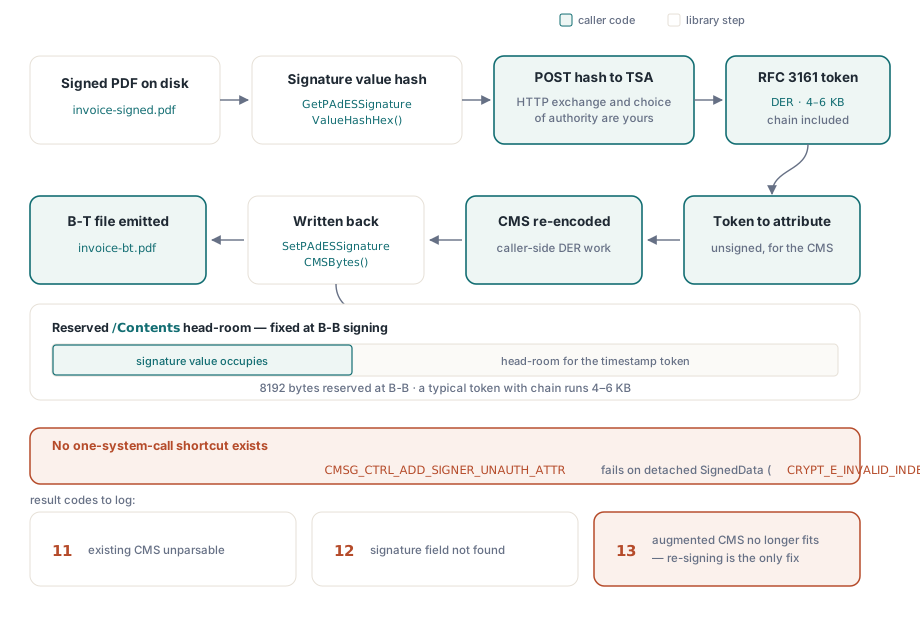
PDF Library for Delphi ships no TSA client, and that is a deliberate boundary rather than a gap. The library computes the hash the timestamp authority must countersign and re-embeds the augmented CMS afterward; the HTTP exchange and the CMS surgery in between belong to the caller. There is a hard technical reason for the split. The Windows CryptoAPI control that nominally adds unsigned attributes, CMSG_CTRL_ADD_SIGNER_UNAUTH_ATTR, fails with CRYPT_E_INVALID_INDEX on the detached SignedData layout PAdES uses. So the enhanced CMS has to come from a CMS encoder under your own control. No library can quietly fold the token in with one system call, and any that claims to is doing the surgery somewhere you cannot see it
var
  Pdf: TPDFlib;
  StsId: Integer;
  HashHex, TstDer, TsAttr, AugmentedCms: AnsiString;
begin
  Pdf := TPDFlib.Create;
  try
    StsId := Pdf.NewPAdESSignatureTimeStampProcessFromFile('invoice-signed.pdf', '');
    Pdf.SetPAdESSignatureTimeStampField(StsId, 'Sig1');
    Pdf.SetPAdESSignatureTimeStampDigestAlgorithm(StsId, 2);
    HashHex := Pdf.GetPAdESSignatureValueHashHex(StsId);
    // both calls below are application code: an HTTP POST to your TSA,
    // and a CMS re-encode that attaches the token as an unsigned attribute
    TstDer := RequestTimeStampToken(HashHex);
    TsAttr := Pdf.BuildPAdESSignatureTimeStampAttribute(TstDer);
    AugmentedCms := AttachUnsignedAttribute(Pdf.GetPAdESSignatureCMSBytes(StsId), TsAttr);
    Pdf.SetPAdESSignatureCMSBytes(StsId, AugmentedCms);
    Pdf.EndPAdESSignatureTimeStampProcessToFile(StsId, 'invoice-bt.pdf');
    if Pdf.GetPAdESSignatureTimeStampProcessResult(StsId) <> 1 then
      raise Exception.Create('timestamp embedding failed');
    Pdf.ReleasePAdESSignatureTimeStampProcess(StsId);
  finally
    Pdf.Free;
  end;
end;
Watch the result codes here: 12 means the named signature field does not exist, 11 that the existing CMS could not be parsed, and 13 that the augmented CMS no longer fits the reserved /Contents placeholder. Code 13 is the one that hurts, because the only fix is re-signing: a typical timestamp token with its certificate chain runs 4 to 6 KB, and the 8192-byte reservation made during the B-B step exists precisely so this step has room to land
Validation starts at the ByteRange, not the certificate chain
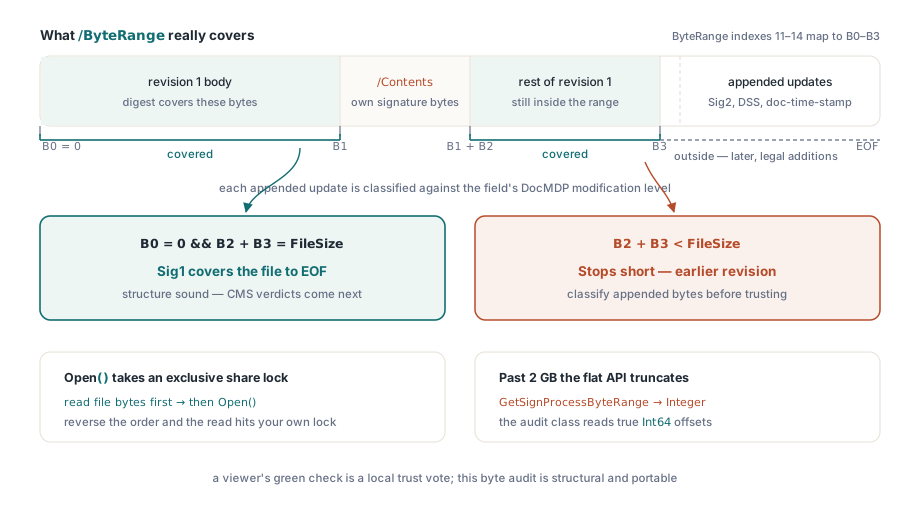
A green check mark in a viewer is a trust decision against that machine's certificate store, not a structural verdict about the file. Programmatic validation should begin lower, with the question incremental updates make subtle: which bytes does each signature actually cover? Every enhancement discussed here, whether a second signature, a DSS dictionary, or a document timestamp, arrives via incremental update, and each update appends bytes outside the earlier signature's /ByteRange. Those appended bytes are legitimate. A validator still has to classify them against the document's modification policy, and the per-field DocMDP level that policy lives in is readable with GetSignatureDocMDPLevelByName
var
  Doc: TPDFlibSignDoc;
  Names: TStringList;
  I: Integer;
  B0, B1, B2, B3, FileSize: Int64;
begin
  FileSize := TFile.GetSize('invoice-bt.pdf');  // before Open: SignDoc holds a share lock
  Doc := TPDFlibSignDoc.Create;
  try
    if not Doc.Open('invoice-bt.pdf', '', False) then
      raise Exception.Create('cannot open for audit');
    Names := TStringList.Create;
    try
      Doc.GetSignatureFieldNames(Names);
      for I := 0 to Names.Count - 1 do
        if Doc.GetSignatureValueObjNum(Names[I]) > 0 then   // >0 means actually signed
        begin
          B0 := StrToInt64(string(Doc.GetSignatureValueByName(Names[I], 11)));
          B1 := StrToInt64(string(Doc.GetSignatureValueByName(Names[I], 12)));
          B2 := StrToInt64(string(Doc.GetSignatureValueByName(Names[I], 13)));
          B3 := StrToInt64(string(Doc.GetSignatureValueByName(Names[I], 14)));
          if (B0 = 0) and (B2 + B3 = FileSize) then
            Writeln(Names[I], ': covers the file to EOF')
          else
            Writeln(Names[I], ': earlier revision, or unexpected ByteRange layout');
        end;
    finally
      Names.Free;
    end;
    Doc.Close;
  finally
    Doc.Free;
  end;
end;
Two traps live in this audit path. TPDFlibSignDoc.Open holds the file with an exclusive share lock, so a validator that also wants to hash the raw file bytes for CMS verification has to read the file into memory before opening it for audit. Reverse that order and the read fails on a lock you set yourself. The second trap is silent rather than loud: the flat-API counterpart GetSignProcessByteRange returns Integer while the underlying offsets are Int64, so past 2 GB the flat call truncates without complaint, which is why this example pulls offsets through the audit class instead. One absence is worth naming too. The flat layer has no VerifySignature wrapper at all. Cryptographic verdicts come from the class-level TPDFlibSignatureVerifier, which returns vsValid, vsInvalid, or vsUnknown, or from an external validator your compliance policy already trusts
Long-term validation: DSS, VRI, and the document timestamp
PAdES-B-LT exists because revocation infrastructure is mortal. ETSI EN 319 142-1 §5.4.2.2 specifies the Document Security Store: a document-level dictionary carrying certificates, CRLs, and OCSP responses, optionally indexed per signature through VRI entries keyed by the hash of each signature's /Contents. The PDF Library for Delphi flow mirrors the timestamp design. NewPAdESDSSProcessFromFile opens the process; AddPAdESDSSCertificate, AddPAdESDSSCRL, and AddPAdESDSSOCSP accept DER blobs; AddPAdESDSSVRI binds selected material to one signature; EndPAdESDSSProcessToFile writes everything as an incremental update. The hard part stays on your side. Fetching the revocation material, and judging whether it is fresh enough to be worth embedding, is the caller's job. The library guarantees the dictionaries are structurally conformant; it cannot guarantee your OCSP responder told the truth
The archival endpoint, B-LTA, adds a document timestamp: a separate signature field whose type is DocTimeStamp rather than Sig, produced through SetSignProcessDocTimeStamp with a reserved signature length. It does not replace the signature timestamp from the B-T step. The signature timestamp proves when one particular signature existed; the document timestamp protects the whole file, DSS evidence included, and is the element a long-term archive renews every few years as algorithms weaken. A mature archival profile carries both. For readers that predate these structures, TPDFlibSignDoc.EnsurePAdESExtensions records the ESIC developer extension in the document catalog, announcing that the file uses ETSI-defined features
One reaction to all this is worth heading off, because it looks like a bug and is not. A viewer often reports "validity unknown" on a file whose PAdES structure is entirely correct. Trust and structure are independent axes. The viewer simply cannot chain the signer to a root it trusts on that machine, which is routine with private CAs and test certificates, even as the ByteRange audit and CMS verification both pass. The fix is to distribute the root certificate properly, or to evaluate against the EU trusted lists when qualified eIDAS status is the actual goal, rather than to touch the signing code
For the audit-side perspective, meaning enumerating signature fields across a corpus, dumping ByteRange layouts, and reading DocMDP levels in bulk, see the companion piece on the compliance and signing workbench. Signed documents that must also satisfy archival policy belong in the workflow described in PDF/A and PDF/UA preflight in Delphi. Full API documentation and evaluation downloads are on the losLab PDF Library for Delphi product page