A workbench that chains compliance validation to digital signing has to coordinate four steps, in this order, and keep them tied to one set of bytes the whole way through. It runs a PDF/A or PDF/UA preflight. It applies whatever fixes the findings demand and saves a corrected revision. It signs that exact revision. Then it reads the signed file back and confirms the signature really covers it. The order is not cosmetic. Skip the read-back and you are trusting your own write path; let the preflight run against the wrong revision and your compliance report describes a file you never shipped
The part most homegrown pipelines get wrong is the seam between validation and signing. Run them as two separate tools with a remediation pass in between and at least three distinct revisions of the file come into existence, each with its own bytes. The preflight report you hand an auditor describes one of them. The signature freezes another. Nothing in the file states they are the same revision, and often they are not. PDF Library for Delphi, the losLab PDF Developer Library for Delphi and C++Builder, puts preflight and PAdES signing behind a single facade class, so the whole sequence can live in one process that never loses track of which bytes it is talking about. Every call below exists in the library today, and so does every trap noted alongside it

Three revisions of one document, and how the gap opens
Count the saves. The original arrives from upstream. The remediation pass loads it, turns on a compliance mode, and writes a corrected revision. The signing pass appends a signature as an incremental update, which is a third write. Three saves, three byte layouts, and a preflight report means nothing unless it names which of the three it covers. A SHA-256 of the file, recorded next to every preflight run and every signature, is the cheap anchor that lets you prove the revision you validated is the revision you signed
One library behavior tightens that discipline further. Compliance fixes requested through SetPDFAMode or SetPDFUAMode do not take effect when you call them. They are applied during the save. Auto-repairs like forcing annotation print flags or assigning a PDF/UA tab order land in the output file and nowhere else, so a check run against the document you just "fixed" in memory tells you nothing about the bytes headed for the signer. Save first, then preflight the saved file. The in-memory state is a draft; only the file on disk is real
Preflight from disk, and the zero that means two things
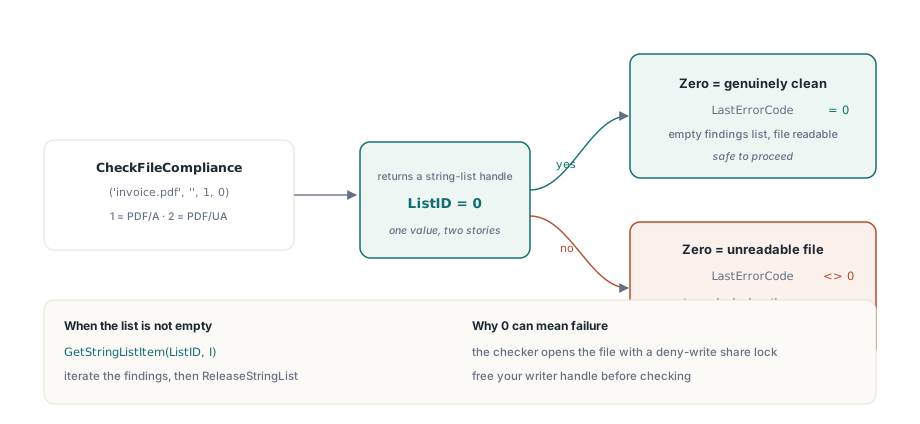
The flat preflight entry point is CheckFileCompliance(FileName, Password, ComplianceTest, Options). Test 1 selects PDF/A (ISO 19005), test 2 selects PDF/UA (ISO 14289). It opens the file through the library's streaming reader, so there is no need to LoadFromFile first, and it returns a string-list handle carrying one finding per entry:
var
  PDF: TPDFlib;
  ListID, I: Integer;
begin
  PDF := TPDFlib.Create;
  try
    ListID := PDF.CheckFileCompliance('invoice-fixed.pdf', '', 1, 0);  // 1 = PDF/A
    if ListID = 0 then
    begin
      if PDF.LastErrorCode <> 0 then
        raise Exception.Create('Preflight could not read the file')
      else
        Writeln('No PDF/A findings');
    end
    else
    begin
      for I := 0 to PDF.GetStringListCount(ListID) - 1 do
        Writeln(PDF.GetStringListItem(ListID, I));
      PDF.ReleaseStringList(ListID);
    end;
  finally
    PDF.Free;
  end;
end;
The trap sits in the return value, and it is the kind that passes every happy-path test. Zero means "no findings." Zero also means "the file could not be opened," because the implementation returns 0 whenever the result list comes back empty, a read failure included. A workbench that reads 0 as a green light will cheerfully approve a file that some other process has locked. Pairing the call with LastErrorCode, as above, is what separates the two cases. The checker also opens the file with a deny-write share mode, so if your remediation step is still holding a writer handle, preflight fails for a reason that has nothing to do with compliance and everything to do with a stream you forgot to free
When a person rather than a pipeline needs to read the findings, CreatePreflightReport renders them as a readable report. ComparePreflightReports diffs two runs, which is a tidy way to show that remediation cleared the original findings without quietly introducing new ones
Signing the checked revision with a SignProcess
Once the saved revision passes preflight and its hash is on record, sign that exact file and no other. The SignProcess API reads like a builder. Open a process handle, configure it line by line, commit, then read the result code back
ProcessID := PDF.NewSignProcessFromFile('invoice-fixed.pdf', '');
if ProcessID = 0 then
  raise Exception.Create('Cannot open source for signing');
PDF.SetSignProcessField(ProcessID, 'ApprovalSig');
PDF.SetSignProcessPFXFromFile(ProcessID, 'company.pfx', PfxPassword);
PDF.SetSignProcessInfo(ProcessID, 'Invoice approval', 'Berlin', 'billing@example.com');
PDF.SetSignProcessCustomSubFilter(ProcessID, 'ETSI.CAdES.detached');  // PAdES baseline
PDF.SetSignProcessDigestAlgorithm(ProcessID, 2);                      // SHA-256
PDF.SetSignProcessReserveContentsBytes(ProcessID, 8192);              // room for a later timestamp
PDF.EndSignProcessToFile(ProcessID, 'invoice-signed.pdf');
if PDF.GetSignProcessResult(ProcessID) <> 1 then
  Writeln('Sign failed, code ', PDF.GetSignProcessResult(ProcessID));
PDF.ReleaseSignProcess(ProcessID);
Two lines in that sequence carry more weight than they look. SetSignProcessCustomSubFilter with ETSI.CAdES.detached picks a PAdES signature as profiled in ETSI EN 319 142-1 rather than the legacy adbe.pkcs7.detached family, which is the difference between a signature a European validator accepts and one it flags. SetSignProcessReserveContentsBytes pads the /Contents placeholder, and the size you choose here is a decision about the future: if a signature timestamp is ever going to follow, the enlarged CMS has to fit the space you reserve now, because the placeholder cannot grow later without re-signing the whole thing. Reserve generously and you waste a few kilobytes. Reserve too tight and the timestamp step fails months from now with an overflow you will struggle to connect back to this one line
GetSignProcessResult answers with a code, not a boolean, and the codes are worth keeping. 1 is success. 4 is a wrong PDF password, 7 a wrong certificate password, 9 a PFX that carries no private key, 11 a failure while the signature was being applied. Collapse those into a true/false and you throw away the one piece of information that tells a wrong-password support case apart from a key-without-private-part one. Log the integer
Read-back: auditing the file you just produced
No workbench should trust the path that wrote the file it is about to certify. The audit class TPDFlibSignDoc reopens the signed output and reads the signature dictionary entries straight off disk:
var
  Doc: TPDFlibSignDoc;
  Names: TStringList;
  FS: TFileStream;
  I: Integer;
  SourceSize, RangeStart, GapStart, TailStart, TailLen: Int64;
begin
  // Capture the size before Open: the audit object holds a share lock on the file
  FS := TFileStream.Create('invoice-signed.pdf', fmOpenRead or fmShareDenyNone);
  SourceSize := FS.Size;
  FS.Free;
  Doc := TPDFlibSignDoc.Create;
  Names := TStringList.Create;
  try
    if not Doc.Open('invoice-signed.pdf', '', False) then Exit;
    Doc.GetSignatureFieldNames(Names);
    for I := 0 to Names.Count - 1 do
      if Doc.GetSignatureValueObjNum(Names[I]) > 0 then  // > 0 means the field is signed
      begin
        RangeStart := StrToInt64(string(Doc.GetSignatureValueByName(Names[I], 11)));
        GapStart   := StrToInt64(string(Doc.GetSignatureValueByName(Names[I], 12)));
        TailStart  := StrToInt64(string(Doc.GetSignatureValueByName(Names[I], 13)));
        TailLen    := StrToInt64(string(Doc.GetSignatureValueByName(Names[I], 14)));
        if (RangeStart = 0) and (TailStart + TailLen = SourceSize) then
          Writeln(Names[I], ': signature covers the file to EOF')
        else
          Writeln(Names[I], ': earlier revision, or unusual ByteRange layout');
      end;
    Doc.Close;
  finally
    Names.Free;
    Doc.Free;
  end;
end;
The ValueKey arguments map onto dictionary entries. Key 0 returns the raw CMS from /Contents, keys 2 and 3 the /Filter and /SubFilter names, and 11 through 14 the four ByteRange numbers. Text values come back through GetSignatureTextValueByName instead: key 0 is the claimed signing time, and key 5 tells an ordinary Sig apart from a DocTimeStamp, which matters once a document carries both
The file-size capture at the top of that example is load-bearing, not housekeeping. TPDFlibSignDoc.Open holds the file under a restrictive share lock for its entire lifetime, so anything that needs the raw bytes (hashing the signed range, re-computing the CMS digest) has to read the file before Open is called. The library's own SigningWorkbench demo reads the whole file into memory first for precisely this reason, and a workbench that ignores the ordering fails intermittently, on whichever machine happens to lose the race
ByteRange arithmetic that proves coverage
A healthy single-signature file has a ByteRange of the form [0 a b c]: coverage starts at offset 0, skips the hex /Contents placeholder between a and b, then resumes through byte b+c. When b+c equals the file size, the signature covers everything to end of file, which is the result you want. When it falls short, someone appended an incremental update after the signature was written. That is perfectly legitimate under ISO 32000-1§12.8, since later form fills, a second signature, and a DSS dictionary all arrive exactly this way. It is also precisely the fact an audit trail should record at signing time rather than reconstruct under pressure during a dispute
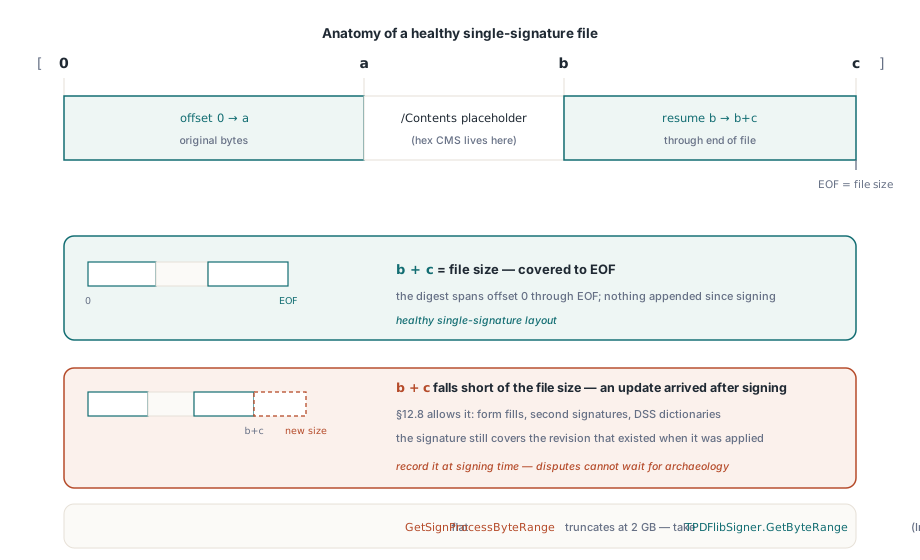
Watch the integer width while you do this arithmetic. The flat API's GetSignProcessByteRange hands back a 32-bit Integer, but the underlying values are Int64, so on a file past 2 GB the flat accessor silently truncates. Reach for the class-layer TPDFlibSigner.GetByteRange, which returns Int64, or parse the values out of GetSignatureValueByName the way the audit code above does
What the library leaves to you
Two boundaries are better learned at design time than in the final sprint. The flat TPDFlib API carries no signature-verification wrapper at all. Cryptographic verification lives one layer down, in TPDFlibSignatureVerifier, whose VerifySignature answers valid, invalid, or unknown. There is also no built-in HTTP client for RFC 3161 timestamp authorities. The library computes the hash to submit and re-embeds the augmented CMS once a token comes back, but the network round trip to the TSA is yours to write. Both are straightforward to wrap and genuinely unpleasant to find missing the week before a release, so design them in from the first sketch
One question about compliance is worth settling plainly, because it decides where the last gate goes: does adding a signature break PDF/A? Not on its own. The signature arrives as an incremental update, and ISO 19005-2 onward explicitly permits signed documents. The catch is the signature appearance, which plays by the same rules as any other page content, embedded fonts and no device-dependent color included. So the final gate in the workbench is one more preflight run, this time against the signed output. Treat CheckFileCompliance as the fast in-pipeline check and still verify release candidates with an independent tool such as veraPDF, since validators implement overlapping but not identical rule sets; when the two disagree, the finding text usually names the clause to go read
One sequencing point falls out of all this. Signing and timestamping are not a single pass: the baseline signature is written first, then a separate timestamp process augments the CMS inside the reserved /Contents space, which is exactly why the reserve-bytes line earlier carried so much weight. For the timestamp and long-term validation layers that build on this workbench, the PAdES signing and validation walkthrough carries the signature from baseline to B-LT, and the preflight half goes deeper in the PDF/A and PDF/UA preflight guide. Full API documentation and trial downloads live on the PDF Library for Delphi product page