Real PDF redaction in Delphi means deleting the underlying bytes, not painting over them. losLab PDF Library draws that line with two APIs: RedactRegion edits the page content stream so the removed text, vectors, and images are physically gone, and SanitizeDocument clears the metadata, scripts, and actions where redacted information also hides. Get either half wrong and you ship a file that looks censored on screen but hands the secret back to anyone who copies the text or opens Document Properties
The failure mode is a matter of public record. Newspapers, courts, and government agencies have all released PDFs with a black rectangle laid over a name or a number, only for a reader to select the text underneath, copy it, and paste the supposedly redacted string into plain view. The rectangle was a drawing. The text was still there, sitting in the content stream one layer below the paint, fully intact and fully selectable. losLab PDF Library, the Delphi and C++Builder PDF engine exposed through the TPDFlib class, treats that distinction as the whole point of redaction rather than an afterthought
Why is drawing a black box over PDF text not real redaction?
losLab PDF Library exposes MaskRect for the cases where covering is genuinely what you want: a watermark, a visual blackout, a proof stamp. MaskRect(Page, Left, Top, Width, Height, Red, Green, Blue) appends a rectangle to the page content stream and paints it with the re path-construction operator followed by the f fill operator (ISO 32000-1 §8.5). Every byte that was already on the page — the glyphs of the name you covered, the vector strokes, the embedded image — stays exactly where it was, one instruction earlier in the same stream. A conforming viewer draws the black box last, so it wins visually. The cover changes nothing underneath
Anyone can retrieve the original content three ways: select and copy the text straight through the opaque box, run a text extractor over the page, or delete the covering rectangle from the content stream. MaskRect is honest about this in its own name — it masks, it does not remove. The result is a sticker over a word you can still read by lifting the sticker off
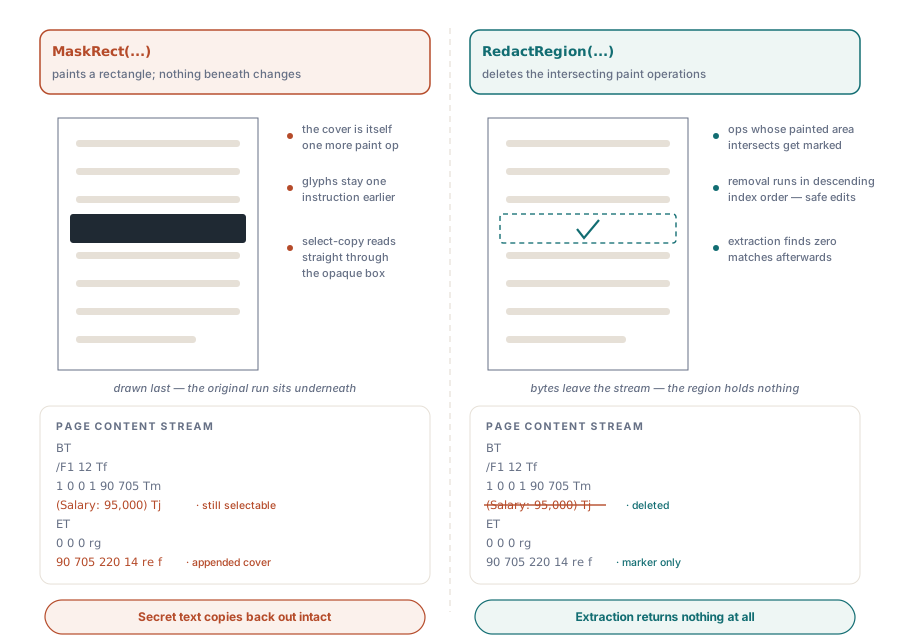
How RedactRegion deletes content at the instruction level
RedactRegion(Page, Left, Top, Width, Height, Options) works one layer below the paint. losLab PDF Library parses each content layer of the page into a TPDFContentProgram, walks the instruction list with a CTM-tracking analyzer (FindInstructionsInRect in the content model), and marks every text-showing, path-painting, and image Do operator whose painted area intersects your rectangle. Those instructions are removed with TPDFContentProgram.Delete, and the edited layer is written back with WritePageContentLayer. The bytes do not slide behind a cover — they leave the stream. A text extractor run afterward finds nothing, because there is nothing to find
Two implementation details are worth carrying into your own reasoning. RedactRegion takes a top-left rectangle in the current origin and units and converts it internally to the bottom-left user space the content stream uses, so you specify the region the way you see it on the page. When a rectangle covers several instructions, RedactRegion deletes them in descending index order, because removing instruction 4 before instruction 7 would shift every later index and corrupt the range. Pass Options = 0 and losLab PDF Library also stamps a solid black box over the cleared region as a visible marker — but that marker is cosmetic, applied after the real content is already gone
In practice you rarely hard-code the rectangle. You search the page for the sensitive string and read back its bounding box — the same page search and element enumeration covered in locating text and page elements in Delphi — then hand that rectangle to RedactRegion:
var
  PDF: TPDFlib;
begin
  PDF := TPDFlib.Create;
  try
    if PDF.LoadFromFile('contract.pdf', '') = 1 then
    begin
      // Delete everything painted inside a 220 x 14 pt box on page 1.
      // Coordinates are top-left, in the current origin and units.
      PDF.RedactRegion(1, 90, 705, 220, 14, 0);   // Options=0 stamps a black marker
      PDF.SaveToFile('contract-redacted.pdf');
    end;
  finally
    PDF.Free;
  end;
end;
Where does redacted information still hide in a PDF?
Redaction that stops at the visible layer leaves a trail, because a PDF stores information in places a reader never looks. losLab PDF Library groups the leaks into channels worth naming. The Document Information Dictionary and the XMP metadata stream routinely carry an Author, a Producer, or a Keywords string that names the very person or case you removed from the body. Document-level JavaScript and the catalog OpenAction can execute on open and reach data you thought was gone. Every annotation carries an optional /A action, and an annotation itself — a sticky note, a stale form field, a link — can sit directly over the redacted spot with its own copy of the text. None of this is touched by encryption; an encrypted file with a plaintext XMP packet still leaks its title to any indexer, a gap worth auditing encryption and permissions on its own. Defensible sanitization has to visit each of these hiding places, not just the page you were looking at
Cleaning the document with SanitizeDocument
losLab PDF Library answers that spread of leaks with SanitizeDocument(Flags), an orchestration call that runs a set of independent strips selected by a bitmask and returns the number of strips it applied. The flags are combinable. SANITIZE_JAVASCRIPT removes every document-level JavaScript package and any OpenAction script. SANITIZE_ACTIONS strips the /A action dictionary from every annotation, through the new TPDFAnnots.RemoveAnnotAction, and clears the catalog OpenAction. SANITIZE_METADATA blanks Author, Subject, Keywords, Creator, and Producer in both the Document Information Dictionary (ISO 32000-1 §14.3.3) and the XMP metadata stream (§14.3.2). SANITIZE_ANNOTATIONS deletes every annotation document-wide, and SANITIZE_OPEN_ACTION removes the catalog /OpenAction entry. SANITIZE_ALL is the bitwise union of all five
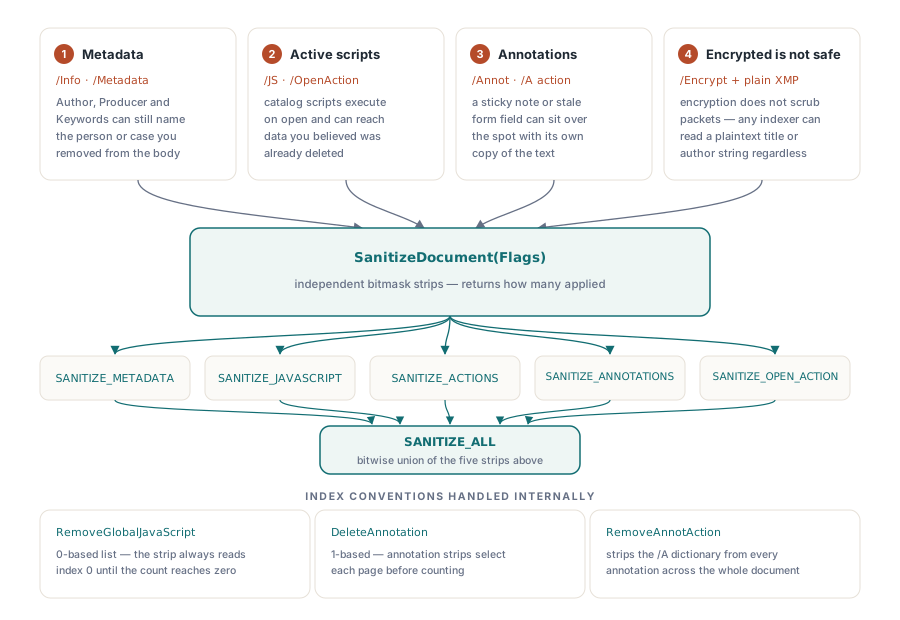
The index conventions inside these strips are exactly the kind of thing that quietly breaks a hand-rolled loop, which is much of why SanitizeDocument exists as one call. GlobalJavaScriptPackageName is 0-based, and RemoveGlobalJavaScript shrinks the list as it goes, so the JavaScript strip always reads package index 0 and removes until the count reaches zero. DeleteAnnotation, by contrast, is 1-based. AnnotationCount reports against the currently selected page, so the annotation strips select each page in turn before counting. losLab PDF Library gets these boundaries right internally, so you pass one flag set and read one count back instead of reproducing five different iteration rules
var
  Applied: Integer;
begin
  // Strip metadata, scripts, and actions but keep the annotations:
  Applied := PDF.SanitizeDocument(SANITIZE_METADATA or SANITIZE_JAVASCRIPT or
    SANITIZE_ACTIONS or SANITIZE_OPEN_ACTION);

  // Or clear every hidden channel, annotations included:
  Applied := PDF.SanitizeDocument(SANITIZE_ALL);
end;
The complete redaction and sanitize workflow
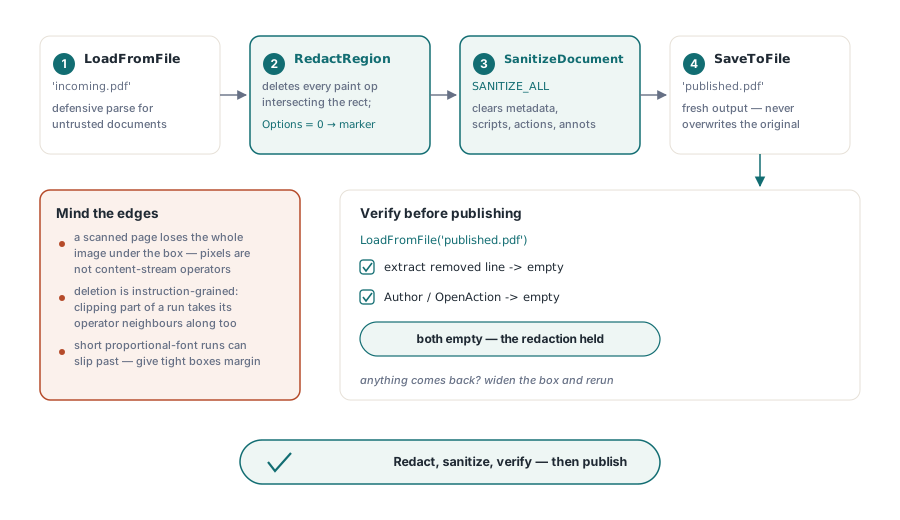
Put the two together and the full procedure is short. losLab PDF Library removes the visible content with RedactRegion, page by page, then clears every hidden channel with SanitizeDocument(SANITIZE_ALL) before the file is written. Because redaction almost always runs on documents that arrived from outside your control, it is worth loading them through a hardened path — the same defensive posture described in parsing untrusted PDFs safely — so a malformed input fails cleanly rather than midway through the redaction pass
var
  PDF: TPDFlib;
  Applied: Integer;
begin
  PDF := TPDFlib.Create;
  try
    if PDF.LoadFromFile('incoming.pdf', '') = 1 then
    begin
      PDF.RedactRegion(1, 90, 705, 220, 14, 0);       // delete the sensitive line
      Applied := PDF.SanitizeDocument(SANITIZE_ALL);   // clear metadata, JS, actions, annots
      PDF.SaveToFile('published.pdf');
    end;
  finally
    PDF.Free;
  end;
end;
Where content-stream redaction stops
RedactRegion operates on the content stream, which is exactly where born-digital text lives and exactly where scanned text does not. When a page is a scanned image, the words are pixels inside an image XObject, not text operators, and losLab PDF Library cannot carve a name out of the middle of a raster the way it deletes a glyph. Its image handling is deliberately conservative: any image whose placement intersects the rectangle is removed whole, so a redaction box on a scanned page takes the entire scan with it rather than a patch of it. Redacting a region inside an image means rasterizing, painting, and re-embedding at the pixel level, which is a different operation than content-stream deletion. The same caution applies to an OCR text layer over a scanned page: RedactRegion removes the text operators it can see, but the picture beneath stays untouched unless its image XObject also intersects the box
Two finer points keep the results honest. The intersection test approximates each text run's width from its character count and font size rather than measuring exact glyph metrics, so a very short word set in a proportional font can slip past a tightly drawn rectangle — give the box a small margin. Deletion is also instruction-granular: RedactRegion removes whole text-showing operators, so a rectangle that clips only part of a run can take adjacent characters that shared the same operator with it. Neither limit is a reason to distrust the mechanism, only a reason to bound the rectangle carefully and check the result
The discipline that closes every redaction workflow is verification, not trust. Redact the region, sanitize the document, save to a new file, reopen it, and try to pull back both the text you removed and the metadata you cleared; when both come back empty, the redaction held. The RedactRegion and SanitizeDocument APIs shown here ship with the losLab PDF Library for Delphi and C++Builder, alongside the full content-model and sanitization reference