A heading filled with 1 0 0 rg, pure red, comes back from a gray conversion as 0.299 g. Pure blue lands at 0.114 g, close enough to black that a navy logo and the body text become hard to tell apart. Those numbers are not a rounding accident: they are the BT.601 luminance weights, the same ones a viewer applies when it shows an RGB page on a gray device, and they decide how much contrast survives when a color brochure has to become a gray one
What RecolorDocument computes for each color
PDF Library for Delphi exposes the conversion as RecolorDocument(TargetSpace) on TPDFlib, with 1 for gray, 2 for RGB and 3 for CMYK. It returns the number of things it converted, and geometry, text positions and image placement stay where they were. Only the color values and the color space names around them change
Every color goes through RGB on its way to the target. Gray is the luminance sum 0.299 R + 0.587 G + 0.114 B. CMYK reaches RGB by the plain device rule from ISO 32000-1 §10.3, where each channel is one minus the sum of its ink and black, clamped to zero. RGB reaches CMYK by pulling the largest component into black: K = 1 - max(R, G, B), and the remaining inks are scaled from what is left. A few results worth knowing before you send anything to a printer:
- A gray of
0.4 gconverted to CMYK becomes0 0 0 0.6 k, black ink only, which is what a press wants for text and rules - RGB
1 0.5 0(orange) becomes0 0.5 1 0 k, with no black at all - A rich black such as
0.6 0.4 0.4 1 kbecomes0 gon the way to gray, so the extra inks simply disappear - Pure cyan,
1 0 0 0 k, turns into0.701 g, lighter than most people expect from a saturated ink
Converted operands are written with at most three decimal places and always with a period as the decimal separator, whatever the locale of the machine running the job. ISO 32000-1 §7.3.3 allows nothing else in a content stream, and a converter that formats numbers with the system locale will write 0,5 g on a German workstation, which a reader parses as the number 0 followed by an unknown operator
var
  Lib: TPDFlib;
  Converted: Integer;
begin
  Lib := TPDFlib.Create;
  try
    if Lib.LoadFromFile('brochure.pdf', '') <> 1 then
      raise Exception.Create('Could not open brochure.pdf');
    Converted := Lib.RecolorDocument(1);   // 1 = gray, 2 = RGB, 3 = CMYK
    WriteLn(Format('%d colors, images and gradients converted', [Converted]));
    Lib.SaveToFile('brochure-gray.pdf');
  finally
    Lib.Free;
  end;
end;
A page whose colors are already in the target space keeps its original content bytes. RecolorDocument counts only conversions that actually cross from one space to another, so a document that is already gray reports 0 and nothing in it is rewritten. On a large file that matters: a diff of input and output shows exactly the pages that changed
Why does RecolorPage leave the cover photo in color?
RecolorPage converts the color operators on the selected page and stops there. The images and gradients are document-level objects, often shared by several pages, and only RecolorDocument converts them. So the obvious way to convert just a cover, select page 1 and call RecolorPage(3), gives you CMYK headings and rules over an RGB photograph
That split is deliberate. An image XObject drawn on the cover may also be drawn on page 12, and converting it for one page converts it for both. A page-scoped call that quietly reached into shared resources would change pages the caller never selected. That is the worse surprise of the two, so the per-page call touches only what belongs to the page
// Operators on the cover only; images and gradients are not converted here
Lib.SelectPage(1);
Changed := Lib.RecolorPage(3);
if Changed = 0 then
  WriteLn('Cover already uses CMYK operators (or the target was out of range)');
Lib.SaveToFile('cover-cmyk-operators.pdf');

// For a document that has to be one space throughout, convert all of it
Lib.RecolorDocument(3);
Lib.SaveToFile('all-cmyk.pdf');
Watch the return value in that snippet. Both calls return 0 for a target outside 1 to 3, and 0 is also the answer for a page that needed no change, so a typo in the target looks exactly like a document that was already correct. Validate the argument yourself before the call. RecolorDocument restores whichever page was selected before it ran, which means you can call it in the middle of a page-by-page job without re-selecting afterwards
One more scope detail. The operator pass reads each page's own content stream, the drawing instructions listed on the page itself, and converts g, rg, k, their stroking forms, and sc / scn when the current space is a device space. When /DeviceRGB cs precedes a converted sc, the space name is rewritten to the target as well. Skip that rename in a hand-written converter and a reader is left looking for three RGB components where one gray value now sits
Images and palettes: which ones change, which keep their bytes
Images matter as much as operators. A brochure converted to gray with only its operators handled still shows color photographs on gray pages, which reads worse than either the original or a full conversion. RecolorDocument converts an image when it has eight bits per component, a device color space, and either no compression or plain Flate with no decode parameters
Indexed images take a different route. Their samples are indices into a color table, so the table is converted and every sample keeps the index it already held. A screenshot or chart saved as a 256-color palette image converts this way regardless of how its samples are packed or compressed, because the samples are never decoded. The base of the palette has to be a device space; a palette over an ICC profile keeps its table
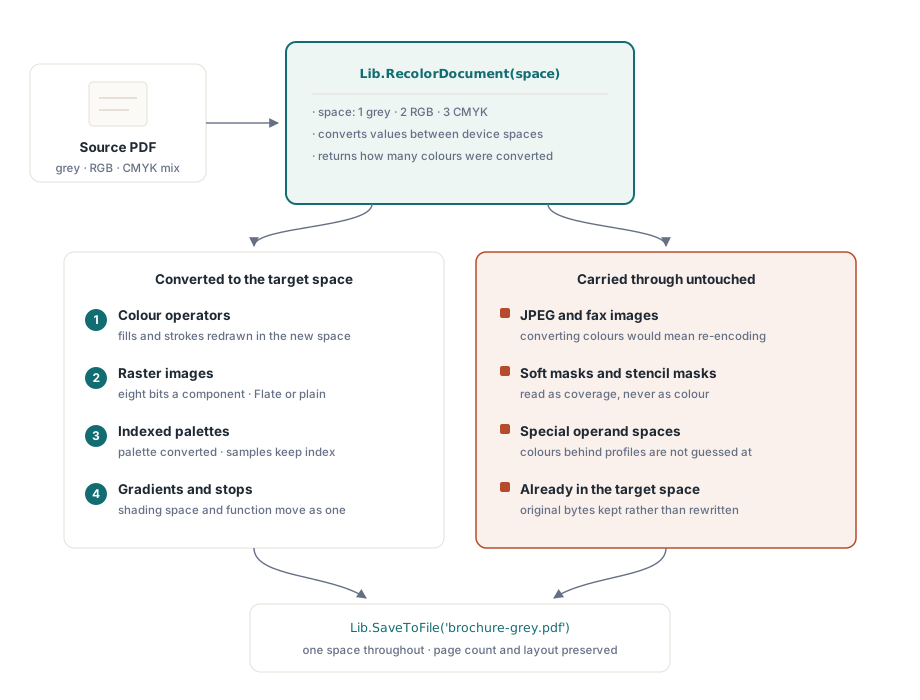
A JPEG or fax-encoded image keeps its bytes. Changing its colors would mean decoding, converting and recompressing it, which adds a second generation of JPEG artifacts and changes the file size in ways nobody asked for. If a job really needs every photo in gray, re-encoding is a separate decision with its own quality setting, and we would rather the caller make it explicitly than have a color conversion make it for them
Soft masks and stencil masks stay as they are for a different reason. A soft mask is usually a DeviceGray image, but its values mean coverage. Convert one to three-component RGB and a viewer stops treating it as transparency; it ends up painted as gray artwork on top of the content it was meant to shape. RecolorDocument collects every object referenced through /SMask or /Mask before it converts any image, and an image with /ImageMask true has no color to convert in the first place
Colors set through ICCBased, Separation, Indexed or Pattern spaces at the operator level are also left as written. Turning a spot color or a profile-tagged value into device gray without reading its profile would change how the page looks, and a pass whose job is to keep the appearance cannot start guessing what a profile meant
Gradients: the color space and the stops move together
A shading declares its color space once and hands every stop to a function. Rename /ColorSpace from DeviceRGB to DeviceGray while the function still returns three numbers, and a reader takes the first of them, the red channel, as the gray level. A blue-to-white gradient then renders as a band that starts at black. RecolorDocument walks the whole function tree read-only first and converts nothing unless every node in it can be converted; only then does it rewrite the stops and rename the space
The functions it rewrites are the exponential type, whose two end colors /C0 and /C1 are plain arrays, and stitching functions built from them. A /Background color is converted with the rest. A shading defined by a sampled table or a PostScript program keeps its definition, as do the mesh types 4 to 7, which store colors inside a stream instead of a function. Rewriting either is regeneration, a different job from converting a color
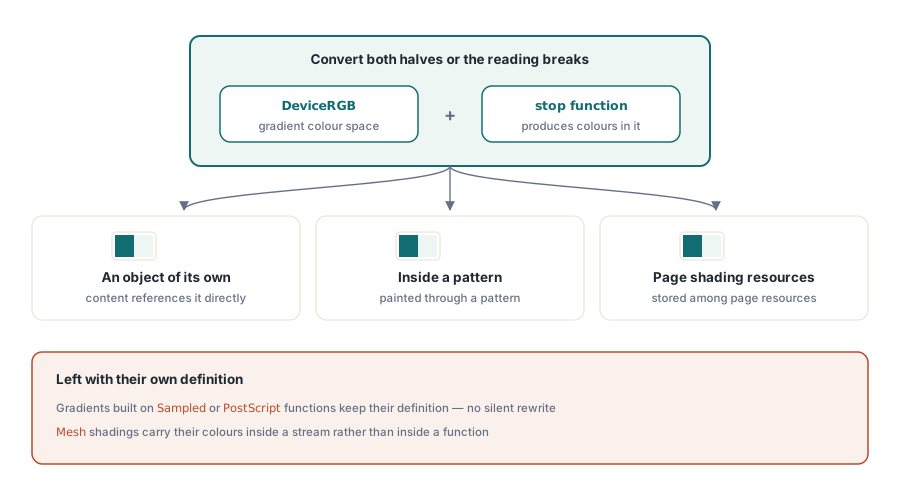
Finding the gradients is its own trap. Design tools rarely give a shading an object of its own; it usually sits inline inside the pattern dictionary that paints it, or inside a page's /Shading resources. When we built the gradient pass, a scan of top-level objects turned up almost none of them. The search now follows the object graph, bounded at twelve levels deep and visiting each object number once, so a resource shared by every page is converted once and a file that points an object at itself cannot loop
Where recoloring fits before a press submission
Treat RecolorDocument as normalization. It converts values between device spaces; it does not apply an ICC profile, honor a rendering intent or simulate a press condition. For a job that has to match a contract proof, a profile-driven workflow is the right tool, and a recolor pass is at most the step that gets everything into one space before that workflow runs
Where it earns its keep is the everyday production case: a submission that has to be gray and arrives with an RGB logo, an internal report that must not print in color, a batch that a preflight step will reject until every file uses one space. Anything that leaves the building should go through RecolorDocument, never RecolorPage alone, because a half-converted file passes a quick visual check and then fails at the printer. Run the verdict in the same job: the notes on PDF/A and PDF/UA preflight and on the compliance and signing workbench show how
// IsValidRecolorTarget is a helper you add yourself; the library has no such call
function IsValidRecolorTarget(Space: Integer): Boolean;
begin
  Result := (Space >= 1) and (Space <= 3);
end;

procedure NormalizeFile(const Src, Dst: string; Space: Integer);
var
  Lib: TPDFlib;
begin
  if not IsValidRecolorTarget(Space) then
    raise EArgumentException.CreateFmt('Bad recolor target %d', [Space]);
  Lib := TPDFlib.Create;
  try
    if Lib.LoadFromFile(Src, '') <> 1 then
      raise Exception.CreateFmt('Could not open %s', [Src]);
    if Lib.RecolorDocument(Space) = 0 then
      WriteLn(Src, ': already in the target space, copied unchanged');
    Lib.SaveToFile(Dst);
  finally
    Lib.Free;
  end;
end;
A quick check you can run on the output: open a converted page's content in any PDF inspector after a gray conversion. The page's own content should no longer contain any rg, RG, k or K operators. Color that survives the pass comes from the cases above: a JPEG, a profile-tagged or spot color, a sampled or mesh gradient, or artwork drawn inside a form XObject, whose instructions live in a stream of their own rather than in the page content
If you are also building the vector artwork rather than only converting it, the walkthrough of vector graphics, shaders and gradients shows how shadings and patterns are created in the first place, which makes the gradient rules above easier to predict
The color pass runs in-process: PDF Library for Delphi is native Pascal for Delphi, C++Builder and Lazarus, so normalizing a batch of incoming files needs no external converter or command-line tool on the server. The PDF Library for Delphi product page lists the rest of its document-processing API