Most Delphi code that touches PDF treats the format as a container for two things: runs of text and a few placed bitmaps. That view is correct as far as it goes, and it leaves the most capable part of the format unused. A PDF page is a resolution-independent 2D canvas built on the same imaging model as PostScript. It can draw lines, curves, filled regions, gradients, and repeating patterns, all as vectors that stay sharp at any zoom and print at the device's full resolution. If you are drawing a logo, a chart, a watermark, or a certificate border, the vector path is almost always the right primitive, and it is smaller and crisper than the rasterized image many programs reach for instead
This article walks through the vector model as ISO 32000-1 defines it and shows the matching PDF Library for Delphi calls. The aim is to make the spec concrete, because the API maps onto it closely, and understanding one teaches you the other
The page is a path machine
ISO 32000-1 §8.5 describes graphics in two phases that never overlap. First you construct a path, which is pure geometry with no visible result. Then you paint that path in a single operation that strokes its outline, fills its interior, or does both. Nothing appears on the page during construction. The path is an abstract sequence of points and segments held in the graphics state until a painting operator consumes it, at which point it is rendered and discarded
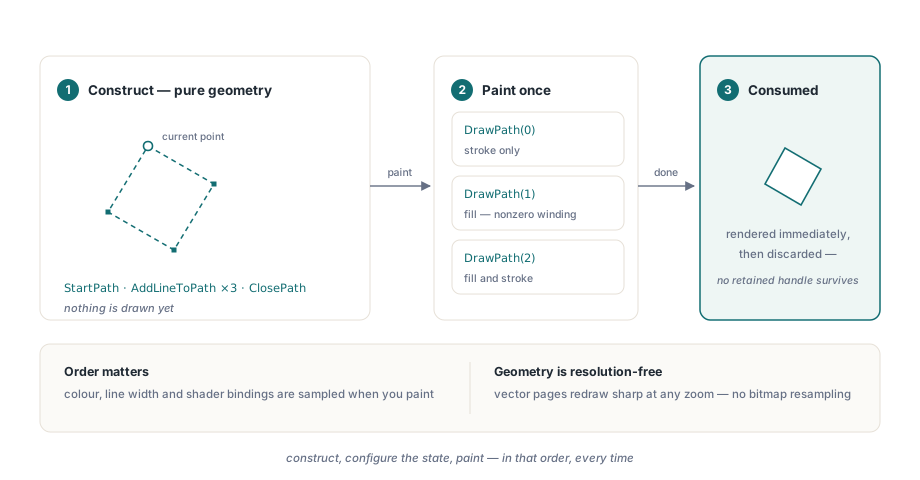
A path is made of one or more subpaths. A subpath begins at a point and grows by appending segments: straight lines, cubic Bezier curves, and on some platforms whole rectangles added as their own closed subpath. In PDF Library for Delphi you open a path with StartPath, which sets the starting point, then extend it with AddLineToPath and AddCurveToPath. Each call advances an implicit current point, so the next segment continues from where the last one ended. ClosePath draws a final straight segment back to the subpath's start, which matters for stroking because it produces a real line join at the closing vertex instead of two loose end caps
// A closed quadrilateral, stroked then filled
PDF.SetLineColor(0, 0, 0);
PDF.SetFillColor(0.6, 0.8, 1.0);
PDF.SetLineWidth(1.5);

PDF.StartPath(150, 100);           // open the path at the first vertex
PDF.AddLineToPath(220, 140);
PDF.AddLineToPath(180, 210);
PDF.AddLineToPath(110, 170);
PDF.ClosePath;                     // straight segment back to (150, 100)
PDF.DrawPath(2);                   // 2 = fill and stroke; path is consumed
Curves use AddCurveToPath, which takes two Bezier control points and an end point: AddCurveToPath(CtAX, CtAY, CtBX, CtBY, EndX, EndY). The curve runs from the current point to (EndX, EndY), pulled toward the two control points along the way. Circular arcs are available through AddArcToPath(CenterX, CenterY, TotalAngle), where the radius is taken from the distance between the current point and the center, and the engine emits the arc as a chain of Bezier segments. Rectangles have a shortcut, AddBoxToPath(Left, Top, Width, Height), which appends a complete closed rectangle as its own subpath without a preceding StartPath
Two fill rules, and why they disagree
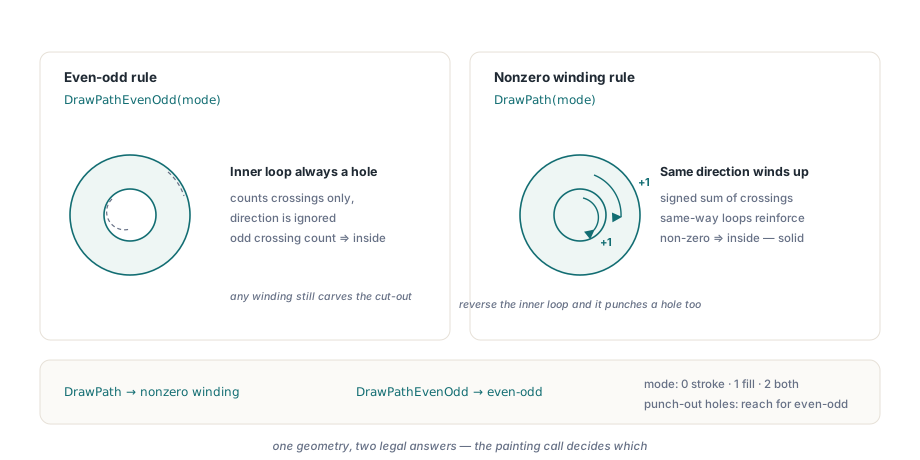
When you fill a path that crosses itself or contains an inner loop, the renderer needs a rule for deciding which regions are inside the shape and which are holes. ISO 32000-1 §8.5.3.3 defines two, and they can paint the same geometry differently. The nonzero winding rule counts the signed crossings of a ray cast from a test point to infinity, adding one for each segment that crosses left to right and subtracting one for each that crosses the other way; the point is inside when the total is not zero. The even-odd rule ignores direction and simply counts crossings, calling the point inside when the count is odd
The classic case where they diverge is a shape with a hole, a donut or a washer. Draw an outer boundary and an inner boundary inside it. Under the even-odd rule the inner loop always carves out a hole, because any point between the two boundaries is crossed once and any point inside the inner loop is crossed twice. Under the nonzero winding rule the hole appears only if the inner loop winds in the opposite direction to the outer one; wind them the same way and the windings reinforce instead of canceling, and the inner region fills solid. A five-pointed star drawn as a single self-intersecting outline shows the same split: even-odd leaves the central pentagon empty while nonzero winding fills it
PDF Library for Delphi selects the rule by the call you make to paint, not by a flag. DrawPath fills with the nonzero winding rule; DrawPathEvenOdd fills with the even-odd rule. Both take the same integer mode: 0 strokes the outline only, 1 fills only, and 2 fills and strokes. The even-odd rule is the easier tool for punch-out holes precisely because it does not require you to manage subpath direction
// Same two boxes, two fill rules, two different results.
// Nonzero winding: both boxes wind the same way, so the inner one
// does NOT cut a hole and the whole outer box fills solid.
PDF.SetFillColor(0.2, 0.4, 0.8);
PDF.AddBoxToPath(100, 100, 200, 120);   // outer
PDF.AddBoxToPath(140, 130, 120,  60);   // inner
PDF.DrawPath(1);                         // 1 = fill, nonzero winding

// Even-odd: the inner box is crossed an even number of times,
// so it punches a clean rectangular hole through the outer box.
PDF.SetFillColor(0.2, 0.4, 0.8);
PDF.AddBoxToPath(100, 300, 200, 120);   // outer
PDF.AddBoxToPath(140, 330, 120,  60);   // inner cut-out
PDF.DrawPathEvenOdd(1);                  // 1 = fill, even-odd
Axial gradients vary color along a line
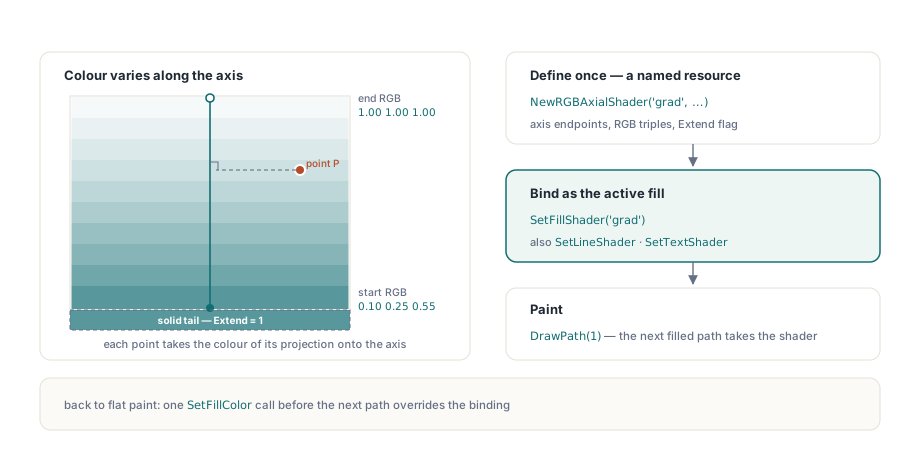
A flat fill color is one value across the whole region. A gradient varies the color continuously, and the simplest kind is the axial, or linear, gradient. ISO 32000-1 §8.7.4.5 specifies it as a Type 2 axial shading: you give two points that define an axis, a start color at the first point and an end color at the second, and the renderer interpolates the color along that axis. Every point in the filled region takes the color of its perpendicular projection onto the axis, so the gradient runs in bands at right angles to the line between the two points
In PDF Library for Delphi a gradient is a named document resource you create once and then select as the active paint. NewRGBAxialShader registers it. The signature is NewRGBAxialShader(ShaderName, StartX, StartY, StartRed, StartGreen, StartBlue, EndX, EndY, EndRed, EndGreen, EndBlue, Extend): the two axis endpoints, the RGB triples at each end as values in the 0 to 1 range, and an Extend flag. With Extend set to 1 the end colors carry on as solid fill beyond the axis endpoints, which is what you usually want so the corners of a region outside the axis are not left unpainted; 0 leaves them untouched. Once the shader exists you bind it with SetFillShader for filled regions, SetLineShader for stroked outlines, or SetTextShader for text. The binding stays active for the drawing calls that follow, so the path you paint next takes the gradient instead of a flat color
// Define a vertical gradient once: blue at the bottom to white at the top.
PDF.NewRGBAxialShader('panelGrad',
  0, 100,   0.10, 0.25, 0.55,    // start point and start RGB
  0, 260,   1.00, 1.00, 1.00,    // end point and end RGB
  1);                            // 1 = extend ends as solid color

// Select the gradient as the fill, then paint a rectangle with it.
PDF.SetFillShader('panelGrad');
PDF.AddBoxToPath(80, 100, 300, 160);
PDF.DrawPath(1);                 // 1 = fill, now filled by the shader
The axis here is vertical, from y=100 to y=260 at a fixed x, so the color bands run horizontally and the rectangle fades from blue at its base to white at its top. Because the shader is keyed by name, one definition can fill any number of shapes on the page, and switching back to a flat color is just another SetFillColor call before the next path
Tiling patterns repeat a cell
Where a gradient varies a single color smoothly, a tiling pattern repeats a small piece of artwork across a region. ISO 32000-1 §8.7.3.1 defines a tiling pattern as a pattern cell, an independent piece of content, that the renderer replicates on a fixed grid to tile the area being painted. This is how you build hatching for an engineering fill, a repeating brand motif behind a header, or a textured background that stays vector-sharp and weighs almost nothing no matter how large the area, because the cell is stored once and referenced everywhere
PDF Library for Delphi builds the pattern cell from captured page content. You capture a page or a region with CapturePage, turn the capture into a named pattern with NewTilingPatternFromCapturedPage(PatternName, CaptureID), and then select that pattern as the current fill with SetFillTilingPattern(PatternName). From that point on, any path you fill is painted with the repeating cell rather than a flat color, exactly as a shader fill works but with a tiled cell as the paint source. The sequence is more involved than a single call, so if the capture step is unfamiliar, treat the pattern as a two-stage operation: produce the captured cell first, then bind it as a fill by name before drawing the region you want tiled
Putting the primitives together
The pieces compose directly. A filled Bezier blob is a path of curves painted with DrawPath. The same outline painted with DrawPathEvenOdd after adding an inner loop shows a hole the winding fill would have closed. A gradient-filled rectangle is a box bound to a shader. The example below draws all three in sequence so the difference between the two fill rules is visible on one page, then lays a gradient panel beneath them
// 1. A filled Bezier shape (nonzero winding).
PDF.SetFillColor(0.85, 0.30, 0.25);
PDF.StartPath(120, 480);
PDF.AddCurveToPath(160, 560, 240, 560, 280, 480);   // top lobe
PDF.AddCurveToPath(240, 420, 160, 420, 120, 480);   // bottom lobe
PDF.ClosePath;
PDF.DrawPath(1);                                     // 1 = fill

// 2. The same outline, plus an inner loop, filled even-odd to show a hole.
PDF.SetFillColor(0.85, 0.30, 0.25);
PDF.StartPath(120, 300);
PDF.AddCurveToPath(160, 380, 240, 380, 280, 300);
PDF.AddCurveToPath(240, 240, 160, 240, 120, 300);
PDF.ClosePath;
PDF.MovePath(180, 300);                              // new subpath: the hole
PDF.AddArcToPath(200, 300, 360);                     // a full circle
PDF.ClosePath;
PDF.DrawPathEvenOdd(1);                              // hole is punched out

// 3. A rectangle filled with an axial gradient.
PDF.NewRGBAxialShader('footerGrad',
  60, 100,  0.95, 0.55, 0.10,
  60, 200,  0.20, 0.10, 0.40,
  1);
PDF.SetFillShader('footerGrad');
PDF.AddBoxToPath(60, 100, 340, 100);
PDF.DrawPath(1);
Two details are worth holding onto. The painting call decides the fill rule, so the choice between DrawPath and DrawPathEvenOdd is the choice between nonzero winding and even-odd, and for shapes with holes the even-odd rule spares you from reasoning about subpath direction. And the graphics state is sampled at the moment you paint: set your colors, line width, and shader binding before the painting call, because that is the state the engine reads. Construct first, configure the state, paint last, and the vector model behaves predictably every time
From here, the natural next steps are reading vectors and text back out of an existing document, covered in our article on text, image, and font extraction, and rendering the same drawing model to a Windows device context for on-screen preview and printing, covered in the print and preview walkthrough. The path, shader, and pattern calls described here ship as part of the Delphi PDF Library alongside the text, image, form, and signing APIs covered elsewhere on this blog